
一起学Android之Layout
本文简述在Android开发中布局的简单应用,属于基础知识,仅供学习分享使用。
概述
在Android UI开发中,布局类型主要有两种:LinearLayout(线性布局)和RelativeLayout(相对布局),两种布局类型各有各的优势与使用场景。
LinearLayout(线性布局)
线性布局允许所有的子元素,以单独的方向进行排列(水平或垂直),所有的元素像栈一样一个接一个的插入,所以如果是垂直(vertical)方向,则每一行只有一个元素。如果是水平( horizontal)方向,则只有一行。(如下图1所示)
线性布局重要属性
android:orientation 设置排列的方向。主要有两个值:horizontal(水平),vertical(垂直)。
android:layout_weight 权重,按比例分配剩余空间。


(图1) (图2)
RelativeLayout(相对布局)
相对布局是指所有子元素以相对的位置进行定位。一个元素可以通过相对于指定的同级元素(如,左边,右边,上边,下边)进行定位,也可以通过父元素进行定位(如,布局控件的顶端,左端,右端,底部等)(如上图2 所示)。如果发现页面中有多个线性布局进行嵌套,那么你就应该用一个相对布局来替换它。
相对布局重要属性
- android:layout_alignParentTop 是否位于父控件的顶部(true 或 false)
- android:layout_alignParentBottom 是否位于父控件的底部(true 或 false)
- android:layout_alignParentLeft 是否位于父控件的左边(true 或 false)
- android:layout_alignParentRight 是否位于父控件的右边(true 或 false)
- android:layout_centerInParent 是否位于父控件的中心(true 或 false)
- android:layout_toLeftOf 位于指定控件的左边(值为控件的ID)
- android:layout_toRightOf 位于指定控件的右边(值为控件的ID)
- android:layout_above 位于指定控件的上边(值为控件的ID)
- android:layout_below 位于指定控件的下边(值为控件的ID)
实例截图
如下图1所示为线性布局(相对简单),如下图2所示,为相对布局(相对复杂)
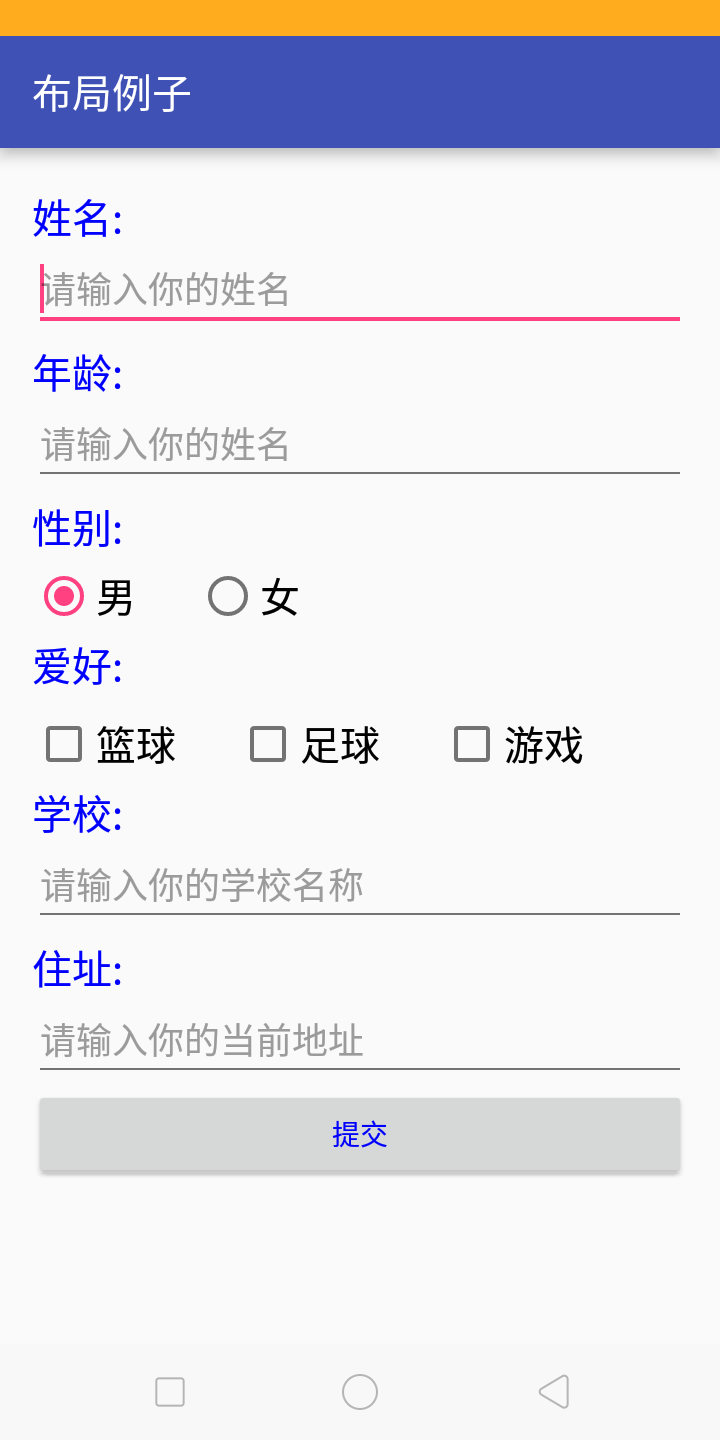
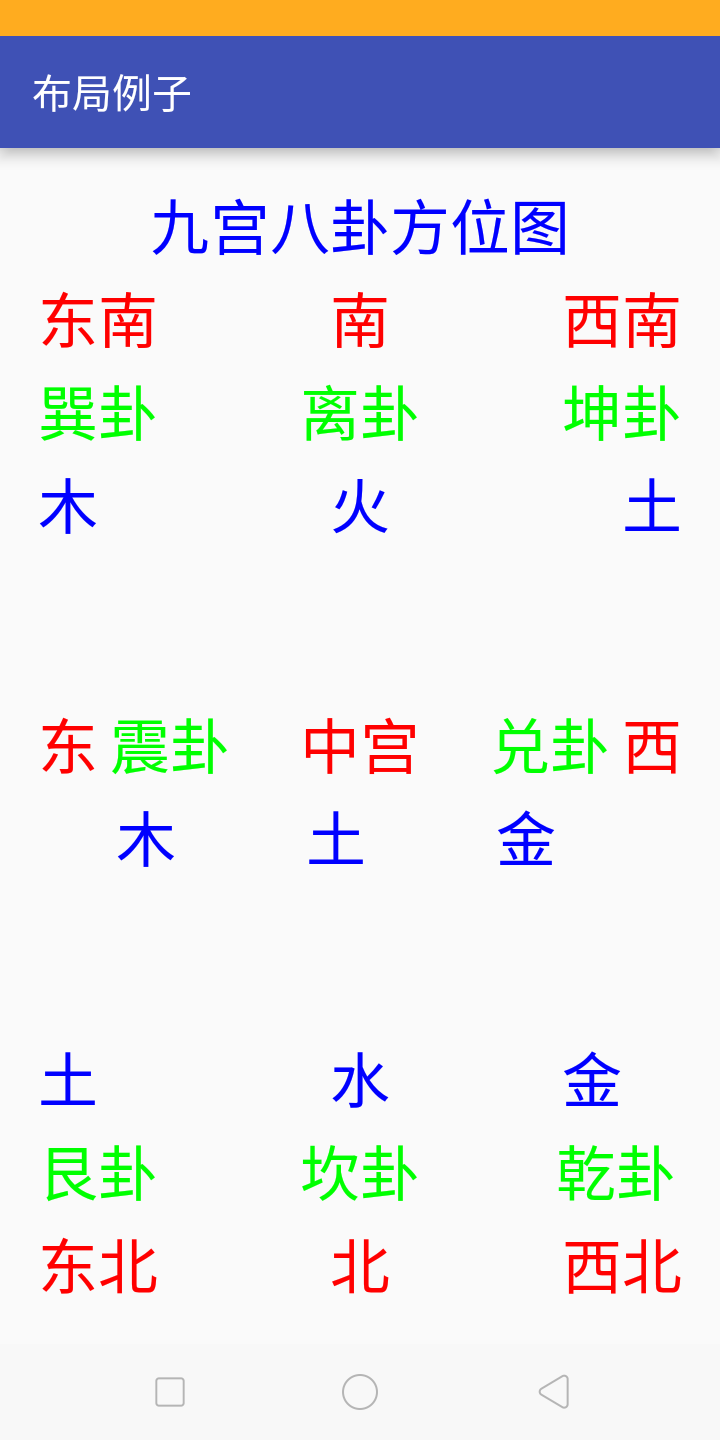
图3 图4
布局源程序
线性布局
 <?xml version="1.0" encoding="utf-8"?>

 <LinearLayout

     xmlns:android="http://schemas.android.com/apk/res/android"

     xmlns:tools="http://schemas.android.com/tools"

     android:layout_width="match_parent"

     android:layout_height="match_parent"

     android:paddingBottom="@dimen/activity_vertical_margin"

     android:paddingLeft="@dimen/activity_horizontal_margin"

     android:paddingRight="@dimen/activity_horizontal_margin"

     android:paddingTop="@dimen/activity_vertical_margin"

     android:orientation="vertical"

     tools:context="com.hex.demolayout.LinearActivity">

     <TextView

         android:id="@+id/tv_text"

         android:text="@string/tv_name"

         android:textSize="20dp"

         android:layout_marginTop="5dp"

         android:textColor="@color/colorBlue"

         android:layout_width="match_parent"

         android:layout_height="wrap_content"/>

     <EditText

         android:id="@+id/txt_name"

         android:hint="@string/hint_name"

         android:layout_width="match_parent"

         android:layout_height="wrap_content"/>

     <TextView

         android:id="@+id/tv_age"

         android:text="@string/tv_age"

         android:textSize="20dp"

         android:layout_marginTop="5dp"

         android:textColor="@color/colorBlue"

         android:layout_width="match_parent"

         android:layout_height="wrap_content"/>

     <EditText

         android:id="@+id/txt_age"

         android:hint="@string/hint_name"

         android:layout_width="match_parent"

         android:layout_height="wrap_content"/>

     <TextView

         android:id="@+id/tv_sex"

         android:text="@string/tv_sex"

         android:textSize="20dp"

         android:layout_marginTop="5dp"

         android:textColor="@color/colorBlue"

         android:layout_width="match_parent"

         android:layout_height="wrap_content"/>

     <RadioGroup

         android:id="@+id/rg_sex"

         android:layout_marginTop="5dp"

         android:orientation="horizontal"

         android:layout_width="match_parent"

         android:layout_height="wrap_content">

         <RadioButton

             android:id="@+id/rb_male"

             android:text="@string/male"

             android:textSize="20sp"

             android:checked="true"

             android:layout_width="wrap_content"

             android:layout_height="wrap_content"/>

         <RadioButton

             android:id="@+id/rb_female"

             android:textSize="20sp"

             android:text="@string/female"

             android:layout_marginLeft="30dp"

             android:layout_width="wrap_content"

             android:layout_height="wrap_content"/>

     </RadioGroup>

     <TextView

         android:id="@+id/tv_love"

         android:text="@string/love"

         android:textSize="20dp"

         android:layout_marginTop="5dp"

         android:textColor="@color/colorBlue"

         android:layout_width="match_parent"

         android:layout_height="wrap_content"/>

     <LinearLayout

         android:layout_width="match_parent"

         android:layout_height="wrap_content"

         android:layout_marginTop="10dp"

         android:orientation="horizontal">

         <CheckBox

             android:id="@+id/ck_basketball"

             android:text="@string/basketball"

             android:textSize="20dp"

             android:layout_width="wrap_content"

             android:layout_height="wrap_content"/>

         <CheckBox

             android:id="@+id/ck_football"

             android:text="@string/football"

             android:textSize="20dp"

             android:layout_marginLeft="30dp"

             android:layout_width="wrap_content"

             android:layout_height="wrap_content"/>

         <CheckBox

             android:id="@+id/ck_game"

             android:text="@string/game"

             android:textSize="20dp"

             android:layout_marginLeft="30dp"

             android:layout_width="wrap_content"

             android:layout_height="wrap_content"/>

     </LinearLayout>

     <TextView

         android:id="@+id/tv_school"

         android:text="@string/school"

         android:textSize="20dp"

         android:layout_marginTop="5dp"

         android:textColor="@color/colorBlue"

         android:layout_width="match_parent"

         android:layout_height="wrap_content"/>

     <EditText

         android:id="@+id/txt_school"

         android:hint="@string/hint_school"

         android:layout_width="match_parent"

         android:layout_height="wrap_content"/>

     <TextView

         android:id="@+id/tv_addr"

         android:text="@string/addr"

         android:textSize="20dp"

         android:layout_marginTop="5dp"

         android:textColor="@color/colorBlue"

         android:layout_width="match_parent"

         android:layout_height="wrap_content"/>

     <EditText

         android:id="@+id/txt_addr"

         android:hint="@string/hint_addr"

         android:layout_width="match_parent"

         android:layout_height="wrap_content"/>

     <Button

         android:id="@+id/bn_submit"

         android:text="@string/bn_submit"

         android:textColor="@color/colorBlue"

         android:layout_width="match_parent"

         android:layout_height="wrap_content"/>

 </LinearLayout>
相对布局
 <?xml version="1.0" encoding="utf-8"?>

 <RelativeLayout

     xmlns:android="http://schemas.android.com/apk/res/android"

     xmlns:tools="http://schemas.android.com/tools"

     android:layout_width="match_parent"

     android:layout_height="match_parent"

     android:paddingBottom="@dimen/activity_vertical_margin"

     android:paddingLeft="@dimen/activity_horizontal_margin"

     android:paddingRight="@dimen/activity_horizontal_margin"

     android:paddingTop="@dimen/activity_vertical_margin"

     tools:context="com.hex.demolayout.MainActivity">

     <TextView

         android:id="@+id/tv_title"

         android:layout_centerHorizontal="true"

         android:layout_alignParentTop="true"

         android:layout_width="wrap_content"

         android:layout_height="wrap_content"

         android:textSize="30dp"

         android:textColor="@color/colorBlue"

         android:layout_margin="3dp"

         android:text="@string/nine_tip"/>

     <TextView

         android:id="@+id/tv_center"

         android:text="@string/center"

         android:textSize="30dp"

         android:layout_margin="3dp"

         android:onClick="open"

         android:textColor="@color/colorRed"

         android:layout_centerInParent="true"

         android:layout_width="wrap_content"

         android:layout_height="wrap_content"/>

     <TextView

         android:id="@+id/tv_east"

         android:text="@string/east"

         android:textSize="30dp"

         android:layout_margin="3dp"

         android:textColor="@color/colorRed"

         android:layout_alignParentLeft="true"

         android:layout_centerVertical="true"

         android:layout_width="wrap_content"

         android:layout_height="wrap_content"/>

     <TextView

         android:id="@+id/tv_west"

         android:text="@string/west"

         android:textSize="30dp"

         android:layout_margin="3dp"

         android:textColor="@color/colorRed"

         android:layout_alignParentRight="true"

         android:layout_centerVertical="true"

         android:layout_width="wrap_content"

         android:layout_height="wrap_content"/>

     <TextView

         android:id="@+id/tv_north"

         android:text="@string/north"

         android:textSize="30dp"

         android:layout_margin="3dp"

         android:textColor="@color/colorRed"

         android:layout_alignParentBottom="true"

         android:layout_centerHorizontal="true"

         android:layout_width="wrap_content"

         android:layout_height="wrap_content"/>

     <TextView

         android:id="@+id/tv_south"

         android:text="@string/south"

         android:textSize="30dp"

         android:layout_margin="3dp"

         android:textColor="@color/colorRed"

         android:layout_below="@id/tv_title"

         android:layout_centerHorizontal="true"

         android:layout_width="wrap_content"

         android:layout_height="wrap_content"/>

     <TextView

         android:id="@+id/tv_east_south"

         android:text="@string/east_south"

         android:textSize="30dp"

         android:layout_margin="3dp"

         android:textColor="@color/colorRed"

         android:layout_below="@id/tv_title"

         android:layout_alignParentLeft="true"

         android:layout_width="wrap_content"

         android:layout_height="wrap_content"/>

     <TextView

         android:id="@+id/tv_west_south"

         android:text="@string/west_south"

         android:textSize="30dp"

         android:layout_margin="3dp"

         android:textColor="@color/colorRed"

         android:layout_below="@id/tv_title"

         android:layout_alignParentRight="true"

         android:layout_width="wrap_content"

         android:layout_height="wrap_content"/>

     <TextView

         android:id="@+id/tv_east_north"

         android:text="@string/east_north"

         android:textSize="30dp"

         android:layout_margin="3dp"

         android:textColor="@color/colorRed"

         android:layout_alignParentBottom="true"

         android:layout_width="wrap_content"

         android:layout_height="wrap_content"/>

     <TextView

         android:id="@+id/tv_west_north"

         android:text="@string/west_north"

         android:textSize="30dp"

         android:layout_margin="3dp"

         android:textColor="@color/colorRed"

         android:layout_alignParentBottom="true"

         android:layout_alignParentRight="true"

         android:layout_width="wrap_content"

         android:layout_height="wrap_content"/>

     <TextView

         android:id="@+id/tv_xun"

         android:text="@string/xun"

         android:textSize="30dp"

         android:layout_margin="3dp"

         android:textColor="@color/colorGreen"

         android:layout_below="@id/tv_east_south"

         android:layout_width="wrap_content"

         android:layout_height="wrap_content"/>

     <TextView

         android:id="@+id/tv_li"

         android:text="@string/li"

         android:textSize="30dp"

         android:layout_margin="3dp"

         android:textColor="@color/colorGreen"

         android:layout_below="@id/tv_south"

         android:layout_centerHorizontal="true"

         android:layout_width="wrap_content"

         android:layout_height="wrap_content"/>

     <TextView

         android:id="@+id/tv_kun"

         android:text="@string/kun"

         android:textSize="30dp"

         android:layout_margin="3dp"

         android:textColor="@color/colorGreen"

         android:layout_below="@id/tv_west_south"

         android:layout_alignParentRight="true"

         android:layout_width="wrap_content"

         android:layout_height="wrap_content"/>

     <TextView

         android:id="@+id/tv_zen"

         android:text="@string/zen"

         android:textSize="30dp"

         android:layout_margin="3dp"

         android:textColor="@color/colorGreen"

         android:layout_toRightOf="@id/tv_east"

         android:layout_centerVertical="true"

         android:layout_width="wrap_content"

         android:layout_height="wrap_content"/>

     <TextView

         android:id="@+id/tv_dui"

         android:text="@string/dui"

         android:textSize="30dp"

         android:layout_margin="3dp"

         android:textColor="@color/colorGreen"

         android:layout_toLeftOf="@id/tv_west"

         android:layout_centerVertical="true"

         android:layout_width="wrap_content"

         android:layout_height="wrap_content"/>

     <TextView

         android:id="@+id/tv_gen"

         android:text="@string/gen"

         android:textSize="30dp"

         android:layout_margin="3dp"

         android:textColor="@color/colorGreen"

         android:layout_above="@id/tv_east_north"

         android:layout_width="wrap_content"

         android:layout_height="wrap_content"/>

     <TextView

         android:id="@+id/tv_kan"

         android:text="@string/kan"

         android:textSize="30dp"

         android:layout_margin="3dp"

         android:layout_above="@id/tv_north"

         android:textColor="@color/colorGreen"

         android:layout_centerHorizontal="true"

         android:layout_width="wrap_content"

         android:layout_height="wrap_content"/>

     <TextView

         android:id="@+id/tv_qan"

         android:text="@string/qan"

         android:textSize="30dp"

         android:layout_margin="3dp"

         android:textColor="@color/colorGreen"

         android:layout_above="@id/tv_west_north"

         android:layout_alignRight="@id/tv_west_north"

         android:layout_width="wrap_content"

         android:layout_height="wrap_content"/>

     <TextView

         android:id="@+id/tv_mu"

         android:text="@string/mu"

         android:textSize="30dp"

         android:layout_margin="3dp"

         android:textColor="@color/colorBlue"

         android:layout_below="@id/tv_xun"

         android:layout_width="wrap_content"

         android:layout_height="wrap_content"/>

     <TextView

         android:id="@+id/tv_huo"

         android:text="@string/huo"

         android:textSize="30dp"

         android:layout_margin="3dp"

         android:textColor="@color/colorBlue"

         android:layout_below="@id/tv_li"

         android:layout_centerHorizontal="true"

         android:layout_width="wrap_content"

         android:layout_height="wrap_content"/>

     <TextView

         android:id="@+id/tv_tu"

         android:text="@string/tu"

         android:textSize="30dp"

         android:layout_margin="3dp"

         android:textColor="@color/colorBlue"

         android:layout_below="@id/tv_kun"

         android:layout_alignParentRight="true"

         android:layout_width="wrap_content"

         android:layout_height="wrap_content"/>

     <TextView

         android:id="@+id/tv_mu2"

         android:text="@string/mu"

         android:textSize="30dp"

         android:layout_margin="3dp"

         android:textColor="@color/colorBlue"

         android:layout_below="@id/tv_zen"

         android:layout_alignLeft="@id/tv_zen"

         android:layout_width="wrap_content"

         android:layout_height="wrap_content"/>

     <TextView

         android:id="@+id/tv_tu2"

         android:text="@string/tu"

         android:textSize="30dp"

         android:layout_margin="3dp"

         android:textColor="@color/colorBlue"

         android:layout_below="@id/tv_center"

         android:layout_alignLeft="@id/tv_center"

         android:layout_width="wrap_content"

         android:layout_height="wrap_content"/>

     <TextView

         android:id="@+id/tv_jin"

         android:text="@string/jin"

         android:textSize="30dp"

         android:textColor="@color/colorBlue"

         android:layout_margin="3dp"

         android:layout_below="@id/tv_dui"

         android:layout_alignLeft="@id/tv_dui"

         android:layout_width="wrap_content"

         android:layout_height="wrap_content"/>

     <TextView

         android:id="@+id/tv_tu3"

         android:text="@string/tu"

         android:textSize="30dp"

         android:layout_margin="3dp"

         android:textColor="@color/colorBlue"

         android:layout_above="@id/tv_gen"

         android:layout_width="wrap_content"

         android:layout_height="wrap_content"/>

     <TextView

         android:id="@+id/tv_shui"

         android:text="@string/shui"

         android:textSize="30dp"

         android:layout_margin="3dp"

         android:layout_above="@id/tv_kan"

         android:textColor="@color/colorBlue"

         android:layout_centerHorizontal="true"

         android:layout_width="wrap_content"

         android:layout_height="wrap_content"/>

     <TextView

         android:id="@+id/tv_jin2"

         android:text="@string/jin"

         android:textSize="30dp"

         android:layout_margin="3dp"

         android:layout_above="@id/tv_qan"

         android:textColor="@color/colorBlue"

         android:layout_alignLeft="@id/tv_qan"

         android:layout_width="wrap_content"

         android:layout_height="wrap_content"/>

 </RelativeLayout>
备注
基础知识学习,从零开始。
一起学Android之Layout的更多相关文章
- 从零开始学android开发- layout属性介绍
android:id 为控件指定相应的ID android:text 指定控件当中显示的文字,需要注意的是,这里尽量使用strings.xml文件当中的字符串 android:gravity 指定Vi ...
- 菜鸟学Android编程——简单计算器《一》
菜鸟瞎搞,高手莫进 本人菜鸟一枚,最近在学Android编程,网上看了一些视频教程,于是想着平时手机上的计算器应该很简单,自己何不尝试着做一个呢? 于是就冒冒失失的开撸了. 简单计算器嘛,功能当然很少 ...
- 学Android开发 这19个开发工具助你顺风顺水
学Android开发 这19个开发工具助你顺风顺水 要想快速开发一个Android应用,通常会用到很多工具,巧妙利用这些工具,能让我们的开发工作事半功倍,节省大量时间,下面大连Android开发培训小 ...
- 一步一步学android控件(之十五) —— DegitalClock & AnalogClock
原本计划DigitalClock和AnalogClock单独各一篇来写,但是想想,两个控件的作用都一样,就和在一起写一篇了. DegitalClock和AnalogClock控件主要用于显示当前时间信 ...
- 一步一步学android控件(之十六)—— CheckBox
根据使用场景不同,有时候使用系统默认的CheckBox样式就可以了,但是有时候就需要自定义CheckBox的样式.今天主要学习如何自定义CheckBox样式.在CheckBox状态改变时有时需要做一些 ...
- 一步一步学android控件(之六) —— MultiAutoCompleteTextView
今天学习的控件是MultiAutoCompleteTextView . 提到MultiAutoCompleteTextView 我们就自然而然地想到AutoCompleteTextView ,就想知道 ...
- CSharp程序员学Android开发---3.Android内部元素不填充BUG
最近公司组织项目组成员开发一个Android项目的Demo,之前没有人有Andoid方面的开发经验,都是开发C#的. 虽说项目要求并不是很高,但是对于没有这方面经验的人来说,第一步是最困难的. 项目历 ...
- Android在layout xml中使用include
Android include与merge标签使用详解 - shuqiaoniu的博客 - 博客频道 - CSDN.NEThttp://blog.csdn.net/shuqiaoniu/article ...
- Android开发学习之路-该怎么学Android(Service和Activity通信为例)
在大部分地方,比如书本或者学校和培训机构,教学Android的方式都基本类似,就是告诉先上原理方法,然后对着代码讲一下. 但是,这往往不是一个很好的方法,为什么? ① 学生要掌握这个方法的用途,只能通 ...
随机推荐
- SpringCloud学习系列之四-----配置中心(Config)使用详解
前言 本篇主要介绍的是SpringCloud中的分布式配置中心(SpringCloud Config)的相关使用教程. SpringCloud Config Config 介绍 Spring Clou ...
- CSharpGL(50)使用Assimp加载骨骼动画
CSharpGL(50)使用Assimp加载骨骼动画 在(http://ogldev.atspace.co.uk/www/tutorial38/tutorial38.html)介绍了C++用Asism ...
- hashCode()方法以及集合中Set的一些总结
一.前言 本篇文章没有什么主题,就是一些零散点的总结.周末没事看了几道蚂蚁金服的面试题,其中有好几道都是特别简单的,基础性的题目,就是我们平时用到的,但是发现要是完全说出来还是有一些不清楚的地方,所以 ...
- 包装类及 LeetCode 每日一题
1.包装类与创建对象 Java 为8大数据类型都提供了相应的包装类,并提供属性和方法,更方便的操作基本数据类型.包装类位于java.lang包中. 对于这几种类型的基本数据,都有相似的方法实现基本数据 ...
- HTML基础系列
HTML标记语言,网页制作的第一步. 什么是HTML呢?查百度 基础语法 常用标签 HTML是超文本标记语言,HTML不用编译,直接在浏览器中执行,HTML是一个文本文件. HTML基本结构,标签,元 ...
- 关于IT公司技术委员会职责
技术委员会的核心职责 组织人才相关 • 制定职级标准 - 能力框架:知识,技能,通用素质 - 职级标准:T2T3T4-P7P8P9- • 职级评审,对齐标准 • 高端招聘,对齐标准 • 校园招聘,对齐 ...
- win10彻底禁用自动更新,win10怎样彻底关闭自动更新,永久关闭win10自动更新,win10更新助手
首先,请广大win10受害者原谅小菜用一个如此长的标题来吸引你们,为了尽最大努力帮助那些饱受win10自动更新折磨的朋友们,小菜不得已出此下策,望见谅! windows 10是一个神奇的操作系统,当你 ...
- Agent Job代理 执行SSIS Package
摘要: 在使用Agent Job时, 运行SSIS包的Run as账号,必须有SSIS中connection manager的连接权限. 如果没有连接权限,可以用创建proxy账号,并确保proxy账 ...
- LeetCode算法题-Prime Number of Set Bits in Binary Representation(Java实现)
这是悦乐书的第311次更新,第332篇原创 01 看题和准备 今天介绍的是LeetCode算法题中Easy级别的第180题(顺位题号是762).给定两个正整数L和R,在[L,R]范围内,计算每个整数的 ...
- 好程序员web前端分享CSS基础篇
学习目标 1.CSS简介 2.CSS语法 3.样式的创建 4.两种引入外部样式表的区别 5.样式表的优先级和作用域 6.CSS选择器 7.选择器的权重 8.浮动属性的简单应用 9.HTML.CSS注释 ...