
Xamarin.Android 调用Web Api(通过ListView展示远程获取的数据)
xamarin.android如何调用sqlserver 数据库呢(或者其他的),很多新手都会有这个疑问。xamarin.android调用远程数据主要有两种方式:
在Android中保存数据或调用数据库可以利用SQLite,android中提供了几个类来管理SQLite数据库,对数据进行增删改查
直接调用Asp.net Web API对数据进行增删改查
这两种方式到底选择哪一种方式好一点呢?哪一种方式好不好我不敢确定,市场上大部分app都是调用api来clud的。当然我也推荐大家使用web api来调用远程数据,至少目前来看我们公司都是使用web api来做的。好吧废话不多说,下面就是ListView来调用web api执行增删改查的例子。
在listview上展示的数据是直接调用远程的web api中的数据。主要实现步骤
- 新建一个web api的项目,写好要用到的方法。
- 在MainActivity.cs中发送请求并将相应的json字符串序列化成List集合。
一、web api
由于我主要介绍下如何在xamarin中使用listview,所以web api我这里不做介绍了,相信聪明的你已经知道如何建立web api并写好方法了。
二、xamarin.android使用listview控件
1.新建xamarin.android项目,这里示例取名为listviewdemo
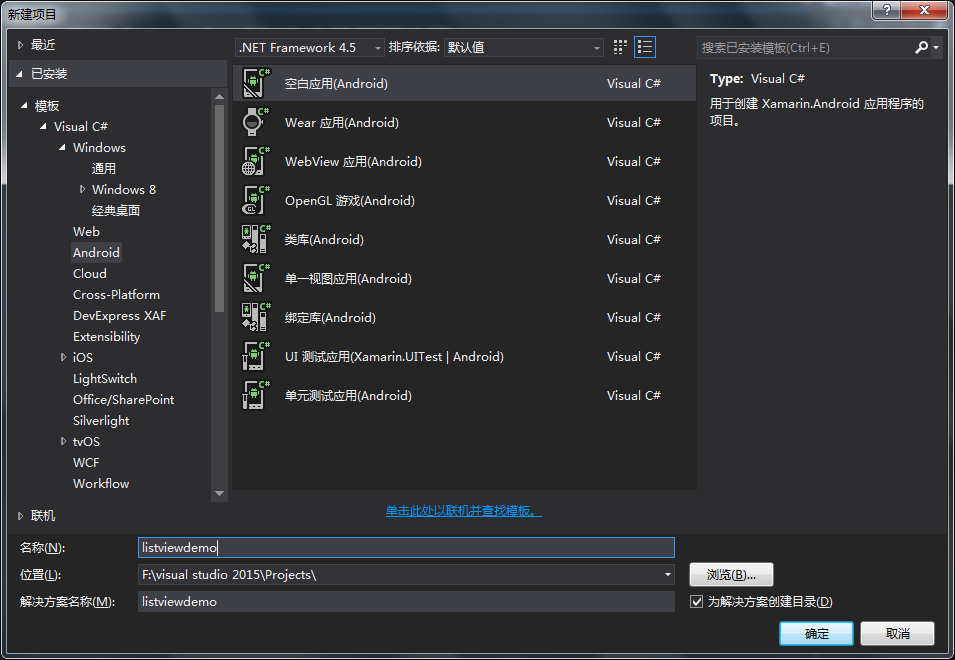
2.建好的项目如下图,这是可以看到运行按键显示了一个“实时播放器”,为何没有显示出模拟器来呢?由于我安装的是海马玩模拟器,请注意,请先运行模拟器,再打开VS项目,这里没有显示出我的模拟器,这是因为当前项目版本高于模拟器版本,我们只需要更改下项目最低兼容版本就可以了,项目属性--android选项--最低安卓版本选择android4.0,这是看到运行按键显示出来模拟器名称了,后面我们可以通过该模拟器进行调试。


3.我们打开layout文件夹下的main.axml文件,在该页面添加一个按钮,用于打开listview页面,main.axml文件修改如下:
<?xml version="1.0" encoding="utf-8"?>

<LinearLayout xmlns:android="http://schemas.android.com/apk/res/android"

    android:orientation="vertical"

    android:layout_width="match_parent"

    android:layout_height="match_parent"

    android:minWidth="25px"

    android:minHeight="25px">

  <Button

      android:text="获取产品信息"

      android:layout_width="match_parent"

      android:layout_height="wrap_content"

      android:id="@+id/GetProductInfo" />

</LinearLayout>
4.在layout文件夹新建2个视图文件,即添加新项,选择android布局,创建ProductAdapter和ProductList两个android布局视图文件。
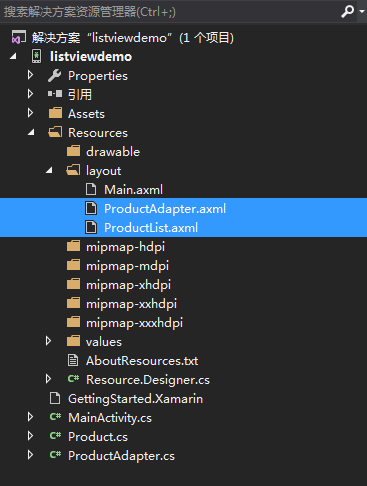
然后开始编辑我们的视图,将下列代码复制并替换到ProductAdapter中:
<?xml version="1.0" encoding="utf-8"?>

<LinearLayout xmlns:android="http://schemas.android.com/apk/res/android"

    android:orientation="vertical"

    android:layout_width="match_parent"

    android:layout_height="match_parent"

    android:minWidth="25px"

    android:minHeight="25px">

    <LinearLayout

        android:orientation="horizontal"

        android:layout_width="match_parent"

        android:layout_height="30.5dp"

        android:id="@+id/linearLayout1">

        <TextView

            android:text="产品型号:"

            android:layout_width="wrap_content"

            android:layout_height="match_parent"

            android:id="@+id/textView1" />

        <TextView

            android:text="Text"

            android:layout_width="wrap_content"

            android:layout_height="match_parent"

            android:id="@+id/ProductModel" />

    </LinearLayout>

    <LinearLayout

        android:orientation="horizontal"

        android:layout_width="match_parent"

        android:layout_height="30.5dp"

        android:id="@+id/linearLayout2">

        <TextView

            android:text="产品名称:"

            android:layout_width="wrap_content"

            android:layout_height="match_parent"

            android:id="@+id/textView2" />

        <TextView

            android:text="Text"

            android:layout_width="wrap_content"

            android:layout_height="match_parent"

            android:id="@+id/ProductName" />

    </LinearLayout>

    <LinearLayout

        android:orientation="horizontal"

        android:layout_width="match_parent"

        android:layout_height="wrap_content"

        android:id="@+id/linearLayout3">

        <TextView

            android:text="产品类型:"

            android:layout_width="wrap_content"

            android:layout_height="match_parent"

            android:id="@+id/textView3" />

        <TextView

            android:text="Text"

            android:layout_width="wrap_content"

            android:layout_height="match_parent"

            android:id="@+id/ProductType" />

    </LinearLayout>

</LinearLayout>
将下列代码复制并替换到ProductList中:
<?xml version="1.0" encoding="utf-8"?>

<LinearLayout xmlns:android="http://schemas.android.com/apk/res/android"

    android:orientation="vertical"

    android:layout_width="match_parent"

    android:layout_height="match_parent"

    android:minWidth="25px"

    android:minHeight="25px">

  <ListView

      android:minWidth="25px"

      android:minHeight="25px"

      android:layout_width="match_parent"

      android:layout_height="match_parent"

      android:id="@+id/StList" />

</LinearLayout>
5.新建一个Product类,用来定义产品信息实体,该实体容器存放我们需要的数据,于是我们在Product中添加如下代码:
   public class Product

    {

        public string ProductModel { get; set; }//产品型号

        public string ProductName { get; set; }//产品名称

        public string ProductType { get; set; }//产品类型

    }
6.新建一个ProductAdapter类,用于把我们的实体数据绑定到适配器,并且继承BaseAdapter类,添加以下代码:
public class ProductAdapter : BaseAdapter

    {

        private List<Product> data;

        private Context context;

        public override int Count

        {

            get

            {

                return data.Count;

            }

        }

        public ProductAdapter(List<Product> data, Context context)

        {

            this.data = data;

            this.context = context;

        }

        public override Java.Lang.Object GetItem(int position)

        {

            return null;

        }

        public override long GetItemId(int position)

        {

            return position;

        }

        public override View GetView(int position, View convertView, ViewGroup parent)

        {

            convertView = LayoutInflater.From(context).Inflate(Resource.Layout.ProductAdapter, parent, false);

            TextView ProductModel = convertView.FindViewById<TextView>(Resource.Id.ProductModel);

            TextView ProductName = convertView.FindViewById<TextView>(Resource.Id.ProductName);

            TextView ProductType = convertView.FindViewById<TextView>(Resource.Id.ProductType);

            ProductModel.Text = data[position].ProductModel;

            ProductName.Text = data[position].ProductName;

            ProductType.Text = data[position].ProductType;

            return convertView;

        }

    }
7.项目添加新建一个活动取名为ProductList,然后我们就可以绑定列表了,将下列代码添加到ProductList活动中,代码中有个url,表示你获取web api服务的IP地址,这里填你实际的web api地址,可以通过花生壳映射内网来操作。
namespace listviewdemo

{

    [Activity(Label = "产品信息")]

    public class ProductList : Activity

    {

        public List<Product> item;//定义一个列表

        public ListView listview;//定义控件

        public ProductAdapter adapter;//定义数据源

        protected override void OnCreate(Bundle savedInstanceState)

        {

            base.OnCreate(savedInstanceState);

            SetContentView(Resource.Layout.ProductList);//设置要显示的视图

            listview = FindViewById<ListView>(Resource.Id.StList);//找到控件

            try

            {

                string url = "http://192.168.1.126:4479/api/app/CompanyServer/GetProduct";

                string content = GetRouteData(url); //接收到响应的json 字符串

                List<Product> list = JsonConvert.DeserializeObject<List<Product>>(content); //已经获取到远程数据的List<News>和之前的本地data就是一样的了。

                adapter = new ProductAdapter(list, this);

                listview.Adapter = adapter;

            }

            catch (Exception ex)

            {

                var dlg = new AlertDialog.Builder(this).SetTitle("警告")

                 .SetMessage(ex.Message);

                dlg.Show();

            }

        }

        public static string GetRouteData(string url)

        {

            //构建请求

            HttpWebRequest request = (HttpWebRequest)WebRequest.Create(url);

            request.ContentType = "text/json;chartset=UTF-8";

            //request.UserAgent = "";

            request.Method = "POST";

            request.ContentLength = ;//如果调用的API无须传递参数,那么请加上这一句

            //接收响应

            HttpWebResponse response = (HttpWebResponse)request.GetResponse();

            Stream stream = response.GetResponseStream();

            StreamReader streamReader = new StreamReader(stream, Encoding.UTF8);

            string retString = streamReader.ReadToEnd();

            return retString;

        }

    }

}
由于使用了HttpWebRequest进行web api请求,请添加如下引用:
using System.Net;

using System.IO;
由于使用到了json转换,请在项目引用进行NuGet,进行添加安装Newtonsoft.Json包。然后进行引用。
using Newtonsoft.Json;
8.完成这种步骤,最后在我们的mainactivity活动中重写button的点击事件用来跳转到ProductList就ok了。
namespace listviewdemo

{

    [Activity(Label = "listviewdemo", MainLauncher = true)]

    public class MainActivity : Activity

    {

        protected override void OnCreate(Bundle savedInstanceState)

        {

            base.OnCreate(savedInstanceState);

            // Set our view from the "main" layout resource

            SetContentView(Resource.Layout.Main);

            Button btnProductInfo = FindViewById<Button>(Resource.Id.GetProductInfo);

            btnProductInfo.Click += btnProductInfo_Click;

        }

        private void btnProductInfo_Click(object sender, EventArgs e)

        {

            Intent intent = new Intent();

            intent.SetClass(this, typeof(ProductList));

            StartActivity(intent);

        }

    }

}
9.运行效果图
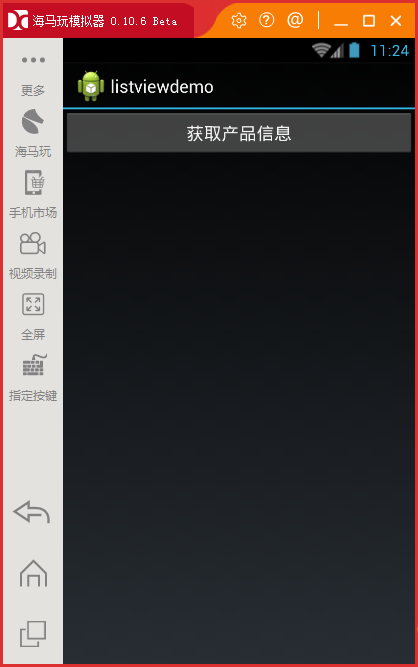

以上说明了使用listview展示数据的方法,并通过模拟器进行运行,若进行发布生成APK时,手机却无法使用闪退,有几个地方是需要设置配置下的,请点击
xamarin.android 发布生成APK真机运行闪退问题
Xamarin.Android 调用Web Api(通过ListView展示远程获取的数据)的更多相关文章
- [置顶]
Xamarin android 调用Web Api(ListView使用远程数据)
xamarin android如何调用sqlserver 数据库呢(或者其他的),很多新手都会有这个疑问.xamarin android调用远程数据主要有两种方式: 在Android中保存数据或调用数 ...
- 【ASP.NET Web API教程】3.3 通过WPF应用程序调用Web API(C#)
原文:[ASP.NET Web API教程]3.3 通过WPF应用程序调用Web API(C#) 注:本文是[ASP.NET Web API系列教程]的一部分,如果您是第一次看本博客文章,请先看前面的 ...
- ASP.NET MVC4中调用WEB API的四个方法
http://tech.it168.com/a2012/0606/1357/000001357231_all.shtml [IT168技术]当今的软件开发中,设计软件的服务并将其通过网络对外发布,让各 ...
- 【ASP.NET Web API教程】3.2 通过.NET客户端调用Web API(C#)
原文:[ASP.NET Web API教程]3.2 通过.NET客户端调用Web API(C#) 注:本文是[ASP.NET Web API系列教程]的一部分,如果您是第一次看本博客文章,请先看前面的 ...
- 通过.NET客户端调用Web API(C#)
3.2 Calling a Web API From a .NET Client (C#) 3.2 通过.NET客户端调用Web API(C#) 本文引自:http://www.asp.net/web ...
- WebApi系列~通过HttpClient来调用Web Api接口
回到目录 HttpClient是一个被封装好的类,主要用于Http的通讯,它在.net,java,oc中都有被实现,当然,我只会.net,所以,只讲.net中的HttpClient去调用Web Api ...
- Android调用Web服务
现在大部分应用程序都把业务逻辑处理,数据调用等功能封装成了服务的形式,应用程序只需要调用这些web服务就好了,在这里就不赘述web服务的优点了.本文总结如何在android中调用Web服务,通过传递基 ...
- 通过HttpClient来调用Web Api接口
回到目录 HttpClient是一个被封装好的类,主要用于Http的通讯,它在.net,java,oc中都有被实现,当然,我只会.net,所以,只讲.net中的HttpClient去调用Web Api ...
- Http下的各种操作类.WebApi系列~通过HttpClient来调用Web Api接口
1.WebApi系列~通过HttpClient来调用Web Api接口 http://www.cnblogs.com/lori/p/4045413.html HttpClient使用详解(java版本 ...
随机推荐
- MySQL备份利器-xtrabackup的介绍和原理(附脑图)
标签(linux): mysql-xtrabackup 笔者Q:972581034 交流群:605799367.有任何疑问可与笔者或加群交流 xtrabackup是Percona公司针对mysql数据 ...
- Python之Django rest_Framework补充
一.什么是RESTful REST与技术无关,代表的是一种软件架构风格,REST是Representational State Transfer的简称,中文翻译为"表征状态转移" ...
- 创建分模块的maven项目
折腾了我2天的maven,整理一下,以后做个参考 一.什么是maven项目: Maven是基于项目对象模型(POM),可以通过一小段描述信息来管理项目的构建,报告和文档的软件项目管理工具. Maven ...
- 一个简单的node.js服务
var http = require('http'); var qs = require('querystring'); var server = http.createServer(function ...
- css选择器:nth-child()与:nth-of-type()的差异
:nth-child()和:nth-of-type()都是Css3中的伪类选择器,其作用相似却又不完全相同. 名词解释 :nth-child()选择器匹配其父元素的第n个子元素,不论元素类型. :nt ...
- for in 在数组和json中
数组中也有for--in,相较于对象中的用法是有区别的:数组中 var arr = ['曹操','曹植','曹丕'] for(i in arr){ console.log(i) //0 1 2 con ...
- Win10编译SqlCipher步骤
准备工作 Visual Studio 2015,其他版本未验证,估计问题不大 ActiveState ActivePerl,用于编译OpenSSL Mingw,在官网下载minimum install ...
- CSS3动画中的animation-timing-function效果演示
CSS3动画(animation)属性有如下几个: 属性 值 说明 animation-name name 指定元素要使用的keyframes名称 animation-duration time(ms ...
- mysql 修改默认字符集为utf8
MySQL 5.5, all you need is: [mysqld] character_set_client=utf8 character_set_server=utf8 collation_s ...
- ps调整文字平滑
1. 选中文字 2. 调整字体样式,选择"平滑"