
Joining Data with dplyr in R
inner_join
按条件取交集dplyr高效处理函数笔记
The inner_join is the key to bring tables together. To use it, you need to provide the two tables that must be joined and the columns on which they should be joined.
> # Use the suffix argument to replace .x and .y suffixes

> parts %>%

  	inner_join(part_categories, by = c("part_cat_id" = "id"), suffix = c("_part", "_category"))

# A tibble: 17,501 x 4

   part_num   name_part                             part_cat_id name_category

   <chr>      <chr>                                       <dbl> <chr>

 1 0901       Baseplate 16 x 30 with Set 080 Yello~           1 Baseplates

 2 0902       Baseplate 16 x 24 with Set 080 Small~           1 Baseplates

 3 0903       Baseplate 16 x 24 with Set 080 Red H~           1 Baseplates

 4 0904       Baseplate 16 x 24 with Set 080 Large~           1 Baseplates

 5 1          Homemaker Bookcase 2 x 4 x 4                    7 Containers

 6 10016414   Sticker Sheet #1 for 41055-1                   58 Stickers

 7 10026stk01 Sticker for Set 10026 - (44942/41841~          58 Stickers

 8 10039      Pullback Motor 8 x 4 x 2/3                     44 Mechanical

 9 10048      Minifig Hair Tousled                           65 Minifig Headwear

10 10049      Minifig Shield Broad with Spiked Bot~          27 Minifig Accesso~

# ... with 17,491 more rows
> # Combine the parts and inventory_parts tables

> inventory_parts %>%

  	inner_join(parts, by = "part_num")

# A tibble: 258,958 x 6

   inventory_id part_num    color_id quantity name                   part_cat_id

          <dbl> <chr>          <dbl>    <dbl> <chr>                        <dbl>

 1           21 3009               7       50 Brick 1 x 6                     11

 2           25 21019c00pa~       15        1 Legs and Hips with Bl~          61

 3           25 24629pr0002       78        1 Minifig Head Special ~          59

 4           25 24634pr0001        5        1 Headwear Accessory Bo~          27

 5           25 24782pr0001        5        1 Minifig Hipwear Skirt~          27

 6           25 88646              0        1 Tile Special 4 x 3 wi~          15

 7           25 973pr3314c~        5        1 Torso with 1 White Bu~          60

 8           26 14226c11           0        3 String with End Studs~          31

 9           26 2340px2           15        1 Tail 4 x 1 x 3 with '~          35

10           26 2340px3           15        1 Tail 4 x 1 x 3 with '~          35

# ... with 258,948 more rows
Joining three tables
sets %>%

	# Add inventories using an inner join

	inner_join(inventories, by = "set_num") %>%

	# Add inventory_parts using an inner join 一般这种情况是因为两个表的列名不同导致的

	inner_join(inventory_parts, by = c("id" = "inventory_id"))
left_join
取第一个参数全部的值以及第二个参数与第一个参数的交集部分
匹配左边的表
return all rows from x, and all columns from x and y. Rows in x with no match in y will have NA values in the new columns. If there are multiple matches between x and y, all combinations of the matches are returned.
# Combine the star_destroyer and millennium_falcon tables

millennium_falcon %>%

  left_join(star_destroyer, by = c("part_num", "color_id"), suffix = c("_falcon", "_star_destroyer"))
> # Aggregate Millennium Falcon for the total quantity in each part

> millennium_falcon_colors <- millennium_falcon %>%

    group_by(color_id) %>%

    summarize(total_quantity = sum(quantity))

>

> # Aggregate Star Destroyer for the total quantity in each part

> star_destroyer_colors <- star_destroyer %>%

    group_by(color_id) %>%

    summarize(total_quantity = sum(quantity))

>

> # Left join the Millennium Falcon colors to the Star Destroyer colors

> millennium_falcon_colors %>%

    left_join(star_destroyer_colors,by="color_id",suffix=c("_falcon", "_star_destroyer"))

# A tibble: 21 x 3

   color_id total_quantity_falcon total_quantity_star_destroyer

      <dbl>                 <dbl>                         <dbl>

 1        0                   201                           336

 2        1                    15                            23

 3        4                    17                            53

 4       14                     3                             4

 5       15                    15                            17

 6       19                    95                            12

 7       28                     3                            16

 8       33                     5                            NA

 9       36                     1                            14

10       41                     6                            15

# ... with 11 more rows
right-join
取第二个参数的全部以及第一个参数与第二个的交集部分
> parts %>%

  	count(part_cat_id) %>%

  	right_join(part_categories, by = c("part_cat_id" = "id")) %>%

  	# Filter for NA

  	filter(is.na(n))

# A tibble: 1 x 3

  part_cat_id     n name

        <dbl> <int> <chr>

1          66    NA Modulex
full_join
有的记录数+a独有的记录数+b独有的记录数,这里要注意顺序
inventory_parts_joined %>%

  # Combine the sets table with inventory_parts_joined

  inner_join(sets, by = "set_num") %>%

  # Combine the themes table with your first join

  inner_join(themes, by = c("theme_id" = "id"), suffix = c("_set", "_theme"))
> batman_parts %>%

    # Combine the star_wars_parts table

    full_join(star_wars_parts, by = c("part_num", "color_id"), suffix = c("_batman", "_star_wars")) %>%

    # Replace NAs with 0s in the n_batman and n_star_wars columns

    replace_na(list(n_batman = 0, n_star_wars = 0))

# A tibble: 3,628 x 4

   part_num color_id n_batman n_star_wars

   <chr>       <dbl>    <dbl>       <dbl>

 1 10113           0       11           0

 2 10113         272        1           0

 3 10113         320        1           0

 4 10183          57        1           0

 5 10190           0        2           0

 6 10201           0        1          21

 7 10201           4        3           0

 8 10201          14        1           0

 9 10201          15        6           0

10 10201          71        4           5

# ... with 3,618 more rows
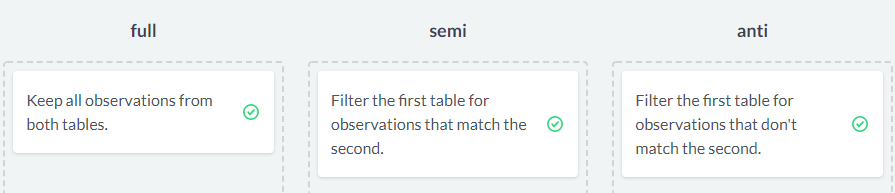
semi- and anti-join
semi_join连接其实是在inner_join的结果中只取属于第一个参数的字段(也就是列)
而anti_join其实就是第一个参数独有的记录
# Filter the batwing set for parts that are also in the batmobile set

> batwing %>%

    semi_join(batmobile, by = c("part_num"))

# A tibble: 126 x 3

   part_num color_id quantity

   <chr>       <dbl>    <dbl>

 1 3023            0       22

 2 3024            0       22

 3 3623            0       20

 4 2780            0       17

 5 3666            0       16

 6 3710            0       14

 7 6141            4       12

 8 2412b          71       10

 9 6141           72       10

10 6558            1        9

# ... with 116 more rows

>

> # Filter the batwing set for parts that aren't in the batmobile set

> batwing %>%

    anti_join(batmobile, by = c("part_num"))

# A tibble: 183 x 3

   part_num color_id quantity

   <chr>       <dbl>    <dbl>

 1 11477           0       18

 2 99207          71       18

 3 22385           0       14

 4 99563           0       13

 5 10247          72       12

 6 2877           72       12

 7 61409          72       12

 8 11153           0       10

 9 98138          46       10

10 2419           72        9

# ... with 173 more rows
 batman_colors %>%

    full_join(star_wars_colors, by = "color_id", suffix = c("_batman", "_star_wars")) %>%

    replace_na(list(total_batman = 0, total_star_wars = 0)) %>%

    inner_join(colors, by = c("color_id" = "id")) %>%

    # Create the difference and total columns

    mutate(difference = percent_batman - percent_star_wars,

           total = total_batman + total_star_wars) %>%

    # Filter for totals greater than 200

    filter(total >= 200)

# A tibble: 16 x 9

   color_id total_batman percent_batman total_star_wars percent_star_wa~ name

      <dbl>        <dbl>          <dbl>           <dbl>            <dbl> <chr>

 1        0         2807        0.296              3258          0.207   Black

 2        1          243        0.0256              410          0.0261  Blue

 3        4          529        0.0558              434          0.0276  Red

 4       14          426        0.0449              207          0.0132  Yell~

 5       15          404        0.0426             1771          0.113   White

 6       19          142        0.0150             1012          0.0644  Tan

 7       28           98        0.0103              183          0.0116  Dark~

 8       36           86        0.00907             246          0.0156  Tran~

 9       46          200        0.0211               39          0.00248 Tran~

10       70          297        0.0313              373          0.0237  Redd~

11       71         1148        0.121              3264          0.208   Ligh~

12       72         1453        0.153              2433          0.155   Dark~

13       84          278        0.0293               31          0.00197 Medi~

14      179          154        0.0162              232          0.0148  Flat~

15      378           22        0.00232             430          0.0273  Sand~

16        7            0       NA                   209          0.0133  Ligh~

# ... with 3 more variables: rgb <chr>, difference <dbl>, total <dbl>
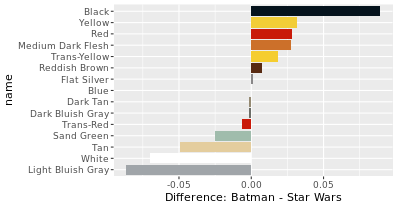
# Create a bar plot using colors_joined and the name and difference columns

> ggplot(colors_joined, aes(name, difference, fill = name)) +

    geom_col() +

    coord_flip() +

    scale_fill_manual(values = color_palette, guide = FALSE) +

    labs(y = "Difference: Batman - Star Wars")
Stack Overflow questions
# Replace the NAs in the tag_name column

questions %>%

  left_join(question_tags, by = c("id" = "question_id")) %>%

  left_join(tags, by = c("tag_id" = "id")) %>%

replace_na(list(tag_name="only-r"))
bind_rows
按行结合时不需要列名相同,但是bind_cols按行结合时需要列名相同
按行连接参考博客
# Combine the two tables into posts_with_tags

> posts_with_tags <- bind_rows(questions_with_tags %>% mutate(type = "question"),

                                answers_with_tags %>% mutate(type = "answer"))

>

> # Add a year column, then aggregate by type, year, and tag_name

> posts_with_tags %>%

    mutate(year = year(creation_date)) %>%

    count(type, year, tag_name)

# A tibble: 58,299 x 4

   type    year tag_name                      n

   <chr>  <dbl> <chr>                     <int>

 1 answer  2008 bayesian                      1

 2 answer  2008 dataframe                     3

 3 answer  2008 dirichlet                     1

 4 answer  2008 eof                           1

 5 answer  2008 file                          1

 6 answer  2008 file-io                       1

 7 answer  2008 function                      7

 8 answer  2008 global-variables              7

 9 answer  2008 math                          2

10 answer  2008 mathematical-optimization     1

# ... with 58,289 more rows
split
split函数用于裂解数据框,可以根据因子来裂解,裂解后得到的是一个list list就非常适合与lapply,sapply,tapply等结合起来使用了
再补充,缺例子
Joining Data with dplyr in R的更多相关文章
- Data Manipulation with dplyr in R
目录 select The filter and arrange verbs arrange filter Filtering and arranging Mutate The count verb ...
- Data manipulation primitives in R and Python
Data manipulation primitives in R and Python Both R and Python are incredibly good tools to manipula ...
- keep or remove data frame columns in R
You should use either indexing or the subset function. For example : R> df <- data.frame(x=1:5 ...
- R︱高效数据操作——data.table包(实战心得、dplyr对比、key灵活用法、数据合并)
每每以为攀得众山小,可.每每又切实来到起点,大牛们,缓缓脚步来俺笔记葩分享一下吧,please~ --------------------------- 由于业务中接触的数据量很大,于是不得不转战开始 ...
- The dplyr package has been updated with new data manipulation commands for filters, joins and set operations.(转)
dplyr 0.4.0 January 9, 2015 in Uncategorized I’m very pleased to announce that dplyr 0.4.0 is now av ...
- R实战 第六篇:数据变换(aggregate+dplyr)
数据分析的工作,80%的时间耗费在处理数据上,而数据处理的主要过程可以分为:分离-操作-结合(Split-Apply-Combine),也就是说,首先,把数据根据特定的字段分组,每个分组都是独立的:然 ...
- R语言扩展包dplyr笔记
引言 2014年刚到, 就在 Feedly 订阅里看到 RStudio Blog 介绍 dplyr 包已发布 (Introducing dplyr), 此包将原本 plyr 包中的 ddply() 等 ...
- Cleaning Data in R
目录 R 中清洗数据 常见三种查看数据的函数 Exploring raw data 使用dplyr包里面的glimpse函数查看数据结构 \(提取指定元素 ```{r} # Histogram of ...
- Fast data loading from files to R
Recently we were building a Shiny App in which we had to load data from a very large dataframe. It w ...
随机推荐
- 【python基础语法】函数的作用域和内置函数和关键字(第7天课堂笔记)
一.函数的作用域: 1.全局变量 2.局部变量 3.global 二.内置函数 1.常见的内置函数 print : 输出 input : 输入 type : 查看数据类型 id : 获取数据的内存地址 ...
- 服务器控件Repeater
在使用aspx开发中,如果一个页面做纯数据展示,Repeater会比GridView更适合,因为它是轻量级的 下面是最基本的用法: aspx: <table> <asp:Repea ...
- Windows10下MariaDB数据库的安装与卸载
MariaDB数据库管理系统是MySQL的一个分支,100%兼容Mysql,开源免费,在Windows系统和Linux系统中都能运行,很受到欢迎.自从mysql被Oracle收购后,MariaDB就成 ...
- 使用shell程序备份crontab中的.sh脚本文件
需求 线上环境有一些定时脚本(用crontab -l可查看当前用户的),有时我们可能会改这些定时任务的脚本内容.为避免改错无后悔药,需用shell实现一个程序,定时备份crontab中的.sh脚本文件 ...
- python之三目运算符的替代品?
# 不知曾几何时,你是否也觉得Python的三目运算写起来很麻烦呢?(没有过) # 比如: a, b = 3, 4 c = a if a > b else b d = a if a < b ...
- es6转码和package.json中的配置
在线实时转换 需要babel-register .babelrc中: { "presets": [ "es2015" ] } 项目中main.js配置: 前提是 ...
- 【spring boot】SpringBoot初学(5)– WebService之Jersey
前言 github: https://github.com/vergilyn/SpringBootDemo 代码位置: 一.准备 spring boot对jersey1.x与jersey2.x的注入方 ...
- JMeter-查找元素
参考文档:https://jmeter.apache.org/usermanual/hints_and_tips.html 有时很难使用变量或包含某个URL或参数的方法在“测试计划”树和元素中找到. ...
- 基于STL的字典生成模块-模拟搜索引擎算法的尝试
该课题来源于UVA中Searching the Web的题目:https://vjudge.net/problem/UVA-1597 按照题目的说法,我对按照特定格式输入的文章中的词语合成字典,以满足 ...
- 5G PDCCH 协议
For downlink, a maximum of 16 HARQ processes per cell is supported by the UE. The number of processe ...