
Android模仿三星手机系统滑动条滑动时滑块变大的特效
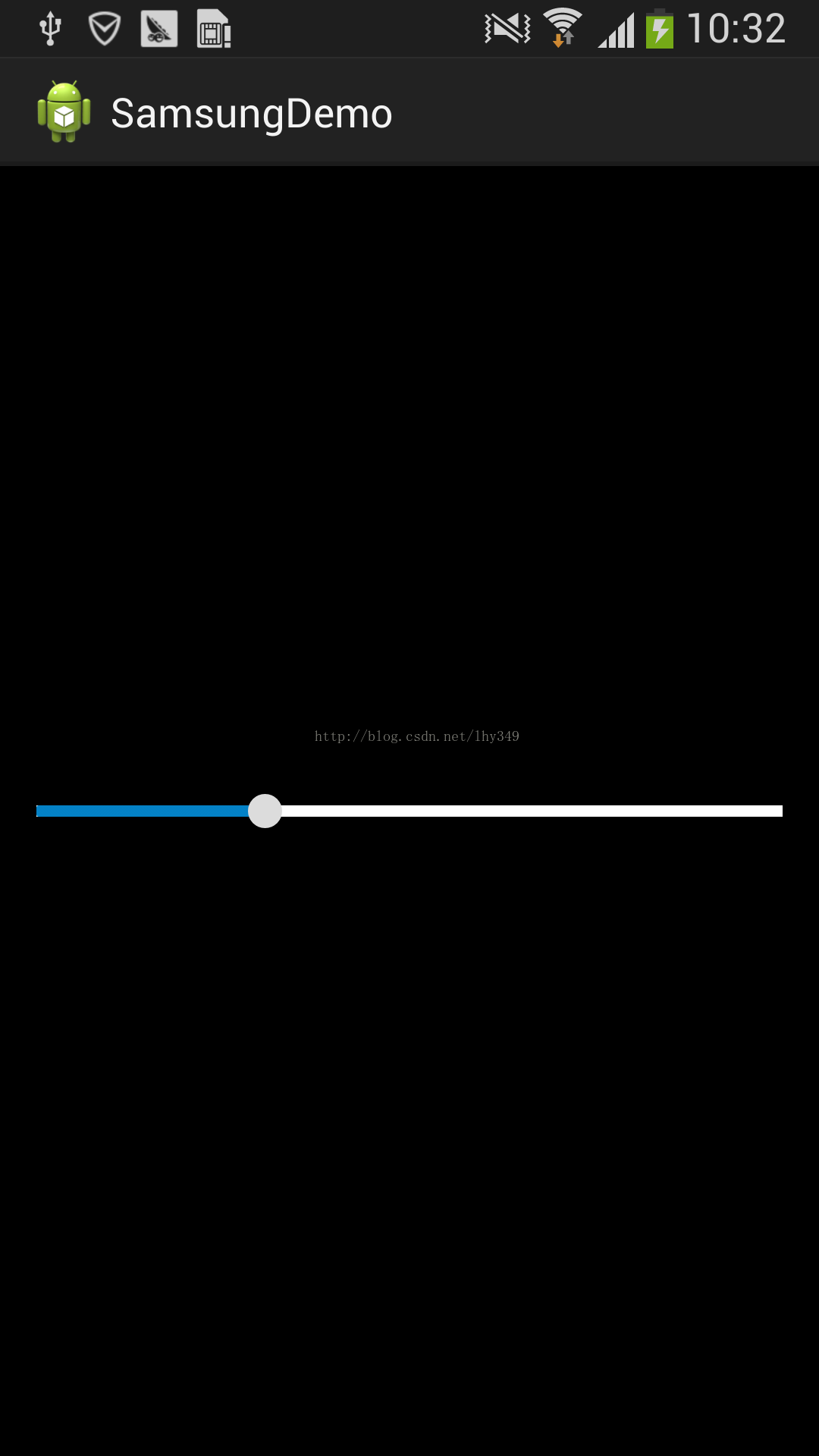
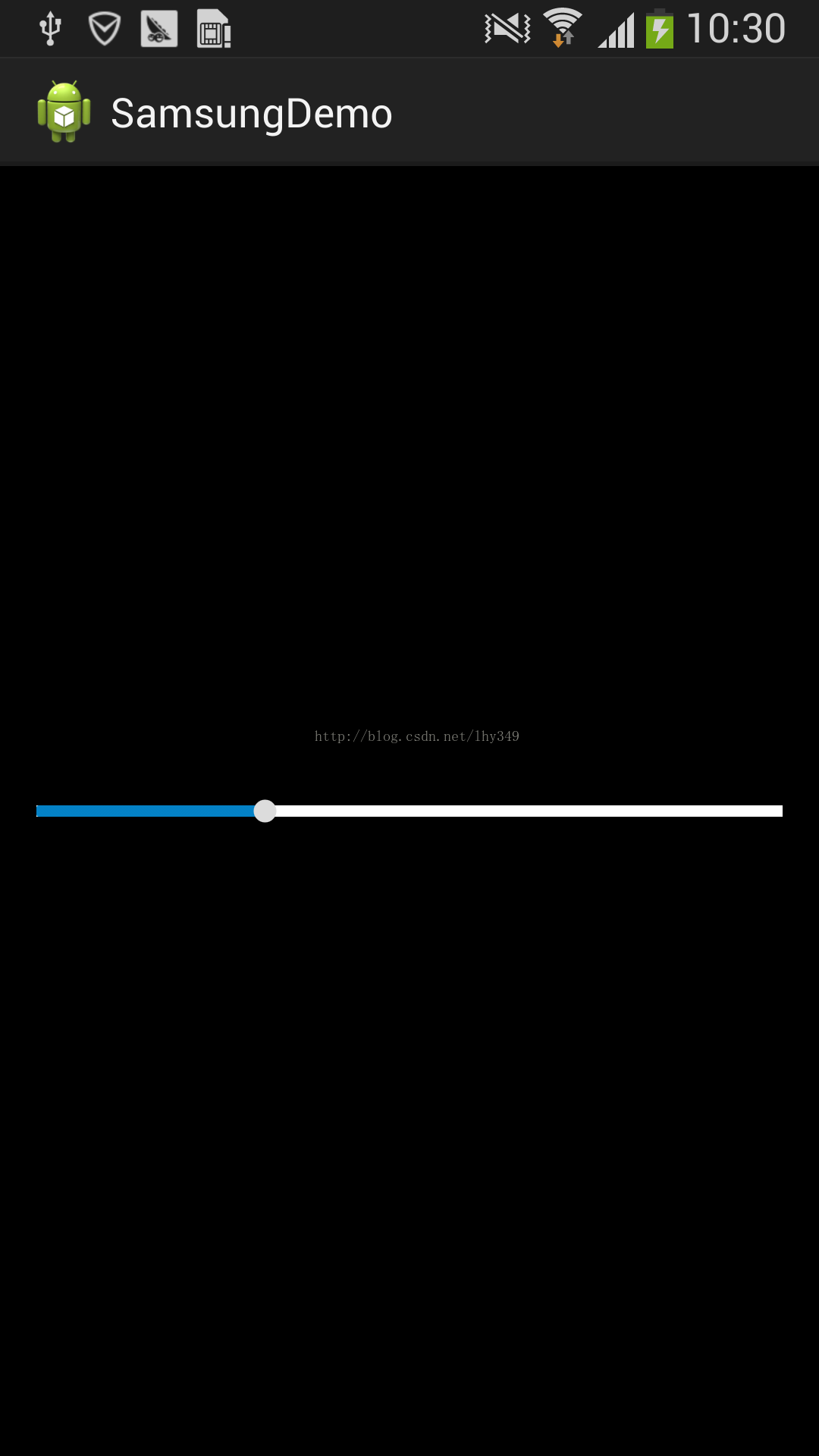
使用三星手机的过程中发现三星手机系统自带的滑动条有一个特效。比方调节亮度的滑动条。在滑动滑块的过程中,滑块会变大。功能非常小可是体验却非常好,于是决定做一个这种效果出来。好了废话不多说了,以下開始实现
我们知道在SeekBar控件中有两个非常重要的属性,一个是进度条(即android:progressDrawable属性),一个是滑块(即android:thumb属性),我们主要用到的是滑块的特效,这里就把进度条的配置略微的介绍一下,先上代码:
在res/xml目录下创建seekbar_progress.xml文件:
<?xml version="1.0" encoding="utf-8"?>

<layer-list xmlns:android="http://schemas.android.com/apk/res/android" >

    <item android:id="@android:id/background">

        <shape>

            <corners android:radius="0dip" />

            <gradient

                android:angle="270"

                android:centerColor="#999999"

                android:centerY="0.75"

                android:endColor="#999999"

                android:startColor="#999999" />

        </shape>

    </item>

    <item android:id="@android:id/secondaryProgress">

        <clip>

            <shape>

                <corners android:radius="1dip" />

                <gradient

                    android:angle="270"

                    android:centerColor="#88803990"

                    android:centerY="0.75"

                    android:endColor="#88803990"

                    android:startColor="#88803990" />

            </shape>

        </clip>

    </item>

    <item android:id="@android:id/progress">

        <clip>

            <shape>

                <corners android:radius="1dip" />

                <gradient

                    android:angle="270"

                    android:centerColor="#803990"

                    android:centerY="0.75"

                    android:endColor="#803990"

                    android:startColor="#803990" />

            </shape>

        </clip>

    </item>

</layer-list>
代码的内容非常easy。主要是设置进度条的第一进度、第二进度和背景颜色。这里就不做详细介绍了。
接下来開始我们的滑块属性,要想实现三星的那种效果。我们必需要处理正常状态下和按下的事件,应该都想到了状态选择器,这里我们在res/drawable目录下创建滑块的状态选择器thum_selector.xml,然后设置去设置它的一些item属性,可是这时候发现我们的滑块还没有创建呢,这里的滑块我们不使用图片。而是通过绘制的方式来实现(至于详细的怎么去创建,我们能够在Android源代码中找到thum的配置文件,改改即可了),在xml目录下创建seekbar_thum_normal.xml文件:
<?xml version="1.0" encoding="UTF-8"?

>

<shape xmlns:android="http://schemas.android.com/apk/res/android"

    android:shape="rectangle" >

    <gradient

        android:angle="270"

        android:endColor="#ff585858"

        android:startColor="#ffffffff" />

    <size

        android:height="15dp"

        android:width="15dp" />

    <stroke

        android:width="5dp"

        android:color="#00000000" />

    <corners

        android:radius="8dp" />

    <solid android:color="#dcdcdc"/>

</shape>
按压状态下滑块的配置文件seekbar_thum_pressed.xml:
<?xml version="1.0" encoding="UTF-8"?>

<shape xmlns:android="http://schemas.android.com/apk/res/android"

    android:shape="rectangle" >

    <gradient

        android:angle="270"

        android:endColor="#ff585858"

        android:startColor="#ffffffff" />

    <size

        android:height="15dp"

        android:width="15dp" />

    <corners

        android:radius="8dp" />

    <solid android:color="#dcdcdc"/>

</shape>
细致看会发现这两个文件基本的差别就是上一个文件多了一个stroke属性。它表示在滑块的外围进行描边,我们将背景设置为透明效果,这样处理的效果是使滑块的大小一致。不至于在滑动的过程中出现进度条上下跳动的问题
接下来就是我们滑块的状态选择器的布局thum_selector.xml了
<?

xml version="1.0" encoding="utf-8"?>

 <selector xmlns:android="http://schemas.android.com/apk/res/android">

     <item android:state_pressed="true"

         android:state_window_focused="true"

         android:drawable="@xml/seekbar_thum_pressed" />

     <item android:state_focused="true"

         android:state_window_focused="true"

         android:drawable="@xml/seekbar_thum_pressed" />

     <item android:state_selected="true"

         android:state_window_focused="true"

         android:drawable="@xml/seekbar_thum_pressed" />

     <item android:drawable="@xml/seekbar_thum_normal" />

 </selector>
最后贴一下seekbar的布局文件。说明一下能够通过调节android:thumbOffset属性,让进度条的进度在滑块的中心点
<SeekBar

             android:id="@+id/seekBar1"

             android:layout_width="fill_parent"

             android:layout_height="wrap_content"

             android:progressDrawable="@xml/seekbar_progress"

             android:thumb="@drawable/thum_selector"

             android:thumbOffset="10dp"

             android:minHeight="5dp"

             android:maxHeight="5dp"

             >

         </SeekBar>
到此,我们模仿的效果就结束了。Demo的下载链接:https://github.com/hiyounglee/SamsungDemo 看一下三星手机的效果图
Android模仿三星手机系统滑动条滑动时滑块变大的特效的更多相关文章
- iOS UISlider滑动块触摸范围调整变大
正常情况下,我们自定义的滑动区域都不会太大,否则UI不美观,但是这样,又会手势不灵敏,用户体验变差. 如何解决? 这里有一种方案:封装一个继承UISlider的自定义类,重写thumbRectForB ...
- mysql mariadb 删除表中的数据时数据库变大
删除表中数据以前 [root@RM uar3]# du -sh * 3.3G apache-tomcat-7.0.54 150M instalRM4UAR 0 mariadb 903M mariadb ...
- VC++ 中滑动条(slider控件)使用 [转+补充]
滑动控件slider是Windows中最常用的控件之一.一般而言它是由一个滑动条,一个滑块和可选的刻度组成,用户可以通过移动滑块在相应的控件中显示对应的值.通常,在滑动控件附近一定有标签控件或编辑框控 ...
- Opencv关于滑动条bar操作的实例
代码如下: //////////////////////////////////////////////////////////////////////// // // 该程序产生一个窗口10s 如果 ...
- 第15.44节、PyQt输入部件:QAbstractSlider派生类QScrollBar滚动条、QSlider滑动条、QDial刻度盘功能详解
专栏:Python基础教程目录 专栏:使用PyQt开发图形界面Python应用 专栏:PyQt入门学习 老猿Python博文目录 老猿学5G博文目录 一.引言 Designer中的输入部件Horizo ...
- PyQt(Python+Qt)学习随笔:QSlider滑动条部件功能简介
专栏:Python基础教程目录 专栏:使用PyQt开发图形界面Python应用 专栏:PyQt入门学习 老猿Python博文目录 老猿学5G博文目录 一.概述 Designer输入部件中的Horizo ...
- 原生js拖拽功能制作滑动条实例教程
拖拽属于前端常见的功能,很多效果都会用到js的拖拽功能.滑动条的核心功能也就是使用js拖拽滑块来修改位置.一个完整的滑动条包括 滑动条.滑动痕迹.滑块.文本 等元素,先把html代码写出来,如下所示: ...
- OpenCV——图像的载入、显示、输出到文件和滑动条、鼠标操作
图像的载入.显示.输出到文件和滑动条 滑动条 示例: 鼠标操作
- Android的属性系统
http://blog.csdn.net/jerryutscn/article/details/5519423 Android的属性系统 每条属性包含了名字和其对应的值,两者都用字符串来描述.Andr ...
随机推荐
- Intel Code Challenge Elimination Round (Div.1 + Div.2, combined) B. Verse Pattern 水题
B. Verse Pattern 题目连接: http://codeforces.com/contest/722/problem/B Description You are given a text ...
- hdu 5784 How Many Triangles 计算几何,平面有多少个锐角三角形
How Many Triangles 题目连接: http://acm.hdu.edu.cn/showproblem.php?pid=5784 Description Alice has n poin ...
- CentOS 7搭建KVM在线管理面板WebVirtMgr
系统版本:CentOS 7.4 WebVirtMgr版本:master分支的20180720版本,下载链接(链接:https://pan.baidu.com/s/1kl060hPHDGbwJUR_iM ...
- MikroTik RouterOS使用VirtualBox挂载物理硬盘作为虚拟机硬盘进行安装
说明:这一切似乎在Windows下更好操作.虚拟机操作不是难点,难点在于虚拟磁盘的转换挂载 一.先挂载硬盘 # 创建虚拟镜像并映射到物理硬盘 cd "c:\Program Files\Ora ...
- MikroTik RouterOS使用U盘安装提示FATAL ERROR: no CD-ROM found Press ENTER to reboot的问题解决
1.首先说明这个ROS是不能使用U盘安装的,无论你怎么修改都无法实现 2.还是老老实实的刻录iso关盘,或者挂载硬盘到虚拟机上进行安装.又或者使用netinstall进行安装. 3.别去找国外的方法, ...
- 一些收集的MikroTik RouterOS破解版虚拟机VMware
会不定期更新,也许后续自己来做,现在是收集.持续关注这个分享链接即可. 链接:https://pan.baidu.com/s/1j7ciesPm1yAgCJ26dLJ8sg 密码:i64w
- GET POST方法长度限制(转)
1. Get方法长度限制 Http Get方法提交的数据大小长度并没有限制,HTTP协议规范没有对URL长度进行限制.这个限制是特定的浏览器及服务器对它的限制. 如:IE对URL长度的限制是20 ...
- .net core中的System.Buffers名字空间
最近研究了一下.net core 2.1的基础类库,发现它引入了一个System.Buffers名字空间,里面提供了一系列比较实用的对象,便简单的管中窥豹浏览一下. ArrayPool<T> ...
- mui选择器和dom获取元素的区别(记得把mui对象转为dom对象才能调用用dom方法)
<!DOCTYPE html><html> <head><meta charset="UTF-8"><meta name=&q ...
- SQL 版本说明
http://www.cnblogs.com/SameZhao/p/6184924.html The ProductMajorVersion产品主版本号 如: 12为 SQL SERVER 2014 ...