
使用visual studio code调试php代码
这回使用visual studio code折腾php代码的调试,又是一顿折腾,无论如何都进不了断点。好在就要放弃使用visual studio code工具的时候,折腾好了,汗~
这里把步骤记录下来:
1、安装一站式php工具wampserver
我安装的是最新的3.1.3 64bit的版本,这个版本内置了4个版本的php,默认使用的是php 5.6.35。如果需要调试php,必须要使用php 7.0以上的版本,这个可能是跟我使用的visual studio code的php插件有关。这里切换到php 7的版本。
2、安装并配置xdebug参数
wampserver默认是内置了xdebug的,不过需要修改一下xdebug的参数。
找到wampserver的托盘工具,左键点击-》PHP->PHP Settings,勾选xdebug.remote_enable,这一项
然后,左键点击-》PHP->php.ini文件,发现会在php.ini文件自动生成如下内容:
; XDEBUG Extension

[xdebug]

zend_extension ="D:/Program/wamp64/bin/php/php7.0.29/zend_ext/php_xdebug-2.6.0-7.0-vc14-x86_64.dll"

xdebug.remote_enable = On

xdebug.profiler_enable = off

xdebug.profiler_enable_trigger = Off

xdebug.profiler_output_name = cachegrind.out.%t.%p

xdebug.profiler_output_dir ="D:/Program/wamp64/tmp"

xdebug.show_local_vars=0
需要添加一行内容,修改后的内容为:
; XDEBUG Extension

[xdebug]

zend_extension ="D:/Program/wamp64/bin/php/php7.0.29/zend_ext/php_xdebug-2.6.0-7.0-vc14-x86_64.dll"

xdebug.remote_enable = On

xdebug.remote_autostart=on

xdebug.profiler_enable = off

xdebug.profiler_enable_trigger = Off

xdebug.profiler_output_name = cachegrind.out.%t.%p

xdebug.profiler_output_dir ="D:/Program/wamp64/tmp"

xdebug.show_local_vars=0
红色的部分是我添加的内容,一直进不了断点,是因为我这句标红的内容没有加,xdebug.remote_autostart参数并不能像xdebug.remote_enable参数一样可以通过菜单开启,汗~~
修改以后,记得重启apache服务
3、安装visual studio code的php插件
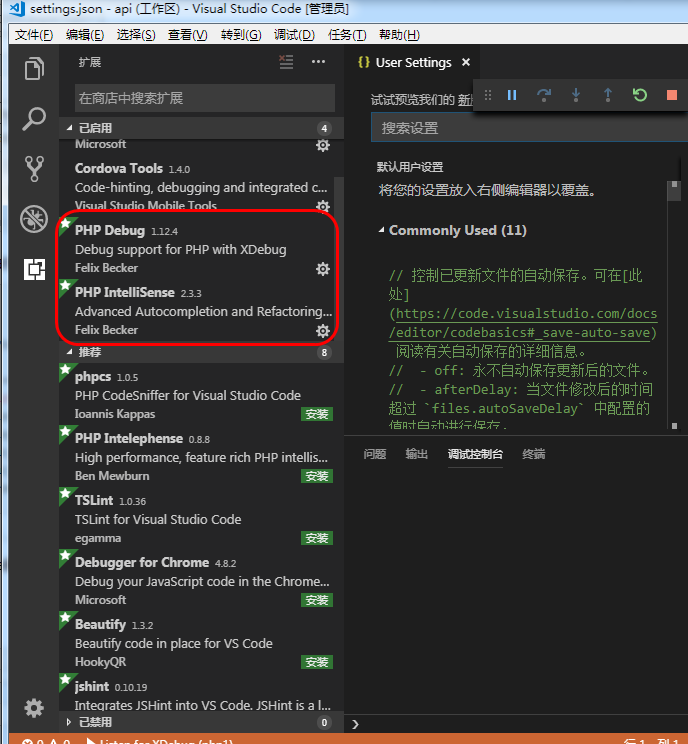
如图所示,添加
PHP IntelliSense和PHP Debug两个插件
这两个插件都需要配置php的路径,菜单:文件-》首选项-》设置
用户设置,我修改为:
{

    "php.executablePath": "D:\\Program\\wamp64\\bin\\php\\php7.0.29\\php.exe",

    "php.validate.executablePath": "D:\\Program\\wamp64\\bin\\php\\php7.0.29\\php.exe"

}
我这里引用的是wampserver内置的php的版本,注意要跟上面启用的php的版本保持一致。
4、Visual Studio Code启用调试
到调试这一栏,添加php的调试,并且启用调试
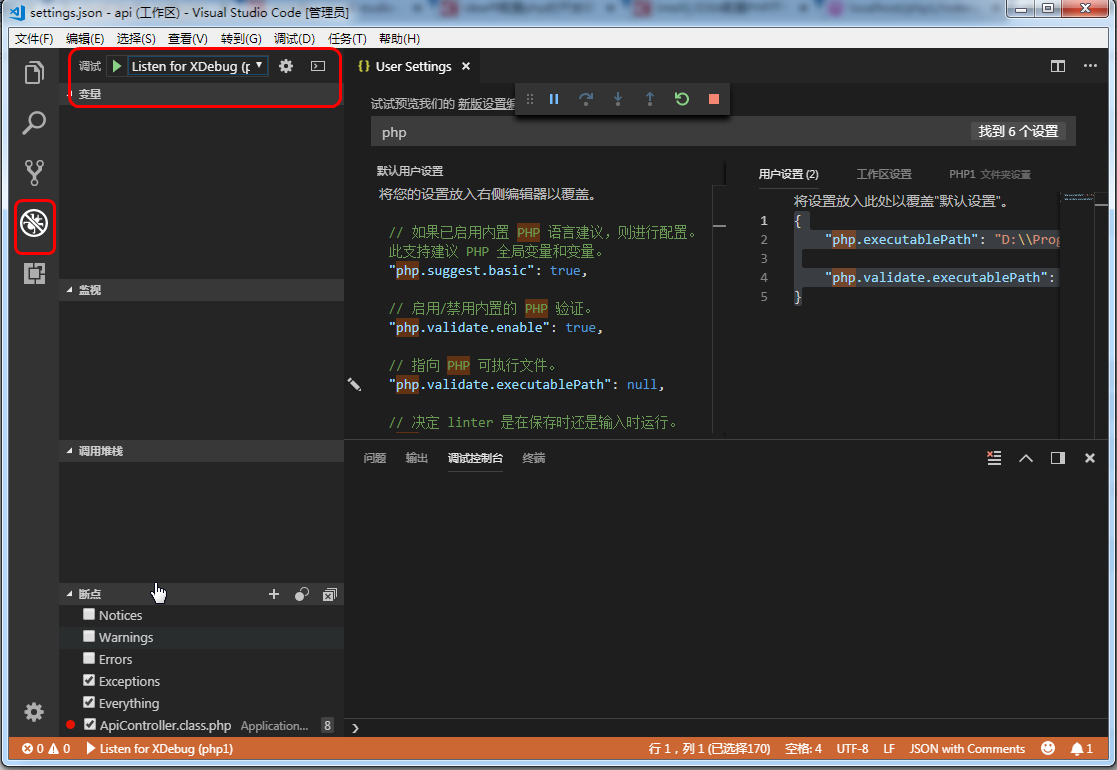
那么在代码中添加断点,运行代码,就可以进行php代码的调试了!
使用visual studio code调试php代码的更多相关文章
- windows下用visual studio code 调试go代码
http://www.golangtc.com/download下载安装包或压缩包 配置环境变量 配置GOROOT: 配置PATH:在PATH最后添加 配置GOPATH:GOPATH的作用请自行百度, ...
- Visual Studio Code调试electron主进程
Visual Studio Code调试electron主进程 作者: jekkay 分类: electron 发布时间: 2017-06-11 14:56 一·概述 此文原出自[水滴石]: htt ...
- Visual Studio Code 调试 PHP
Visual Studio Code 调试 PHP 2018/12/4 更新 Nginx + php-cgi.exe 下与 Visual Studio Code 配合调试 必需环境 Visual St ...
- Visual Studio Code调试node.js:无法在PATH上找到运行时的node
首先,环境变量Path中加入nodejs的路径: 验证nodejs是否已经加入环境变量: 接着,重新启动Visual Studio Code, 试一下,是不是好了~ 附录:Visual Studi ...
- Visual Studio Code - 调试 Node.js 代码
官方的文档写的太好了!大家还是看参考资料吧. 参考资料: Debugging in Visual Studio Code Debug Node.js Apps using Visual Studio ...
- 使用Visual Studio Code调试基于ActionScript的LayaAir HTML5游戏
使用Visual Studio Code(VS Code)调试的优势 使用VS Code我们可以极大地提高LayaAir Html5游戏项目的调试效率,VS Code的优势有以下几点: 在发生Java ...
- visual studio code 调试nodejs 配置简单HTTP服务器
介绍 Visual Studio Code是一个轻量级的Web集成开发环境on Linux,Mac and Windows,特别是作为前端人员来了, 多了一个可供选择的生产力工具IDE,调试js代码简 ...
- Go学习笔记(二)搭建Visual Studio Code调试环境
上一篇 Go学习笔记(一)安装Go语言环境 安装Visual Studio Code 这是目前我觉得最好用的文本编辑器了, https://code.visualstudio.com/ 中间有几部确认 ...
- Visual Studio Code 调试 SpringBoot
Build Anything with Spring Boot:Spring Boot is the starting point for building all Spring-based appl ...
随机推荐
- 基于设备树的TQ2440 DMA学习(2)—— 简单的DMA传输
作者 彭东林 pengdonglin137@163.com 平台 TQ2440 Linux-4.9 概述 上一篇博客分析了DMA控制器的寄存器,循序渐进,下面我们直接操作DMA控制器的寄存器实 ...
- 使用jQuery实现input数值的增量和减量
在很多电商网站中,在购物车所在页面,涉及到商品数量的时候,都会提供一个+号按钮和-号按钮来实现增1和减1,并且只允许input中输入数值.Bootstrap TouchSpin这款插件就是针对此需求而 ...
- Node.js批量去除BOM文件
之前的同事写了一个工具,但有bug,就是在替换文件后原文件的格式变成utf8 BOM了,这种带BOM的XML在Mac下可能读取不出来,所以就需要写个工具处理一下- 其实思路比较简单,首先遍历目录, ...
- Android之greenDao,一个orm的使用
转自:http://blog.csdn.net/krislight/article/details/9391455 greenDaoMaster的学习研究 分类: 心得笔记 2013-07-20 16 ...
- SQLite中的事务操作
关于SQLite事务可以解决一些问题,比如你要插入两个数据,可以将两个数据作为同一个事务进行插入,这样如果第二个数据错误了,便自动执行回滚操作,第一个数据也不会插入成功,保证了数据的同步! 一.实际的 ...
- linux 7z 命令编译安装,mac安装p7zip
linux 7z 命令编译安装 7zip是一个开源的压缩软件 7z格式是压缩率最高的格式 服务器备份 数据几个g 要是tar压缩下载的话 时间太长 7zip压缩出来体积很小 首先安装 我这是 ce ...
- npm出错的解决方案
npm show grpc # 返回版本号 # 安装旧版本: npm install grpc@1.2.0
- golang导入包的几个说明:import
导入包: 标准包使用的是给定的短路径,如"fmt"."net/http" 自己的包,需要在工作目录(GOPATH)下指定一个目录,improt 导入包,实际上就 ...
- jquery实现相同事件名称,不同命名空间的调用方法
<html xmlns="http://www.w3.org/1999/xhtml"> <head> <title></title> ...
- 【BZOJ】【3931】【CQOI2015】网络吞吐量
最短路+最大流 思维难度并不高,其实题面几乎已经把算法讲完了…… 练习模板的好题= = 哦对了,求最短路和最大流的时候都得开long long……QwQ /********************** ...