
vue-transition-animation
<!Doctype>

<html>

<head>

    <meta charset="utf-8">

    <meta name="viewport"

          content="width=device-width, initial-scale=1.0, maximum-scale=1.0, minimum-scale=1.0, user-scalable=no"/>

    <style>

        * {

            margin: 0;

            padding: 0;

        }

        @keyframes shape-change {

            0%, 100% {

                border-radius: 50%;

                background: red

            }

            50% {

                border-radius: 0;

                background: blue

            }

        }

        @keyframes moveball-in {

            0% {

                transform: translate3d(300px, -200px, 0)

            }

            50% {

                transform: translate3d(100px, -400px, 0)

            }

            100% {

                transform: translate3d(0, 0, 0)

            }

        }

        @keyframes moveball-out {

            0% {

                transform: translate3d(0, 0, 0)

            }

            50% {

                transform: translate3d(100px, -400px, 0)

            }

            100% {

                transform: translate3d(300px, -200px, 0)

            }

        }

        .btn {

            width: 40px;

            height: 30px;

            margin-top: 40px;

            border: none;

            outline: none;

            background: red;

            color: #fff;

        }

        .ball {

            position: absolute;

            bottom: 20px;

            left: 20px;

            width: 50px;

            height: 50px;

            transition: all 1s cubic-bezier(.22, -0.86, .97, .58)

        }

        .ball.move-enter-active {

            opacity: 1;

            animation: moveball-in 1s;

        }

        .ball.move-enter-active .inner {

            animation: shape-change 1s

        }

        .ball.move-leave-active {

            opacity: 0.8;

            animation: moveball-out 1s

        }

        .ball.move-leave-active .inner {

            animation: shape-change 1s

        }

        .inner {

            display: inline-block;

            width: 30px;

            height: 30px;

            border-radius: 50%;

            background: red;

            transition: all 1s linear;

        }

    </style>

</head>

<body>

<div id="app">

    <template>

        <div class="app">

            <button @click="showball" class="btn">show</button>

            <transition name="move" type="animation">

                <div class="ball" v-show="show">

                    <div class="inner"></div>

                </div>

            </transition>

        </div>

    </template>

</div>

<script src="../vue.js"></script>

<script>

    var app = new Vue({

        el: "#app",

        data: {

            show: false

        },

        methods: {

            showball: function () {

                this.show = !this.show;

            }

        }

    });

</script>

</body>

</html>
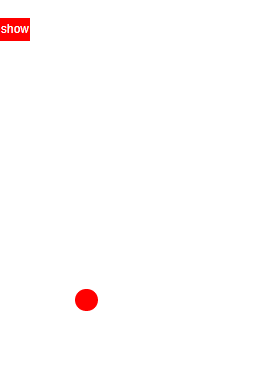
vue-transition-animation的更多相关文章
- css3 transition animation nick
时光转眼即逝,又到周六了,今天写点某部分人看不起的css玩玩! 转换 转换属性transform: 浏览器前缀: -webkit-transform;-o-transform;-moz-transfo ...
- Atitti css transition Animation differ区别
Atitti css transition Animation differ区别 1.1. transition的优点在于简单易用,但是它有几个很大的局限. 1 1.2. Transition ...
- Atitti css transition Animation differ区别
Atitti css transition Animation differ区别 1.1. transition的优点在于简单易用,但是它有几个很大的局限. 1 1.2. js 动态改变 st ...
- A transition animation compatible Library.
Android5.0之后为我们提供了许多炫酷的界面过渡效果,其中共享元素过渡也是很有亮点的一个效果,但这个效果只能在Android5.0之后使用,那今天我们就来将共享元素过渡效果兼容到Android4 ...
- css3动画transition animation
CSS动画简介 transition animation transition过渡:css3通过transitions属性引入时间概念,通过开始.结束状态自动计算中间状态,实现状态改变的过渡效果 ...
- CSS3 & transition & animation
CSS3 & transition & animation https://developer.mozilla.org/en-US/docs/Web/CSS/transition-ti ...
- CSS动画-transition/animation
HTML系列: 人人都懂的HTML基础知识-HTML教程(1) HTML元素大全(1) HTML元素大全(2)-表单 CSS系列: CSS基础知识筑基 常用CSS样式属性 CSS选择器大全48式 CS ...
- vue transition
Vue.js 教程 (9) : 过渡动画 Vue.js 提供非常简单的过渡动画接口.这些过渡动画在 Vue.js 将目标元素插入或移除出 DOM 的时候会自动执行.能够触发动画的指令包括 v-if , ...
- css3的新特性transform,transition,animation
一.transform css3引入了一些可以对网页元素进行变换的属性,比如旋转,缩放,移动,或者沿着水平或者垂直方向扭曲(斜切变换)等等.这些的基础都是transform属性 transform属性 ...
- css笔记——区分css3中的transform transition animation
出处:http://blog.csdn.net/dyllove98/article/details/8957232 CSS3中和动画有关的属性有三个 transform. transition ...
随机推荐
- #pragma pack(n)对齐格式
#pragma pack(n)对齐格式 #pragma pack(n) 是预处理器用来指定对齐格式的指令,表示n对齐.当元素字节小于n时,要扩展到n:若元素字节大于n则占用其实际大小. struct ...
- opencv打开视频文件出错
使用C#调用mingw的so文件,在C++端使用opencv打开视频.这样的项目完成过了一个,第二次做的时候,发现opencv打开视频文件出错. 首先怀疑是opencv的opencv_ffmpeg24 ...
- Icingaweb2监控oracle数据库的安装配置流程
Icinga2安装配置check_oracle_health流程 1.安装 由于check_oracle_health是使用perl语言编写的,因此在安装该插件之前,首先要安装oracle的客户端实例 ...
- python函数中的位置参数、默认参数、关键字参数、可变参数区别
一.位置参数 调用函数时根据函数定义的参数位置来传递参数. #!/usr/bin/env python # coding=utf-8 def print_hello(name, sex): sex_d ...
- Java学习个人备忘录之关键字final
final关键字final可以修饰类,方法,变量.final修饰的类不可以被继承final修饰的方法不可以被覆盖final修饰的变量是一个常量.只能被赋值一次.内部类只能访问被final修饰的局部变量 ...
- 软件工程课堂作业(二)续——升级完整版随机产生四则运算题目(C++)
一.设计思想: 1.根据题目新设要求,我将它们分为两类:一类是用户输入数目,根据这个数目改变一系列后续问题:另一类是用户输入0或1,分情况解决问题. 2.针对这两类要求,具体设计思路已在上篇博文中写出 ...
- win8安装Ubuntu14
概述: 1.复制安装镜像和启动文件到FAT32分区 2.查找出FAT32分区的分区号,修改启动配置文件 3.启动FAT32分区的安装镜像,开始安装 UEFI Win7/8/Ubuntu 硬盘安装Ubu ...
- iOS-获取webView的高度
- (void)webViewDidFinishLoad:(UIWebView *)wb{ //方法1 CGFloat documentWidth = [[wb stringByEvaluatingJ ...
- 【Docker 命令】- images命令
docker images : 列出本地镜像. 语法 docker images [OPTIONS] [REPOSITORY[:TAG]] OPTIONS说明: -a :列出本地所有的镜像(含中间映像 ...
- 修改QQ各版本的默认保存位置(聊天记录)
这几天没少折腾windows,都有点烦了,我是那种有强迫症的,只要知道的自己没有做到的会感觉到浑身不爽的因为系统重装了好几次,QQ也没少安装几次,我使用的是TM的QQ(没有 那么多烦人的广告,娱乐组件 ...