
CheckBox复选框控件
CheckBox复选框控件
一、简介
1、

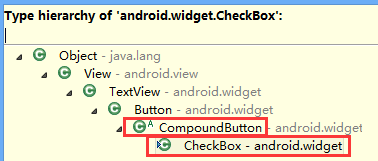
2、类结构图
二、CheckBox复选框控件使用方法
这里是使用java代码在LinearLayout里面添加控件
1、新建LinearLayout布局
2、建立CheckBox的XML的Layout文件
3、通过View.inflate()方法创建CheckBox
CheckBox checkBox=(CheckBox) View.inflate(this, R.layout.checkbox, null);
4、通过LinearLayout的addView方法添加CheckBox
ll_checkBoxList.addView(checkBox);
5、通过List<CheckBox>完成输出功能
for(CheckBox checkBox:checkBoxList)
三、代码实例
1、效果图:

2、代码
fry.Activity01
 package fry;

 import java.util.ArrayList;

 import java.util.List;

 import com.example.CheckBoxDemo1.R;

 import android.app.Activity;

 import android.os.Bundle;

 import android.view.View;

 import android.view.View.OnClickListener;

 import android.widget.Button;

 import android.widget.CheckBox;

 import android.widget.LinearLayout;

 import android.widget.Toast;

 public class Activity01 extends Activity implements OnClickListener{

     private List<CheckBox> checkBoxList=new ArrayList<CheckBox>();

     private LinearLayout ll_checkBoxList;

     private Button btn_ok;

 //    CheckBox复选框控件使用方法

 //    这里是使用java代码在LinearLayout里面添加控件

 //    1、新建LinearLayout布局

 //    2、建立CheckBox的XML的Layout文件

 //    3、通过View.inflate()方法创建CheckBox

 //    4、通过LinearLayout的addView方法添加CheckBox

 //    5、通过List<CheckBox>完成输出功能

     @Override

     protected void onCreate(Bundle savedInstanceState) {

         // TODO Auto-generated method stub

         super.onCreate(savedInstanceState);

         setContentView(R.layout.activity01);

         ll_checkBoxList=(LinearLayout) findViewById(R.id.ll_CheckBoxList);

         btn_ok=(Button) findViewById(R.id.btn_ok);

         String[] strArr={"你是学生吗?","你是否喜欢android","您喜欢旅游吗?","打算出国吗?"};

         for(String str:strArr){

             CheckBox checkBox=(CheckBox) View.inflate(this, R.layout.checkbox, null);

             checkBox.setText(str);

             ll_checkBoxList.addView(checkBox);

             checkBoxList.add(checkBox);

         }

         btn_ok.setOnClickListener(this);

     }

     @Override

     public void onClick(View v) {

         // TODO Auto-generated method stub

         String str="";

         for(CheckBox checkBox:checkBoxList){

             if(checkBox.isChecked()){

                 str+=checkBox.getText().toString()+"\n";

             }

         }

         Toast.makeText(this, str, Toast.LENGTH_SHORT).show();

     }

 }
/CheckBoxDemo1/res/layout/activity01.xml
 <?xml version="1.0" encoding="utf-8"?>

 <LinearLayout xmlns:android="http://schemas.android.com/apk/res/android"

     android:layout_width="match_parent"

     android:layout_height="match_parent"

     android:orientation="vertical" >

     <LinearLayout

         android:id="@+id/ll_CheckBoxList"

         android:layout_width="match_parent"

         android:layout_height="wrap_content"

         android:orientation="vertical"

         >

     </LinearLayout>

     <Button

         android:id="@+id/btn_ok"

         android:layout_width="match_parent"

         android:layout_height="wrap_content"

         android:text="确定"

         />

 </LinearLayout>
/CheckBoxDemo1/res/layout/checkbox.xml
 <?xml version="1.0" encoding="utf-8"?>

 <CheckBox xmlns:android="http://schemas.android.com/apk/res/android"

     android:layout_width="match_parent"

     android:layout_height="match_parent"

     android:orientation="vertical" >

 </CheckBox>
四、收获
1、 View.inflate(this, R.layout.checkbox, null)方法里面的checkbox的XML
 <?xml version="1.0" encoding="utf-8"?>

 <CheckBox xmlns:android="http://schemas.android.com/apk/res/android"

     android:layout_width="match_parent"

     android:layout_height="match_parent"

     android:orientation="vertical" >

 </CheckBox>
2、用代码在LinearLayout中添加CheckBox方法
1)通过View.inflate()方法创建CheckBox
CheckBox checkBox=(CheckBox) View.inflate(this, R.layout.checkbox, null);
2)通过LinearLayout的addView方法添加CheckBox
ll_checkBoxList.addView(checkBox);
3、List<CheckBox>的创建
private List<CheckBox> checkBoxList=new ArrayList<CheckBox>();
4、for(CheckBox checkBox:checkBoxList)
遍历
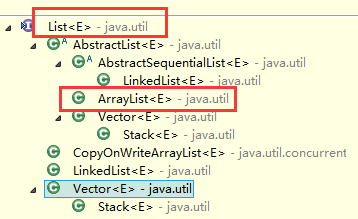
5、list类结构图
CheckBox复选框控件的更多相关文章
- css input checkbox复选框控件 样式美化的多种方案
checkbox复选框可能是网站中常用的html元素,但大多数人并不满意它的默认样式,这篇文章就讲讲如何实现input checkbox复选框控件 样式美化效果. 资源网站大全 https://55w ...
- 转 纯CSS设置Checkbox复选框控件的样式
Checkbox复选框是一个可能每一个网站都在使用的HTML元素,但大多数人并不给它们设置样式,所以在绝大多数网站它们看起来是一样的.为什么不把你的网站中的Checkbox设置一个与众不同的样式,甚至 ...
- 【转】纯CSS设置Checkbox复选框控件的样式
Checkbox复选框是一个可能每一个网站都在使用的HTML元素,但大多数人并不给它们设置样式,所以在绝大多数网站它们看起来是一样的.为什么不把你的网站中的Checkbox设置一个与众不同的样式,甚至 ...
- 纯CSS设置Checkbox复选框控件的样式
Checkbox复选框是一个可能每一个网站都在使用的HTML元素,但大多数人并不给它们设置样式,所以在绝大多数网站它们看起来是一样的.为什么不把你的网站中的Checkbox设置一个与众不同的样式,甚至 ...
- Android控件之CheckBox(复选框控件)
一.有两种状态: 选中状态(true).未选中状态(false) 二.属性 android:id = "@+id/checkbox" android:layout_width=&q ...
- css 设置 checkbox复选框控件的对勾√样式
效果 最终的样式,想要的效果: 我们要创建方框中的对勾,对于这一点,我们可以使用:after伪类创建一个新的元素,为了实现这个样式,我们可以创建一个5px * 15px的长方形并给他加上边框. ...
- Java通过复选框控件数组实现添加多个复选框控件
编写程序,通过复选框控件数组事先选择用户爱好信息的复选框,在该程序中,要求界面中的复选框数量可以根据指定复选框名称的字符串数组的长度来自动调节. 思路如下: 创建JPanel面板对象: 使用JPane ...
- Asp.net自定义单选复选框控件
将常用的jquery插件封装成控件也是个不错的选择 下面是效果的简单颜色,由于博客系统的限制没法完整演示最终效果,请下载示例查看 Asp.netWeb APIC#Javascript 1.新建类库 ...
- 安卓开发_复选按钮控件(CheckBox)的简单使用
复选按钮 即可以选择若干个选项,与单选按钮不同的是,复选按钮的图标是方块,单选按钮是圆圈 复选按钮用CheckBox表示,CheckBox是Button的子类,支持使用Button的所有属性 一.由于 ...
随机推荐
- <2014 04 26> 《Coders at Work编程人生:15位软件先驱访谈录》
什么是老派程序员?调试只用printf,关心数据结构,先整体或先局部,不知道OO.IDE.TDD.BDD等等为何物.Ken Thompson,Jamie Zawinski,Joe Armstrong, ...
- json/pickle/shelve/xml/configparser/hashlib/subprocess - 总结
序列化:序列化指把内存里的数据类型转成字符串,以使其能存储到硬盘或通过网络传输到远程,因为硬盘或网络传输时只能接受bytes为什么要序列化:可以直接把内存数据(eg:10个列表,3个嵌套字典)存到硬盘 ...
- JMH 性能测试框架
参考 1 Java 并发编程笔记:JMH 性能测试框架 http://blog.dyngr.com/blog/2016/10/29/introduction-of-jmh/ 2 Code Samp ...
- hadoop开发MapReduce程序
准备工作: 1.设置HADOOP_HOME,指向hadoop安装目录 2.在window下,需要把hadoop/bin那个目录替换下,在网上搜一个对应版本的 3.如果还报org.apache.hado ...
- New Moto X 2014 全版本官方解锁Bootloader图文教程
]秒后松开,手机就会进入fastboot模式. 如下图: <ignore_js_op> 接下来,手机连接电脑,打开刚刚的fastboot工具里面的命令提示符: <ignore_js_ ...
- StrobeMediaPlayback的Javascript桥接
StrobeMediaPlayback是Adobe官方出的流媒体播放器,支持RTMP协议,在项目中运用到了,却在网上怎么都找不到相关资料,可以说是寥寥无几. 无奈之下,稍微看了点源代码,对播放器与JS ...
- IOS JAVA PHP 安卓 通用加密方式
PHP代码: class Aes { private $hex_iv = '00000000000000000000000000000000'; // converted JAVA byte code ...
- beego——ORM使用方法
先来看一个简单示例: models.gp package main import ( "github.com/astaxie/beego/orm" ) type User stru ...
- Php 删除数组后几个元素
<?php /* * 文件分类: practice@helkbore * 删除数组后几个元素 年2月5日10:24:42 */ $arr1 = array('aa', 'b', 'c', 'dd ...
- maven依赖排除、顺序原则、版本统一管理
<dependency> <groupId>org.springframework</groupId> <artifactId>spring-core& ...