
安卓开发_复选按钮控件(CheckBox)的简单使用
复选按钮 即可以选择若干个选项,与单选按钮不同的是,复选按钮的图标是方块,单选按钮是圆圈
复选按钮用CheckBox表示,CheckBox是Button的子类,支持使用Button的所有属性
一、由于复选框可以选中多项,所有为了确定用户是否选择了某一项,还需要为每一个选项添加setOnCheckedChangeListener事件监听
例如:
为id为like1的复选按钮添加状态改变事件监听,代码如下
 final CheckBox like1 = (CheckBox)findViewById(R.id.like1);

     //监听事件

     like1.setOnCheckedChangeListener(new OnCheckedChangeListener()){

     @Override

     public void onCheckedChanged(CompoundButton arg0, boolean arg1) {

         // TODO Auto-generated method stub

         if(like1.isChecked())

             like1.getText();

         }

     });
二、使用示例
先看布局文件
<?xml version="1.0" encoding="utf-8"?>

<LinearLayout xmlns:android="http://schemas.android.com/apk/res/android"

    android:layout_width="match_parent"

    android:layout_height="match_parent"

    android:orientation="vertical" >

    <TextView

        android:layout_width="wrap_content"

        android:layout_height="wrap_content"

        android:text="选择您的爱好"

        android:textSize="19dp"

        />

    <CheckBox

        android:layout_width="wrap_content"

        android:layout_height="wrap_content"

        android:id="@+id/id_checkbox_1"

        android:text="音乐"

        />

    <CheckBox

        android:layout_width="wrap_content"

        android:layout_height="wrap_content"

        android:id="@+id/id_checkbox_2"

        android:text="美术"

        />

    <CheckBox

        android:layout_width="wrap_content"

        android:layout_height="wrap_content"

        android:id="@+id/id_checkbox_3"

        android:text="体育"

        />

    <Button

        android:layout_width="wrap_content"

        android:layout_height="wrap_content"

        android:text="提交"

        android:id="@+id/btn_checkbox_tijiao"

        />

</LinearLayout>
效果图:

再看JAVA文件
 package base_ui;

 import com.example.allcode.R;

 import android.app.Activity;

 import android.os.Bundle;

 import android.view.View;

 import android.view.View.OnClickListener;

 import android.widget.Button;

 import android.widget.CheckBox;

 import android.widget.Checkable;

 import android.widget.CompoundButton;

 import android.widget.RadioGroup.OnCheckedChangeListener;

 import android.widget.Toast;

 public class Ui_CheckBox extends Activity implements android.widget.CompoundButton.OnCheckedChangeListener{

     private Button tijiao;

     private CheckBox checkbox_1;

     private CheckBox checkbox_2;

     private CheckBox checkbox_3;

     private OnCheckedChangeListener checkbox_listen ;

     @Override

     protected void onCreate(Bundle savedInstanceState) {

         // TODO Auto-generated method stub

         super.onCreate(savedInstanceState);

         setContentView(R.layout.base_ui_checkbox);

         tijiao = (Button) findViewById(R.id.btn_checkbox_tijiao);

         checkbox_1 = (CheckBox) findViewById(R.id.id_checkbox_1);

         checkbox_2 = (CheckBox) findViewById(R.id.id_checkbox_2);

         checkbox_3 = (CheckBox) findViewById(R.id.id_checkbox_3);

         tijiao = (Button) findViewById(R.id.btn_checkbox_tijiao);

         checkbox_1.setOnCheckedChangeListener(this);

         checkbox_2.setOnCheckedChangeListener(this);

         checkbox_3.setOnCheckedChangeListener(this);

         tijiao.setOnClickListener(new OnClickListener() {

             @Override

             public void onClick(View v) {

                 // TODO Auto-generated method stub

                 String str="";   //存放选中的选项的值

                 if(checkbox_1.isChecked())

                     str+=checkbox_1.getText().toString()+" ";

                 if(checkbox_2.isChecked())

                     str+=checkbox_2.getText().toString()+" ";

                 if(checkbox_3.isChecked())

                     str+=checkbox_3.getText().toString()+" ";

                 Toast.makeText(Ui_CheckBox.this, "您选择的喜欢的爱好为:"+str, ).show();

             }

         });

     }

     //监听事件

     @Override

     public void onCheckedChanged(CompoundButton arg0, boolean arg1) {

         // TODO Auto-generated method stub

     }

 }
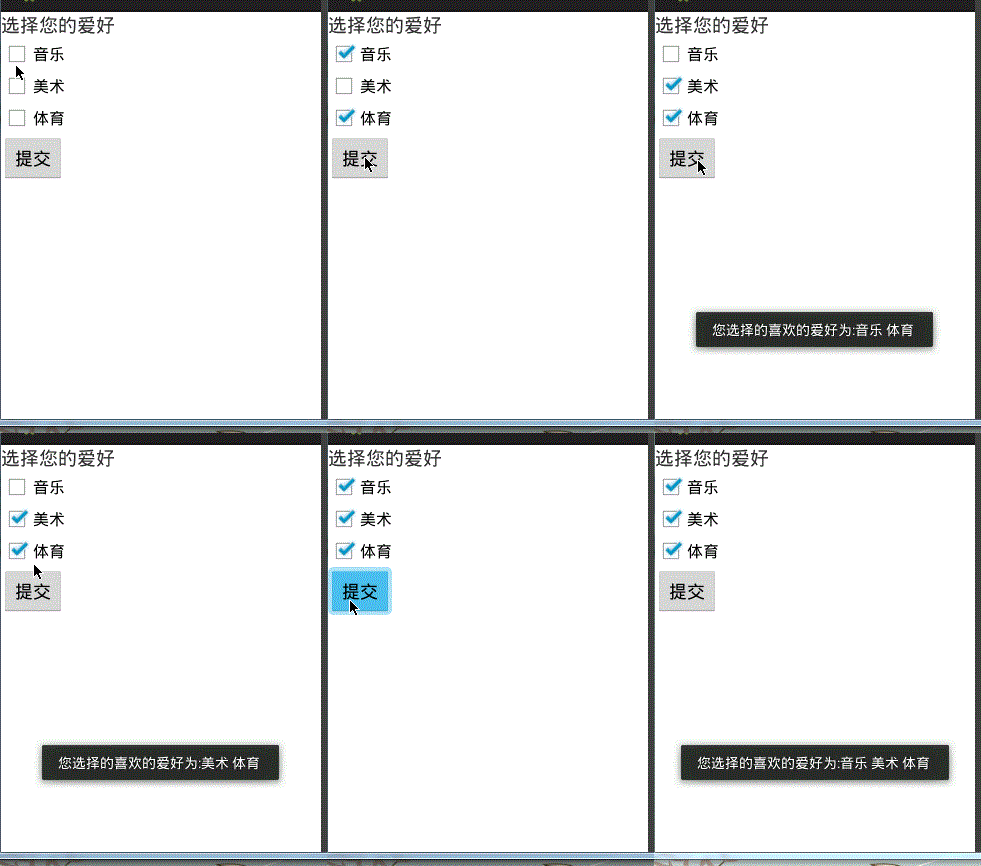
可以看到,代码是很简单的,只有一个方法需要学习
checkbox_1.isChecked()
返回checkbox_1对应的复选按钮控件是否被选中
效果图:
安卓开发_复选按钮控件(CheckBox)的简单使用的更多相关文章
- 安卓开发_深入学习ViewPager控件
一.概述 ViewPager是android扩展包v4包(android.support.v4.view.ViewPager)中的类,这个类可以让用户左右切换当前的view. ViewPager特点: ...
- css input checkbox复选框控件 样式美化的多种方案
checkbox复选框可能是网站中常用的html元素,但大多数人并不满意它的默认样式,这篇文章就讲讲如何实现input checkbox复选框控件 样式美化效果. 资源网站大全 https://55w ...
- Java通过复选框控件数组实现添加多个复选框控件
编写程序,通过复选框控件数组事先选择用户爱好信息的复选框,在该程序中,要求界面中的复选框数量可以根据指定复选框名称的字符串数组的长度来自动调节. 思路如下: 创建JPanel面板对象: 使用JPane ...
- CheckBox复选框控件
CheckBox复选框控件 一.简介 1. 2.类结构图 二.CheckBox复选框控件使用方法 这里是使用java代码在LinearLayout里面添加控件 1.新建LinearLayout布局 2 ...
- [js开源组件开发]js多选日期控件
js多选日期控件 详情请见:http://www.lovewebgames.com/jsmodule/calendar.html 它的github地址:https://github.com/tianx ...
- 【Android】11.0 UI开发(二)——列表控件ListView的简单实现1
************************ 转载请注明出处:https://www.cnblogs.com/xiaofu007/p/10342462.html ***************** ...
- Asp.net自定义单选复选框控件
将常用的jquery插件封装成控件也是个不错的选择 下面是效果的简单颜色,由于博客系统的限制没法完整演示最终效果,请下载示例查看 Asp.netWeb APIC#Javascript 1.新建类库 ...
- 转 纯CSS设置Checkbox复选框控件的样式
Checkbox复选框是一个可能每一个网站都在使用的HTML元素,但大多数人并不给它们设置样式,所以在绝大多数网站它们看起来是一样的.为什么不把你的网站中的Checkbox设置一个与众不同的样式,甚至 ...
- 【转】纯CSS设置Checkbox复选框控件的样式
Checkbox复选框是一个可能每一个网站都在使用的HTML元素,但大多数人并不给它们设置样式,所以在绝大多数网站它们看起来是一样的.为什么不把你的网站中的Checkbox设置一个与众不同的样式,甚至 ...
随机推荐
- /etc/sysconfig/iptables 默认配置详解
[参考链接]:一把三尺剑的百度知道回答 1. iptables文件 2. 规则语句详解 :INPUT ACCEPT [0:0] # 该规则表示INPUT表默认策略是ACCEPT :FORWARD AC ...
- 内存管理-slab[代码]
主要介绍kmalloc和kfree代码流程,侧重kmalloc和kfree流程中锁使用规则,会引用到cpuset,mempolicy(内存策略),numa相关知识.如果读起来比较困难可以参考另一篇随笔 ...
- interface21 - web - ContextLoaderListener(Spring Web Application Context加载流程)
前言 最近打算花点时间好好看看spring的源码,然而现在Spring的源码经过迭代的版本太多了,比较庞大,看起来比较累,所以准备从最初的版本(interface21)开始入手,仅用于学习,理解其设计 ...
- python3中的range函数返回的是列表吗?
注意,这里说的Python3里面的range函数,和Python2是不同的,返回的不是列表,是可迭代对象. 在python3中,如果执行下面的语句 print(range(10)) 得到结果是 ran ...
- 逆向知识之CS1.6辅助/外挂专题.1.实现CS1.6主武器副武器无限子弹
逆向知识之CS辅助/外挂专题.1.实现CS主武器副武器无限子弹 PS: 相信大家CS1.6这类的FPS应该玩过.现在我们通过外挂手法.讲解逆向的本质.以及应用. 关于CS1.6的下载.网络百度下载即可 ...
- VueJs开发笔记—IDE选择和优化、框架特性、数据调用、路由选项及使用
一.IDE的选择: VsCode和WebStorm都是不错的选择,说一下两者的优缺点,调试便捷性来说两者不相上下. WebStorm缺点:性能方面VsCode远好于WebStorm: WebStorm ...
- CEF C++环境搭建
第一步:下载CEF 到这里下载最新版本的CEF http://cefbuilds.com/ 下载解压之后,大概会看到如下图所示的文件 cefclient:是一个比较复杂的示例代码cefsimple:是 ...
- hexo自动部署到git、ftp(虚拟主机等)、云服务器的方式
自动部署很有用,当你写完文章后,直接使用hexo d就可以自动更新你的网站了 部署到git 首先你需要在你的blog下安装git deployer插件:npm install hexo-deploye ...
- SpringBoot入门之集成Druid
Druid:为监控而生的数据库连接池.这篇先了解下它的简单使用,下篇尝试用它做多数据源配置.主要参考:https://github.com/alibaba/druid/wiki/常见问题 https: ...
- c# DataReader转换为Json
/// <summary> /// DataReader转换为Json /// </summary> /// <param name="dataReader&q ...