
elasticsearch数据过期删除处理
一、概述
使用elasticsearch收集日志进行处理,时间久了,很老的数据就没用了或者用途不是很大,这个时候就要对过期数据进行清理.这里介绍两种方式清理这种过期的数据。
1、curator
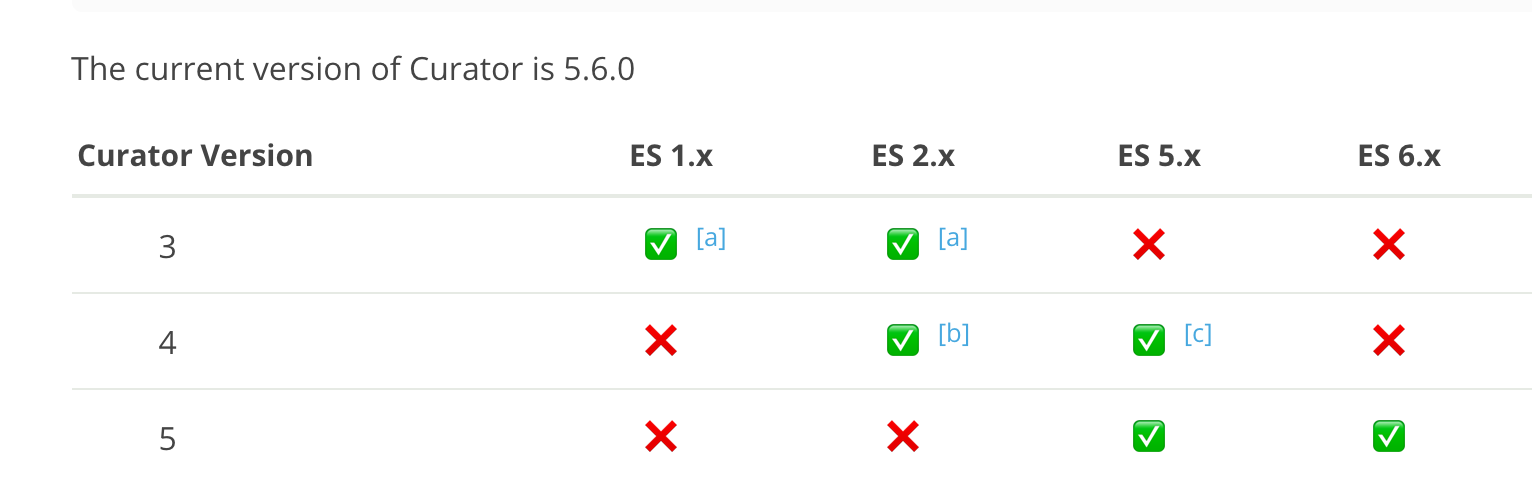
关于版本:
安装:
https://www.elastic.co/guide/en/elasticsearch/client/curator/current/installation.html
我使用的是ubuntu系统,所以参考的是https://www.elastic.co/guide/en/elasticsearch/client/curator/current/apt-repository.html
wget -qO - https://packages.elastic.co/GPG-KEY-elasticsearch | sudo apt-key add -

vim  /etc/apt/sources.list.d/curator.list

deb [arch=amd64] https://packages.elastic.co/curator/5/debian stable main

sudo apt-get update && sudo apt-get install elasticsearch-curator
我使用的是elasticsearch-6.5.1,所以安装的是curator5.
安装完成后会生成两个命令:curator、curator_cli,这里我们只先用到curator。
需要创建配置文件:有两个文件一个是config、一个是action
mkdir {/etc/curator,/data/curator}
config:
# cat config_file.yml

client:

  hosts:

    - 127.0.0.1

  port:

  url_prefix:

  use_ssl: False

  certficate:

  client_cert:

  client_key:

  ssl_no_validate: False

  http_auth:

  timeout:

  master_only: true

logging:

  loglevel: INFO

  logfile: "/data/curator/action.log"

  logformat: default
action:
# cat action_file.yml
---

actions:

  :

    action: delete_indices

    description: >-

      Delete indices older than  days (based on index name), for logstash-

      prefixed indices. Ignore the error if the filter does not result in an

      actionable list of indices (ignore_empty_list) and exit cleanly.

    options:

      ignore_empty_list: True

      timeout_override:

      continue_if_exception: False

      disable_action: False

    filters:

    - filtertype: pattern

      kind: regex

      value: '^apm-6.5.1-transaction-|^apm-6.5.1-span-'

      exclude:

    - filtertype: age

      source: name

      direction: older

      timestring: '%Y.%m.%d'

      unit: days

      unit_count:

      exclude:

  :

    action: delete_indices

    description: >-

      Delete indices older than  days (based on index name), for logstash-

      prefixed indices. Ignore the error if the filter does not result in an

      actionable list of indices (ignore_empty_list) and exit cleanly.

    options:

      ignore_empty_list: True

      timeout_override:

      continue_if_exception: False

      disable_action: False

    filters:

    - filtertype: pattern

      kind: prefix

      value: loadbalance-api-

      exclude:

    - filtertype: age

      source: name

      direction: older

      timestring: '%Y-%m-%d'

      unit: days

      unit_count:

      exclude:
---

actions:

  :

    action: delete_indices

    description: >-

      Delete indices older than  days (based on index name), for logstash-

      prefixed indices. Ignore the error if the filter does not result in an

      actionable list of indices (ignore_empty_list) and exit cleanly.

    options:

      ignore_empty_list: True

      timeout_override:

      continue_if_exception: False

      disable_action: False

    filters:

    - filtertype: pattern

      kind: regex

      value: 'fluentd-k8s-(2019.02.11|2019.02.12)$'

      exclude: true

    - filtertype: pattern

      kind: prefix

      value: fluentd-k8s-

      exclude:

    - filtertype: age

      source: name

      direction: older

      timestring: '%Y.%m.%d'

      unit: days

      unit_count:

      exclude:
可以设置多个action,每个都以不同的数字分割,使用不同的清理策略,具体可以参考https://www.elastic.co/guide/en/elasticsearch/client/curator/5.6/actions.html
注意自己的index的格式,比如我这里的时间格式有两种:
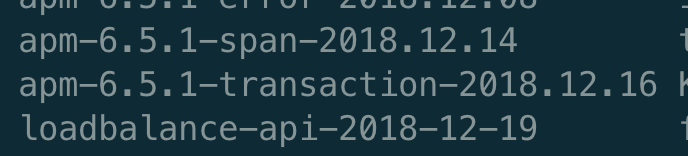
注意匹配,否则那个action就返回空列表,从而不会删除。
这个历史数据重要的会先落地到hdfs,然后在删除。这个日期根据自己服务器的磁盘和日志的重要性自己规划。重要的比如双11的数据不想删除,想留下来可以写到exclude里面,
或者做一个snapshot备份。接下来设置一个定时任务去删除就好了。
crontab -e

*  *  */ * *  curator --config /etc/curator/config_file.yml  /etc/curator/action_file.yml
2、使用脚本删除
# cat es-dele-indices.sh

#!/bin/bash

#delete elasticsearch indices

searchIndex=fluentd-k8s

elastic_url=127.0.0.1

elastic_port=

date2stamp(){

  date --utc --date "$1" +%s

}

dateDiff(){

  case $ in

    -s)  sec=;     shift;;

    -m)  sec=;    shift;;

    -h)  sec=;  shift;;

    -d)  sec=; shift;;

     *)  sec=; shift;;

  esac

  dte1=$(date2stamp $)

  dte2=$(date2stamp $)

  diffSec=$((dte2-dte1))

  if ((diffSec < )); then abs=-; else abs=; fi

  echo $((diffSec/sec*abs))

}

for index in $(curl -s "${elastic_url}:${elastic_port}/_cat/indices?v" | grep -E " ${searchIndex}-20[0-9][0-9]\.[0-1][0-9]\.[0-3][0-9]" | awk '{     print $3 }');do

  date=$(echo ${index: -}|sed 's/\./-/g')

  cond=$(date +%Y-%m-%d)

  diff=$(dateDiff -d $date $cond)

  echo -n "${index} (${diff})"

  if [ $diff -gt  ]; then

    #echo "/ DELETE"

    curl -XDELETE "${elastic_url}:${elastic_port}/${index}?pretty"

  else

    echo ""

  fi

done
elasticsearch数据过期删除处理的更多相关文章
- 18-10-15 服务器删除数据的方法【Elasticsearch 数据删除 (delete_by_query 插件安装使用)】方法二没有成功
rpa 都是5.xx ueba 分为2.0 或者5.0 上海吴工删除数据的方法 在许多项目中,用户提供的数据存储盘大小有限,在运行一段时间后,大小不够就需要删除历史的 Elasticsearch 数 ...
- 关于Redis数据过期策略
1.Redis中key的的过期时间 通过EXPIRE key seconds命令来设置数据的过期时间.返回1表明设置成功,返回0表明key不存在或者不能成功设置过期时间.在key上设置了过期时间后ke ...
- redis数据过期策略【转】
key的过期时间通常,Redis key被创建时不会自动关联过期时间,key将长久存在,除非通过DEL等命令显示的删除.EXPIRE命令簇可以为指定的key关联一个过期时间,代价是一点额外的内存开销. ...
- Redis数据过期策略
1.Redis中key的的过期时间 通过EXPIRE key seconds命令来设置数据的过期时间.返回1表明设置成功,返回0表明key不存在或者不能成功设置过期时间.在key上设置了过期时间后ke ...
- Redis数据过期和淘汰策略详解(转)
原文地址:https://yq.aliyun.com/articles/257459# 背景 Redis作为一个高性能的内存NoSQL数据库,其容量受到最大内存限制的限制. 用户在使用Redis时,除 ...
- java操作elasticsearch实现查询删除和查询所有
后期博客本人都只给出代码,具体的说明在代码中也有注释. 1.查询删除 //查询删除:将查询到的数据进行删除 @Test public void test8() throws UnknownHostEx ...
- 工作随笔——elasticsearch数据冷热分离、数据冷备
概述: 适合日志类型的数据存储方案.即当日数据写入,历史数据只读. 节省部分硬件成本.热数据采用更好的硬件. 环境: 已有6个ES节点,使用docker-compose方式搭建. es1:master ...
- ElasticSearch 数据增删改实现
前言 本文介绍 ElasticSearch 增加.删除.修改数据的使用示例.通过Restful 接口和 Python 实现.ES最新版本中有Delete By Query 和 Update By Qu ...
- Redis(二十):Redis数据过期和淘汰策略详解(转)
原文地址:https://yq.aliyun.com/articles/257459# 背景 Redis作为一个高性能的内存NoSQL数据库,其容量受到最大内存限制的限制. 用户在使用Redis时,除 ...
随机推荐
- zabbix邮件自动预警
Zabbix报警 自定义脚本报警 报警大致过程 item数据采集--->触发器由阈值触发带级别的信息-->触发动作发送邮件预警 1. 发送邮件脚本 1)安装sendEmail(参考Linu ...
- Scrum冲刺阶段2
成员今日完成的任务 人员 任务 何承华 后端设计 陈宇 后端设计 丁培辉 后端设计 温志铭 主页面的设计 杨宇潇 主页面的设计 张主强 服务器构建 成员遇到的问题 人员 问题 何承华 暂无 陈宇 暂无 ...
- linux 系统管理学习
Linux系统管理一.进程管理1.进程管理的作用1)判断服务器健康状态2)查看系统中所有进程3)杀死进程2.进程的查看1)查看所有进程ps aux 查看系统中所有进程ps -le 查看系统中所有进程- ...
- TensorFlow 计算模型 -- 计算图
TensorFlow是一个通过计算图的形式表述计算机的编程系统 TensorFlow程序一般分为两个阶段,第一个阶段需要定义计算图中所有的计算(变量) 第二个阶段为执行计算 如以下代码 import ...
- 小程序快捷键(mac中)
快捷键 格式调整 - Ctrl+S:保存文件 - Ctrl+[, Ctrl+]:代码行缩进 - Ctrl+Shift+[, Ctrl+Shift+]:折叠打开代码块 - Ctrl+C Ctrl ...
- 桌面应用开发之WPF页面导航
先看效果图 Get Start 为了项目解耦,使用mvvmlight框架.MVVM设计模式请自行了解. 1 新建项目 新建一个MvvmLight(WPF)项目,删除其中无关文件夹:Design ...
- Java连接MySQL数据库详细教程(附网盘下载地址)
准备工具 Eclipse-oxygen-64位 http://pan.baidu.com/s/1gf48FIj MySQL-5.7.17 http://pan.baidu.com/s/1skD14Cl ...
- 描述linux下文件删除的原理
Linux文件删除原理: Linux是通过link的数量来控制文件删除的,只有当一个文件不存在任何link的时候,这个文件才会被删除. 一般来说,每个文件都有2个link计数器:i_count 和 i ...
- 制作Visual Studio 2019 (VS 2019) 离线安装包
与制作Visual Studio 2017的离线安装包(https://www.cnblogs.com/danzhang/p/6534341.html)类似,可以使用--layout的参数在安装前先下 ...
- [转]kaldi上的深度神经网络
转:http://blog.csdn.net/wbgxx333/article/details/41019453 深度神经网络已经是语音识别领域最热的话题了.从2010年开始,许多关于深度神经网络的文 ...