
Spring Cloud Consul使用——服务注册与发现(注册中心)
一、Consul 服务端
接下来我们开发 Consul 的服务端,创建一个 spring-cloud-consul-producer 项目
1、添加依赖包
<dependencies>

    <dependency>

        <groupId>org.springframework.boot</groupId>

        <artifactId>spring-boot-starter-actuator</artifactId>

    </dependency>

    <dependency>

        <groupId>org.springframework.cloud</groupId>

        <artifactId>spring-cloud-starter-consul-discovery</artifactId>

    </dependency>

    <dependency>

        <groupId>org.springframework.boot</groupId>

        <artifactId>spring-boot-starter-web</artifactId>

    </dependency>

    <dependency>

        <groupId>org.springframework.boot</groupId>

        <artifactId>spring-boot-starter-test</artifactId>

        <scope>test</scope>

    </dependency>

</dependencies>
spring-boot-starter-actuator 健康检查依赖于此包
spring-cloud-starter-consul-discovery Spring Cloud Consul 的支持。
Spring Boot 版本使用的是 2.0.3.RELEASE,Spring Cloud 最新版本是 Finchley.RELEASE 依赖于 Spring Boot 2.x.
<parent>

    <groupId>org.springframework.boot</groupId>

    <artifactId>spring-boot-starter-parent</artifactId>

    <version>2.0.3.RELEASE</version>

    <relativePath/> <!-- lookup parent from repository -->

</parent>

<dependencyManagement>

    <dependencies>

        <dependency>

            <groupId>org.springframework.cloud</groupId>

            <artifactId>spring-cloud-dependencies</artifactId>

            <version>${spring-cloud.version}</version>

            <type>pom</type>

            <scope>import</scope>

        </dependency>

    </dependencies>

</dependencyManagement>
2、application.properties配置文件
spring.application.name=spring-cloud-consul-producer

server.port=8501

spring.cloud.consul.host=localhost

spring.cloud.consul.port=8500

#注册到consul的服务名称

spring.cloud.consul.discovery.serviceName=service-producer
Consul的地址和端口号默认是 localhost:8500 ,如果不是这个地址可以自行配置。
spring.cloud.consul.discovery.serviceName 是指注册到 Consul 的服务名称,消费端会根据这个名称来进行服务调用。
3、启动类
@SpringBootApplication

@EnableDiscoveryClient

public class ConsulProducerApplication {

    public static void main(String[] args) {

        SpringApplication.run(ConsulProducerApplication.class, args);

    }

}
添加了 @EnableDiscoveryClient 注解表示支持服务发现。
4、提供服务
我们创建一个 Controller,提供 hello 服务。
@RestController

public class HelloController {

    @RequestMapping("/hello")

    public String hello() {

        return "helle consul";

    }

}
启动spring-cloud-consul-producer 项目,访问 http://localhost:8500,显示如下:
发现页面多了 service-producer 服务,点击进去后可以看到页面的服务提供者: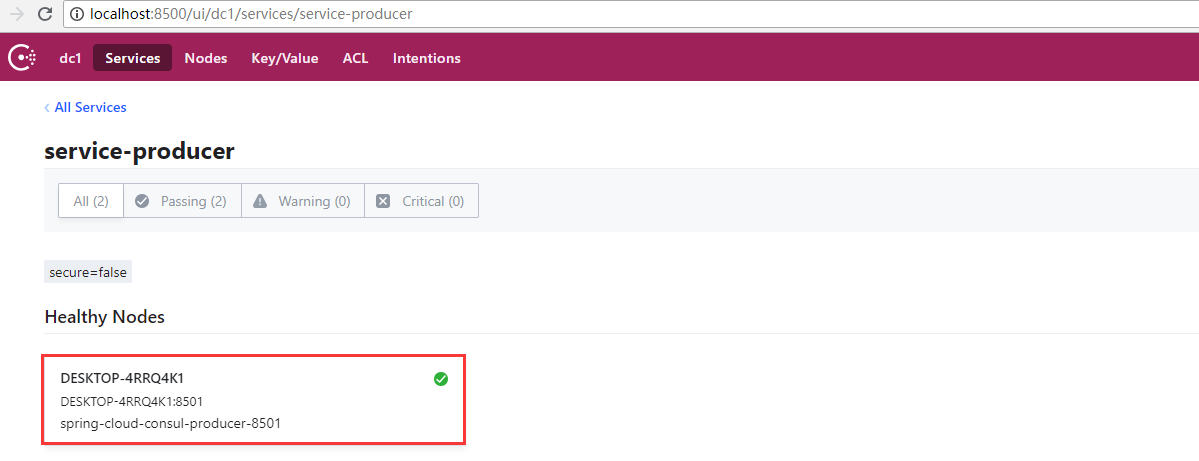
这样服务提供者就准备好了。
二、Consul 消费端
创建一个 spring-cloud-consul-consumer 项目,pom 文件和上面示例保持一致。
1、application.properties配置文件
spring.application.name=spring-cloud-consul-consumer

server.port=8503

spring.cloud.consul.host=127.0.0.1

spring.cloud.consul.port=8500

#设置不需要注册到consul中

spring.cloud.consul.discovery.register=false
客户端可以设置注册到 Consul 中,也可以不注册到 Consul 注册中心中,根据我们的业务来选择,只需要在使用服务时通过 Consul 对外提供的接口获取服务信息即可。
2、启动类
@SpringBootApplication

public class ConsulConsumerApplication {

    public static void main(String[] args) {

        SpringApplication.run(ConsulConsumerApplication.class, args);

    }

}
3、进行测试
我们先来创建一个 ServiceController,试试如何去获取 Consul 中的服务。
@RestController

public class ServiceController {

    @Autowired

    private LoadBalancerClient loadBalancer;

    @Autowired

    private DiscoveryClient discoveryClient;

    /**

     * 获取所有服务

     */

    @RequestMapping("/services")

    public Object services() {

        return discoveryClient.getInstances("service-producer");

    }

    /**

     * 从所有服务中选择一个服务(轮询)

     */

    @RequestMapping("/discover")

    public Object discover() {

        return loadBalancer.choose("service-producer").getUri().toString();

    }

}
Controller 中有俩个方法,一个是获取所有服务名为service-producer的服务信息并返回到页面,一个是随机从服务名为service-producer的服务中获取一个并返回到页面。
添加完 ServiceController 之后我们启动项目,访问地址:http://localhost:8503/services,返回:
[{"serviceId":"service-producer","host":"DESKTOP-4RRQ4K1","port":8501,"secure":false,"metadata":{"secure":"false"},"uri":"http://DESKTOP-4RRQ4K1:8501","scheme":null}]
访问地址:http://localhost:8503/discover,返回:
http://DESKTOP-4RRQ4K1:8501
4、模拟调用服务端提供的 hello 方法
@RestController

public class CallHelloController {

    @Autowired

    private LoadBalancerClient loadBalancer;

    @RequestMapping("/call")

    public String call() {

        ServiceInstance serviceInstance = loadBalancer.choose("service-producer");

        System.out.println("服务地址:" + serviceInstance.getUri());

        System.out.println("服务名称:" + serviceInstance.getServiceId());

        String callServiceResult = new RestTemplate().getForObject(serviceInstance.getUri().toString() + "/hello", String.class);

        System.out.println(callServiceResult);

        return callServiceResult;

    }

}
使用 RestTemplate 进行远程调用。添加完之后重启 spring-cloud-consul-consumer 项目。在浏览器中访问地址:http://localhost:8503/call,依次返回结果如下:
helle consul
说明我们已经成功的调用了 Consul 服务端提供的服务,并且实现了服务端的均衡负载功能。通过今天的实践我们发现 Consul 提供的服务发现易用、强大。
Spring Cloud Consul使用——服务注册与发现(注册中心)的更多相关文章
- Spring Cloud Consul 实现服务注册和发现
Spring Cloud 是一个基于 Spring Boot 实现的云应用开发工具,它为基于 JVM 的云应用开发中涉及的配置管理.服务发现.断路器.智能路由.微代理.控制总线.全局锁.决策竞选.分布 ...
- 干货|基于 Spring Cloud 的微服务落地
转自 微服务架构模式的核心在于如何识别服务的边界,设计出合理的微服务.但如果要将微服务架构运用到生产项目上,并且能够发挥该架构模式的重要作用,则需要微服务框架的支持. 在Java生态圈,目前使用较多的 ...
- 基于Spring Cloud的微服务落地
微服务架构模式的核心在于如何识别服务的边界,设计出合理的微服务.但如果要将微服务架构运用到生产项目上,并且能够发挥该架构模式的重要作用,则需要微服务框架的支持. 在Java生态圈,目前使用较多的微服务 ...
- Spring Cloud Consul 之Greenwich版本全攻略
什么是Consul Consul是HashiCorp公司推出的开源软件,使用GO语言编写,提供了分布式系统的服务注册和发现.配置等功能,这些功能中的每一个都可以根据需要单独使用,也可以一起使用以构建全 ...
- Spring Cloud构建微服务架构
Dalston版本 由于Brixton和Camden版本的教程已经停止更新,所以笔者计划在2017年上半年完成Dalston版本的教程编写(原计划完成Camden版本教程,但由于写了两篇Dalston ...
- Spring Boot + Spring Cloud 构建微服务系统(一):服务注册和发现(Consul)
使用Consul提供注册和发现服务 什么是 Consul Consul 是 HashiCorp 公司推出的开源工具,用于实现分布式系统的服务发现与配置.与其它分布式服务注册与发现的方案,Consul ...
- 服务注册发现、配置中心集一体的 Spring Cloud Consul
前面讲了 Eureka 和 Spring Cloud Config,今天介绍一个全能选手 「Consul」.它是 HashiCorp 公司推出,用于提供服务发现和服务配置的工具.用 go 语言开发,具 ...
- Spring Cloud Eureka 实现服务注册与发现
微服务 是一种架构模式,跟具体的语言实现无关,微服务架构将业务逻辑分散到了各个服务当中,服务间通过网络层进行通信共同协作:这样一个应用就可以划分为多个服务单独来维护发布.构建一个可靠微服务系统是需要具 ...
- Spring Cloud构建微服务架构(一)服务注册与发现
Spring Cloud简介 Spring Cloud是一个基于Spring Boot实现的云应用开发工具,它为基于JVM的云应用开发中的配置管理.服务发现.断路器.智能路由.微代理.控制总线.全局锁 ...
随机推荐
- vue 需求 data中的数据之间的调用
我遇到过这种情况 就是在我的data中 会有数据调用data中的其他数据 如图 我的alertInfoType需要拿到screeningCondition中type的值 用过vue的都知道 我是不 ...
- [树状数组+逆序对][NOIP2013]火柴排队
火柴排队 题目描述 涵涵有两盒火柴,每盒装有n根火柴,每根火柴都有一个高度.现在将每盒中的火柴各自排成一列,同一列火柴的高度互不相同,两列火柴之间的距离定义为:∑ (ai-bi)2,i=1,2,3,. ...
- 记一次Java Core Dump分析过程
#背景提要 很久没有亲自动手部署代码了,命令行的亲切感越来越低.放飞了键盘,习惯了鼠标操作的windows环境.冷不丁实操部署也是不错的. 常常在部署时,运维同学对于[hs_err_pid]文件视而不 ...
- ios 单例的再次理解
单例模式 在建模的时候,如果这个东西确实只需要一个对象,多余的对象都是无意义的,那么就考虑用单例模式.比如定位管理(CLLocationManager),硬件设备就只有一 个,弄再多的逻辑对象 ...
- Linux 第七天
软件包管理 1.软件包分类 1)源码包(脚本安装包) 优点: l 开源,如果有足够的能力,可以修改源代码 l 可以自由选择所需的功能 l 软件是编译安装,所以更加适合自己的系统,更加稳定也效率更 ...
- mysql8.0 linux 安装
1.下载 mysql-8.0.15-linux-glibc2.12-x86_64.tar.xz 2.解压 tar -xvf mysql-8.0.15-linux-glibc2.12-x86_64.ta ...
- Ubuntu Apache 不同端口监听不同站点
在/etc/apache2/apache2.conf 中,把项目根目录设置成默认的/var/www 不要设置在某个站点的路径下(我就是配置第一个站点时改了这里才会配置第二个站点时好久弄不出来) 在 / ...
- 【pycharm 警告】unittest RuntimeWarning: Parent module ” not found while handling absolute import
Pycharm 2016.2执行单元测试遇到如下问题: RuntimeWarning: Parent module ‘YOUR_MODULE_HERE’ not found while handlin ...
- 手写实现简单版IOC
概述 IOC (Inversion of Control) 控制反转,大家应该都比较熟悉了.应该也都有用过,这里就不具体介绍了.自己平时也有用到过IOC,但是对它的具体实现原理只有一个模糊的概念,所以 ...
- 我的FP感悟
FP概要: 我主要总结了以下5点: 函数是一等公民: 函数的参数是函数,返回值是函数,类型还是函数... 舍弃语句,拥抱表达式: 表达式就一定有返回值. 无副作用: 不修改外部系统的状态. immut ...