
Spring Cloud Consul使用——服务注册与发现(注册中心)
一、Consul 服务端
接下来我们开发 Consul 的服务端,创建一个 spring-cloud-consul-producer 项目
1、添加依赖包
<dependencies>

    <dependency>

        <groupId>org.springframework.boot</groupId>

        <artifactId>spring-boot-starter-actuator</artifactId>

    </dependency>

    <dependency>

        <groupId>org.springframework.cloud</groupId>

        <artifactId>spring-cloud-starter-consul-discovery</artifactId>

    </dependency>

    <dependency>

        <groupId>org.springframework.boot</groupId>

        <artifactId>spring-boot-starter-web</artifactId>

    </dependency>

    <dependency>

        <groupId>org.springframework.boot</groupId>

        <artifactId>spring-boot-starter-test</artifactId>

        <scope>test</scope>

    </dependency>

</dependencies>
spring-boot-starter-actuator 健康检查依赖于此包
spring-cloud-starter-consul-discovery Spring Cloud Consul 的支持。
Spring Boot 版本使用的是 2.0.3.RELEASE,Spring Cloud 最新版本是 Finchley.RELEASE 依赖于 Spring Boot 2.x.
<parent>

    <groupId>org.springframework.boot</groupId>

    <artifactId>spring-boot-starter-parent</artifactId>

    <version>2.0.3.RELEASE</version>

    <relativePath/> <!-- lookup parent from repository -->

</parent>

<dependencyManagement>

    <dependencies>

        <dependency>

            <groupId>org.springframework.cloud</groupId>

            <artifactId>spring-cloud-dependencies</artifactId>

            <version>${spring-cloud.version}</version>

            <type>pom</type>

            <scope>import</scope>

        </dependency>

    </dependencies>

</dependencyManagement>
2、application.properties配置文件
spring.application.name=spring-cloud-consul-producer

server.port=8501

spring.cloud.consul.host=localhost

spring.cloud.consul.port=8500

#注册到consul的服务名称

spring.cloud.consul.discovery.serviceName=service-producer
Consul的地址和端口号默认是 localhost:8500 ,如果不是这个地址可以自行配置。
spring.cloud.consul.discovery.serviceName 是指注册到 Consul 的服务名称,消费端会根据这个名称来进行服务调用。
3、启动类
@SpringBootApplication

@EnableDiscoveryClient

public class ConsulProducerApplication {

    public static void main(String[] args) {

        SpringApplication.run(ConsulProducerApplication.class, args);

    }

}
添加了 @EnableDiscoveryClient 注解表示支持服务发现。
4、提供服务
我们创建一个 Controller,提供 hello 服务。
@RestController

public class HelloController {

    @RequestMapping("/hello")

    public String hello() {

        return "helle consul";

    }

}
启动spring-cloud-consul-producer 项目,访问 http://localhost:8500,显示如下:
发现页面多了 service-producer 服务,点击进去后可以看到页面的服务提供者: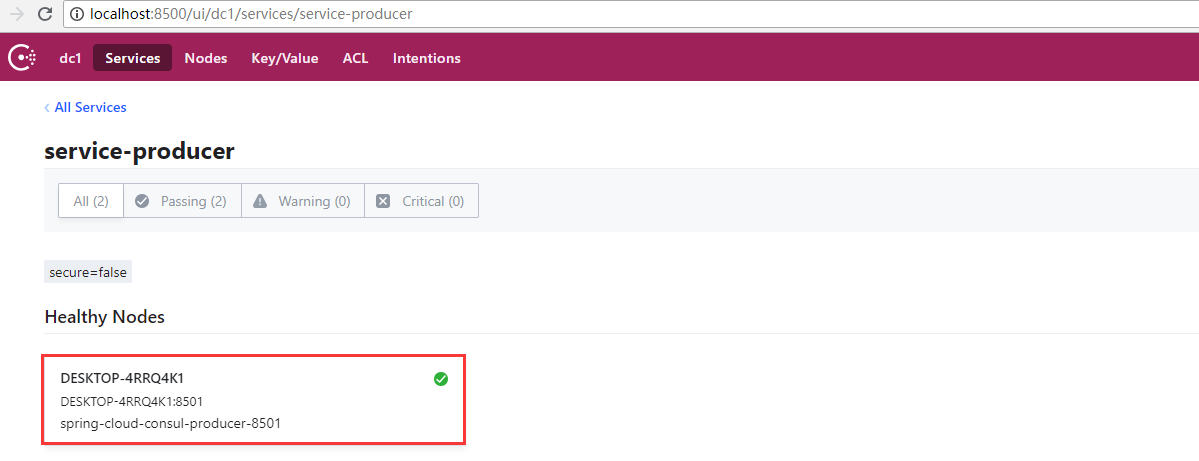
这样服务提供者就准备好了。
二、Consul 消费端
创建一个 spring-cloud-consul-consumer 项目,pom 文件和上面示例保持一致。
1、application.properties配置文件
spring.application.name=spring-cloud-consul-consumer

server.port=8503

spring.cloud.consul.host=127.0.0.1

spring.cloud.consul.port=8500

#设置不需要注册到consul中

spring.cloud.consul.discovery.register=false
客户端可以设置注册到 Consul 中,也可以不注册到 Consul 注册中心中,根据我们的业务来选择,只需要在使用服务时通过 Consul 对外提供的接口获取服务信息即可。
2、启动类
@SpringBootApplication

public class ConsulConsumerApplication {

    public static void main(String[] args) {

        SpringApplication.run(ConsulConsumerApplication.class, args);

    }

}
3、进行测试
我们先来创建一个 ServiceController,试试如何去获取 Consul 中的服务。
@RestController

public class ServiceController {

    @Autowired

    private LoadBalancerClient loadBalancer;

    @Autowired

    private DiscoveryClient discoveryClient;

    /**

     * 获取所有服务

     */

    @RequestMapping("/services")

    public Object services() {

        return discoveryClient.getInstances("service-producer");

    }

    /**

     * 从所有服务中选择一个服务(轮询)

     */

    @RequestMapping("/discover")

    public Object discover() {

        return loadBalancer.choose("service-producer").getUri().toString();

    }

}
Controller 中有俩个方法,一个是获取所有服务名为service-producer的服务信息并返回到页面,一个是随机从服务名为service-producer的服务中获取一个并返回到页面。
添加完 ServiceController 之后我们启动项目,访问地址:http://localhost:8503/services,返回:
[{"serviceId":"service-producer","host":"DESKTOP-4RRQ4K1","port":8501,"secure":false,"metadata":{"secure":"false"},"uri":"http://DESKTOP-4RRQ4K1:8501","scheme":null}]
访问地址:http://localhost:8503/discover,返回:
http://DESKTOP-4RRQ4K1:8501
4、模拟调用服务端提供的 hello 方法
@RestController

public class CallHelloController {

    @Autowired

    private LoadBalancerClient loadBalancer;

    @RequestMapping("/call")

    public String call() {

        ServiceInstance serviceInstance = loadBalancer.choose("service-producer");

        System.out.println("服务地址:" + serviceInstance.getUri());

        System.out.println("服务名称:" + serviceInstance.getServiceId());

        String callServiceResult = new RestTemplate().getForObject(serviceInstance.getUri().toString() + "/hello", String.class);

        System.out.println(callServiceResult);

        return callServiceResult;

    }

}
使用 RestTemplate 进行远程调用。添加完之后重启 spring-cloud-consul-consumer 项目。在浏览器中访问地址:http://localhost:8503/call,依次返回结果如下:
helle consul
说明我们已经成功的调用了 Consul 服务端提供的服务,并且实现了服务端的均衡负载功能。通过今天的实践我们发现 Consul 提供的服务发现易用、强大。
Spring Cloud Consul使用——服务注册与发现(注册中心)的更多相关文章
- Spring Cloud Consul 实现服务注册和发现
Spring Cloud 是一个基于 Spring Boot 实现的云应用开发工具,它为基于 JVM 的云应用开发中涉及的配置管理.服务发现.断路器.智能路由.微代理.控制总线.全局锁.决策竞选.分布 ...
- 干货|基于 Spring Cloud 的微服务落地
转自 微服务架构模式的核心在于如何识别服务的边界,设计出合理的微服务.但如果要将微服务架构运用到生产项目上,并且能够发挥该架构模式的重要作用,则需要微服务框架的支持. 在Java生态圈,目前使用较多的 ...
- 基于Spring Cloud的微服务落地
微服务架构模式的核心在于如何识别服务的边界,设计出合理的微服务.但如果要将微服务架构运用到生产项目上,并且能够发挥该架构模式的重要作用,则需要微服务框架的支持. 在Java生态圈,目前使用较多的微服务 ...
- Spring Cloud Consul 之Greenwich版本全攻略
什么是Consul Consul是HashiCorp公司推出的开源软件,使用GO语言编写,提供了分布式系统的服务注册和发现.配置等功能,这些功能中的每一个都可以根据需要单独使用,也可以一起使用以构建全 ...
- Spring Cloud构建微服务架构
Dalston版本 由于Brixton和Camden版本的教程已经停止更新,所以笔者计划在2017年上半年完成Dalston版本的教程编写(原计划完成Camden版本教程,但由于写了两篇Dalston ...
- Spring Boot + Spring Cloud 构建微服务系统(一):服务注册和发现(Consul)
使用Consul提供注册和发现服务 什么是 Consul Consul 是 HashiCorp 公司推出的开源工具,用于实现分布式系统的服务发现与配置.与其它分布式服务注册与发现的方案,Consul ...
- 服务注册发现、配置中心集一体的 Spring Cloud Consul
前面讲了 Eureka 和 Spring Cloud Config,今天介绍一个全能选手 「Consul」.它是 HashiCorp 公司推出,用于提供服务发现和服务配置的工具.用 go 语言开发,具 ...
- Spring Cloud Eureka 实现服务注册与发现
微服务 是一种架构模式,跟具体的语言实现无关,微服务架构将业务逻辑分散到了各个服务当中,服务间通过网络层进行通信共同协作:这样一个应用就可以划分为多个服务单独来维护发布.构建一个可靠微服务系统是需要具 ...
- Spring Cloud构建微服务架构(一)服务注册与发现
Spring Cloud简介 Spring Cloud是一个基于Spring Boot实现的云应用开发工具,它为基于JVM的云应用开发中的配置管理.服务发现.断路器.智能路由.微代理.控制总线.全局锁 ...
随机推荐
- 在IIS7里配置 ISAPI,运行dll程序,总提示下载dll
在IIS7里配置 ISAPI,运行dll程序,总提示下载dll,只需要把对应站点应用程序池里面的高级设置里的启用32位应用程序,设为“true"即可.
- Egret中使用P2物理引擎
游戏中的对象按照物理规律移动,体现重力.引力.反作用力.加速度等物体特性,实现自由落体.摇摆运动.抛物线运动,以及物理碰撞现象的模拟.用于模拟物理碰撞.物理运动的引擎称为物理引擎. 来自瑞典斯德哥尔摩 ...
- nc 画界面,触发效果(第一种)
package nc.ui.hzctr.sellctr.action; import java.awt.BorderLayout; import java.awt.Dimension; import ...
- mui几种页面跳转方式对比
1.初始化时创建子页面 mui.init({ subpages: [{ url: your - subpage - url, //子页面HTML地址,支持本地地址和网络地址 id: your - su ...
- centos7 go ENV 部署
1.wget官网下载go 官网https://golang.org/dl/ 2.解压 tar -C /usr/local -xzf go$VERSION.$OS-$ARCH.tar.gz 3.配置环境 ...
- ABP框架系列之十七:(Data-Filters-数据过滤)
Introduction It's common to use the soft-deletepattern which is used to not delete an entity from da ...
- visual studio 2013怎样快速查看代码函数关系--代码图
可以发现没有调试运行代码时是无法查看代码图的,可以在某行加一个断点,如下图,并开始debug调试: 这时,就会在代码调试工具栏看到代码图按钮,点击它: 右边就会出现代码图了: 这下就方便多了. 不仅适 ...
- Shell脚本学习-数组
跟着RUNOOB网站的教程学习的笔记 Shell数组 数组中可以存放多个值,Bash Shell只支持一维数组(不支持多维数组),初始化时不需要定义数组大小(与PHP类似). 与大部分编程语言类似,数 ...
- [转]WordPress“添加媒体”文件时只显示上传到当前文章的附件图片
使用WordPress的朋友应该都清楚,特别是喜欢图文并茂的网站,肯定离不开的就是WordPress文章编辑页面的“添加媒体”按钮,每次点击就能弹出一个插入多媒体的界面,然后页面默认就会列举加载所有最 ...
- 几种String对象方法的区别
1.在String对象方法中,发现.slice()方法和.substring()方法的作用几乎相同,都是根据起始索引返回截取得到的字符串.经过查阅资料和实测得到区别: 正常情况下索引都为正值,返回值为 ...