
IDEA2016 maven项目配置Junit
- 添加插件:File->Settings->Plugins

- 设置生成模式:File->Settings->Other Settings
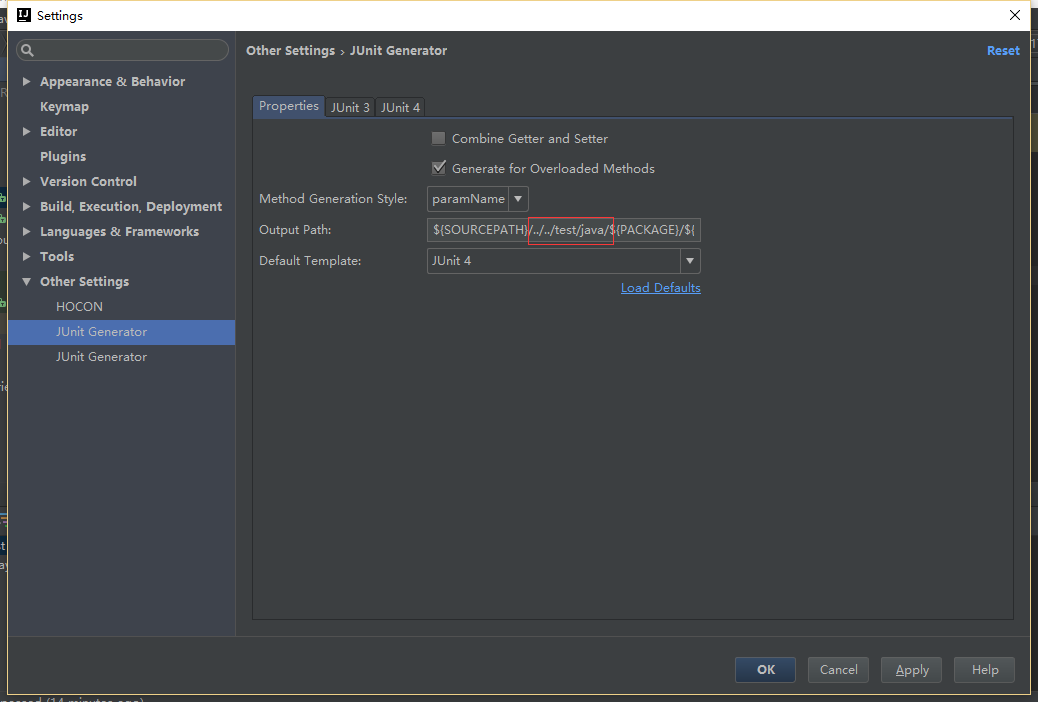
- 修改模板:File->Settings->Other Settings->Junit Generator->Junit4
#if( $entry.packageName.length()>0)package test.$entry.packageName; #end

    * @author:Hunter

    * @since:$today

* @version 1.0 - 在代码上右键Generate
- 结构图
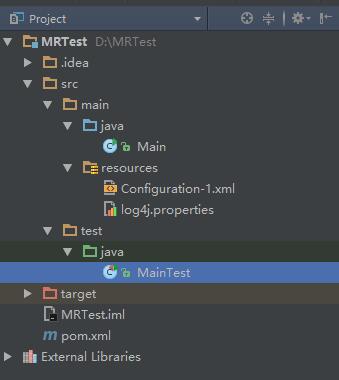
src/main/java:source root
src/test/java:test root
- Main.java
/**

 * Created by Hunter on 2016/07/19.

 */

import org.apache.hadoop.conf.Configuration;

public class Main {

    public static void main(String[] args){

        for(String arg:args)

            System.out.println(arg);

    }

    public static String getColor(){

        Configuration conf =new Configuration();

        conf.addResource("Configuration-1.xml");

        return conf.get("color");

    }

    public static int getSize(){

        Configuration conf =new Configuration();

        conf.addResource("Configuration-1.xml");

        return conf.getInt("size",0);

    }

}
- 自动生成MainTest.java
import org.junit.Test;

import org.junit.Before;

import org.junit.After;

import static org.junit.Assert.assertThat;

import static org.junit.Assert.assertEquals;

import static org.hamcrest.Matchers.*;

import org.apache.log4j.Logger;

/**

* Main Tester.

*

* @author:Hunter

* @since:7/19/2016

* @version 1.0

*/

public class MainTest {

private static Logger logger=Logger.getLogger(MainTest.class);

@Before

public void before() throws Exception {

    logger.info("Test start……");

}

@After

public void after() throws Exception {

    logger.info("Test end……");

}

/**

*

* Method: main(String[] args)

*

*/

@Test

public void testMain() throws Exception {

    String[] args=new String[2];

    args[0]="Hello";

    args[1]="world";

    Main.main(args);

}

/**

*

* Method: getColor()

*

*/

@Test

public void testGetColor() throws Exception {

    assertThat(Main.getColor(),is("yellow"));

}

@Test

public void testGetSize() throws Exception{

    assertEquals(Main.getSize(),10);

}

}
- Pom.xml
<?xml version="1.0" encoding="UTF-8"?>

<project xmlns="http://maven.apache.org/POM/4.0.0"

         xmlns:xsi="http://www.w3.org/2001/XMLSchema-instance"

         xsi:schemaLocation="http://maven.apache.org/POM/4.0.0 http://maven.apache.org/xsd/maven-4.0.0.xsd">

    <modelVersion>4.0.0</modelVersion>

    <groupId>com.ggz</groupId>

    <artifactId>MRTest</artifactId>

    <version>1.0-SNAPSHOT</version>

    <dependencies>

        <dependency>

            <groupId>log4j</groupId>

            <artifactId>log4j</artifactId>

            <version>1.2.17</version>

        </dependency>

        <!-- https://mvnrepository.com/artifact/junit/junit -->

        <dependency>

            <groupId>junit</groupId>

            <artifactId>junit</artifactId>

            <version>4.12</version>

        </dependency>

        <dependency>

            <groupId>org.apache.hadoop</groupId>

            <artifactId>hadoop-common</artifactId>

            <version>2.6.0</version>

        </dependency>

        <dependency>

            <groupId>org.hamcrest</groupId>

            <artifactId>hamcrest-all</artifactId>

            <version>1.3</version>

        </dependency>

    </dependencies>

</project>
IDEA2016 maven项目配置Junit的更多相关文章
- maven项目配置findbugs插件 使用git钩子控制代码的提交
maven项目配置findbugs插件对代码进行静态检测 当发现代码有bug时,就不让用户commit代码到远程仓库里 没有bug时才可以commit到远程仓库中 (1)新建maven项目 ,配置fi ...
- maven项目配置使用jdk1.8进行编译的插件
在使用Maven插件编译Maven项目的时候报了这样一个错:[Java source1.5不支持diamond运算符,请使用source 7或更高版本以启用diamond运算符],这里记录下出现这个错 ...
- maven 项目配置
创建java web的maven项目方法有两种,一是先创建maven项目,再选择jdk 和 dynamic web 运行环境 ,二是创建java项目,然后转化为maven项目 1.将普通java项目转 ...
- apache log4j日志工具使用入门[maven 项目配置]
简单的介绍下Maven项目中有关org.apache.log4j.Logger的使用.[1]首先我们需要找到 org.apache.log4j.Logger的坐标,并配置到POM.xml <de ...
- maven项目配置框架
任何一个maven项目都会继承一个默认的父pom配置:Super POM,详见:https://maven.apache.org/guides/introduction/introduction-to ...
- 【IDEA】本地新建Maven项目+配置Git和GitHub+代码上传和拉取到GitHub+其他IDEA和GitHub实战
一.本地新建Maven项目并启动成功 1. 按照IDEA提供的模板,构建一个maven webapp的模板项目. 一路Next,到最后的finish.如下图. 2. 新建Tomcat,启动刚建立的项目 ...
- Maven项目配置Logback输出JSON格式日志
最近,项目提出需求,日志需要固定输出为JSON格式,以便后端Flink程序解析. 项目背景 项目为简单的Maven项目,日志由Filebeat采集,因此不需要配置输出至Logstash. 下面为pom ...
- maven 项目配置到tomcat不能正常启动
最近使用IntelliJ IDEA搭建公司项目,该项目是maven项目,加载jar和编译的时候没有任何异常,但是部署到tomcat上之后,就会出现如下异常: org.apache.catalina.L ...
- Maven项目配置外部依赖(本地依赖)
加入有一些公共jar包只限于公司内部使用,不能暴露在外部时,有如下的方案: 1.搭建私有远程仓库(nexus) 2.使用http.ftp.共享地址,github地址等(主要是通过maven-deplo ...
随机推荐
- Linq中datetime的处理以及asp.net下拉列表控件的selectitem,text等的设置显示处理
dhl:报错:LINQ to Entities 不支持指定的类型成员“Date” Linq如: var v = from l in _dal.Share where l.PingcoId == pin ...
- jsp请求转发与重定向区别小结
1.当使用转发时,JSP容器将使用一个内部方法来调用目标页面,新的页面继续处理同一个请求,而浏览器不会知道这个过程; 2.重定向是第一个页面通知浏览器发送一个新的页面请求. 3.转发不改变URL,重定 ...
- RAID的基本介绍
一.传统磁盘的劣势 影响计算机性能的组件一般包括:CPU.主板总线IO.内存IO.硬盘IO.网卡IO.现代处理器性能已经很高了,但是计算机整体IO性能较弱,严重影响了计算机性能 现代的计算机总线.内存 ...
- Json转换工具
import java.util.List; import com.fasterxml.jackson.core.JsonProcessingException; import com.fasterx ...
- 指导手册05:MapReduce编程入门
指导手册05:MapReduce编程入门 Part 1:使用Eclipse创建MapReduce工程 操作系统: Centos 6.8, hadoop 2.6.4 情景描述: 因为Hadoop本身 ...
- go web framework gin middleware 设计原理
场景:一个middleware可以具体为一个函数,而由前面的gin 路由分析可得,每一个路径都对有一个HandlersChain 与其对应. 那么实际上增加一个middleware的过程,就是将每一个 ...
- VM for Linux 版本的Bundle格式文件的安装
VM for Linux 版本的安装步骤: 下面链接下载VM程序包 : https://www.vmware.com/products/workstation-pro/workstation-pro- ...
- 剑指Offer 11. 二进制中1的个数 (其他)
题目描述 输入一个整数,输出该数二进制表示中1的个数.其中负数用补码表示. 题目地址 https://www.nowcoder.com/practice/8ee967e43c2c4ec193b040e ...
- Object.create(null)、Object.create({})、{} 三者创建对象的区别
参考 1.先看看我们经常使用的{}创建的对象是什么样子的: var o = {a:1}; console.log(o) 从上图可以看到,新创建的对象继承了Object自身的方法,如hasOwnProp ...
- gitlab 同步小脚本
gitlab 是公司中的代码仓库,如何保证两台机器同步呢 公司中使用的是docker那么久使用docker进行演示了也方便以后的工作查找资料 附:脚本 #!/bin/bash docker stop ...