
java之数据库连接池-dbcp&c3p0&dbutils
介绍
因为数据库连接对象的创建比较消耗性能,所以可以在应用程序启动时就在内存中开辟一片空间(集合)存放多个数据库连接对象,后面需要连接时直接从该空间中取而不用新创建;使用完毕后归还连接(将连接重新放回空间),确保连接对象能重复使用。
知识储备
装饰者模式
package com.zze.test;

public interface IWaiter {
    void service();
}
IWaiter.java
package com.zze.test;

public class Waiter implements IWaiter{
    public void service(){
        System.out.println("正在服务");
    }
}
Waiter.java
package com.zze.test;

public class WaiterWrapper implements IWaiter {
    public WaiterWrapper(Waiter waiter) {
        this.waiter = waiter;
    }

    private Waiter waiter;

    @Override
    public void service() {
        System.out.println("服务之前");
        waiter.service();
        System.out.println("服务之后");
    }
}
WaiterWrapper.java
@Test
public void wrapperTest() {
    IWaiter waiter = new WaiterWrapper(new Waiter());
    waiter.service();
    /*
    服务之前
    正在服务
    服务之后
     */
}
test
自己实现一个连接池
通常一个连接使用完毕后我们要调用它的 close 方法关闭它,而这里我们是要让它归还到连接池,这里我们可以通过装饰者模式修改它的 close 方法实现:
package com.zze.util;

import java.sql.*;
import java.util.List;
import java.util.Map;
import java.util.Properties;
import java.util.concurrent.Executor;

public class ConnectionWrap implements Connection {
    private Connection connection = null;
    private List<Connection> connectionList;

    /**
     * 构造函数
     * @param connection 要装饰的连接
     * @param connectionList 连接池储存连接的集合
     */
    public ConnectionWrap(Connection connection, List<Connection> connectionList) {
        super();
        this.connection = connection;
        this.connectionList = connectionList;
    }

    @Override
    public void close() throws SQLException {
        connectionList.add(connection);
    }

    @Override
    public Statement createStatement() throws SQLException {
        return connection.createStatement();
    }

    @Override
    public PreparedStatement prepareStatement(String sql) throws SQLException {
        return connection.prepareStatement(sql);
    }

    @Override
    public CallableStatement prepareCall(String sql) throws SQLException {
        return connection.prepareCall(sql);
    }

    @Override
    public String nativeSQL(String sql) throws SQLException {
        return connection.nativeSQL(sql);
    }

    @Override
    public void setAutoCommit(boolean autoCommit) throws SQLException {
        connection.setAutoCommit(autoCommit);
    }

    @Override
    public boolean getAutoCommit() throws SQLException {
        return connection.getAutoCommit();
    }

    @Override
    public void commit() throws SQLException {
        connection.commit();
    }

    @Override
    public void rollback() throws SQLException {
        connection.rollback();
    }

    @Override
    public boolean isClosed() throws SQLException {
        return connection.isClosed();
    }

    @Override
    public DatabaseMetaData getMetaData() throws SQLException {
        return connection.getMetaData();
    }

    @Override
    public void setReadOnly(boolean readOnly) throws SQLException {
        connection.setReadOnly(readOnly);
    }

    @Override
    public boolean isReadOnly() throws SQLException {
        return connection.isReadOnly();
    }

    @Override
    public void setCatalog(String catalog) throws SQLException {
        connection.setCatalog(catalog);
    }

    @Override
    public String getCatalog() throws SQLException {
        return connection.getCatalog();
    }

    @Override
    public void setTransactionIsolation(int level) throws SQLException {
        connection.setTransactionIsolation(level);
    }

    @Override
    public int getTransactionIsolation() throws SQLException {
        return connection.getTransactionIsolation();
    }

    @Override
    public SQLWarning getWarnings() throws SQLException {
        return connection.getWarnings();
    }

    @Override
    public void clearWarnings() throws SQLException {
        connection.clearWarnings();
    }

    @Override
    public Statement createStatement(int resultSetType, int resultSetConcurrency) throws SQLException {
        return connection.createStatement(resultSetType, resultSetConcurrency);
    }

    @Override
    public PreparedStatement prepareStatement(String sql, int resultSetType, int resultSetConcurrency) throws SQLException {
        return connection.prepareStatement(sql, resultSetType, resultSetConcurrency);
    }

    @Override
    public CallableStatement prepareCall(String sql, int resultSetType, int resultSetConcurrency) throws SQLException {
        return connection.prepareCall(sql,resultSetType,resultSetConcurrency);
    }

    @Override
    public Map<String, Class<?>> getTypeMap() throws SQLException {
        return connection.getTypeMap();
    }

    @Override
    public void setTypeMap(Map<String, Class<?>> map) throws SQLException {
        connection.setTypeMap(map);
    }

    @Override
    public void setHoldability(int holdability) throws SQLException {
        connection.setHoldability(holdability);
    }

    @Override
    public int getHoldability() throws SQLException {
        return connection.getHoldability();
    }

    @Override
    public Savepoint setSavepoint() throws SQLException {
        return connection.setSavepoint();
    }

    @Override
    public Savepoint setSavepoint(String name) throws SQLException {
        return connection.setSavepoint(name);
    }

    @Override
    public void rollback(Savepoint savepoint) throws SQLException {
        connection.rollback();
    }

    @Override
    public void releaseSavepoint(Savepoint savepoint) throws SQLException {
        connection.releaseSavepoint(savepoint);
    }

    @Override
    public Statement createStatement(int resultSetType, int resultSetConcurrency, int resultSetHoldability) throws SQLException {
        return connection.createStatement(resultSetType, resultSetConcurrency, resultSetHoldability);
    }

    @Override
    public PreparedStatement prepareStatement(String sql, int resultSetType, int resultSetConcurrency, int resultSetHoldability) throws SQLException {
        return connection.prepareStatement(sql, resultSetType, resultSetConcurrency, resultSetHoldability);
    }

    @Override
    public CallableStatement prepareCall(String sql, int resultSetType, int resultSetConcurrency, int resultSetHoldability) throws SQLException {
        return connection.prepareCall(sql,resultSetType,resultSetConcurrency,resultSetHoldability);
    }

    @Override
    public PreparedStatement prepareStatement(String sql, int autoGeneratedKeys) throws SQLException {
        return connection.prepareStatement(sql, autoGeneratedKeys);
    }

    @Override
    public PreparedStatement prepareStatement(String sql, int[] columnIndexes) throws SQLException {
        return connection.prepareStatement(sql, columnIndexes);
    }

    @Override
    public PreparedStatement prepareStatement(String sql, String[] columnNames) throws SQLException {
        return connection.prepareStatement(sql, columnNames);
    }

    @Override
    public Clob createClob() throws SQLException {
        return connection.createClob();
    }

    @Override
    public Blob createBlob() throws SQLException {
        return connection.createBlob();
    }

    @Override
    public NClob createNClob() throws SQLException {
        return connection.createNClob();
    }

    @Override
    public SQLXML createSQLXML() throws SQLException {
        return connection.createSQLXML();
    }

    @Override
    public boolean isValid(int timeout) throws SQLException {
        return connection.isValid(timeout);
    }

    @Override
    public void setClientInfo(String name, String value) throws SQLClientInfoException {
        connection.setClientInfo(name,value);
    }

    @Override
    public void setClientInfo(Properties properties) throws SQLClientInfoException {
        connection.setClientInfo(properties);
    }

    @Override
    public String getClientInfo(String name) throws SQLException {
        return connection.getClientInfo(name);
    }

    @Override
    public Properties getClientInfo() throws SQLException {
        return connection.getClientInfo();
    }

    @Override
    public Array createArrayOf(String typeName, Object[] elements) throws SQLException {
        return connection.createArrayOf(typeName,elements);
    }

    @Override
    public Struct createStruct(String typeName, Object[] attributes) throws SQLException {
        return connection.createStruct(typeName,attributes);
    }

    @Override
    public void setSchema(String schema) throws SQLException {
        connection.setSchema(schema);
    }

    @Override
    public String getSchema() throws SQLException {
        return connection.getSchema();
    }

    @Override
    public void abort(Executor executor) throws SQLException {
        connection.abort(executor);
    }

    @Override
    public void setNetworkTimeout(Executor executor, int milliseconds) throws SQLException {
        connection.setNetworkTimeout(executor,milliseconds);
    }

    @Override
    public int getNetworkTimeout() throws SQLException {
        return connection.getNetworkTimeout();
    }

    @Override
    public <T> T unwrap(Class<T> iface) throws SQLException {
        return connection.unwrap(iface);
    }

    @Override
    public boolean isWrapperFor(Class<?> iface) throws SQLException {
        return connection.isWrapperFor(iface);
    }
}
ConnectionWrap.java
对于连接池,java 已经给我们提供了接口 javax.sql.DataSource ,我们要做的就是实现它:
package com.zze.util;

import javax.sql.DataSource;
import java.io.PrintWriter;
import java.sql.Connection;
import java.sql.SQLException;
import java.sql.SQLFeatureNotSupportedException;
import java.util.ArrayList;
import java.util.List;
import java.util.logging.Logger;

public class MyDataSource implements DataSource {
    // 定义一个集合用来存放连接
    private List<Connection> connections = new ArrayList<>();

    public MyDataSource() {
        // 初始化 10 个连接
        for (int i = 0; i < 10; i++) {
            connections.add(JDBCUtil.getConnection());
        }
    }

    /**
     * 获取连接
     *
     * @return 从连接池取出的连接
     */
    @Override
    public Connection getConnection() throws SQLException {
        // 取连接但集合没有连接时,新添加 5 个连接
        if (connections.size() == 0) {
            for (int i = 0; i < 5; i++) {
                connections.add(JDBCUtil.getConnection());
            }
        }
        Connection connection = connections.remove(0);
        // 返回我们定义的连接包装类
        ConnectionWrap connectionWrap = new ConnectionWrap(connection, connections);
        return connectionWrap;
    }

    @Override
    public Connection getConnection(String username, String password) throws SQLException {
        return null;
    }

    @Override
    public <T> T unwrap(Class<T> iface) throws SQLException {
        return null;
    }

    @Override
    public boolean isWrapperFor(Class<?> iface) throws SQLException {
        return false;
    }

    @Override
    public PrintWriter getLogWriter() throws SQLException {
        return null;
    }

    @Override
    public void setLogWriter(PrintWriter out) throws SQLException {

    }

    @Override
    public void setLoginTimeout(int seconds) throws SQLException {

    }

    @Override
    public int getLoginTimeout() throws SQLException {
        return 0;
    }

    @Override
    public Logger getParentLogger() throws SQLFeatureNotSupportedException {
        return null;
    }
}
MyDataSource.java
此时就可以通过我们自己编写的连接池获取连接了:
@Test
public void getConnTest() {
    try {
        MyDataSource dataSource = new MyDataSource();
        Connection connection = dataSource.getConnection();
        System.out.println(connection); // com.zze.util.ConnectionWrap@6c629d6e
    } catch (SQLException e) {
        e.printStackTrace();
    }
}
test
第三方连接池使用
DBCP
DBCP (DataBase Connection Pool) 是 java 数据库连接池的一种,由 Apache 开发,通过它可以让程序自动管理数据库连接的释放和断开。
# 连接设置
driverClassName=com.mysql.cj.jdbc.Driver
url=jdbc:mysql://localhost:3306/test
username=root
password=root

# 初始化连接
initialSize=10

# 最大连接数量
maxActive=50

# 最大空闲连接
maxIdle=20

# 最小空闲连接
minIdle=5

# 超时等待时间以毫秒为单位 6000毫秒/1000等于60秒
maxWait=60000

# JDBC驱动建立连接时附带的连接属性属性的格式必须为这样:[属性名=property;]
# 注意:"user" 与 "password" 两个属性会被明确地传递,因此这里不需要包含他们。
connectionProperties=useUnicode=true;characterEncoding=gbk;serverTimezone=GMT

# 指定由连接池所创建的连接的自动提交(auto-commit)状态。
defaultAutoCommit=true

# driver default 指定由连接池所创建的连接的事务级别(TransactionIsolation)。
# 可用值为下列之一:(详情可见javadoc。)NONE,READ_UNCOMMITTED, READ_COMMITTED, REPEATABLE_READ, SERIALIZABLE
defaultTransactionIsolation=READ_UNCOMMITTED
src:dbcpconfig.properties
package com.zze.test;

import org.apache.commons.dbcp.BasicDataSource;
import org.apache.commons.dbcp.BasicDataSourceFactory;
import org.junit.Test;

import javax.sql.DataSource;
import java.io.FileInputStream;
import java.sql.Connection;
import java.sql.SQLException;
import java.util.Properties;

public class DemoTest {
    /**
     * 通过代码配置创建连接池
     */
    @Test
    public void dbcpTest1() {
        try {
            // 构建数据源对象
            BasicDataSource dataSource = new BasicDataSource();
            // 数据库驱动
            dataSource.setDriverClassName("com.mysql.cj.jdbc.Driver");
            // 用户名
            dataSource.setUsername("root");
            // 密码
            dataSource.setPassword("root");
            // 数据库链接
            dataSource.setUrl("jdbc:mysql://localhost:3306/test?serverTimezone=GMT");
            // 得到连接对象
            Connection connection = dataSource.getConnection();
            System.out.println(connection.getClass());
            // class org.apache.commons.dbcp.PoolingDataSource$PoolGuardConnectionWrapper
        } catch (SQLException e) {
            e.printStackTrace();
        }
    }

    /**
     * 通过配置文件创建连接池
     */
    @Test
    public void dbcpTest2() {
        try {
            Properties properties = new Properties();
            properties.load(new FileInputStream("src//dbcpconfig.properties"));
            DataSource dataSource = BasicDataSourceFactory.createDataSource(properties);
            Connection connection = dataSource.getConnection();
            System.out.println(connection.getClass());
        } catch (Exception e) {
            e.printStackTrace();
        }
    }
}
C3P0
C3P0 也是一个开源的 JDBC 连接池,它实现了数据源和 JNDI 绑定,支持 JDBC3 规范和 JDBC2 的标准扩展。目前使用它的开源项目有 Hibernate、Sping 等。
<?xml version="1.0" encoding="UTF-8"?>
<c3p0-config>
<!--默认配置-->
<default-config>
<property name="initialPoolSize">10</property>
<property name="maxIdleTime">30</property>
<property name="maxPoolSize">100</property>
<property name="minPoolSize">10</property>
<property name="maxStatements">200</property>
</default-config>
<!--配置 mysql 连接池-->
<named-config name="mysql">
<property name="driverClass">com.mysql.jdbc.Driver</property>
<property name="jdbcUrl">jdbc:mysql://localhost:3306/test?useUnicode=true&serverTimezone=GMT&characterEncoding=utf-8</property>
<property name="user">root</property>
<property name="password">root</property>
<property name="initialPoolSize">10</property>
<property name="maxIdleTime">30</property>
<property name="maxPoolSize">100</property>
<property name="minPoolSize">10</property>
<property name="maxStatements">200</property>
</named-config>
</c3p0-config>
src:c3p0-config.xml
    <!--acquireIncrement:链接用完了自动增量3个。 -->
    <property name="acquireIncrement">3</property>

    <!--acquireRetryAttempts:链接失败后重新试30次。-->
    <property name="acquireRetryAttempts">30</property>

    <!--acquireRetryDelay;两次连接中间隔1000毫秒。 -->
    <property name="acquireRetryDelay">1000</property>

    <!--autoCommitOnClose:连接关闭时默认将所有未提交的操作回滚。 -->
    <property name="autoCommitOnClose">false</property>

    <!--automaticTestTable:c3p0测试表,没什么用。-->
    <property name="automaticTestTable">Test</property>

    <!--breakAfterAcquireFailure:出错时不把正在提交的数据抛弃。-->
    <property name="breakAfterAcquireFailure">false</property>

    <!--checkoutTimeout:100毫秒后如果sql数据没有执行完将会报错,如果设置成0,那么将会无限的等待。 -->
    <property name="checkoutTimeout">100</property>

    <!--connectionTesterClassName:通过实现ConnectionTester或QueryConnectionTester的类来测试连接。类名需制定全路径。Default: com.mchange.v2.c3p0.impl.DefaultConnectionTester-->
    <property name="connectionTesterClassName"></property>

    <!--factoryClassLocation:指定c3p0 libraries的路径,如果(通常都是这样)在本地即可获得那么无需设置,默认null即可。-->
    <property name="factoryClassLocation">null</property>

    <!--forceIgnoreUnresolvedTransactions:作者强烈建议不使用的一个属性。-->
    <property name="forceIgnoreUnresolvedTransactions">false</property>

    <!--idleConnectionTestPeriod:每60秒检查所有连接池中的空闲连接。-->
    <property name="idleConnectionTestPeriod">60</property>

    <!--initialPoolSize:初始化时获取三个连接,取值应在minPoolSize与maxPoolSize之间。 -->
    <property name="initialPoolSize">3</property>

    <!--maxIdleTime:最大空闲时间,60秒内未使用则连接被丢弃。若为0则永不丢弃。-->
    <property name="maxIdleTime">60</property>

    <!--maxPoolSize:连接池中保留的最大连接数。 -->
    <property name="maxPoolSize">15</property>

    <!--maxStatements:最大链接数。-->
    <property name="maxStatements">100</property>

    <!--maxStatementsPerConnection:定义了连接池内单个连接所拥有的最大缓存statements数。Default: 0  -->
    <property name="maxStatementsPerConnection"></property>

    <!--numHelperThreads:异步操作,提升性能通过多线程实现多个操作同时被执行。Default: 3-->
    <property name="numHelperThreads">3</property>

    <!--overrideDefaultUser:当用户调用getConnection()时使root用户成为去获取连接的用户。主要用于连接池连接非c3p0的数据源时。Default: null-->
    <property name="overrideDefaultUser">root</property>

    <!--overrideDefaultPassword:与overrideDefaultUser参数对应使用的一个参数。Default: null-->
    <property name="overrideDefaultPassword">password</property>

    <!--password:密码。Default: null-->
    <property name="password"></property>

    <!--preferredTestQuery:定义所有连接测试都执行的测试语句。在使用连接测试的情况下这个一显著提高测试速度。注意: 测试的表必须在初始数据源的时候就存在。Default: null-->
    <property name="preferredTestQuery">select id from test where id=1</property>

    <!--propertyCycle:用户修改系统配置参数执行前最多等待300秒。Default: 300 -->
    <property name="propertyCycle">300</property>

    <!--testConnectionOnCheckout:因性能消耗大请只在需要的时候使用它。Default: false -->
    <property name="testConnectionOnCheckout">false</property>

    <!--testConnectionOnCheckin:如果设为true那么在取得连接的同时将校验连接的有效性。Default: false -->
    <property name="testConnectionOnCheckin">true</property>

    <!--user:用户名。Default: null-->
    <property name="user">root</property>

    <!--usesTraditionalReflectiveProxies:动态反射代理。Default: false-->
    <property name="usesTraditionalReflectiveProxies">false</property>
src:c3p0-config.xml
package com.zze.test;

import com.mchange.v2.c3p0.ComboPooledDataSource;
import org.junit.Test;

import javax.sql.DataSource;
import java.sql.Connection;

public class DemoTest {
    /**
     * 代码配置创建连接池
     */
    @Test
    public void c3p0Test1() {
        try {
            ComboPooledDataSource comboPooledDataSource = new ComboPooledDataSource();
            comboPooledDataSource.setDriverClass("com.mysql.cj.jdbc.Driver");
            comboPooledDataSource.setJdbcUrl("jdbc:mysql://localhost:3306/test?serverTimezone=GMT");
            comboPooledDataSource.setUser("root");
            comboPooledDataSource.setPassword("root");
            Connection connection = comboPooledDataSource.getConnection();
            System.out.println(connection);
            // com.mchange.v2.c3p0.impl.NewProxyConnection@7a0ac6e3
        } catch (Exception e) {
            e.printStackTrace();
        }
    }

    /**
     * 配置文件创建连接池
     */
    @Test
    public void c3p0Test2() {
        try {
            //参数对应使用哪个config,如果不写,表示使用默认的config,即default-config里的配置,否则使用参数指定的named-config里的配置。
            DataSource ds = new ComboPooledDataSource("mysql");
            Connection connection = ds.getConnection();
            System.out.println(connection);
            // com.mchange.v2.c3p0.impl.NewProxyConnection@3796751b
        } catch (Exception e) {
            e.printStackTrace();
        }
    }
}
抽取工具类
package com.zze.util;

import com.mchange.v2.c3p0.ComboPooledDataSource;

import javax.sql.DataSource;
import java.sql.Connection;
import java.sql.SQLException;

public class JDBCUtil {

    private static final ComboPooledDataSource DATA_SOURCE = new ComboPooledDataSource("mysql");
    private static final ThreadLocal<Connection> t = new ThreadLocal<>();

    public static Connection getConnection() {
        Connection conn = null;
        try {
            conn = t.get();
            if (conn == null) {
                conn = DATA_SOURCE.getConnection();
                t.set(conn);
            }

        } catch (Exception e) {
            e.printStackTrace();
        }
        return conn;
    }

    public static void beginTransaction() throws SQLException {
        Connection conn = getConnection();
        conn.setAutoCommit(false);
    }

    public static void commitTransaction() throws SQLException {
        Connection conn = getConnection();
        conn.commit();
    }

    public static DataSource getDataSource() {
        return DATA_SOURCE;
    }
}
DBUtils
使用
要使用 dbutils 需要提供一个连接池,这里我使用 c3p0 。
package com.zze.bean;

public class User {
    public User() {
    }
    public User(Integer id, String username, String password) {
        this.id = id;
        this.username = username;
        this.password = password;
    }

    private Integer id;
    private String password;
    private String username;

    public Integer getId() {
        return id;
    }

    public void setId(Integer id) {
        this.id = id;
    }

    public String getPassword() {
        return password;
    }

    public void setPassword(String password) {
        this.password = password;
    }

    public String getUsername() {
        return username;
    }

    public void setUsername(String username) {
        this.username = username;
    }

    @Override
    public String toString() {
        return String.format("id=%d,username=%s", this.id, this.username);
    }
}
com.zze.bean.User
package com.zze.test;

import com.mchange.v2.c3p0.ComboPooledDataSource;
import com.zze.bean.User;
import org.apache.commons.dbutils.QueryRunner;
import org.apache.commons.dbutils.ResultSetHandler;
import org.junit.Test;

import javax.sql.DataSource;
import java.sql.ResultSet;
import java.sql.SQLException;
import java.util.ArrayList;
import java.util.List;

public class DemoTest {
    /**
     * 查询所有
     */
    @Test
    public void listAllTest() {
        try {
            DataSource ds = new ComboPooledDataSource("mysql");
            QueryRunner qr = new QueryRunner(ds);
            List<User> userList = qr.query("select * from user", new ResultSetHandler<List<User>>() {
                @Override
                public List<User> handle(ResultSet resultSet) throws SQLException {
                    List<User> users = new ArrayList<>();
                    while (resultSet.next()) {
                        int id = resultSet.getInt("id");
                        String username = resultSet.getString("username");
                        String password = resultSet.getString("password");
                        users.add(new User(id, username, password));
                    }
                    return users;
                }
            });
            System.out.println(userList);
            // [id=1,username=张三, id=2,username=李四]
        } catch (Exception e) {
            e.printStackTrace();
        }
    }

    /**
     * 根据 Id 查询
     */
    @Test
    public void getByIdTest() {
        try {
            Integer id = 1;
            DataSource ds = new ComboPooledDataSource("mysql");
            QueryRunner qr = new QueryRunner(ds);
            User user = qr.query("select * from user where id=?", new ResultSetHandler<User>() {
                @Override
                public User handle(ResultSet resultSet) throws SQLException {
                    if (resultSet.next()) {
                        int id = resultSet.getInt("id");
                        String username = resultSet.getString("username");
                        String password = resultSet.getString("password");
                        return new User(id, username, password);
                    }
                    return null;
                }
            }, id);
            System.out.println(user);
            // id=1,username=张三
        } catch (Exception e) {
            e.printStackTrace();
        }
    }

    /**
     * 新增
     */
    @Test
    public void testAdd() {
        Integer id = 1;
        DataSource ds = new ComboPooledDataSource("mysql");
        QueryRunner qr = new QueryRunner(ds);
        try {
            int count = qr.update("insert into user (username,password) values(?,?)", "王五", "1226");
            System.out.println(count > 0 ? "success" : "failed");
        } catch (SQLException e) {
            e.printStackTrace();
        }
    }

    /**
     * 更新
     */
    @Test
    public void testUpdate() {
        DataSource ds = new ComboPooledDataSource("mysql");
        QueryRunner qr = new QueryRunner(ds);
        try {
            int count = qr.update("update user set username=? where id=?", "赵六", 3);
            System.out.println(count > 0 ? "success" : "failed");
        } catch (SQLException e) {
            e.printStackTrace();
        }
    }

    /**
     * 删除
     */
    @Test
    public void testDelete() {
        DataSource ds = new ComboPooledDataSource("mysql");
        QueryRunner qr = new QueryRunner(ds);
        try {
            int count = qr.update("delete from user where id=?", 3);
            System.out.println(count > 0 ? "success" : "failed");
        } catch (SQLException e) {
            e.printStackTrace();
        }
    }
}
自己实现一个QueryRunner
package com.zze.util;

import java.sql.ResultSet;

public interface ResultHandler<T> {
    T handle(ResultSet resultSet);
}
com.zze.util.ResultHandler
package com.zze.util;

import javax.sql.DataSource;
import javax.xml.crypto.Data;
import java.sql.Connection;
import java.sql.PreparedStatement;
import java.sql.ResultSet;

public class MyQueryRunner {
    public MyQueryRunner(DataSource dataSource){
        this.dataSource = dataSource;
    }
    private DataSource dataSource;

    public int update(String sql, Object... args) {
        try {
            Connection conn = dataSource.getConnection();
            PreparedStatement preparedStatement = conn.prepareStatement(sql);
            int parameterCount = preparedStatement.getParameterMetaData().getParameterCount();
            for (int i = 0; i < parameterCount; i++) {
                preparedStatement.setObject(i + 1, args[i]);
            }
            return preparedStatement.executeUpdate();
        } catch (Exception e) {
            e.printStackTrace();
        }
        return 0;
    }

    public <T> T query(String sql, ResultHandler<T> handler, Object... args) {
        try {
            Connection conn = dataSource.getConnection();
            PreparedStatement preparedStatement = conn.prepareStatement(sql);
            int parameterCount = preparedStatement.getParameterMetaData().getParameterCount();
            for (int i = 0; i < parameterCount; i++) {
                preparedStatement.setObject(i + 1, args[i]);
            }
            ResultSet resultSet = preparedStatement.executeQuery();
            T result = handler.handle(resultSet);
            return result;
        } catch (Exception e) {
            e.printStackTrace();
        }
        return null;
    }
}
com.zze.util.MyQueryRunner
package com.zze.test;

import com.mchange.v2.c3p0.ComboPooledDataSource;
import com.zze.bean.User;
import com.zze.util.MyQueryRunner;
import com.zze.util.ResultHandler;
import org.junit.Test;

import javax.sql.DataSource;
import java.sql.ResultSet;
import java.sql.SQLException;
import java.util.ArrayList;
import java.util.List;

/**
 * 自定义的 DBUtils 测试
 */
public class MyDBUtilsTest {
    /**
     * 查询所有
     */
    @Test
    public void listAllTest() {
        DataSource ds = new ComboPooledDataSource("mysql");
        MyQueryRunner myQueryRunner = new MyQueryRunner(ds);
        List<User> userList = myQueryRunner.query("select * from user", new ResultHandler<List<User>>() {
            @Override
            public List<User> handle(ResultSet resultSet) {
                try {
                    List<User> users = new ArrayList<>();
                    while (resultSet.next()) {
                        int id = resultSet.getInt("id");
                        String username = resultSet.getString("username");
                        String password = resultSet.getString("password");
                        users.add(new User(id, username, password));
                    }
                    return users;
                } catch (Exception e) {
                    e.printStackTrace();
                }
                return null;
            }
        });
        System.out.println(userList);
    }

    @Test
    public void getByIdTest() {
        DataSource ds = new ComboPooledDataSource("mysql");
        MyQueryRunner myQueryRunner = new MyQueryRunner(ds);
        int id = 1;
        User user = myQueryRunner.query("select * from user where id=?", new ResultHandler<User>() {
            @Override
            public User handle(ResultSet resultSet) {
                try {
                    if (resultSet.next()) {
                        int id = resultSet.getInt("id");
                        String username = resultSet.getString("username");
                        String password = resultSet.getString("password");
                        return new User(id, username, password);
                    }
                } catch (SQLException e) {
                    e.printStackTrace();
                }
                return null;
            }
        }, id);
        System.out.println(user);
    }

    /**
     * 新增
     */
    @Test
    public void testAdd() {
        Integer id = 1;
        DataSource ds = new ComboPooledDataSource("mysql");
        MyQueryRunner qr = new MyQueryRunner(ds);
        try {
            int count = qr.update("insert into user (username,password) values(?,?)", "王五", "1226");
            System.out.println(count > 0 ? "success" : "failed");
        } catch (Exception e) {
            e.printStackTrace();
        }
    }

    /**
     * 更新
     */
    @Test
    public void testUpdate() {
        DataSource ds = new ComboPooledDataSource("mysql");
        MyQueryRunner qr = new MyQueryRunner(ds);
        try {
            int count = qr.update("update user set username=? where id=?", "赵六", 7);
            System.out.println(count > 0 ? "success" : "failed");
        } catch (Exception e) {
            e.printStackTrace();
        }
    }

    /**
     * 删除
     */
    @Test
    public void testDelete() {
        DataSource ds = new ComboPooledDataSource("mysql");
        MyQueryRunner qr = new MyQueryRunner(ds);
        try {
            int count = qr.update("delete from user where id=?", 6);
            System.out.println(count > 0 ? "success" : "failed");
        } catch (Exception e) {
            e.printStackTrace();
        }
    }
}
DBUtils提供的结果集处理器
@Test
public void beanHandlerTest() {
    try {
        Integer id = 1;
        DataSource ds = new ComboPooledDataSource("mysql");
        QueryRunner qr = new QueryRunner(ds);
        User user = qr.query("select * from user where id=?", new BeanHandler<>(User.class), id);
        System.out.println(user);
    } catch (Exception e) {
        e.printStackTrace();
    }
}

@Test
public void beanListHandlerTest() {
    try {
        DataSource ds = new ComboPooledDataSource("mysql");
        QueryRunner qr = new QueryRunner(ds);
        List<User> userList = qr.query("select * from user", new BeanListHandler<>(User.class));
        System.out.println(userList);
    } catch (Exception e) {
        e.printStackTrace();
    }
}

@Test
public void mapHandlerTest() {
    try {
        DataSource ds = new ComboPooledDataSource("mysql");
        QueryRunner qr = new QueryRunner(ds);
        Map<String, Object> user = qr.query("select * from user where id=?", new MapHandler(), 2);
        System.out.println(user); // {password=1226, id=2, username=李四}
    } catch (Exception e) {
        e.printStackTrace();
    }
}

@Test
public void mapListHandlerTest() {
    try {
        DataSource ds = new ComboPooledDataSource("mysql");
        QueryRunner qr = new QueryRunner(ds);
        List<Map<String, Object>> users = qr.query("select * from user", new MapListHandler());
        System.out.println(users); // [{password=1226, id=1, username=张三}, {password=1226, id=2, username=李四}]
    } catch (Exception e) {
        e.printStackTrace();
    }
}
练习
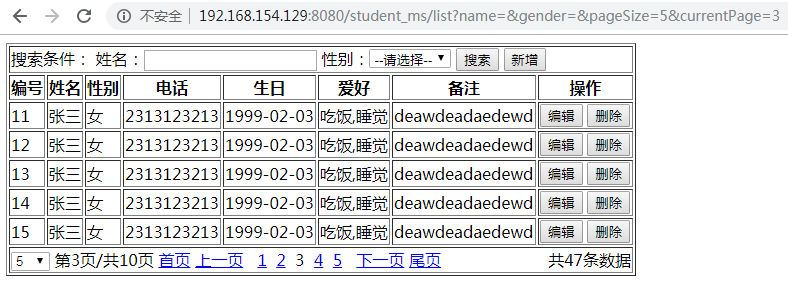
这个练习算是对之前知识的总结,一个包含 CRUD、模糊查询、分页功能的简易版学生管理系统,点击下载。
java之数据库连接池-dbcp&c3p0&dbutils的更多相关文章
- java常用数据库连接池 (DBCP、c3p0、Druid) 配置说明
1. 引言 1.1 定义 数据库连接是一种关键的有限的昂贵的资源,这一点在多用户的网页应用程序中体现得尤为突出.对数据库连接的管理能显著影响到整个应用程序的伸缩性和健壮性,影响到程序的性能指标.数据库 ...
- JDBC学习笔记(8)——数据库连接池(dbcp&C3P0)
JDBC数据库连接池的必要性 一.在使用开发基于数据库的web程序时,传统的模式基本是按一下步骤: 1)在主程序(如servlet/beans)中建立数据库连接 2)进行sql操作 3)断开数据库连接 ...
- 【转】JDBC学习笔记(8)——数据库连接池(dbcp&C3P0)
转自:http://www.cnblogs.com/ysw-go/ JDBC数据库连接池的必要性 一.在使用开发基于数据库的web程序时,传统的模式基本是按一下步骤: 1)在主程序(如servlet/ ...
- 主流Java数据库连接池分析(C3P0,DBCP,TomcatPool,BoneCP,Druid)
主流数据库连接池 常用的主流开源数据库连接池有C3P0.DBCP.Tomcat Jdbc Pool.BoneCP.Druid等 C3p0: 开源的JDBC连接池,实现了数据源和JNDI绑定,支持JDB ...
- java攻城狮之路--复习JDBC(数据库连接池 : C3P0、DBCP)
复习数据库连接池 : C3P0.DBCP 1.数据库连接池技术的优点: •资源重用: 由于数据库连接得以重用,避免了频繁创建,释放连接引起的大量性能开销.在减少系统消耗的基础上,另一方面也增 ...
- [数据库连接池] Java数据库连接池--DBCP浅析.
前言对于数据库连接池, 想必大家都已经不再陌生, 这里仅仅设计Java中的两个常用数据库连接池: DBCP和C3P0(后续会更新). 一. 为何要使用数据库连接池假设网站一天有很大的访问量,数据库服务 ...
- 常用数据库连接池 (DBCP、c3p0、Druid) 配置说明
1. 引言 1.1 定义 数据库连接是一种关键的有限的昂贵的资源,这一点在多用户的网页应用程序中体现得尤为突出.对数据库连接的管理能显著影响到整个应用程序的伸缩性和健壮性,影响到程序的性能指标.数据库 ...
- DataSource - 常用数据库连接池 (DBCP、c3p0、Druid) 配置说明
1. 引言 1.1 定义 数据库连接是一种关键的有限的昂贵的资源,这一点在多用户的网页应用程序中体现得尤为突出.对数据库连接的管理能显著影响到整个应用程序的伸缩性和健壮性,影响到程序的性能指标.数据库 ...
- 常用数据库连接池 (DBCP、c3p0、Druid) 配置说明.RP
1. 引言 1.1 定义 数据库连接是一种关键的有限的昂贵的资源,这一点在多用户的网页应用程序中体现得尤为突出.对数据库连接的管理能显著影响到整个应用程序的伸缩性和健壮性,影响到程序的性能指标.数据库 ...
随机推荐
- easyui中combobox 取值
<input id="cmbstrTrainType" class="easyui-combobox" name="cmbstrTrainTyp ...
- 环境的配置; host 配置地址
1.环境的配置: C:\Windows\System32\drivers\etc 2.如果没有下载host 切记复制etc的文件,在c盘桌面打开,更改后替换 3.可下载host 和fiddle 4.多 ...
- 【交换机】交换机RLDP(环路检测&链路检测)功能介绍及配置说明
功能简介RLDP 全称是Rapid Link Detection Protocol,是锐捷网络自主开发的一个用于快速检测以太网链路故障的链路协议.一般的以太网链路检测机制都只是利用物理连接的状态,通过 ...
- linux下access函数
Linux内核总是根据进程的有效用户ID和有效组ID来决定一个进程是否有权访问某个文件. 因此,在编写调整用户ID的程序时,在读写一个文件之前必须明确检查其用户是否原本就有对此文件的访问权限. 为了实 ...
- Hadoop 2.2.0安装和配置lzo
转自:http://www.iteblog.com/archives/992 Hadoop经常用于处理大量的数据,如果期间的输出数据.中间数据能压缩存储,对系统的I/O性能会有提升.综合考虑压缩.解压 ...
- spring-boot子模块打包去掉BOOT-INF文件夹
1.spring-boot maven打包,一般pom.xml文件里会加 <plugin> <groupId>org.springframework.boot</grou ...
- Ubuntu下安装open-falcon-v0.2.1
在Ubuntu下安装open-falcon和Centos下安装的方法有点区别,因为Ubuntu使用的包管理器是apt-get,而Centos下使用的是Yum,建议不要再Ubuntu下使用yum 建议自 ...
- Qt编写自定义控件6-指南针仪表盘
前言 指南针仪表盘,主要用来指示东南西北四个方位,双向对称两个指针旋转,其实就是360度打转,功能属于简单型,可能指针的绘制稍微难一点,需要计算多个点构成多边形,本系列控件文章将会连续发100+篇,一 ...
- C++学习 —— 重新认识C++
我大概是从读研究生入学那天开始,想要学好C++的,学习C++几乎也成了我每个学期的计划之一.为什么会每个学期都想要学好C++呢?因为每次学习都失败了啊... 本月,我开始再Coursera上学习Het ...
- 判断网页请求与FTP请求
实例说明 在访问Internet网络时,经常涉及到很多访问协议,其中最明显.最常用的就是访问页面的http协议.访问ftp服务器的FTP协议等.