
springboot获取properties文件的配置内容(转载)
1、使用@Value注解读取
读取properties配置文件时,默认读取的是application.properties。
application.properties:
demo.name=Name

demo.age=18
Java代码:
import org.springframework.beans.factory.annotation.Value;

import org.springframework.web.bind.annotation.RequestMapping;

import org.springframework.web.bind.annotation.RestController;

@RestController

public class GatewayController {

    @Value("${demo.name}")

    private String name;

    @Value("${demo.age}")

    private String age;

    @RequestMapping(value = "/gateway")

    public String gateway() {

        return "get properties value by ''@Value'' :" +

                //1、使用@Value注解读取

                " name=" + name +

                " , age=" + age;

    }

}
运行结果:
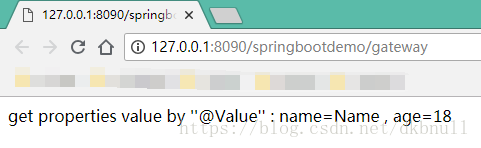
这里,如果要把
            @Value("${demo.name}")

            private String name;

            @Value("${demo.age}")

            private String age;
部分放到一个单独的类A中进行读取,然后在类B中调用,则要把类A增加@Component注解,并在类B中使用@Autowired自动装配类A,代码如下。
类A:
import org.springframework.beans.factory.annotation.Value;

import org.springframework.stereotype.Component;

@Component

public class ConfigBeanValue {

    @Value("${demo.name}")

    public String name;

    @Value("${demo.age}")

    public String age;

}
类B:
import cn.wbnull.springbootdemo.config.ConfigBeanValue;

import org.springframework.beans.factory.annotation.Autowired;

import org.springframework.web.bind.annotation.RequestMapping;

import org.springframework.web.bind.annotation.RestController;

@RestController

public class GatewayController {

    @Autowired

    private ConfigBeanValue configBeanValue;

    @RequestMapping(value = "/gateway")

    public String gateway() {

        return "get properties value by ''@Value'' :" +

                //1、使用@Value注解读取

                " name=" + configBeanValue.name +

                " , age=" + configBeanValue.age;

    }

}
运行结果:
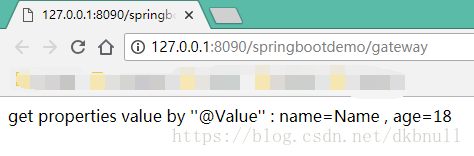
注意:如果@Value${}所包含的键名在application.properties配置文件中不存在的话,会抛出异常:

org.springframework.beans.factory.BeanCreationException: Error creating bean with name 'configBeanValue': Injection of autowired dependencies failed;
nested exception is java.lang.IllegalArgumentException: Could not resolve placeholder 'demo.name' in value "${demo.name}"
2、使用Environment读取
application.properties:
demo.sex=男

demo.address=山东
代码
import cn.wbnull.springbootdemo.config.ConfigBeanValue;

import org.springframework.beans.factory.annotation.Autowired;

import org.springframework.core.env.Environment;

import org.springframework.web.bind.annotation.RequestMapping;

import org.springframework.web.bind.annotation.RestController;

@RestController

public class GatewayController {

    @Autowired

    private ConfigBeanValue configBeanValue;

    @Autowired

    private Environment environment;

    @RequestMapping(value = "/gateway")

    public String gateway() {

        return "get properties value by ''@Value'' :" +

                //1、使用@Value注解读取

                " name=" + configBeanValue.name +

                " , age=" + configBeanValue.age +

                "<p>get properties value by ''Environment'' :" +

                //2、使用Environment读取

                " , sex=" + environment.getProperty("demo.sex") +

                " , address=" + environment.getProperty("demo.address");

    }

}
运行结果:

这里,我们在application.properties做如下配置:
server.tomcat.uri-encoding=UTF-8

spring.http.encoding.charset=UTF-8

spring.http.encoding.enabled=true

spring.http.encoding.force=true

spring.messages.encoding=UTF-8
重新运行结果如下:
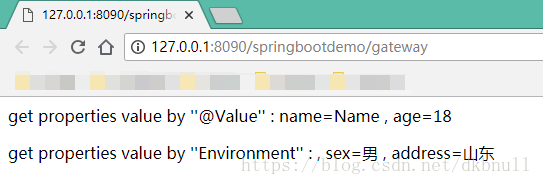
3、使用@ConfigurationProperties注解读取
在实际项目中,当项目需要注入的变量值很多时,上述所述的两种方法工作量会变得比较大,这时候我们通常使用基于类型安全的配置方式,将properties属性和一个Bean关联在一起,即使用注解@ConfigurationProperties读取配置文件数据。
在src\main\resources下新建config.properties配置文件:
demo.phone=10086

demo.wife=self
创建ConfigBeanProp并注入config.properties中的值:
import org.springframework.boot.context.properties.ConfigurationProperties;

import org.springframework.context.annotation.PropertySource;

import org.springframework.stereotype.Component;

@Component

@ConfigurationProperties(prefix = "demo")

@PropertySource(value = "config.properties")

public class ConfigBeanProp {

    private String phone;

    private String wife;

    public String getPhone() {

        return phone;

    }

    public void setPhone(String phone) {

        this.phone = phone;

    }

    public String getWife() {

        return wife;

    }

    public void setWife(String wife) {

        this.wife = wife;

    }

}
@Component 表示将该类标识为Bean

@ConfigurationProperties(prefix = "demo")用于绑定属性,其中prefix表示所绑定的属性的前缀。

@PropertySource(value = "config.properties")表示配置文件路径。


使用时,先使用@Autowired自动装载ConfigBeanProp,然后再进行取值,示例如下:
import cn.wbnull.springbootdemo.config.ConfigBeanProp;

import cn.wbnull.springbootdemo.config.ConfigBeanValue;

import org.springframework.beans.factory.annotation.Autowired;

import org.springframework.core.env.Environment;

import org.springframework.web.bind.annotation.RequestMapping;

import org.springframework.web.bind.annotation.RestController;

@RestController

public class GatewayController {

    @Autowired

    private ConfigBeanValue configBeanValue;

    @Autowired

    private Environment environment;

    @Autowired

    private ConfigBeanProp configBeanProp;

    @RequestMapping(value = "/gateway")

    public String gateway() {

        return "get properties value by ''@Value'' :" +

                //1、使用@Value注解读取

                " name=" + configBeanValue.name +

                " , age=" + configBeanValue.age +

                "<p>get properties value by ''Environment'' :" +

                //2、使用Environment读取

                " sex=" + environment.getProperty("demo.sex") +

                " , address=" + environment.getProperty("demo.address") +

                "<p>get properties value by ''@ConfigurationProperties'' :" +

                //3、使用@ConfigurationProperties注解读取

                " phone=" + configBeanProp.getPhone() +

                " , wife=" + configBeanProp.getWife();

    }

}
运行结果:
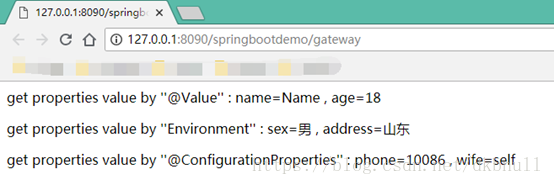
4.使用PropertiesLoaderUtils
app-config.properties

#### 通过注册监听器(`Listeners`) + `PropertiesLoaderUtils`的方式

com.zyd.type=Springboot - Listeners

com.zyd.title=使用Listeners + PropertiesLoaderUtils获取配置文件

com.zyd.name=zyd

com.zyd.address=Beijing

com.zyd.company=in
PropertiesListener.java 用来初始化加载配置文件
package com.zyd.property.listener;

import org.springframework.boot.context.event.ApplicationStartedEvent;

import org.springframework.context.ApplicationListener;

import com.zyd.property.config.PropertiesListenerConfig;

/**

 * 配置文件监听器,用来加载自定义配置文件

 *

 * @author <a href="mailto:yadong.zhang0415@gmail.com">yadong.zhang</a>

 * @date 2017年6月1日 下午3:38:25

 * @version V1.0

 * @since JDK : 1.7

 */

public class PropertiesListener implements ApplicationListener<ApplicationStartedEvent> {

    private String propertyFileName;

    public PropertiesListener(String propertyFileName) {

        this.propertyFileName = propertyFileName;

    }

    @Override

    public void onApplicationEvent(ApplicationStartedEvent event) {

        PropertiesListenerConfig.loadAllProperties(propertyFileName);

    }

}
PropertiesListenerConfig.java 加载配置文件内容
package com.zyd.property.config;

import java.io.IOException;

import java.io.UnsupportedEncodingException;

import java.util.HashMap;

import java.util.Map;

import java.util.Properties;

import org.springframework.beans.BeansException;

import org.springframework.core.io.support.PropertiesLoaderUtils;

/**

 * 第四种方式:PropertiesLoaderUtils

 *

 * @author <a href="mailto:yadong.zhang0415@gmail.com">yadong.zhang</a>

 * @date 2017年6月1日 下午3:32:37

 * @version V1.0

 * @since JDK : 1.7

 */

public class PropertiesListenerConfig {

    public static Map<String, String> propertiesMap = new HashMap<>();

    private static void processProperties(Properties props) throws BeansException {

        propertiesMap = new HashMap<String, String>();

        for (Object key : props.keySet()) {

            String keyStr = key.toString();

            try {

                // PropertiesLoaderUtils的默认编码是ISO-8859-1,在这里转码一下

                propertiesMap.put(keyStr, new String(props.getProperty(keyStr).getBytes("ISO-8859-1"), "utf-8"));

            } catch (UnsupportedEncodingException e) {

                e.printStackTrace();

            } catch (java.lang.Exception e) {

                e.printStackTrace();

            }

        }

    }

    public static void loadAllProperties(String propertyFileName) {

        try {

            Properties properties = PropertiesLoaderUtils.loadAllProperties(propertyFileName);

            processProperties(properties);

        } catch (IOException e) {

            e.printStackTrace();

        }

    }

    public static String getProperty(String name) {

        return propertiesMap.get(name).toString();

    }

    public static Map<String, String> getAllProperty() {

        return propertiesMap;

    }

}
Applaction.java 启动类
package com.zyd.property;

import java.io.UnsupportedEncodingException;

import java.util.HashMap;

import java.util.Map;

import org.springframework.boot.SpringApplication;

import org.springframework.boot.autoconfigure.SpringBootApplication;

import org.springframework.web.bind.annotation.RequestMapping;

import org.springframework.web.bind.annotation.RestController;

import com.zyd.property.config.PropertiesListenerConfig;

import com.zyd.property.listener.PropertiesListener;

/**

 * @author <a href="mailto:yadong.zhang0415@gmail.com">yadong.zhang</a>

 * @date 2017年6月1日 下午3:49:30

 * @version V1.0

 * @since JDK : 1.7

 */

@SpringBootApplication

@RestController

public class Applaction {

    /**

     *

     * 第四种方式:通过注册监听器(`Listeners`) + `PropertiesLoaderUtils`的方式

     *

     * @author zyd

     * @throws UnsupportedEncodingException

     * @since JDK 1.7

     */

    @RequestMapping("/listener")

    public Map<String, Object> listener() {

        Map<String, Object> map = new HashMap<String, Object>();

        map.putAll(PropertiesListenerConfig.getAllProperty());

        return map;

    }

    public static void main(String[] args) throws Exception {

        SpringApplication application = new SpringApplication(Applaction.class);

        // 第四种方式:注册监听器

        application.addListeners(new PropertiesListener("app-config.properties"));

        application.run(args);

    }

}
springboot获取properties文件的配置内容(转载)的更多相关文章
- java工具类获取properties文件的配置
import java.io.BufferedReader; import java.io.IOException; import java.io.InputStream; import java.i ...
- 每日一蠢 .kettle 下的kettle.properties文件内配置的内容不能被识别
昨天装封装好的ETL 工具 窝将环境变量中的KETTLE_HOME删除了, 结果 .kettle 下的kettle.properties文件内配置的内容不能被识别 can't parse argum ...
- 获取properties文件的内容
获取properties文件的内容 public void test() throws Exception{ String resource = "application.propertie ...
- 如何快速获取properties中的配置属性值
本文为博主原创,未经博主允许,不得转载: 在项目中,经常需要将一些配置的常量信息放到properties文件中,这样在项目的配置变动的时候,只需要修改配置文件中 对应的配置常量即可. 在项目应用中,如 ...
- SpringBoot yml properties文件
一.在SpringBoot实现属性注入: 1).添加pom依赖jar包: 1 <!-- 支持 @ConfigurationProperties 注解 --> 2 <!-- https ...
- java读取properties文件的配置信息
项目开发中,我们一般来向 application.properties 文件中放一些全局配置变量,以便程序中读取使用,本篇内容来演示从properties配置文件中读取键值. 当然,我们不一定写入 a ...
- 2.SpringBoot的properties的属性配置详解
SpringBoot是为了简化Spring应用的创建.运行.调试.部署等一系列问题而诞生的产物,自动装配的特性让我们可以更好的关注业务本身而不是外部的XML配置,我们只需遵循规范,引入相关的依赖就可以 ...
- Java 获取*.properties配置文件中的内容 ,常见的两种方法
import java.io.InputStream; import java.util.Enumeration; import java.util.List; import java.util.Pr ...
- 将properties文件的配置设置为整个Web应用的全局变量。
四种作用域: Web应用中的变量存放在不同的jsp对象中,会有不一样的作用域,四种不同的作用域排序是 pageContext < request < session < applic ...
随机推荐
- MySQL常用引擎的锁机制
一.引言 ...
- supervisor 监控redis & mongodb
安装 安装python brew install python 安装pipwget https://bootstrap.pypa.io/get-pip.pysudo python get-pip.py ...
- NSL:SOFM神经网络实现预测哪个样本与哪个样本处在同一层,从而科学规避我国煤矿突水灾难—Jason niu
load water_data.mat attributes = mapminmax(attributes); P_train = attributes(:,1:35); T_train = clas ...
- 大数据项目之_15_电信客服分析平台_03&04_数据分析
3.3.数据分析3.3.1.Mysql 表结构设计3.3.2.需求:按照不同的维度统计通话3.3.3.环境准备3.3.4.编写代码:数据分析3.3.5.运行测试3.3.6.bug 解决 3.3.数据分 ...
- this 相关
对于前端程序媛(员)来说,this这个机制应用的地方是很多的,所以搞懂是必要的,不熟练使用this将遇到一些困惑,下面是一些关于this的学习心得分享,希望大家可以一起学习: 1,this并不是指向自 ...
- linux 学习笔记 显示压缩文件 gong.zip 的文件内容
#zip -v gong zip zip info: xxx >删除压缩文件中俄smart.txt 文件 #zip -d gong.zip smart.txt deleting:smart.tx ...
- linux学习笔记 yum 在线管理软件包
-y 如果yum在工作过程中需要使用者响应.这个参数可以直接回答yes #yum list 列出资源库中所有可安装或者可更新的rpm包 #yum perl 列出为perl的包 #yum perl* ...
- iOS APP提交上架流程
转载自CocoaChina,链接地址:http://www.cocoachina.com/bbs/read.php?tid=330302 后面问题我也遇到了,参考该文章解决的 转自http://blo ...
- Android编译环境配置(Ubuntu 14.04)
常识:编译Android源代码需要在Linux系统环境下进行... 在Linux中,开发Android环境包括以下需求:Git.repo.JDK(现在一般使用OpenJDK)等:其中,Git用于下载源 ...
- JS字符串截取(获取指定字符后面的所有字符内容)
function getCaption(obj){ var index=obj.lastIndexOf("\-"); obj=obj.substring(index ...