
Struts2之HelloWorld
首先既然是开发Struts程序的话,那么自然需要用到Struts2开发包,Struts2是apache旗下的开源框架,所有的开发包和源代码都可以在Apache官网下载。
那么,就来开始编写第一个Struts2程序。
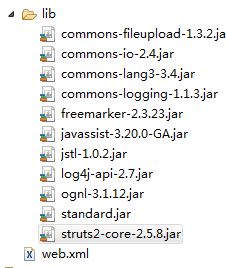
1、新建一个Dynamic web project。 把必须的java包拷贝到lib目录下。
至此准备工作就完成了,下面开始编写第一个Hello World!!!
2、首先,struts2采用的是拦截器原理,所有的请求都会被一个过滤器给拦截,所以需要在web.xml文件中配置如下的过滤器,来过滤所有的请求。
   <filter>

       <filter-name>struts2</filter-name>

       <filter-class>org.apache.struts2.dispatcher.ng.filter.StrutsPrepareAndExecuteFilter</filter-class>

   </filter>

   <filter-mapping>

       <filter-name>struts2</filter-name>

       <url-pattern>/*</url-pattern>

   </filter-mapping>
3、编写Action,要想实现Struts2程序有三种方法
①实现Action接口(com.opensymphony.xwork2.Action)
②继承ActionSupport类 (com.opensymphony.xwork2.ActionSupport)
③继承一个自定义的类
由于ActionSupport类已经实现了Action接口,而且提供了更加丰富的操作方法,所以一般采用继承ActionSupport类的方式。
1 package com.fuwh.struts2;
 2

 3 import com.opensymphony.xwork2.Action;

 4

 5 public class HelloWorld implements Action{

 6

 7     private String HelloWorld;

 8     public String getHelloWorld() {

 9         return HelloWorld;

     }

     public void setHelloWorld(String helloWorld) {

         HelloWorld = helloWorld;

     }

     @Override

     public String execute() throws Exception {

         // TODO Auto-generated method stub

         HelloWorld="世界你好!!!";

         return SUCCESS;

     }


 }
4、Action编写好了之后,需要编写一个struts.xml的配置文件,来管理Action的跳转关系
<?xml version="1.0" encoding="UTF-8"?>
<!DOCTYPE struts PUBLIC

    "-//Apache Software Foundation//DTD Struts Configuration 2.3//EN"

    "http://struts.apache.org/dtds/struts-2.3.dtd">

<struts>

    <package name="helloWorld" extends="struts-default">

        <action name="hello" class="com.fuwh.struts2.HelloWorld">

            <result name="success">HelloWorld.jsp</result>

        </action>

    </package>

</struts>
5、最后来编写HelloWorld.jsp页面
<%@ page language="java" pageEncoding="UTF-8"%>
<!DOCTYPE html PUBLIC "-//W3C//DTD HTML 4.01 Transitional//EN" "http://www.w3.org/TR/html4/loose.dtd">

<html>

<head>

<title>Insert title here</title>

</head>

<body>

${HelloWorld}

</body>

</html>
6、将项目发布到服务器,请求如下连接,就大功告成了
http://localhost/Struts2/hello
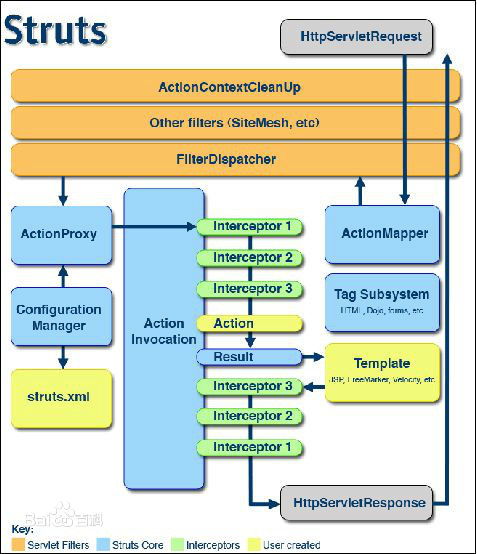
7,最后来谈谈Struts2的工作原理
Struts2之HelloWorld的更多相关文章
- 使用maven+eclipse搭建最简单的struts2的helloworld
使用maven+eclipse搭建最简单的struts2的helloworld 一.web分层结构简介 1.web[细]粒度分层结构: 按细粒度分层可以分为以下6种: 1).表现层:html/css/ ...
- 创建一个struts2的HelloWorld
1.下载struts2的jar包 http://struts.apache.org/download.cgi#struts255 下载一个稳定版本Struts 2.3.31 里面提供了maven ja ...
- Struts2 的 helloworld
配置步骤: 1.在你的strut2目录下找到例子项目,把它的 lib 下的jar拷贝到你的项目.例如我的:struts-2.3.24\apps\struts2-blank 2.struts-2.3.2 ...
- 使用MyEclipse 9.0 创建 struts2 的HelloWorld 工程
作为眼高手低的典范,必须痛改前非,好好动手多做开发! 本文是struts2的入门指导,权当笔记! 在MyEclipse中,配置Apache tomcat 7.x 服务器 创建新的Web project ...
- 2.第一个Struts2程序-HelloWorld程序
1.新建Web Project项目:Study_Struts2 2.新建HelloWordAction.java类 3.复制struts.xml文件到src目录下,配置struts.xml文件内容如下 ...
- struts2的HelloWorld的基本过程
login.jsp中 <form action="Login"... 该页面提交后, web.xml中设置的过滤器会起作用 <filter> ...
- Struts2学习笔记 - HelloWorld总结
相信网上已经有很多关于struts2的HelloWorld可参考,我这里就不重复了,没个学struts2的人都会做过很多个HelloWorld,而我这里就总结一下一个简单的HelloWorld 我在一 ...
- 菜鸟学Struts2——Struts工作原理
在完成Struts2的HelloWorld后,对Struts2的工作原理进行学习.Struts2框架可以按照模块来划分为Servlet Filters,Struts核心模块,拦截器和用户实现部分,其中 ...
- 2. Struts2 基础
1. Struts2简介 Struts2是一个WEB端MVC框架.作为比较早的MVC 框架之一,Struts2在使用中还是比较多的.虽然个人感受没有SpringMVC还那么的好用 Struts2 官网 ...
随机推荐
- 做一个 App 前需要考虑的几件事
做一个 App 前需要考虑的几件事 来源:limboy的博客 随着工具链的完善,语言的升级以及各种优质教程的涌现,做一个 App 的成本也越来越低了.尽管如此,有些事情最好前期就做起来,避免当 ...
- SQL优化技术分析-2:SQL书写的影响
1.同一功能同一性能不同写法SQL的影响. 如一个SQL在A程序员写的为 Select * from zl_yhjbqk B程序员写的为 Select * from dlyx.zl_yhjbqk(带表 ...
- error LNK2001: 无法解析的外部符号
1.错误描述 error LNK2001: 无法解析的外部符号 "__declspec(dllimport) void __cdecl PadSystem::Private::printQS ...
- hbase 权威指南笔记(二)
这次我们先来讨论hbase的重试机制,为什么呐,因为最近公司最近也在做这方面的优化,所以就今天研究的一些成功记录一下. configuration.setInt("hbase.client. ...
- Linux下安装jdk1.7、Apache-tomcat7
首先说明下我的主机环境:主机:32位win7 虚拟机:VMware Workstation10.0.1 linux:红帽子centos6.4 jdk1.7 Apache-tomcat7 java环境需 ...
- SVM一点心得体会
支持向量机的学习说是刚刚开始,又不合理,只能说隔了很长的时间再看,终于在分类这块的层面上有了新的认识. 总的来说,支持向量机分为线性支持向量机和非线性支持向量机,线性支持向量机又可以分为硬间隔最大化线 ...
- Mybatis
Mybatis MyBatis本是apache的一个开源项目iBatis,2010年这个项目有Apache software foundation 迁移到了Google code,并改名MyBatis ...
- jquery each函数 break和continue功能
jquery each函数 break和continue功能幸运的是另一个突破,持续一个jQuery循环方式.你可以打破在函数返回一个jQuery参数虚假循环.一个可以继续执行只是在做不指定返回值或返 ...
- mybatis: 利用多数据源实现分库存储
之前写过一篇mybatis 使用经验小结 提到过多数据源的处理方式,虽然简单但是姿势不太优雅,今天介绍一些更美观的办法: spring中有一个AbstractRoutingDataSource的抽象类 ...
- [LeetCode] Strobogrammatic Number 对称数
A strobogrammatic number is a number that looks the same when rotated 180 degrees (looked at upside ...