
图像数据增强 (Data Augmentation in Computer Vision)
1.1 简介
深层神经网络一般都需要大量的训练数据才能获得比较理想的结果。在数据量有限的情况下,可以通过数据增强(Data Augmentation)来增加训练样本的多样性, 提高模型鲁棒性,避免过拟合。
在计算机视觉中,典型的数据增强方法有翻转(Flip),旋转(Rotat ),缩放(Scale),随机裁剪或补零(Random Crop or Pad),色彩抖动(Color jittering),加噪声(Noise)
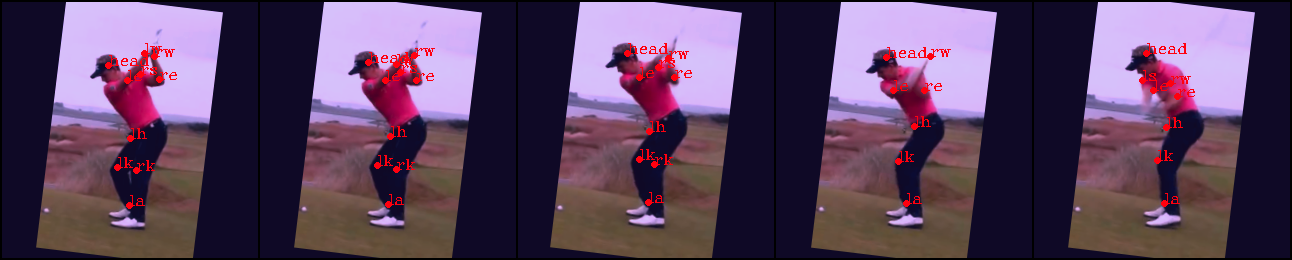
笔者在跟进视频及图像中的人体姿态检测和关键点追踪(Human Pose Estimatiion and Tracking in videos)的项目。因此本文的数据增强仅使用——翻转(Flip),旋转(Rotate ),缩放以及缩放(Scale)
2.1 裁剪(Crop)
image.shape--([3, width, height])一个视频序列中的一帧图片,裁剪前大小不统一
bbox.shape--([4,])人体检测框,用于裁剪
x.shape--([1,13]) 人体13个关键点的所有x坐标值
y.shape--([1,13])人体13个关键点的所有y坐标值
     def crop(image, bbox, x, y, length):

         x, y, bbox = x.astype(np.int), y.astype(np.int), bbox.astype(np.int)

         x_min, y_min, x_max, y_max = bbox

         w, h = x_max - x_min, y_max - y_min

         # Crop image to bbox

         image = image[y_min:y_min + h, x_min:x_min + w, :]

         # Crop joints and bbox

         x -= x_min

         y -= y_min

         bbox = np.array([0, 0, x_max - x_min, y_max - y_min])

         # Scale to desired size

         side_length = max(w, h)

         f_xy = float(length) / float(side_length)

         image, bbox, x, y = Transformer.scale(image, bbox, x, y, f_xy)

         # Pad

         new_w, new_h = image.shape[1], image.shape[0]

         cropped = np.zeros((length, length, image.shape[2]))

         dx = length - new_w

         dy = length - new_h

         x_min, y_min = int(dx / 2.), int(dy / 2.)

         x_max, y_max = x_min + new_w, y_min + new_h

         cropped[y_min:y_max, x_min:x_max, :] = image

         x += x_min

         y += y_min

         x = np.clip(x, x_min, x_max)

         y = np.clip(y, y_min, y_max)

         bbox += np.array([x_min, y_min, x_min, y_min])

         return cropped, bbox, x.astype(np.int), y.astype(np.int)
2.2 缩放(Scale)
image.shape--([3, 256, 256])一个视频序列中的一帧图片,裁剪后输入网络为256*256
bbox.shape--([4,])人体检测框,用于裁剪
x.shape--([1,13]) 人体13个关键点的所有x坐标值
y.shape--([1,13])人体13个关键点的所有y坐标值
f_xy--缩放倍数
     def scale(image, bbox, x, y, f_xy):

         (h, w, _) = image.shape

         h, w = int(h * f_xy), int(w * f_xy)

         image = resize(image, (h, w), preserve_range=True, anti_aliasing=True, mode='constant').astype(np.uint8)

         x = x * f_xy

         y = y * f_xy

         bbox = bbox * f_xy

         x = np.clip(x, 0, w)

         y = np.clip(y, 0, h)

         return image, bbox, x, y
2.3 翻转(fillip)
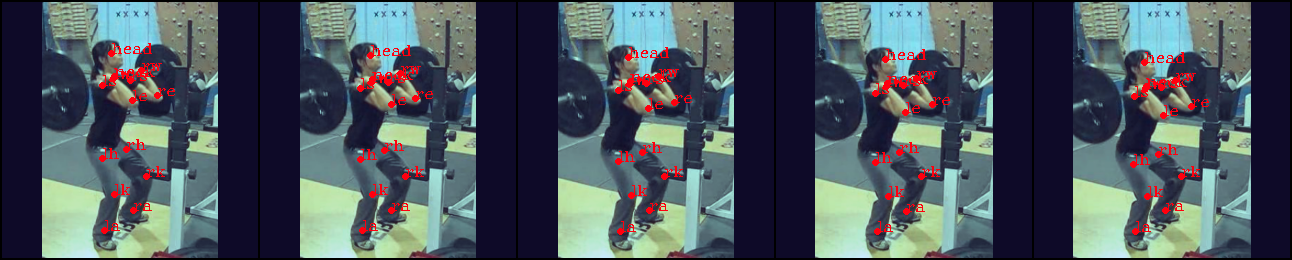
这里是将图片围绕对称轴进行左右翻转(因为人体是左右对称的,在关键点检测中有助于防止模型过拟合)
     def flip(image, bbox, x, y):

         image = np.fliplr(image).copy()

         w = image.shape[1]

         x_min, y_min, x_max, y_max = bbox

         bbox = np.array([w - x_max, y_min, w - x_min, y_max])

         x = w - x

         x, y = Transformer.swap_joints(x, y)

         return image, bbox, x, y
翻转前:

翻转后:
2.4 旋转(rotate)
angle--旋转角度
     def rotate(image, bbox, x, y, angle):

         # image - -(256, 256, 3)

         # bbox - -(4,)

         # x - -[126 129 124 117 107  99 128 107 108 105 137 155 122  99]

         # y - -[209 176 136 123 178 225  65  47  46  24  44  64  49  54]

         # angle - --8.165648811999333

         # center of image [128,128]

         o_x, o_y = (np.array(image.shape[:2][::-1]) - 1) / 2.

         width,height = image.shape[0],image.shape[1]

         x1 = x

         y1 = height - y

         o_x = o_x

         o_y = height - o_y

         image = rotate(image, angle, preserve_range=True).astype(np.uint8)

         r_x, r_y = o_x, o_y

         angle_rad = (np.pi * angle) /180.0

         x = r_x + np.cos(angle_rad) * (x1 - o_x) - np.sin(angle_rad) * (y1 - o_y)

         y = r_y + np.sin(angle_rad) * (x1 - o_x) + np.cos(angle_rad) * (y1 - o_y)

         x = x

         y = height - y

         bbox[0] = r_x + np.cos(angle_rad) * (bbox[0] - o_x) + np.sin(angle_rad) * (bbox[1] - o_y)

         bbox[1] = r_y + -np.sin(angle_rad) * (bbox[0] - o_x) + np.cos(angle_rad) * (bbox[1] - o_y)

         bbox[2] = r_x + np.cos(angle_rad) * (bbox[2] - o_x) + np.sin(angle_rad) * (bbox[3] - o_y)

         bbox[3] = r_y + -np.sin(angle_rad) * (bbox[2] - o_x) + np.cos(angle_rad) * (bbox[3] - o_y)

         return image, bbox, x.astype(np.int), y.astype(np.int)
旋转前:

旋转后:

3 结果(output)
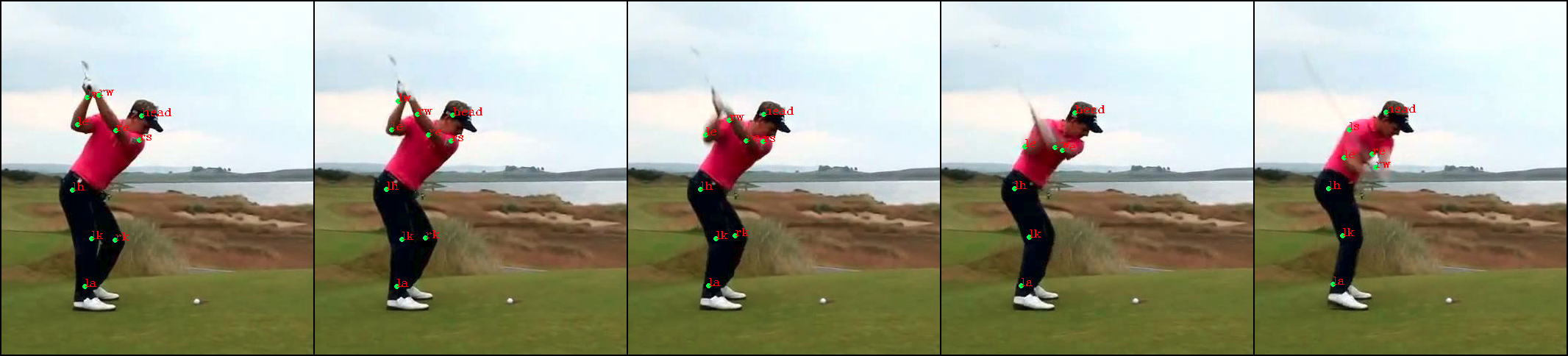
数据增强前的原图:
数据增强后:
图像数据增强 (Data Augmentation in Computer Vision)的更多相关文章
- Python数据增强(data augmentation)库--Augmentor 使用介绍
Augmentor 使用介绍 原图 random_distortion(probability, grid_height, grid_width, magnitude) 最终选择参数为 p.rando ...
- 【Tool】Augmentor和imgaug——python图像数据增强库
Augmentor和imgaug--python图像数据增强库 Tags: ComputerVision Python 介绍两个图像增强库:Augmentor和imgaug,Augmentor使用比较 ...
- [DeeplearningAI笔记]卷积神经网络2.9-2.10迁移学习与数据增强
4.2深度卷积网络 觉得有用的话,欢迎一起讨论相互学习~Follow Me 2.9迁移学习 迁移学习的基础知识已经介绍过,本篇博文将介绍提高的部分. 提高迁移学习的速度 可以将迁移学习模型冻结的部分看 ...
- Python库 - Albumentations 图片数据增强库
Python图像处理库 - Albumentations,可用于深度学习中网络训练时的图片数据增强. Albumentations 图像数据增强库特点: 基于高度优化的 OpenCV 库实现图像快速数 ...
- OpenCV中IplImage图像格式与BYTE图像数据的转换
最近在将Karlsruhe Institute of Technology的Andreas Geiger发表在ACCV2010上的Efficent Large-Scale Stereo Matchin ...
- Javascript高级编程学习笔记(93)—— Canvas(10) 模式及图像数据
模式 模式其实就是重复的图像,用来填充或描边图形 要创建一个新模式,可以调用 createPattern()并传入两个参数 一个HTML img元素 用于表示如何重复的字符串 "repeat ...
- keras对图像数据进行增强 | keras data augmentation
本文首发于个人博客https://kezunlin.me/post/8db507ff/,欢迎阅读最新内容! keras data augmentation Guide code # import th ...
- 【48】数据扩充(Data augmentation)
数据扩充(Data augmentation) 大部分的计算机视觉任务使用很多的数据,所以数据扩充是经常使用的一种技巧来提高计算机视觉系统的表现.我认为计算机视觉是一个相当复杂的工作,你需要输入图像的 ...
- Computer Vision 学习 -- 图像存储格式
本文把自己理解的图像存储格式总结一下. 计算机中的数据,都是二进制的,所以图片也不例外. 这是opencv文档的描述,具体在代码里面,使用矩阵来进行存储. 类似下图是(BGR格式): 图片的最小单位是 ...
随机推荐
- 洗礼灵魂,修炼python(37)--面向对象编程(7)—了解魔法方法
也许上一篇博文提到的property内置函数的用法你还觉得记忆犹新,那么有没有更多的类似的方法呢?有的,就是本篇文章要说的魔法方法 魔法方法 1.什么是魔法方法 (其实前面已经提到多次,每次我都是说暂 ...
- 洗礼灵魂,修炼python(32)--面向对象编程(2)—进一步认识类
上一篇文章已经看到了如何定义类,但是我想你应该有很多疑惑的吧?最好的学习方法就是不断思考,不断问为什么,不断和已有知识做类比,从中获得理解.那么这一篇博文就是从解惑答疑中进一步认识类. 解惑答疑 我按 ...
- Postgresql_根据执行计划优化SQL
执行计划路径选择 postgresql查询规划过程中,查询请求的不同执行方案是通过建立不同的路径来表达的,在生成许多符合条件的路径之后,要从中选择出代价最小的路径,把它转化为一个计划,传递给执行器执行 ...
- 第七章 鼠标(CHECKER1)
CHECKER1程序将客户区划分成25个矩形,构成一个5*5的数组.如果在其中一个矩形内单击鼠标,就用X形填充该矩形.再次单击,则X形消失. /*--------------------------- ...
- Tell Me About Yourself Example 1
Tell Me About Yourself Employers ask this question because they want to know you have the relevant e ...
- 从列表和实例来了解python迭代器
什么是迭代器?它是一个带状态的对象,在你调用next()方法的时候返回容器中的下一个值,任何实现了__iter__和__next__()(python2中实现next())方法的对象都是迭代器,__i ...
- Activiti工作流的定义部署和执行
工作流引擎 个人觉得直接理解工作流引擎概念有点难度,我们可以先通过了解工作流引擎的职责再反过来理解工作流引擎,工作流引擎一般都做两件事情: 1.定义流程,也就是给我们提供某种规范来定义规则,以 ...
- Ubuntu18.04 安装tomcat9
1.官网下载 2.移动到/usr/local/tomcat 3.解压 4.修改权限,否则在idea中不能正常使用
- Win10上启动UICrawler自动遍历时报 "org.openqa.selenium.WebDriverException: An unknown server-side error occur red while processing the command. Original error: Could not sign with default certifi cate."
操作步骤: 1.直接启动 Appium (我用的是 version 1.10.0) 2.打开命令窗口,切换到 UICrawler 所在路径 3.执行命令 java -jar UICrawler-2.2 ...
- sql语句如何将多个空格字符替换成一个空格字符
很多时候,数据表中某个字段的值会带有一个或多个空格字符串的情况,面对多样化的需求,我们可能需要将这些空格字符串去除,当然,这很好说,我们可以直接用replace(' ','')将单个空格变成无就可以了 ...