
[转] Spring MVC sample application for downloading files
http://www.codejava.net/frameworks/spring/spring-mvc-sample-application-for-downloading-files
n this article, we are going to show you how to implement file download functionality in a Spring MVC application. The solution is similar to the one described in the article: Send files from servlet to client for downloading, but is implemented in a Spring MVC application.
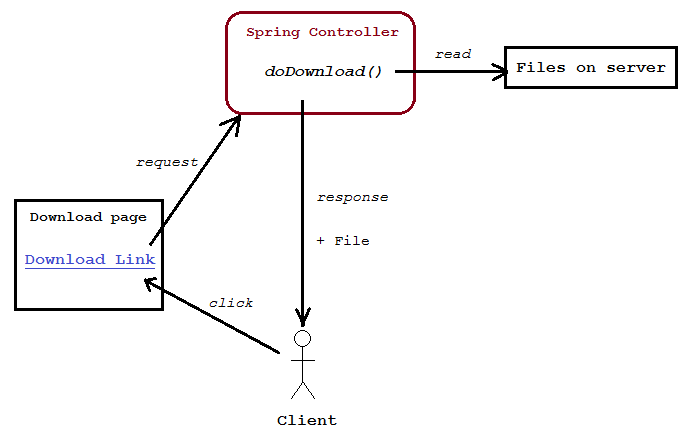
The following picture depicts workflow of the sample application we are going to build:
Project structure (Eclipse project):
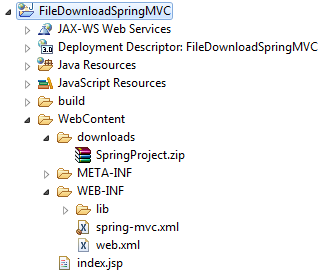
The file to be downloaded in this application is SpringProject.zip file which resides in the downloads directory which is relative to the application’s directory.
1. Code of download page
Create index.jsp file under WebContent directory with the following HTML code:
|
1
2
3
4
5
6
7
8
9
10
11
12
13
14
15
|
<%@ page language="java" contentType="text/html; charset=ISO-8859-1" pageEncoding="ISO-8859-1"%><!DOCTYPE html PUBLIC "-//W3C//DTD HTML 4.01 Transitional//EN" "http://www.w3.org/TR/html4/loose.dtd"><html><head><meta http-equiv="Content-Type" content="text/html; charset=ISO-8859-1"><title>Download Page</title></head><body> <center> <h2><a href="/download.do">Click here to download file</a></h2> </center></body></html> |
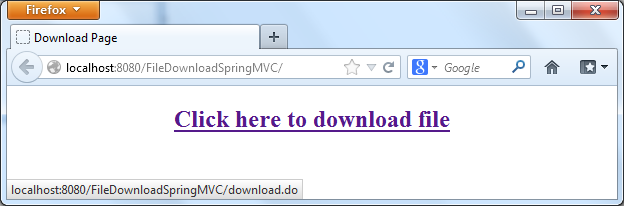
This page simply shows a link “Click here to download file” with URL points to the relative path: download.do. We’ll configure Spring controller class to handle this URL.
2. Code of Spring controller class
Create FileDownloadController.java file under the source package net.codejava.spring with the following code:
|
1
2
3
4
5
6
7
8
9
10
11
12
13
14
15
16
17
18
19
20
21
22
23
24
25
26
27
28
29
30
31
32
33
34
35
36
37
38
39
40
41
42
43
44
45
46
47
48
49
50
51
52
53
54
55
56
57
58
59
60
61
62
63
64
65
66
67
68
69
70
71
72
73
74
75
76
77
78
79
80
|
package net.codejava.spring;import java.io.File;import java.io.FileInputStream;import java.io.IOException;import java.io.OutputStream;import javax.servlet.ServletContext;import javax.servlet.http.HttpServletRequest;import javax.servlet.http.HttpServletResponse;import org.springframework.stereotype.Controller;import org.springframework.web.bind.annotation.RequestMapping;import org.springframework.web.bind.annotation.RequestMethod;@Controller@RequestMapping("/download.do")public class FileDownloadController { /** * Size of a byte buffer to read/write file */ private static final int BUFFER_SIZE = 4096; /** * Path of the file to be downloaded, relative to application's directory */ private String filePath = "/downloads/SpringProject.zip"; /** * Method for handling file download request from client */ @RequestMapping(method = RequestMethod.GET) public void doDownload(HttpServletRequest request, HttpServletResponse response) throws IOException { // get absolute path of the application ServletContext context = request.getServletContext(); String appPath = context.getRealPath(""); System.out.println("appPath = " + appPath); // construct the complete absolute path of the file String fullPath = appPath + filePath; File downloadFile = new File(fullPath); FileInputStream inputStream = new FileInputStream(downloadFile); // get MIME type of the file String mimeType = context.getMimeType(fullPath); if (mimeType == null) { // set to binary type if MIME mapping not found mimeType = "application/octet-stream"; } System.out.println("MIME type: " + mimeType); // set content attributes for the response response.setContentType(mimeType); response.setContentLength((int) downloadFile.length()); // set headers for the response String headerKey = "Content-Disposition"; String headerValue = String.format("attachment; filename=\"%s\"", downloadFile.getName()); response.setHeader(headerKey, headerValue); // get output stream of the response OutputStream outStream = response.getOutputStream(); byte[] buffer = new byte[BUFFER_SIZE]; int bytesRead = -1; // write bytes read from the input stream into the output stream while ((bytesRead = inputStream.read(buffer)) != -1) { outStream.write(buffer, 0, bytesRead); } inputStream.close(); outStream.close(); }} |
This is a typical Spring controller class which is annotated by Spring MVC annotation types. The method doDownload() will receive requests from the client, read the file on server and send it to the client for downloading. Note that, unlike traditional Spring controller’s methods, the method doDownload()does not return a view name, because our purpose is to send a file to the client. The method exits as soon as the file is completely transferred to the client.
Recommended Book: Getting started with Spring Framework
3. Code of Spring configuration file
Create spring-mvc.xml file under WebContent\WEB-INF directory with the following content:
|
1
2
3
4
5
6
7
8
9
10
11
12
13
|
<?xml version="1.0" encoding="UTF-8"?><beans xmlns="http://www.springframework.org/schema/beans" xmlns:xsi="http://www.w3.org/2001/XMLSchema-instance" xmlns:context="http://www.springframework.org/schema/context" xsi:schemaLocation="http://www.springframework.org/schema/beans http://www.springframework.org/schema/beans/spring-beans-3.0.xsd http://www.springframework.org/schema/context http://www.springframework.org/schema/context/spring-context-3.0.xsd"> <context:component-scan base-package="net.codejava.spring" /> <!-- your beans declaration goes here --></beans> |
This is a deadly simple Spring configuration file which tells the framework to scan the package net.codejava.spring for annotated types (element <context:component-scan />). Of course your application will have some bean definitions, but for the purpose of this application, such configuration is enough to work.
Related Course: The Java Spring Tutorial
4. Code of web.xml
The Spring dispatcher servlet is configured to handle requests in the web.xml file as follows:
|
1
2
3
4
5
6
7
8
9
10
11
12
13
14
15
16
17
18
19
20
21
22
23
|
<?xml version="1.0" encoding="UTF-8"?><web-app xmlns:xsi="http://www.w3.org/2001/XMLSchema-instance" xmlns="http://java.sun.com/xml/ns/javaee" xmlns:web="http://java.sun.com/xml/ns/javaee/web-app_2_5.xsd" xsi:schemaLocation="http://java.sun.com/xml/ns/javaee http://java.sun.com/xml/ns/javaee/web-app_3_0.xsd" id="WebApp_ID" version="3.0"> <display-name>FileDownloadSpringMVC</display-name> <servlet> <servlet-name>SpringController</servlet-name> <servlet-class>org.springframework.web.servlet.DispatcherServlet</servlet-class> <init-param> <param-name>contextConfigLocation</param-name> <param-value>/WEB-INF/spring-mvc.xml</param-value> </init-param> <load-on-startup>1</load-on-startup> </servlet> <servlet-mapping> <servlet-name>SpringController</servlet-name> <url-pattern>*.do</url-pattern> </servlet-mapping></web-app> |
Recommended Book: Spring in Action
5. Required jar files
Add the following jar files into the WebContent\WEB-INF\lib directory:
- commons-logging-1.1.1.jar
- spring-beans-3.2.1.RELEASE.jar
- spring-context-3.2.1.RELEASE.jar
- spring-core-3.2.1.RELEASE.jar
- spring-expression-3.2.1.RELEASE.jar
- spring-web-3.2.1.RELEASE.jar
- spring-webmvc-3.2.1.RELEASE.jar
The Commons Logging jar files can be downloaded from Apache Commons Logging, other jar files come from Spring framework 3.2.1 RELEASE download.
Related Course: The Java Spring Tutorial
6. Testing the application
Deploy the application on localhost Tomcat server, type the following URL into browser’s address bar:
http://localhost:8080/FileDownloadSpringMVC/
The download page is displayed:
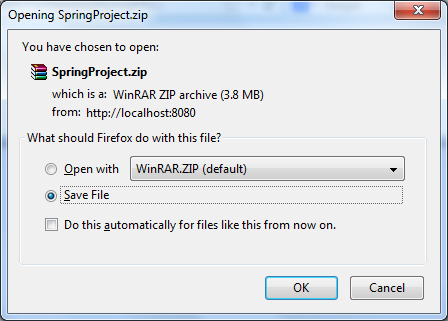
Click on the link, the browser will ask to download the file:
You can download Eclipse project for this application as well as deployable WAR file in the attachment section below.
NOTES: One may ask why not just putting a file somewhere on the server and give the users a link to download it? Of course that will work, however that is a static way. By handling the file to be downloaded programmatically, we can obtain the following benefits:
- Delivering the files dynamically, based on user’s requests.
- Controlling access to the files: who can download and when the download is available.
- Hiding the actual location of files on the server.
Recommended Book: Spring in Practice
[转] Spring MVC sample application for downloading files的更多相关文章
- 【spring mvc】application context的生命周期
上一次讲application context中bean的生命周期,后面贴了一部分代码,但根本没理解代码意思,有幸在博客园看到一篇关于这部分的代码解析,特别长,特此做了一些整理笔记,并附上链接:htt ...
- 【spring mvc】application context中【bean】的生命周期
生命周期过程 主要分为四部分: 一.实例化 1. 当调用者通过 getBean( name )向 容器寻找Bean 时,如果容器注册了org.springframework.beans.factory ...
- spring mvc 介绍
Spring MVC Tutorial tag. * * If you do not want to deal with the intricities of the noscript * secti ...
- web框架的前生今世--从servlet到spring mvc到spring boot
背景 上世纪90年代,随着Internet和浏览器的飞速发展,基于浏览器的B/S模式随之火爆发展起来.最初,用户使用浏览器向WEB服务器发送的请求都是请求静态的资源,比如html.css等. 但是可 ...
- Spring MVC Cookie example
In this post we will see how to access and modify http cookies of a webpage in Spring MVC framework. ...
- Spring MVC Hello World Example(转)
Spring 3 You may interest at this Spring 3 MVC hello world example. In Spring MVC web application, i ...
- spring mvc mybatis集成踩的坑
开园这么多年了也没写几篇文章,现在想想光看别人的也不行啊,咱也自己写写,就写这天我我在做spring mvc与mybatis的集成时遇到的问题 1 spring与mybatis的集成 这个相信大家都弄 ...
- Inspection info: Checks Spring Boot application .properties configuration files. Highlights unresolved and deprecated configuration keys and in
Cannot resolve class or package ‘jdbc’ less… (Ctrl+F1) Inspection info: Checks Spring Boot applicati ...
- ajax使用向Spring MVC发送JSON数据出现 org.springframework.web.HttpMediaTypeNotSupportedException: Content type 'application/x-www-form-urlencoded;charset=UTF-8' not supported错误
ajax使用向Spring MVC发送JSON数据时,后端Controller在接受JSON数据时报org.springframework.web.HttpMediaTypeNotSupportedE ...
随机推荐
- SQL Server 2008 R2 安装出错:Could not open key
安装Sql Server 2008 R2 企业版出现错误提示无法继续安装,错误提示为: Could not open key: UNKNOWN\Components\7ABFE44842C12B390 ...
- a标签的妙用-拨打电话、发送短信、发送邮件
前端时间在做手机WAP网站时,遇到需要点击页面上显示的电话号能直接拨号的需求,查找资料发现可以使用html的a标签完美实现该需求!记录下来以备后用...... 目前主流手机浏览器对H5的支持已经很不错 ...
- xmpp即时通讯的笔记(摘抄)
xmpp的使用: 即时通讯 instant messaging(IM) : -->实时收发信息! 即时通讯相关软件: **QQ,MSN,GoogleTalk,AIM,Jabber(XMPP别名 ...
- August 11th 2016, Week 33rd Thursday
A particular fine spring came around. 转眼又是一番分外明媚的春光. Hey, it is hot outside, sometimes even unbearab ...
- SQL存储过程大全
--增加 create proc usp_insertToText ), ), @usitPrice decimal as begin insert into TEST1 output inserte ...
- .net学习之母版页执行顺序、jsonp跨域请求原理、IsPostBack原理、服务器端控件按钮Button点击时的过程、缓存、IHttpModule 过滤器
1.WebForm使用母版页后执行的顺序是先执行子页面中的Page_Load,再执行母版页中的Page_Load,请求是先生成母版页的控件树,然后将子页面生成的控件树填充到母版页中,最后输出 2.We ...
- Hadoop 苦旅(1)——准备以及Cygwin安装
安装篇: 安装是最基本的,也是最难的.俗话说的好,万事开头难啊!的确如此.刚开始,自己折腾,总会是这样那样的问题,也许一个小的问题,就要推倒了重来.我现在就将这几天(2014-2-16~2014-2- ...
- 在PYTHON3中,使用Asyncio来管理Event loop
#!/usr/bin/env python # -*- coding: utf-8 -*- import asyncio import datetime import time def functio ...
- Linux环境下使用perl编写CGI(httpd)
例子1: /var/www/cgi-bin/hello.cgi #!/usr/bin/perl print "Content-type: text/html\n\n"; print ...
- Ubuntu下Chromium for Android 源码的编译
转自:http://blog.csdn.net/leer168/article/details/9146689 一.环境Ubuntu10.4.4 -desktop-amd64 + VMware Wor ...