
MyBatis入门(四)---动态SQL
一、创建数据库表
1.1、创建表
USE `mybatis`;

/*Table structure for table `user` */

DROP TABLE IF EXISTS `user`;

CREATE TABLE `user` (

  `id` int(11) NOT NULL AUTO_INCREMENT COMMENT '用户ID',

  `name` varchar(45) NOT NULL DEFAULT '无名氏' COMMENT '用户名',

  `age` tinyint(3) NOT NULL DEFAULT '' COMMENT '用户年龄',

  `birthday` datetime NOT NULL DEFAULT '1970-01-01 00:00:00' COMMENT '用户生日',

  `address` varchar(256) NOT NULL DEFAULT '北京' COMMENT '用户地址',

  PRIMARY KEY (`id`)

) ENGINE=InnoDB AUTO_INCREMENT=18 DEFAULT CHARSET=utf8 COMMENT='用户表';

/*Data for the table `user` */

insert  into `user`(`id`,`name`,`age`,`birthday`,`address`)

values (1,'赵敏',23,'1990-01-23 20:24:21','明教'),

(2,'李四',18,'1986-12-23 12:13:11','广州'),

(3,'张五',33,'1975-09-23 02:13:11','上海'),

(4,'王六',27,'1984-11-01 11:23:14','重庆'),

(5,'张三丰',108,'1971-01-02 02:12:11','武当'),

(6,'想起 来叫什么了',22,'1984-01-23 20:23:22','魔都上海'),

(7,'呵呵',22,'1984-01-23 20:23:22','不知道是哪的'),

(8,'张无忌',18,'2015-10-28 15:31:31','明教');
二、创建项目导入Jar包
2.1、
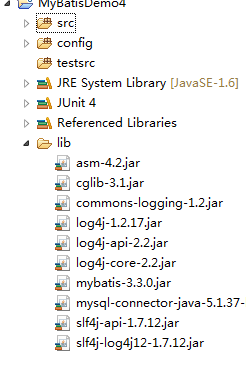
三、创建实现类和Mybatis各个配置文件
3.1、创建pojo类
/**

*/

package com.pb.mybatis.po;

import java.util.Date;

/**

 * @Title: User.java

 * @Package com.pb.mybatis.po

 * @ClassName User

 * @Description: TODO(用户类)

 * @author 刘楠

 * @date 2015-10-30 下午4:27:05

 * @version V1.0

 */

public class User {

    //用户ID

    private int id;

    //用户名

    private String name;

    //用户年龄

    private int age;

    //生日

    private Date birthday;

    //地址

    private String address;

    /**

     * @return the id

     */

    public int getId() {

        return id;

    }

    /**

     * @param id the id to set

     */

    public void setId(int id) {

        this.id = id;

    }

    /**

     * @return the name

     */

    public String getName() {

        return name;

    }

    /**

     * @param name the name to set

     */

    public void setName(String name) {

        this.name = name;

    }

    /**

     * @return the age

     */

    public int getAge() {

        return age;

    }

    /**

     * @param age the age to set

     */

    public void setAge(int age) {

        this.age = age;

    }

    /**

     * @return the birthday

     */

    public Date getBirthday() {

        return birthday;

    }

    /**

     * @param birthday the birthday to set

     */

    public void setBirthday(Date birthday) {

        this.birthday = birthday;

    }

    /**

     * @return the address

     */

    public String getAddress() {

        return address;

    }

    /**

     * @param address the address to set

     */

    public void setAddress(String address) {

        this.address = address;

    }

    /** (non Javadoc)

     * <p>Title: toString</p>

     * <p>Description: </p>

     * @return

     * @see java.lang.Object#toString()

     */

    @Override

    public String toString() {

        return "User [id=" + id + ", name=" + name + ", age=" + age

                + ", birthday=" + birthday + ", address=" + address + "]";

    }

}
3.2、创建db.properties
#数据库基本配置信息

#驱动

jdbc.driver=com.mysql.jdbc.Driver

#连接URL

jdbc.url=jdbc:mysql://localhost:3306/mybatis?CharacterEncoding=utf8

#用户名

jdbc.username=root

#密码

jdbc.password=root
log4j
# Global logging configuration

log4j.rootLogger=DEBUG, stdout

# MyBatis logging configuration...

# Console output...

log4j.appender.stdout=org.apache.log4j.ConsoleAppender

log4j.appender.stdout.layout=org.apache.log4j.PatternLayout

log4j.appender.stdout.layout.ConversionPattern=%5p [%t] - %m%n
3.3、创建UserMapper与mapper.xml
/**

*/

package com.pb.mybatis.mapper;

import java.util.List;

import org.apache.ibatis.annotations.Param;

import com.pb.mybatis.po.User;

/**

 * @Title: UserMapper.java

 * @Package com.pb.mybatis.mapper

 * @ClassName UserMapper

 * @Description: TODO(用户类数据访问层Mapper接口)

 * @author 刘楠

 * @date 2015-10-30 下午6:17:43

 * @version V1.0

 */

public interface UserMapper {

    public User findUserById(int id);

    /**

     *

     * @Title: findUserByWhere

     * @Description: TODO(根据条件查询用户)

     * @return List<User>

     */

    public List<User> findUserByWhere(@Param("id") int id,@Param("name")String username);

    /**

     *

     * @Title: updateUser

     * @Description: TODO(修改)

     * @param user

     * @return int

     */

    public int updateUser(User user);

}
xml
<?xml version="1.0" encoding="UTF-8"?>

<!DOCTYPE mapper

  PUBLIC "-//mybatis.org//DTD Mapper 3.0//EN"

  "http://mybatis.org/dtd/mybatis-3-mapper.dtd">

<mapper namespace="com.pb.mybatis.mapper.UserMapper">

<!-- 映射 -->

<resultMap type="User" id="userResultMap">

<id property="id" column="id"/>

<result property="name" column="name"/>

<result property="age" column="age"/>

<result property="birthday" column="birthday"/>

<result property="address" column="address"/>

</resultMap>

<select id="findUserById" parameterType="int" resultMap="userResultMap">

select * from user where id=#{id}

</select>

<!-- 根据条件查询用户 -->

<select id="findUserByWhere" resultMap="userResultMap">

select * from user

<where>

<!--where会自动去掉第一个成功的条件的and和or  -->

<if test="id!=null and id!='' and id!=0">

and id=#{id}

</if>

<if test="name!=null and name!=''">

or name like "%"#{name}"%"

</if>

</where>

</select>

<!--修改

SET NAME=#{name},

age=#{age},

birthday=#{birthday},

address=#{address}

-->

<update id="updateUser" parameterType="User">

UPDATE USER

<!--使用SET来更新  -->

<set>

<if test="name !=null and name !=''">NAME=#{name},</if>

<if test="age !=null  and age !='' and age !=0">age=#{age},</if>

<if test="birthday !=null">birthday=#{birthday},</if>

<if test="address !=null and address !=''">address=#{address}</if>

</set>

WHERE id=#{id}

</update>

</mapper>
3.4、创建configuration.xml
<?xml version="1.0" encoding="UTF-8"?>

<!DOCTYPE configuration

  PUBLIC "-//mybatis.org//DTD Config 3.0//EN"

  "http://mybatis.org/dtd/mybatis-3-config.dtd">

<configuration>

<properties resource="db.properties" />

<typeAliases>

<!--使用默认别名  -->

<package name="com.pb.mybatis.po"/>

</typeAliases>

<environments default="development">

<environment id="development">

    <transactionManager type="JDBC"/>

    <dataSource type="POOLED">

        <property name="driver" value="${jdbc.driver}"/>

        <property name="url" value="${jdbc.url}"/>

        <property name="username" value="${jdbc.username}"/>

        <property name="password" value="${jdbc.password}"/>

    </dataSource>

</environment>

</environments>

<mappers>

<!-- 加载映射 -->

<package name="com.pb.mybatis.mapper"/>

</mappers>

</configuration>
3.5、测试
/**

*/

package com.pb.mybatis.mapper;

import static org.junit.Assert.*;

import java.io.InputStream;

import java.util.Date;

import java.util.List;

import org.apache.ibatis.io.Resources;

import org.apache.ibatis.session.SqlSession;

import org.apache.ibatis.session.SqlSessionFactory;

import org.apache.ibatis.session.SqlSessionFactoryBuilder;

import org.junit.Before;

import org.junit.Test;

import com.pb.mybatis.po.User;

/**

 * @Title: UserMapperTest.java

 * @Package com.pb.mybatis.mapper

 * @ClassName UserMapperTest

 * @Description: TODO(用一句话描述该文件做什么)

 * @author 刘楠

 * @date 2015-10-30 下午6:25:23

 * @version V1.0

 */

public class UserMapperTest {

private SqlSessionFactory sqlSessionFactory;

    /**

     *

     * @Title: setUp

     * @Description: TODO(在每个方法前执行的方法)

     * @throws Exception void

     */

    @Before

    public void setUp() throws Exception {

        String resource="configuration.xml";

        InputStream in=Resources.getResourceAsStream(resource);

        //获取会话工厂

        sqlSessionFactory=new SqlSessionFactoryBuilder().build(in);

    }

    @Test

    public void testFindUserById() {

        //获取会话

        SqlSession sqlSession=sqlSessionFactory.openSession();

        UserMapper userMapper=sqlSession.getMapper(UserMapper.class);

        User user=userMapper.findUserById(1);

        System.out.println(user);

    }

    @Test

    public void testFindUserByWhere() {

        //获取会话

        SqlSession sqlSession=sqlSessionFactory.openSession();

        UserMapper userMapper=sqlSession.getMapper(UserMapper.class);

        List<User> list=userMapper.findUserByWhere(0,"");

        System.out.println(list);

    }

    @Test

    public void testUpdateUser() {

        //获取会话

        SqlSession sqlSession=sqlSessionFactory.openSession();

        UserMapper userMapper=sqlSession.getMapper(UserMapper.class);

        User user=userMapper.findUserById(6);

        System.out.println(user);

        user.setBirthday(new Date());

        user.setName("sssss");

        user.setAddress("ddd");

        int num=userMapper.updateUser(user);

        sqlSession.commit();

        System.out.println("num="+num);

    }

}
MyBatis入门(四)---动态SQL的更多相关文章
- Mybatis入门之动态sql
Mybatis入门之动态sql 通过mybatis提供的各种标签方法实现动态拼接sql. 1.if.where.sql.include标签(条件.sql片段) <sql id="sel ...
- mybatis入门基础----动态SQL
原文:http://www.cnblogs.com/selene/p/4613035.html 阅读目录 一:动态SQL 二:SQL片段 三:foreach 回到顶部 一:动态SQL 1.1.定义 m ...
- <MyBatis>入门六 动态sql
package org.maple.mapper; import org.apache.ibatis.annotations.Param; import org.maple.pojo.Employee ...
- 【mybatis深度历险系列】mybatis中的动态sql
最近一直做项目,博文很长时间没有更新了,今天抽空,学习了一下mybatis,并且总结一下.在前面的博文中,小编主要简单的介绍了mybatis中的输入和输出映射,并且通过demo简单的介绍了输入映射和输 ...
- mybatis 详解------动态SQL
mybatis 详解------动态SQL 目录 1.动态SQL:if 语句 2.动态SQL:if+where 语句 3.动态SQL:if+set 语句 4.动态SQL:choose(when,o ...
- mybatis中的动态SQL
在实际开发中,数据库的查询很难一蹴而就,我们往往要根据各种不同的场景拼接出不同的SQL语句,这无疑是一项复杂的工作,我们在使用mybatis时,mybatis给我们提供了动态SQL,可以让我们根据具体 ...
- Mybatis映射文件动态SQL语句-01
因为在很多业务逻辑复杂的项目中,往往不是简单的sql语句就能查询出来自己想要的数据,所有mybatis引入了动态sql语句, UserMapper.xml <?xml version=" ...
- MyBatis实战之动态SQL
如果使用JDBC或者其他框架,很多时候你得根据需要去拼接SQL,这是一个麻烦的事情,而MyBatis提供对SQL语句动态的组装能力,而且它只有几个基本的元素,非常简单明了,大量的判断都可以在MyBat ...
- 6.Mybatis中的动态Sql和Sql片段(Mybatis的一个核心)
动态Sql是Mybatis的核心,就是对我们的sql语句进行灵活的操作,他可以通过表达式,对sql语句进行判断,然后对其进行灵活的拼接和组装.可以简单的说成Mybatis中可以动态去的判断需不需要某些 ...
- MyBatis注解配置动态SQL
MySQL创建表 DROP TABLE IF EXISTS `tb_employee`; CREATE TABLE `tb_employee` ( `id` int(11) NOT NULL AUTO ...
随机推荐
- codeforce Number of Ways(暴力)
#include<iostream> #include<cstdio> #include<cstring> #include<algorithm> #d ...
- 简单学ES6 - class
前言 随着ES6标准的定稿,众多的特性也趋于稳定,各大浏览器也在逐步实现这些特性,那么对ES6有更多的了解就无可厚非了. 准备 在学习ES6之前,我们需要有一个环境来测试ES6代码.在这里我推荐使用n ...
- suricata学习笔记1--初步认识
1.前言 最近工作需要对网站的关键字进行检测,找出敏感词.这个过程需要对报文进行收集.解码.检测和记录日志.当前只是简单实现功能,根据关键字进行简单的匹配,而没有进行关键字的语义分析.导致的结果就是 ...
- 开放产品开发(OPD):Archi 汉化工具下载
本文更新版本已挪至 http://www.zhoujingen.cn/blog/3378.html ------------------------------ 在OPD中,我们使用了ArchiMa ...
- SerializationUtility
public static T LoadFromXml<T>(string fileName) { FileStream fs = null; try { XmlSerializer se ...
- 利用DropDownList实现下拉
在视图的Model<Vo>里面我们需要使用IEnumerable来将别的列表的数据全部的转化为下拉列表.下面是关于在项目中实际的写法. 一:实现下拉属性列表的写法 通过使用Select ...
- LRU Cache
LRU Cache 题目链接:https://oj.leetcode.com/problems/lru-cache/ Design and implement a data structure for ...
- C# WinFrom 跨线程访问控件
1.跨线程访问控件委托和类的定义 using System; using System.Windows.Forms; namespace ahwildlife.Utils { /// <summ ...
- 使用事务操作SQLite数据批量插入,提高数据批量写入速度,源码讲解
SQLite数据库作为一般单机版软件的数据库,是非常优秀的,我目前单机版的软件产品线基本上全部替换Access作为优选的数据库了,在开发过程中,有时候需要批量写入数据的情况,发现传统的插入数据模式非常 ...
- 人民币大写金额转换C#方法
方法的代码如下: /// <summary> /// 人民币大写 /// </summary> /// <param name="input"> ...