
HttpModule的一些初步认识
新建一个类 ValidaterHttpModuleEvents继承管道接口 IHttpModule,代码如下
public class ValidaterHttpModuleEvents:IHttpModule

    {

        public void Dispose()

        {

        }

        public void Init(HttpApplication context)

        {

            context.BeginRequest += new EventHandler(context_BeginRequest);

            context.EndRequest += new EventHandler(context_EndRequest);

            context.AuthorizeRequest += new EventHandler(context_AuthorizeRequest);

            context.AcquireRequestState += new EventHandler(context_AcquireRequestState);

            context.AuthenticateRequest += new EventHandler(context_AuthenticateRequest);

            context.PreRequestHandlerExecute += new EventHandler(context_PreRequestHandlerExecute);

            context.PostRequestHandlerExecute += new EventHandler(context_PostRequestHandlerExecute);

            context.ReleaseRequestState += new EventHandler(context_ReleaseRequestState);

            context.UpdateRequestCache += new EventHandler(context_UpdateRequestCache);

            context.ResolveRequestCache += new EventHandler(context_ResolveRequestCache);

            context.PreSendRequestHeaders += new EventHandler(context_PreSendRequestHeaders);

            context.PreSendRequestContent += new EventHandler(context_PreSendRequestContent);

        }

        //

        void context_BeginRequest(object sender, EventArgs e)

        {

            HttpApplication application = (HttpApplication)sender;

            application.Context.Response.Write("请求处理开始<br>");

        }

        //

        void context_AuthenticateRequest(object sender, EventArgs e)

        {

            HttpApplication application = (HttpApplication)sender;

            application.Context.Response.Write("封装请求身份验证<br>");

        }

        //

        void context_AuthorizeRequest(object sender, EventArgs e)

        {

            HttpApplication application = (HttpApplication)sender;

            application.Context.Response.Write("封装检查是否能利用以前缓存的输出页面处理请求的过程<br>");

        }

        //4

        void context_ResolveRequestCache(object sender, EventArgs e)

        {

            HttpApplication application = (HttpApplication)sender;

            application.Context.Response.Write("从缓存中得到数据<br>");

        }

        //5加载初始化Session

        void context_AcquireRequestState(object sender, EventArgs e)

        {

            HttpApplication application = (HttpApplication)sender;

            application.Context.Response.Write("封装坚持是否能利用以前缓存的输出页面处理请求<br>");

        }

        //

        void context_PreRequestHandlerExecute(object sender, EventArgs e)

        {

            HttpApplication application = (HttpApplication)sender;

            application.Context.Response.Write("Http请求进入HttpHandler之前触发<br>");

        }

        //

        void context_PostRequestHandlerExecute(object sender, EventArgs e)

        {

            HttpApplication application = (HttpApplication)sender;

            application.Context.Response.Write("在Http请求进入HttpHandler之后触发<br>");

        }

        //

        void context_ReleaseRequestState(object sender, EventArgs e)

        {

            HttpApplication application = (HttpApplication)sender;

            application.Context.Response.Write("存储Session状态时触发<br>");

        }

        //

        void context_UpdateRequestCache(object sender, EventArgs e)

        {

            HttpApplication application = (HttpApplication)sender;

            application.Context.Response.Write("更新缓存信息时触发<br>");

        }

        //

        void context_EndRequest(object sender, EventArgs e)

        {

            HttpApplication application = (HttpApplication)sender;

            application.Context.Response.Write("Http请求处理完成<br>");

        }

        //

        void context_PreSendRequestHeaders(object sender, EventArgs e)

        {

            HttpApplication application = (HttpApplication)sender;

            application.Context.Response.Write("在向客户端发送Header之前触发<br>");

        }

        //

        void context_PreSendRequestContent(object sender, EventArgs e)

        {

            HttpApplication application = (HttpApplication)sender;

            application.Context.Response.Write("在向客户端发送内容之前触发<br>");

        }
新建一个aspx页面,在Page_Load事件写上
Response.Write("<br/><br/>来自Default.aspx页面<br/>");
最后,在配置文件中加上如下代码
<httpModules>
<add name="MyHttpModule" type="HttpModuleTest.ValidaterHttpModuleEvents,HttpModuleTest"/>
</httpModules>
type中的“HttpModuleTest”表示最基本的命名空间,ValidaterHttpModuleEvents表示自己的HttpModule名称。
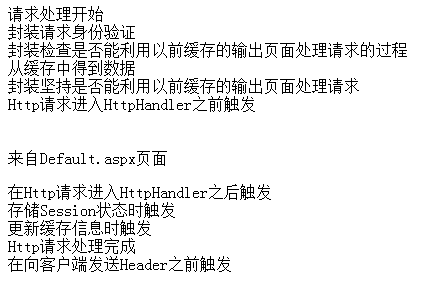
运行结果如下图所示
HttpModule的一些初步认识的更多相关文章
- ASP.NET底层与各个组件的初步认识与理解 (转载)
ASP.NET底层的初步认识与理解 最近在国外的网站乱走一通,发现一些比较好的文章,收集整理加于自己的理解,作为笔记形式记录下来,让以后自己有个回忆. ASP.NET是一个非常强大的构建Web应用 ...
- Git使用总结 Asp.net生命周期与Http协议 托管代码与非托管代码的区别 通过IEnumerable接口遍历数据 依赖注入与控制反转 C#多线程——优先级 AutoFac容器初步 C#特性详解 C#特性详解 WPF 可触摸移动的ScrollViewer控件 .NET(C#)能开发出什么样的APP?盘点那些通过Smobiler开发的移动应用
一,原理 首先,我们要明白Git是什么,它是一个管理工具或软件,用来管理什么的呢?当然是在软件开发过程中管理软件或者文件的不同版本的工具,一些作家也可以用这个管理自己创作的文本文件,由Linus开发的 ...
- 移动端之Android开发的几种方式的初步体验
目前越来越多的移动端混合开发方式,下面列举的大多数我都略微的尝试过,就初步的认识写个简单的心得: 开发方式 开发环境 是否需要AndroidSDK 支持跨平台 开发语言&技能 MUI Win+ ...
- CSharpGL(29)初步封装Texture和Framebuffer
+BIT祝威+悄悄在此留下版了个权的信息说: CSharpGL(29)初步封装Texture和Framebuffer +BIT祝威+悄悄在此留下版了个权的信息说: Texture和Framebuffe ...
- Android自定义View初步
经过上一篇的介绍,大家对于自定义View一定有了一定的认识,接下来我们就以实现一个图片下显示文字的自定义View来练习一下.废话不多说,下面进入我们的正题,首先看一下我们的思路,1.我们需要通过在va ...
- 初步认识Node 之Node为何物
很多人即便是在使用了Node之后也不知道它到底是什么,阅读完本文你应该会有一个初步的.具体的概念了. Node的目标 提供一种简单的构建可伸缩网络程序的方法.那么,什么是可伸缩网络程序呢?可伸缩 ...
- [入门级] 基于 visual studio 2010 mvc4 的图书管理系统开发初步 (二)
[入门级] 基于 visual studio 2010 mvc4 的图书管理系统开发初步 (二) Date 周六 10 一月 2015 By 钟谢伟 Category website develop ...
- ASP.NET使用HttpModule压缩并删除空白Html请求
当我们压缩我的Response后再传到Client端时,可以明显节省宽带. 提升Site的性能. 现在的浏览器大部分都支持Gzip,Deflate压缩. 同时我们还可以删除一些空白段,空行,注释等以使 ...
- [转]HttpModule的认识
HttpModule是向实现类提供模块初始化和处置事件.当一个HTTP请求到达HttpModule时,整个ASP.NET Framework系统还并没有对这个HTTP请求做任何处理,也就是说此时对于H ...
随机推荐
- EF学习笔记——通用增删改查方案
http://blog.csdn.net/leftfist/article/details/25005307 我刚接触EF未久,还不知道它有什么强大之处,但看上去,EF提供了一般的增删改查功能.以往用 ...
- javascript 中的 true 或 false
JavaScript中奇葩的假值 通常在以下语句结构中需要判断真假 if分支语句 while循环语句 for里的第二个语句 如 1 2 3 4 5 6 7 if (boo) { // do somet ...
- nodejs-基本语法
初识nodejs-基本语法 nodejs是JavaScript的一个在后端的运行环境,关于nodejs的认识,我们可以看上一篇文章<<初识nodejs>>,我们要使用nodej ...
- Oracle调整联机日志大小
近期一个项目反馈月底高峰期时系统整体性能下降,抓取对应的AWR和ASH查看,等待事件排第一位的竟然是redo日志切换.进一步看每秒的日志量是5M多,而日志文件大小仅有200M.建议项目上调整日志大小, ...
- Nginx 负载均衡学习
nginx作为负载均衡服务器,用户请求先到达nginx,再由nginx根据负载配置将请求转发至 tomcat服务器. nginx负载均衡服务器 tomcat1服务器 tomcat2服务器 1.1 ...
- 为什么要使用sass
或许你已经听过一个叫作Sass的东东?可能你已经了解它,并且你能像大师一样写出一些函数? 对于不清楚我在讲什么的读者或者客户,你们可以想想web开发过程,你们的期望和站点用户的体验想要怎样的.无论如何 ...
- 【solr】java整合solr5.0之solrj的使用
1.首先导入solrj需要的的架包 2.需要注意的是低版本是solr是使用SolrServer进行URL实例的,5.0之后已经使用SolrClient替代这个类了,在添加之后首先我们需要根据schem ...
- node_nibbler:自定义Base32/base64 encode/decode库
https://github.com/mattrobenolt/node_nibbler 可以将本源码复制到自己需要的JS文件中,比如下面这个文件,一个基于BASE64加密请求参数的REST工具: [ ...
- JSTL标签库中<c:choose></c:choose>不能放JSP页面<!-- -->注释
笔者最近在使用JSTL标签库的<c:choose>标签时候,发现在该标签体中加了JSP的<!-- -->注释时,总是会显示报错信息.错误的信息如下: <span styl ...
- protoc 和 protoc-gen-go 产生的 proto 文件代码对比
protoc 命令来自 https://github.com/google/protobuf, 由于这里没有 go 的产生代码, go的产生代码在 protoc-gen-go (https://gi ...