
C# 使用AForge调用摄像头
AForge官网地址:http://www.aforgenet.com/framework/
using System;

using System.Collections.Generic;

using System.ComponentModel;

using System.Data;

using System.Drawing;

using System.Linq;

using System.Text;

using System.Windows.Forms;

using AForge.Video.DirectShow;

using AForge.Video;

namespace AForgeDemo

{

    public partial class Form1 : Form

    {

        private bool DeviceExist = false;

        private FilterInfoCollection videoDevices;

        private VideoCaptureDevice videoSource = null;

        public Form1()

        {

            InitializeComponent();

        }

        private void Form1_Load(object sender, EventArgs e)

        {

            getCamList();

        }

        private void getCamList()

        {

            try

            {

                videoDevices = new FilterInfoCollection(FilterCategory.VideoInputDevice);

                cbDev.Items.Clear();

                if (videoDevices.Count == 0)

                    throw new ApplicationException();

                DeviceExist = true;

                foreach (FilterInfo device in videoDevices)

                {

                    cbDev.Items.Add(device.Name);

                }

                cbDev.SelectedIndex = 0;

            }

            catch (ApplicationException)

            {

                DeviceExist = false;

                cbDev.Items.Add("无设备");

            }

        }

        private void CloseVideoSource()

        {

            if (!(videoSource == null))

                if (videoSource.IsRunning)

                {

                    videoSource.SignalToStop();

                    videoSource = null;

                }

        }

        private void video_NewFrame(object sender, NewFrameEventArgs eventArgs)

        {

            Bitmap img = (Bitmap)eventArgs.Frame.Clone();

            picVideo.Image = img;

        }

        private void Form1_FormClosed(object sender, FormClosedEventArgs e)

        {

            CloseVideoSource();

        }

        private void btnOpen_Click(object sender, EventArgs e)

        {

            if (DeviceExist)

            {

                videoSource = new VideoCaptureDevice(videoDevices[cbDev.SelectedIndex].MonikerString);

                videoSource.NewFrame += new NewFrameEventHandler(video_NewFrame);

                CloseVideoSource();

                videoSource.DesiredFrameSize = new Size(picVideo.Width, picVideo.Height);

                videoSource.Start();

                lbinfo.Text = "设备运行...";

            }

            else

            {

                lbinfo.Text = "没有选择设备";

            }

        }

        private void btnStop_Click(object sender, EventArgs e)

        {

            if (videoSource.IsRunning)

            {

                CloseVideoSource();

                lbinfo.Text = "设备停止";

            }

        }

    }

}
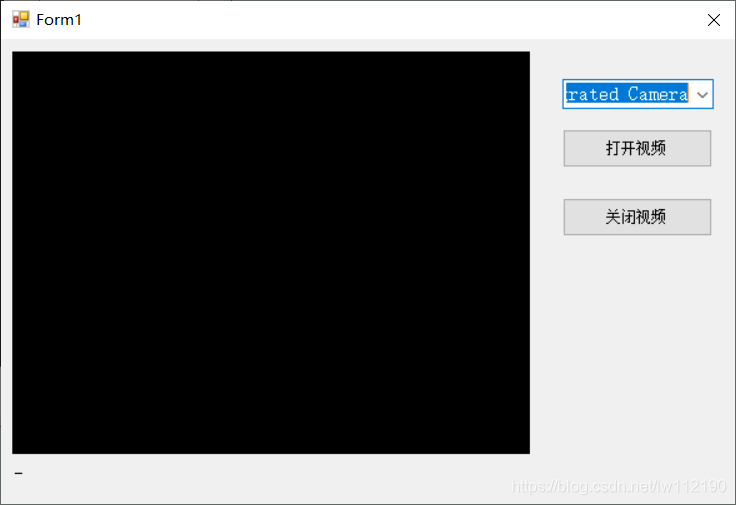
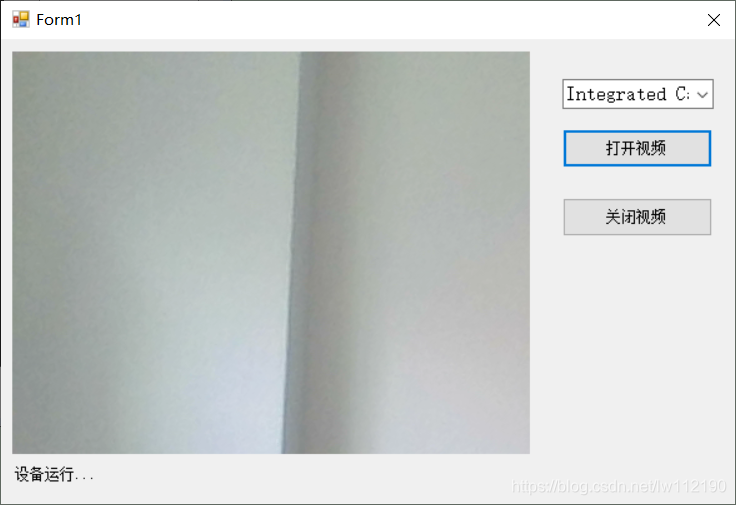
效果图:
C# 使用AForge调用摄像头的更多相关文章
- AForge调用摄像头拍照时设置分辨率
简单记录下AForge2.2.5.0版本调用摄像头拍照时设置分辨率的方法. FilterInfo info = _videoDevices[0];//获取第一个摄像头 _cameraDevice = ...
- C#使用Aforge调用摄像头拍照
一. 新建一个Winform项目 二.使用Nuget添加引用 安装下图中红色框住的两个程序包 安装完后发现安装了如下图的程序包,这是因为上述两个程序包存在对其它程序包的依赖. 三.编写程序 1. 窗体 ...
- Emgucv(一)Aforge切换摄像头并调用摄像头属性
一.新建一个Windows窗体应用程序,在Form1窗体上添加一个PictureBox控件.一个ComboBox控件,命名为PictureBox1.cbCapture,还有两个Button控件,Tex ...
- C# - VS2019调用AForge库实现调用摄像头拍照功能
前言 作为一名资深Delphi7程序员,想要实现摄像头扫描一维码/二维码功能,发现所有免费的第三方库都没有简便的实现办法,通用的OpenCV或者ZXing库基本上只支持XE以上的版本,而且一维码的识别 ...
- C#调用摄像头(AForge)实现扫描条码解析(Zxing)功能
网上找了很多代码,都比较零散,以下代码纯自己手写,经过测试.下面有链接,下载后可以直接使用. 介绍: 自动识别:点击Start按钮会调用PC摄像头,代码内置Timer,会每100毫秒识别一下当前摄像头 ...
- 【C#】#100 调用摄像头
需求:由于项目需要获得用户的头像,所以需要用C#调用摄像头获取头像. 下面写一个调用摄像头的方法 案例:调用摄像头的一个DEMO[效果图] 使用的类库:AForge.dll [Demo下载,Dem ...
- C# winfrom调用摄像头扫描二维码(完整版)
前段时间看到一篇博客,是这个功能的,参考了那篇博客写了这个功能玩一玩,没有做商业用途.发现他的代码给的有些描述不清晰的,我就自己整理一下发出来记录一下. 参考博客链接:https://www.cnbl ...
- unity调用摄像头的方法
http://blog.csdn.net/cocoa_china/article/details/10527995 using UnityEngine; using System.Collection ...
- java javacv调用摄像头并拍照
调用摄像头并拍张照片,我一开始用的java的jmf媒体框架,但这个有很多的局限性不好使并且很有麻烦,兜了一圈发现javacv东西,研究之后这东西简单,方便:废话不多说了来重点. javacv官网:点击 ...
- Android入门(十六)调用摄像头相册
原文链接:http://www.orlion.ga/665/ 一.调用摄像头 创建一个项目ChoosePicDemo,修改activity_main.xml: <LinearLayout xml ...
随机推荐
- Reactive 简介
1. 概念 Reactive 非常适合低延迟.高吞吐量的工作负载. Reactive Processing 是一种范式(规范),它使开发人员能够构建非阻塞的.异步的应用程序,这些应用程序能够处理背压( ...
- CF1398C Good Subarrays(写给我们萌新团体)
Good Subarrays 传送门: Good Subarrays - 洛谷 | 计算机科学教育新生态 (luogu.com.cn) 思路 暴力!!!!! 一如既往的暴力!!! 复杂度O(n^2) ...
- golang常用库包:redis操作库go-redis使用(03)-高级数据结构和其它特性
Redis 高级数据结构操作和其它特性 第一篇:go-redis使用,介绍Redis基本数据结构和其他特性,以及 go-redis 连接到Redis https://www.cnblogs.com/j ...
- 常用SQL语句备查
查询表中某一列是否有重复值 SELECT bizType, COUNT(bizType) FROM Res GROUP BY bizType HAVING COUNT(bizType) > 1 ...
- zookeeper源码(09)follower处理客户端请求
在zookeeper中,follower也可以接收客户端连接,处理客户端请求,本文将分析follower处理客户端请求的流程: 读请求处理 写请求转发与响应 follower接收转发客户端请求 网络层 ...
- 项目实战:Qt管道焊接参数条码打印系统(条码打印机TSC 244 Pro、打印条码、打印中文、打印字符、多张连续打印)
需求 电脑端通过条码打印机TSC-TTP244 Pro: 1. 打印出尺寸为60*30cm 2. 条码打印机TSC-TTP244 Pro 不干胶纸 (不需要碳带,热敏纸) 3. window ...
- C#程序全局异常处理—WPF和Web API两种模式
C#程序的全局异常处理,网上搜下资料都是一大堆,我这里最近也是独立做一个B/S结构的小项目, 后面又增加了需求用WPF实现相同的功能,这里将我所使用的全局异常处理方式做一个简短的总结分享. Web A ...
- EL表达式处理字符串
示例 JSP页面页头添加 <%@ taglib uri="/WEB-INF/taglib/c.tld" prefix="c"%> <%@ ta ...
- C语言初学习——易错点合集(长篇)
转义字符 例题一 int main() { char s[] = "012xy\08s34f4w2"; int i, n = 0; for (i = 0; s[i] != 0; i ...
- C++ STL之 map 学习笔记
•何为 map? map 是 STL 的一个关联容器,它提供一对一的数据处理,map 中存放的是一个 key-value键值对,其类型可以自己定义: 第一个可以称为关键字,每个关键字在 map 中只能 ...