
dotnet 6 已知问题 获取 CultureInfo.NumberFormat 可能抛出 IndexOutOfRangeException 异常
本文记录一个 dotnet 6 已知问题,准确来说这是一个在 dotnet 5 引入的问题,到 dotnet 6.0.12 还没修。在获取 CultureInfo.NumberFormat 属性时,在一些奇怪的 Windows 设备上可能抛出 IndexOutOfRangeException 异常。本文将来告诉大家问题的原因和解决方法
最简复现代码
_ = new CultureInfo("en-US").NumberFormat;
在一些语言文化奇怪的系统上运行,以上代码将会抛出 IndexOutOfRangeException 异常。这个问题其中的一个影响就是会让 WPF 应用程序的 TextBlock 在布局时抛出 IndexOutOfRangeException 而失败。如果刚好全局捕获异常,且无视,那将会无限抛出
异常堆栈如下
>  PresentationCore.dll!MS.Internal.TextFormatting.DigitState.HasLatinDigits(System.Globalization.CultureInfo culture)

   PresentationCore.dll!MS.Internal.TextFormatting.DigitState.GetDigitCulture(System.Globalization.CultureInfo numberCulture, System.Windows.Media.NumberSubstitutionMethod method, out bool contextual)

   PresentationCore.dll!MS.Internal.TextFormatting.DigitState.SetTextRunProperties(System.Windows.Media.TextFormatting.TextRunProperties properties)

   PresentationCore.dll!MS.Internal.TextFormatting.SimpleRun.Create(MS.Internal.TextFormatting.FormatSettings settings, System.Windows.Media.TextFormatting.CharacterBufferRange charString, System.Windows.Media.TextFormatting.TextRun textRun, int cp, int cpFirst, int runLength, int widthLeft, int idealRunOffsetUnRounded, double pixelsPerDip)

   PresentationCore.dll!MS.Internal.TextFormatting.SimpleTextLine.Create(MS.Internal.TextFormatting.FormatSettings settings, int cpFirst, int paragraphWidth, double pixelsPerDip)

   PresentationCore.dll!MS.Internal.TextFormatting.TextFormatterImp.FormatLineInternal(System.Windows.Media.TextFormatting.TextSource textSource, int firstCharIndex, int lineLength, double paragraphWidth, System.Windows.Media.TextFormatting.TextParagraphProperties paragraphProperties, System.Windows.Media.TextFormatting.TextLineBreak previousLineBreak, System.Windows.Media.TextFormatting.TextRunCache textRunCache)

   PresentationCore.dll!MS.Internal.TextFormatting.TextFormatterImp.FormatLine(System.Windows.Media.TextFormatting.TextSource textSource, int firstCharIndex, double paragraphWidth, System.Windows.Media.TextFormatting.TextParagraphProperties paragraphProperties, System.Windows.Media.TextFormatting.TextLineBreak previousLineBreak, System.Windows.Media.TextFormatting.TextRunCache textRunCache)

   PresentationFramework.dll!System.Windows.Controls.TextBlock.MeasureOverride(System.Windows.Size constraint)

   PresentationFramework.dll!System.Windows.FrameworkElement.MeasureCore(System.Windows.Size availableSize)

   PresentationCore.dll!System.Windows.UIElement.Measure(System.Windows.Size availableSize)

   PresentationFramework.dll!System.Windows.Controls.Grid.MeasureOverride(System.Windows.Size constraint)

   PresentationFramework.dll!System.Windows.FrameworkElement.MeasureCore(System.Windows.Size availableSize)

   PresentationCore.dll!System.Windows.UIElement.Measure(System.Windows.Size availableSize)

   PresentationFramework.dll!MS.Internal.Helper.MeasureElementWithSingleChild(System.Windows.UIElement element, System.Windows.Size constraint)

   PresentationFramework.dll!System.Windows.FrameworkElement.MeasureCore(System.Windows.Size availableSize)

   PresentationCore.dll!System.Windows.UIElement.Measure(System.Windows.Size availableSize)

   PresentationFramework.dll!System.Windows.Controls.Decorator.MeasureOverride(System.Windows.Size constraint)

   PresentationFramework.dll!System.Windows.Documents.AdornerDecorator.MeasureOverride(System.Windows.Size constraint)

   PresentationFramework.dll!System.Windows.FrameworkElement.MeasureCore(System.Windows.Size availableSize)

   PresentationCore.dll!System.Windows.UIElement.Measure(System.Windows.Size availableSize)

   PresentationFramework.dll!System.Windows.Controls.Border.MeasureOverride(System.Windows.Size constraint)

   PresentationFramework.dll!System.Windows.FrameworkElement.MeasureCore(System.Windows.Size availableSize)

   PresentationCore.dll!System.Windows.UIElement.Measure(System.Windows.Size availableSize)

   PresentationFramework.dll!System.Windows.Window.MeasureOverrideHelper(System.Windows.Size constraint)

   PresentationFramework.dll!System.Windows.Window.MeasureOverride(System.Windows.Size availableSize)

   PresentationFramework.dll!System.Windows.FrameworkElement.MeasureCore(System.Windows.Size availableSize)

   PresentationCore.dll!System.Windows.UIElement.Measure(System.Windows.Size availableSize)

   PresentationCore.dll!System.Windows.Interop.HwndSource.SetLayoutSize()

   PresentationCore.dll!System.Windows.Interop.HwndSource.RootVisualInternal.set(System.Windows.Media.Visual value)

   PresentationFramework.dll!System.Windows.Window.SetRootVisualAndUpdateSTC()

   PresentationFramework.dll!System.Windows.Window.SetupInitialState(double requestedTop, double requestedLeft, double requestedWidth, double requestedHeight)

   PresentationFramework.dll!System.Windows.Window.CreateSourceWindow(bool duringShow)

   PresentationFramework.dll!System.Windows.Window.ShowHelper(object booleanBox)

   WindowsBase.dll!System.Windows.Threading.ExceptionWrapper.InternalRealCall(System.Delegate callback, object args, int numArgs)

   WindowsBase.dll!System.Windows.Threading.ExceptionWrapper.TryCatchWhen(object source, System.Delegate callback, object args, int numArgs, System.Delegate catchHandler)

   WindowsBase.dll!System.Windows.Threading.DispatcherOperation.InvokeImpl()

   WindowsBase.dll!MS.Internal.CulturePreservingExecutionContext.CallbackWrapper(object obj)

   System.Private.CoreLib.dll!System.Threading.ExecutionContext.RunInternal(System.Threading.ExecutionContext executionContext, System.Threading.ContextCallback callback, object state)

   WindowsBase.dll!MS.Internal.CulturePreservingExecutionContext.Run(MS.Internal.CulturePreservingExecutionContext executionContext, System.Threading.ContextCallback callback, object state)

   WindowsBase.dll!System.Windows.Threading.DispatcherOperation.Invoke()

   WindowsBase.dll!System.Windows.Threading.Dispatcher.ProcessQueue()

   WindowsBase.dll!System.Windows.Threading.Dispatcher.WndProcHook(nint hwnd, int msg, nint wParam, nint lParam, ref bool handled)

   WindowsBase.dll!MS.Win32.HwndWrapper.WndProc(nint hwnd, int msg, nint wParam, nint lParam, ref bool handled)

   WindowsBase.dll!MS.Win32.HwndSubclass.DispatcherCallbackOperation(object o)

   WindowsBase.dll!System.Windows.Threading.ExceptionWrapper.InternalRealCall(System.Delegate callback, object args, int numArgs)

   WindowsBase.dll!System.Windows.Threading.ExceptionWrapper.TryCatchWhen(object source, System.Delegate callback, object args, int numArgs, System.Delegate catchHandler)

   WindowsBase.dll!System.Windows.Threading.Dispatcher.LegacyInvokeImpl(System.Windows.Threading.DispatcherPriority priority, System.TimeSpan timeout, System.Delegate method, object args, int numArgs)

   WindowsBase.dll!MS.Win32.HwndSubclass.SubclassWndProc(nint hwnd, int msg, nint wParam, nint lParam)
解决方法
可选以下任意方式解决
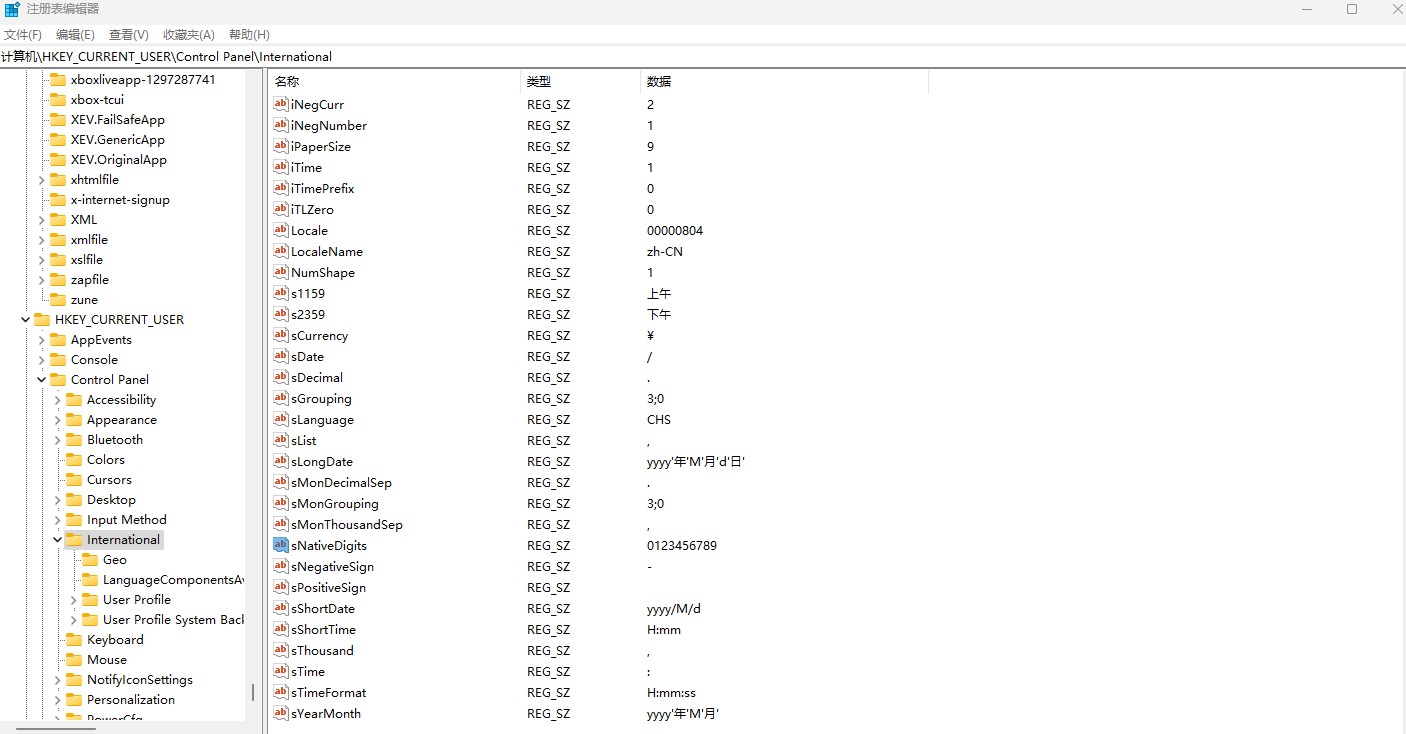
- 尝试修复用户错误的设置,因为这个设置不仅影响 .NET 系应用,同时也影响任何做好国际化多语言的应用。前往注册表的
HKEY_CURRENT_USER\Control Panel\International看一下sNativeDigits的内容,大部分情况下应该是0123456789才对。 另外,可以去控制面板的区域设置,更改日期、时间或数字格式,进入其他设置里面,点击重置 - 切换回 NLS 方案,切换方法是设置环境变量
DOTNET_SYSTEM_GLOBALIZATION_USENLS为 true 即可,详细请看 Globalization and ICU - .NET Microsoft Learn - 由于此问题在 .NET 7 运行时已修复,且官方无计划合入到 .NET 6 里。因此可以尝试更新自己的运行时到 .NET 7 版本,或者是挑拣 https://github.com/dotnet/runtime/pull/58598 的更改到自己的 .NET 6 运行时,进行私有发布
下图是注册表的配置:
如果是 .NET 系的非 WPF 应用,这个异常是在自己应用程序代码抛出的,可选采用忽略用户配置的方式,在创建 CultureInfo 对象时,可以传入参数,表示是否使用用户配置,如以下代码
var numberFormat = new CultureInfo("en-US", false).NumberFormat;
问题原因
此问题已报告给 .NET 官方,请看 https://github.com/dotnet/runtime/issues/83764
同步也报告给 WPF 官方,请看 https://github.com/dotnet/wpf/issues/7658
这个异常是在 .NET 5 引入的,根据官方文档可以了解到,在 .NET 5 之前,语言文化是调用平台相关的,也就是在 Windows 下调用的是 National Language Support (NLS) 进行语言文化格式化。在 .NET 5 才使用 International Components for Unicode (ICU) 进行格式化
而此问题就是设备的 ICU 存在问题导致的,更底层系统是什么问题,我没有了解到
在获取数字的语言文化时,将会进入 CultureData.GetNFIValues 方法,这个方法是采用如下代码来获取的
 // LOCALE_SNATIVEDIGITS (array of 10 single character strings).

 string digits = GetLocaleInfoCoreUserOverride(LocaleStringData.Digits);

 nfi._nativeDigits = new string[10];

 for (int i = 0; i < nfi._nativeDigits.Length; i++)

 {

     nfi._nativeDigits[i] = char.ToString(digits[i]);

 }
以上代码存在一个问题,那就是 GetLocaleInfoCoreUserOverride 函数可能返回一个空字符串,这就导致了 nfi._nativeDigits[i] = char.ToString(digits[i]); 获取 10 个字符时抛出异常
什么时候 GetLocaleInfoCoreUserOverride 函数返回空字符串?这个函数底层将调用到 CultureData.IcuGetLocaleInfo 函数,代码如下
        private string GetLocaleInfoCoreUserOverride(LocaleStringData type)

        {

            return ShouldUseUserOverrideNlsData ? NlsGetLocaleInfo(type) : IcuGetLocaleInfo(type);

        }
以上的 ShouldUseUserOverrideNlsData 默认值就是 false 值,只有设置环境变量 DOTNET_SYSTEM_GLOBALIZATION_USENLS 为 true 等方法才会是 true 的值,详细请看 Globalization and ICU - .NET Microsoft Learn
在 IcuGetLocaleInfo 函数里面是如此实现的,调用 GetLocaleInfoString 获取,如果获取失败,那就返回空字符串
 bool result = Interop.Globalization.GetLocaleInfoString(localeName, (uint)type, buffer, ICU_ULOC_KEYWORD_AND_VALUES_CAPACITY, uiCultureName);

 if (!result)

 {

     // Failed, just use empty string

     Debug.Fail("[CultureData.IcuGetLocaleInfo(LocaleStringData)] Failed");

     return string.Empty;

 }

 return new string(buffer);
因此 GetLocaleInfoCoreUserOverride 是可能在此情况下返回空字符串的。由于这是 ICU 引入的问题,通过以上代码也可以知道,只需要让 ShouldUseUserOverrideNlsData 为 true 即可不调用 IcuGetLocaleInfo 方法,换成 NlsGetLocaleInfo 方法,走 NLS 从而修复此问题
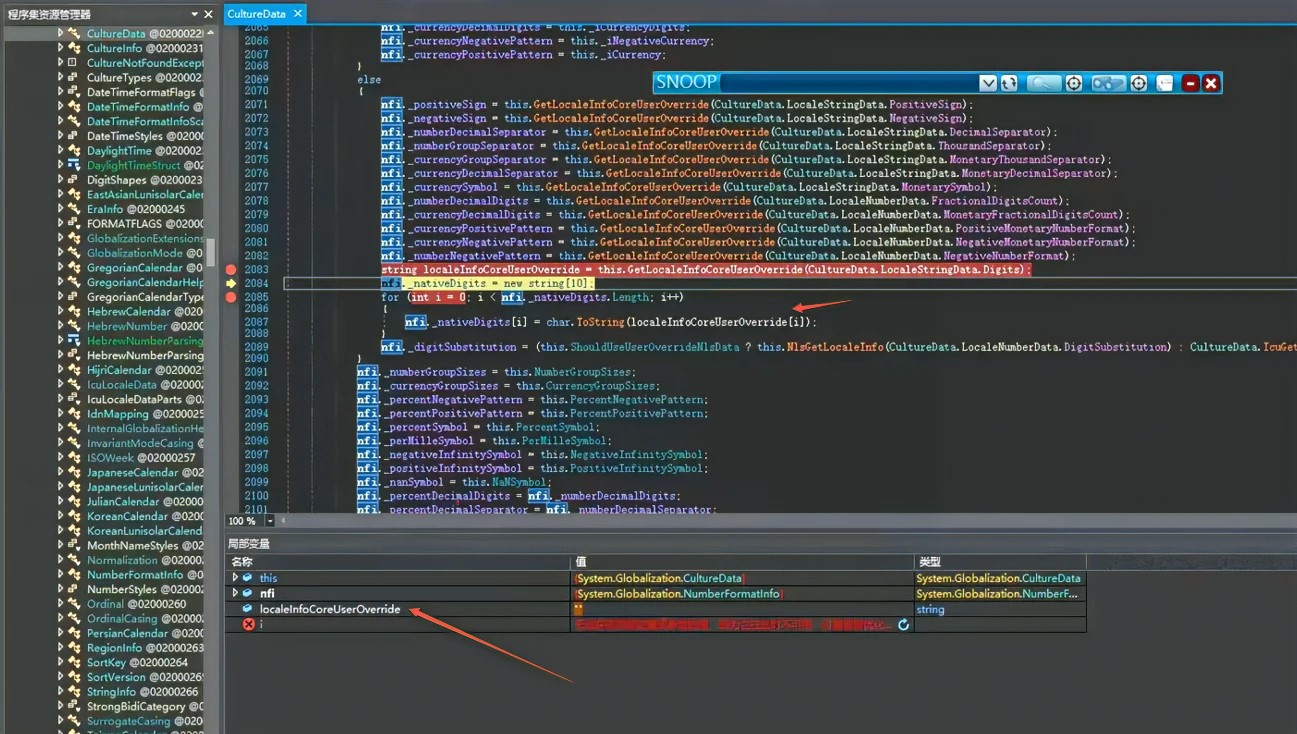
在 .NET 7 将判断返回值是空字符串,准确来说是对于 10 个字符,将返回的格式化字符串数组而不是强行读取
此问题会影响到 WPF 的原因是在 WPF 里面,默认的 XAML 语言格式化,在没有明确设置时,将会使用 en-US 文化,这是在 FrameworkElement 里面定义的,请看代码
 static public readonly DependencyProperty LanguageProperty =

             DependencyProperty.RegisterAttached(

                         "Language",

                         typeof(XmlLanguage),

                         _typeofThis,

                         new FrameworkPropertyMetadata(

                                 XmlLanguage.GetLanguage("en-US"),

                                 FrameworkPropertyMetadataOptions.Inherits | FrameworkPropertyMetadataOptions.AffectsMeasure));
在 TextBlock 里面,将会使用此 XAML 语言文化获取 CultureInfo 类型,调用堆栈如下
>  PresentationCore.dll!System.Windows.Markup.XmlLanguage.GetSpecificCulture()

   PresentationFramework.dll!MS.Internal.Text.DynamicPropertyReader.GetCultureInfo(System.Windows.DependencyObject element)

   PresentationFramework.dll!MS.Internal.Text.TextProperties.InitCommon(System.Windows.DependencyObject target)

   PresentationFramework.dll!MS.Internal.Text.TextProperties.TextProperties(System.Windows.FrameworkElement target, bool isTypographyDefaultValue)

   PresentationFramework.dll!System.Windows.Controls.TextBlock.GetLineProperties()

   PresentationFramework.dll!System.Windows.Controls.TextBlock.EnsureTextBlockCache()

   PresentationFramework.dll!System.Windows.Controls.TextBlock.MeasureOverride(System.Windows.Size constraint)
在 XmlLanguage.GetSpecificCulture 里面将会调用 CultureInfo.GetCultureInfoByIetfLanguageTag 获取 CultureInfo 类型。默认情况下传入参数就是 en-US 且会使用用户配置
通过异常的调用堆栈可以看到是在 DigitState.HasLatinDigits 函数里炸掉的,此函数的 culture 参数就是以上 XmlLanguage.GetSpecificCulture 获取到的值
>  PresentationCore.dll!MS.Internal.TextFormatting.DigitState.HasLatinDigits(System.Globalization.CultureInfo culture)

   PresentationCore.dll!MS.Internal.TextFormatting.DigitState.GetDigitCulture(System.Globalization.CultureInfo numberCulture, System.Windows.Media.NumberSubstitutionMethod method, out bool contextual)

   PresentationCore.dll!MS.Internal.TextFormatting.DigitState.SetTextRunProperties(System.Windows.Media.TextFormatting.TextRunProperties properties)

   PresentationCore.dll!MS.Internal.TextFormatting.SimpleRun.Create(MS.Internal.TextFormatting.FormatSettings settings, System.Windows.Media.TextFormatting.CharacterBufferRange charString, System.Windows.Media.TextFormatting.TextRun textRun, int cp, int cpFirst, int runLength, int widthLeft, int idealRunOffsetUnRounded, double pixelsPerDip)

   PresentationCore.dll!MS.Internal.TextFormatting.SimpleTextLine.Create(MS.Internal.TextFormatting.FormatSettings settings, int cpFirst, int paragraphWidth, double pixelsPerDip)

   PresentationCore.dll!MS.Internal.TextFormatting.TextFormatterImp.FormatLineInternal(System.Windows.Media.TextFormatting.TextSource textSource, int firstCharIndex, int lineLength, double paragraphWidth, System.Windows.Media.TextFormatting.TextParagraphProperties paragraphProperties, System.Windows.Media.TextFormatting.TextLineBreak previousLineBreak, System.Windows.Media.TextFormatting.TextRunCache textRunCache)

   PresentationCore.dll!MS.Internal.TextFormatting.TextFormatterImp.FormatLine(System.Windows.Media.TextFormatting.TextSource textSource, int firstCharIndex, double paragraphWidth, System.Windows.Media.TextFormatting.TextParagraphProperties paragraphProperties, System.Windows.Media.TextFormatting.TextLineBreak previousLineBreak, System.Windows.Media.TextFormatting.TextRunCache textRunCache)

   PresentationFramework.dll!System.Windows.Controls.TextBlock.MeasureOverride(System.Windows.Size constraint)

   PresentationFramework.dll!System.Windows.FrameworkElement.MeasureCore(System.Windows.Size availableSize)

   PresentationCore.dll!System.Windows.UIElement.Measure(System.Windows.Size availableSize)
在 HasLatinDigits 里面用到了 CultureInfo 的 NumberFormat 属性,从而导致炸掉,请看代码
 private static bool HasLatinDigits(CultureInfo culture)

 {

     string[] digits = culture.NumberFormat.NativeDigits;

     for (int i = 0; i < 10; ++i)

     {

         string d = digits[i];

         if (d.Length != 1 || d[0] != (char)('0' + i))

             return false;

     }

     return true;

 }
这就是为什么此 .NET 运行时的问题影响 WPF 应用的原因
即使修了 TextBlock 里的这个模块,依然还有其他好多模块可能炸掉,同时 .NET 运行时底层也在 .NET 7 修复了此问题,且用户端也有规避方法,因此我就关闭了问题
dotnet 6 已知问题 获取 CultureInfo.NumberFormat 可能抛出 IndexOutOfRangeException 异常的更多相关文章
- JavaWeb项目中获取对Oracle操作时抛出的异常错误码
最近在项目中碰到了这么一个需求,一个JavaWeb项目,数据库用的是Oracle.业务上有一个对一张表的操作功能,当时设置了两个字段联合的唯一约束.由于前断没有对重复字段的校验,需要在插入时如果碰到唯 ...
- C# Dictionary已知value获取对应的key
1:循环遍历法,分为遍历key-value键值对和遍历所有key两种形式 2:使用Linq查询法 private void GetDictKeyByValue() { Dictionary<in ...
- Java知多少(49)throw:异常的抛出
到目前为止,你只是获取了被Java运行时系统抛出的异常.然而,程序可以用throw语句抛出明确的异常.Throw语句的通常形式如下: throw ThrowableInstance;这里,Thr ...
- Java知多少(45)未被捕获的异常
在你学习在程序中处理异常之前,看一看如果你不处理它们会有什么情况发生是很有好处的.下面的小程序包括一个故意导致被零除错误的表达式. class Exc0 { public static void ma ...
- .net core获取数据库连接 抛出The type initializer to throw an exception
原文:https://www.cnblogs.com/pudefu/p/7580722.html 在.NET Framework框架时代我们的应用配置内容一般都是写在Web.config或者App.c ...
- Java基础进阶:时间类要点摘要,时间Date类实现格式化与解析源码实现详解,LocalDateTime时间类格式化与解析源码实现详解,Period,Duration获取时间间隔与源码实现,程序异常解析与处理方式
要点摘要 课堂笔记 日期相关 JDK7 日期类-Date 概述 表示一个时间点对象,这个时间点是以1970年1月1日为参考点; 作用 可以通过该类的对象,表示一个时间,并面向对象操作时间; 构造方法 ...
- 已知起始点,获取每段等距离途经点的经纬度(用百度js api作)
已知两个中文地址,自动规划路径,获取路径上每个3公里的点的经纬度 <html> <head> <meta http-equiv="Content-Type&qu ...
- java基础 File与递归练习 使用文件过滤器筛选将指定文件夹下的小于200K的小文件获取并打印按层次打印(包括所有子文件夹的文件) 多层文件夹情况统计文件和文件夹的数量 统计已知类型的数量 未知类型的数量
package com.swift.kuozhan; import java.io.File; import java.io.FileFilter; /*使用文件过滤器筛选将指定文件夹下的小于200K ...
- Acticiti流程引擎在已知当前流程定义id的情况下获取当前流程的所有信息(包括:节点和连线)
这里我们已知流程已经部署,我的需求是获取当前流程的所有任务节点,我使用instanceof关键字来进行匹配 private List<UserTask> getProcessUserTas ...
- 对象布局已知时 C++ 对象指针的转换时地址调整
在我调试和研究 netscape 系浏览器插件开发时,注意到了这个问题.即,在对象布局已知(即对象之间具有继承关系)时,不同类型对象的指针进行转换(不管是隐式的从下向上转换,还是强制的从上到下转换)时 ...
随机推荐
- MySQL(表相关操作)
一 存储引擎 日常生活中文件格式有很多,并且针对不同的文件格式会有对应不同存储方式 和处理机制(txt.word) 针对不同的数据应该有对应的不同的处理机制来存储 存储引擎就是不同的处理机制 MySQ ...
- 记录-js基础练习题
这里给大家分享我在网上总结出来的一些知识,希望对大家有所帮助 隔行换色(%): window.onload = function() { var aLi = document.getElementsB ...
- 记录--教你用three.js写一个炫酷的3D登陆页面
这里给大家分享我在网上总结出来的一些知识,希望对大家有所帮助 前言: 该篇文章用到的主要技术:vue3.three.js 我们先看看成品效果: 高清大图预览(会有些慢): 座机小图预览: 废话不多说, ...
- axios封装(处理token跟get中Content-Type的请求问题)
axios封装 import axios from 'axios' //引入axios import store from '@/store/index' //引入store //此处引入router ...
- 详解SSL证书系列(7)HTTP的三大缺点
我们已经了解到HTTP协议具有相当优秀和方便的一面,然而HTTP并非只有好的一面,事物皆具有两面性,它也是有不足之处的,那么HTTP有哪些缺点呢? 窃听风险 由于HTTP本身不具备加密的功能,所以也无 ...
- KingbaseES V8R6 集群运维案例--备库timeline not contain minimum recovery point故障
案例现象: KingbaseES V8R6集群备库启动后,加入集群失败,sys_log日志信息提示,如下图所示: 适用版本: kingbaseES V8R6 一.问题分析 在timeline对应的 ...
- #分类讨论#CF891A Pride
题目 你有一个长度为 \(n\) 的数列 \(a\),你能执行一些操作. 每个操作是这样的:选择两个相邻的数 \(x\) 和 \(y\),把 它们中的一个 换为 \(\gcd(x,y)\). 问你把数 ...
- #分治NTT#CF1218E Product Tuples
Codeforces 用 OGF 表示 \(F(B,x)\) 就是 \[\prod_{i=1}^n(1+(q-a_i)x) \] 直接分治 NTT 把 \([x^k]\) 也就是这一位的系数求出来就可 ...
- #线段树,二分#洛谷 2824 [HEOI2016/TJOI2016]排序
题目 分析 这排序就很难实现,考虑定一个基准,小于该基准的视为0,否则视为1, 那排序可以看作将0和1分开,这就很好用线段树实现了 如果该位置是0,说明这个基准太高,显然可以用二分答案(基准),那么时 ...
- #特征方程,dp,快速幂#洛谷 4451 [国家集训队]整数的lqp拆分
题目 分析 设\(dp[n]\)表示答案,因为\(dp[n]=\sum\prod_{i=1}^mF_{a_i}\) \(dp[n]=\sum_{i=1}^{n-1}dp[i]*F_{n-i-1}\) ...