
Gluon 编译 JavaFx -> exe
Gluon 编译 JavaFx -> exe
能力强的伙伴可以直接参考官方文档
开发工具
- idea 2023.3
- idea gluon plugin
- git
- apache-maven-3.8.4
环境准备
- vs 2022 community 版本 (使用微软官方的安装器安装,社区版即可)
- jdk 11 or 17+ (可以使用idea进行下载安装)
- GraalVM CE Gluon 22.1.0.1-Final
vs 2022的安装明细
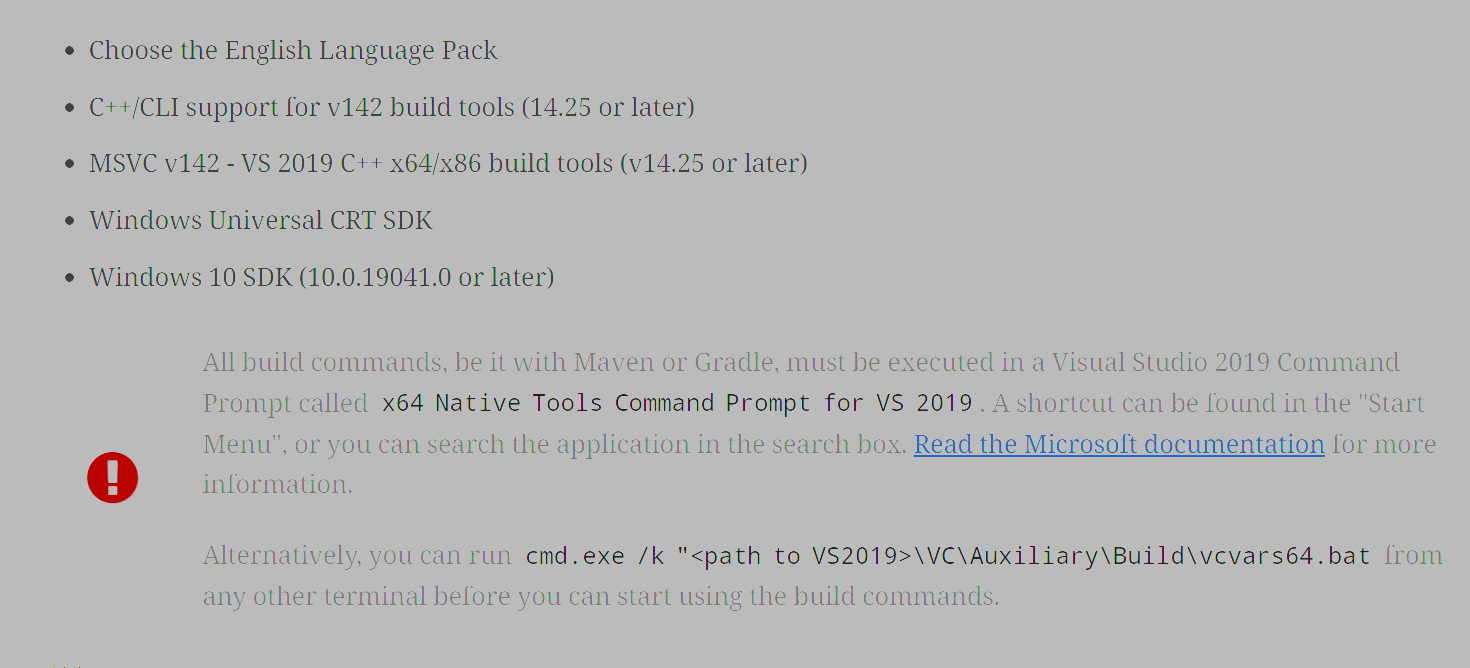
可以参考我的安装明细
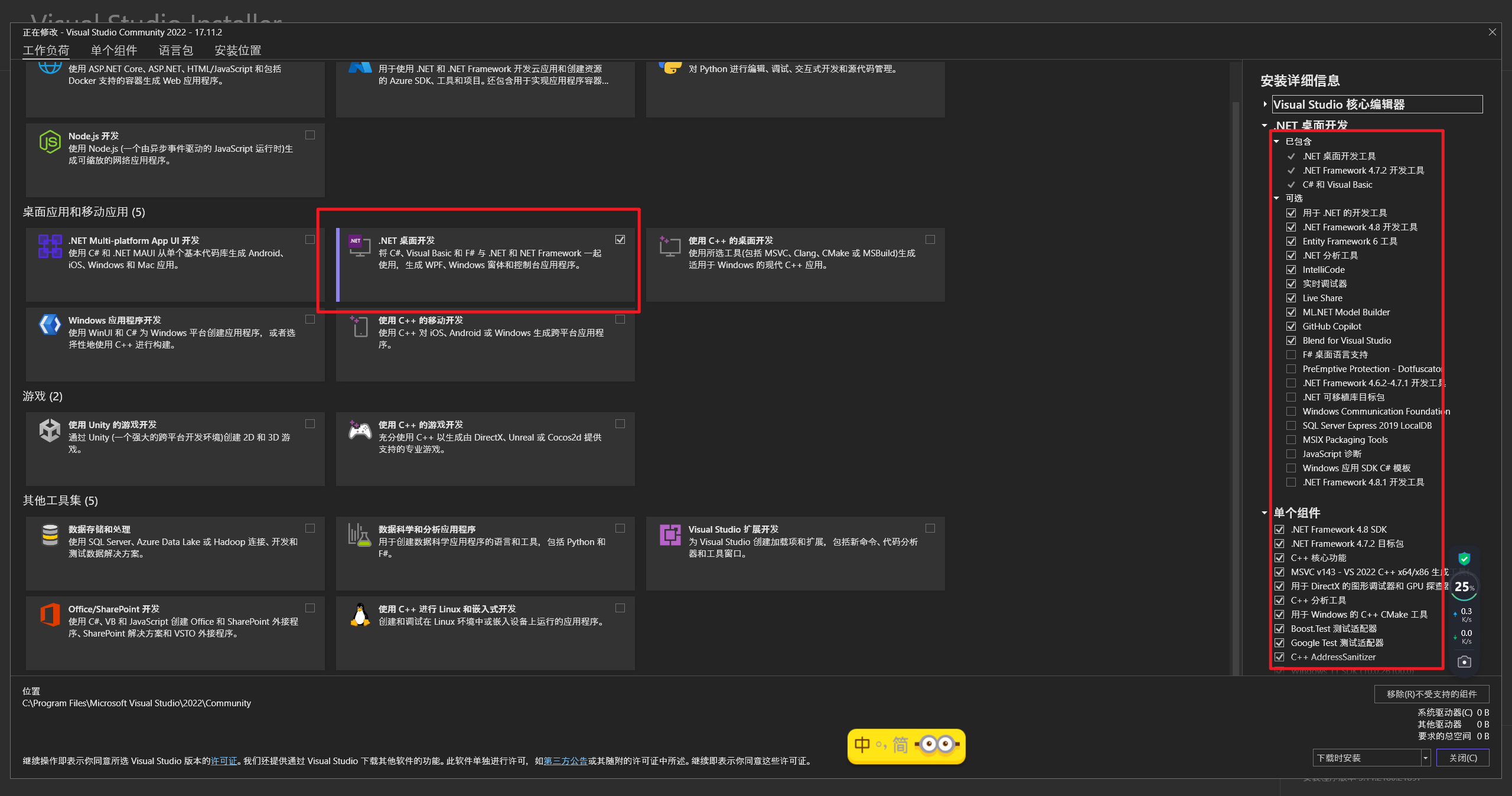
以上步骤之后,新增一个路径到Path环境变量中
(因为后续编译的时候,会用到这个路径下的cl,默认没有添加到path,下面的版本号 14.29.30133根据自己的安装情况设置)
C:\Program Files\Microsoft Visual Studio\2022\Community\VC\Tools\MSVC\14.29.30133\bin\HostX86\x86
配置上jdk环境变量
# 新增环境变量

JAVA_HOME=D:\development\env\java\openjdk-21.0.2

CLASSPATH=.;%JAVA_HOME%\lib;%JAVA_HOME%\lib\tools.jar

# Path新增条目

%JAVA_HOME%\bin

%JAVA_HOME%\jre\bin
安装GraalVM CE Gluon 22.1.0.1-Final
下载解压到合适的目录后配置好环境变量
GRAALVM_HOME=D:\development\env\java\graalvm-svm-java17-windows-gluon-22.1.0.1-Final
编译官网示例项目
(到这里,我默认你的环境已经安装了git、mvn等工具,并配置相应的环境变量,且以上的步骤都没有问题)
拉取项目到本地
git clone https://github.com/gluonhq/gluon-samples.git
使用idea打开项目,设置项目的jdk为17+,给文件 gluon-samples/HelloFX/pom.xml文件增加几个build配置项
<properties>

    <main.class>hellofx.HelloFX</main.class>

    <gluonfx.target>host</gluonfx.target>

    <gluonfx.maven.plugin.version>1.0.23</gluonfx.maven.plugin.version>

    <javafx.maven.plugin.version>0.0.8</javafx.maven.plugin.version>

</properties>

<build>

        <plugins>

            <plugin>

                <groupId>org.apache.maven.plugins</groupId>

                <artifactId>maven-compiler-plugin</artifactId>

                <version>3.8.1</version>

                <configuration>

                    <source>17</source>

                    <target>17</target>

                    <release>17</release>

                    <encoding>utf-8</encoding>

                </configuration>

            </plugin>

            <plugin>

                <groupId>org.openjfx</groupId>

                <artifactId>javafx-maven-plugin</artifactId>

                <version>${javafx.maven.plugin.version}</version>

                <configuration>

                    <mainClass>${main.class}</mainClass>

                </configuration>

            </plugin>

            <plugin>

                <groupId>com.gluonhq</groupId>

                <artifactId>gluonfx-maven-plugin</artifactId>

                <version>${gluonfx.maven.plugin.version}</version>

                <configuration>

                     <target>${gluonfx.target}</target>

                     <mainClass>${main.class}</mainClass>

                    <reflectionList>

                        <list>.*\\.db$</list>

                        <list>.*\\.xlsx$</list>

                    </reflectionList>

                </configuration>

            </plugin>

        </plugins>

    </build>
新建build.bat文件
在项目路径 gluon-samples/HelloFX新建一个build.bat文件
call "C:\Program Files\Microsoft Visual Studio\2022\Community\VC\Auxiliary\Build\vcvars64.bat"

mvn  gluonfx:build -DskipTests=true -P desktop
执行编译
cd 项目路径

./build.bat
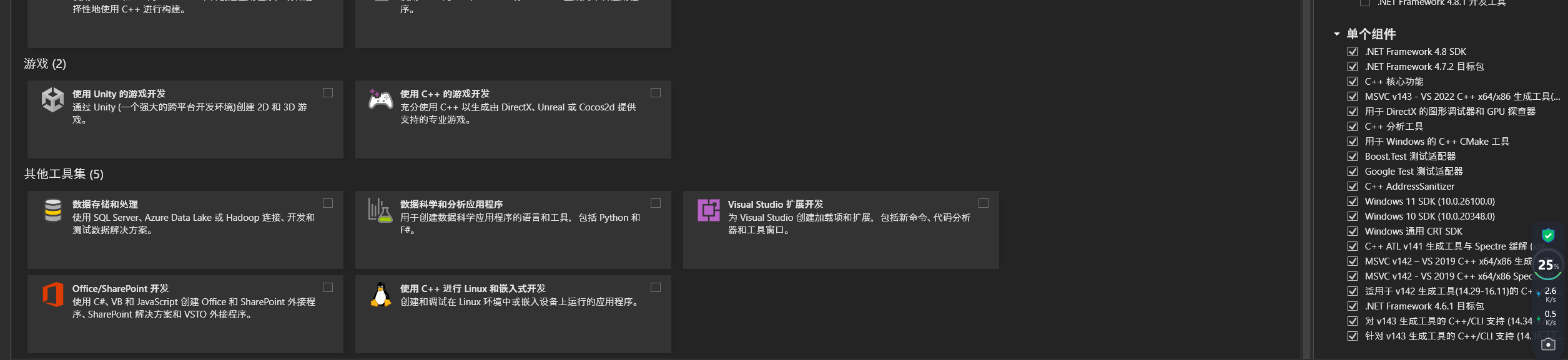
查看结果
编译结果输出到了 gluon-samples\HelloFX\target\gluonfx\x86_64-windows

异常处理
1.java.io.IOException: Cannot run program "cl" (in directory "D:\workspace\code\mycode\Gluon\gluon-samples\HelloFX\target\gluonfx\x86_64-windows\gvm\HelloFX"): CreateProcess error=2, 系统找不到指定的文件。
出现这个异常是因为上面的cl指令路径没有添加到path环境变量中
2.java.lang.IllegalArgumentException: We currently can't compile to aarch64-linux-android when running on x86_64-microsoft-windows
这个异常是编译在x86_64的环境中编译aarch64-linux-android,我们搭建的环境只能编译exe,导致这个错误的原因是项目的profiles设置如下
而且是直接到
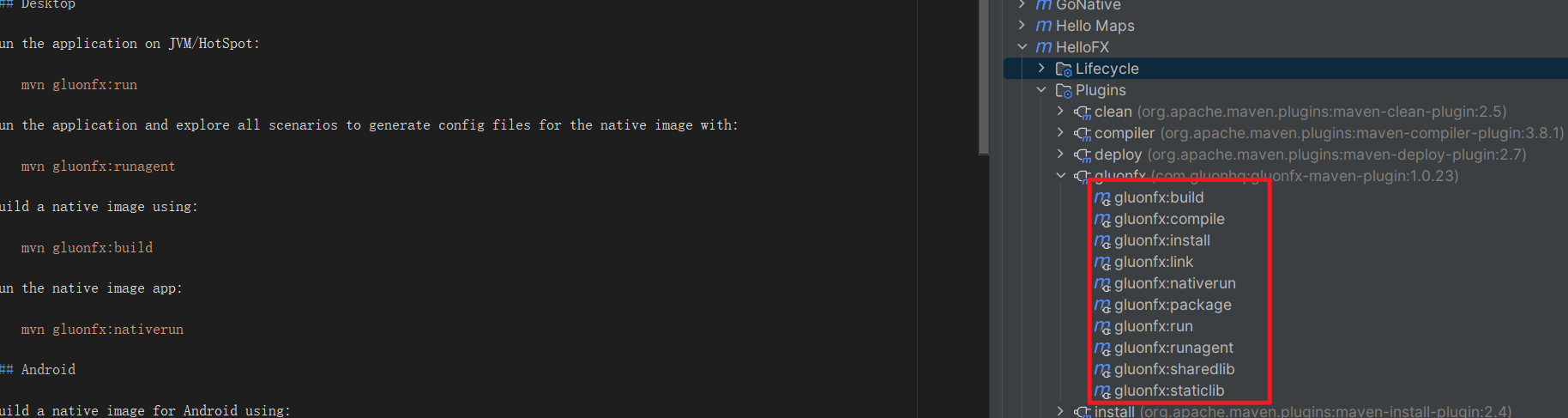
这里面去执行的编译,在这里执行没有预先执行vcvars64.bat,这也是前面写那个build脚本的原因
修复方法就是将项目profiles选择为desktop,同时使用脚本去执行。
将desktop编译动作绑定packge到生命周期
这样会将build脚本执行和package进行捆绑
<properties>

    <skip.exec>true</skip.exec>

</properties>

<profiles>

    <profile>

        <id>ios</id>

        <properties>

            <gluonfx.target>ios</gluonfx.target>

        </properties>

    </profile>

    <profile>

        <id>android</id>

        <properties>

            <gluonfx.target>android</gluonfx.target>

        </properties>

    </profile>

    <profile>

        <id>desktop</id>

        <activation>

            <activeByDefault>true</activeByDefault>

        </activation>

        <properties>

            <env>desktop</env>

            <skip.exec>false</skip.exec>

            <gluonfx.target>host</gluonfx.target>

        </properties>

    </profile>

</profiles>

<build>

    <plugins>

        <!-- Exec Maven 插件 -->

        <plugin>

            <groupId>org.codehaus.mojo</groupId>

            <artifactId>exec-maven-plugin</artifactId>

            <version>3.0.0</version>

            <executions>

                <execution>

                    <id>run-prepare-env</id>

                    <phase>package</phase>

                    <goals>

                        <goal>exec</goal>

                    </goals>

                    <configuration>

                        <executable>./bin/build.bat</executable>

                        <arguments>

                        </arguments>

                    </configuration>

                </execution>

            </executions>

            <configuration>

                <skip>${skip.exec}</skip>

            </configuration>

        </plugin>

        <plugin>

            <groupId>org.apache.maven.plugins</groupId>

            <artifactId>maven-compiler-plugin</artifactId>

            <version>3.8.1</version>

        </plugin>

        <plugin>

            <groupId>org.openjfx</groupId>

            <artifactId>javafx-maven-plugin</artifactId>

            <version>${javafx.plugin.version}</version>

            <configuration>

                <mainClass>${mainClassName}</mainClass>

            </configuration>

        </plugin>

        <plugin>

            <groupId>com.gluonhq</groupId>

            <artifactId>gluonfx-maven-plugin</artifactId>

            <version>${gluonfx.plugin.version}</version>

            <configuration>

                <target>${gluonfx.target}</target>

                <attachList>

                    <list>display</list>

                    <list>lifecycle</list>

                    <list>statusbar</list>

                    <list>storage</list>

                </attachList>

                <reflectionList>

                    <list>com.xxx.PrimaryPresenter</list>

                    <list>com.xxx.SecondaryPresenter</list>

                </reflectionList>

                <mainClass>${mainClassName}</mainClass>

            </configuration>

        </plugin>

    </plugins>

</build>
Gluon 编译 JavaFx -> exe的更多相关文章
- Windows下使用Graalvm将Javafx应用编译成exe
1 背景 Graalvm是Oracle推出的一款新型虚拟机,其中一个吸引人的功能是:它可以将Java代码编译成各个平台的本地代码,这些平台包括:linux.macOS.windows.iOS.andr ...
- 把perl脚本编译成exe
来源:http://www.veryhuo.com/a/view/38338.html 今天想把 perl 脚本编译成 exe 以便脱离 perl 解释器独立运行.都可以生成PERL的PE文件,在PE ...
- Matlab中调用VS编译的exe文件并传递变量 的方法
经历::在网上找了很多方法,都没有实现在matlab中调用vs的exe文件并且能够传递变量参数,一些小细节花费了自己很多时间,比喻忽略了一些空格! 网上很多的方法都是纯粹复制别人的方法,自己都没有去 ...
- 用python写个简单的小程序,编译成exe跑在win10上
每天的工作其实很无聊,早知道应该去IT公司闯荡的.最近的工作内容是每逢一个整点,从早7点到晚11点,去查一次客流数据,整理到表格中,上交给素未蒙面的上线,由他呈交领导查阅. 人的精力毕竟是有限的,所以 ...
- 将 php 转换/编译为 EXE
将 php 转换/编译为 EXE 本文仅仅是将原文用谷歌作了翻译,原文来源于 http://stackoverflow.com 资料来源 http://stackoverflow.com/quest ...
- cmd,py脚本,py编译的exe,uipath及uibot对它们的调用
UIPATH调用Python编译程序exe 好处: 1)code不以可编辑的状态被用户接触,对于不懂反编译的一般用户,可提升一定的代码安全性: 2)不需要用户机器上安装 python环境. 3)可以将 ...
- 把java编译成exe和安装包
由于某些项目甲方迟迟不结算尾款,这就很烦,只能想一些办法 我们知道java,python之类的代码是没有隐私可言的,那么怎么办,总要发给甲方验收,这就要做一些操作来确保自己的利益. 通过在源代码里加上 ...
- Python将py文件编译为exe的方法
使用PyCharm工具写好的Python程序脚本,怎么将.py文件编译为可执行的.exe文件 前提是已经安装了Python环境. 第一步:在PyCharm内下载安装pyinstalle库或使用CMD安 ...
- pyhon之编译成exe
1安装pyinstaller pip install pyinstaller 2 编译 pyinstaller -F -w game.py (-F表示打包单个文件,-w是为了打开exe时候不弹出黑框 ...
- 编译LOADCEPC.EXE程序
1.安装编译工具 安装MSVC152路径C:/MSVC; 安装MASM611可以自己指定E:/MASM611; 命令行编译 相关文件配置 修改setupen2.bat 如下: :PATH_DONE s ...
随机推荐
- FFmpeg开发笔记(三十六)Linux环境安装SRS实现视频直播推流
<FFmpeg开发实战:从零基础到短视频上线>一书在第10章介绍了轻量级流媒体服务器MediaMTX,通过该工具可以测试RTSP/RTMP等流媒体协议的推拉流.不过MediaMTX的功能 ...
- Yaml配置文件语法详解
YAML 简介 YAML,即 "YAML Ain't a Markup Language"(YAML 不是一种标记语言)的递归缩写,YAML 意思其实是" Yet Ano ...
- BS架构和CS架构应用
概述 B/S结构即浏览器和服务器结构.它是随着Internet技术的兴起,对C/S结构的一种变化或者改进的结构.在这种结构下,用户工作界面是通过WWW浏览器来实现,极少部分事务逻辑在前端(Br ...
- Vue3中如何使用this
vue3提供了getCurrentInstance ,通过这个属性,直接使用ctx是错误的,需要找到全局属性globalProperties import { getCurrentInstance } ...
- 前缀函数及 Knuth–Morris–Pratt 算法学习笔记
\(\text{1 引言 Preface}\) 对于形如以下的问题: 给予一个模式串 \(T\) 和主串 \(S\),在主串中寻找 \(T\). 我们称之为字符串匹配. 很显然朴素算法时间复杂度是 \ ...
- 使用 useRequestURL 组合函数访问请求URL
title: 使用 useRequestURL 组合函数访问请求URL date: 2024/7/26 updated: 2024/7/26 author: cmdragon excerpt: 摘要: ...
- fragment基础
XML中调用fragment 属性包括: android:id="@+id/fragg" //ID android:name="com.example.subway.fr ...
- Linux Kernel CFI机制简介及测试禁用
PS:要转载请注明出处,本人版权所有. PS: 这个只是基于<我自己>的理解, 如果和你的原则及想法相冲突,请谅解,勿喷. 环境说明 无 前言 当我们为android移植linux ...
- git篇-- Git在项目实操中常见的使用命令--02
Git是现代软件开发中不可或缺的版本控制工具.它能帮助开发者跟踪项目的所有变更,并与团队成员高效协作.本文将介绍一些在项目实操中常见的Git命令,帮助你更好地管理代码. 1. 初始化和配置 初始化仓库 ...
- 【ElasticSearch】01 CRUD操作
1.资料: ES官网最新版本下载地址: https://www.elastic.co/cn/downloads/elasticsearch 历史版本下载: https://www.elastic.co ...