
知识图谱(Knowledge Graph)- Neo4j 5.10.0 CentOS 安装
知识图谱(Knowledge Graph)- Neo4j 5.10.0 Docker 安装
知识图谱(Knowledge Graph)- Neo4j 5.10.0 CentOS 安装
https://neo4j.com/docs/operations-manual/5/installation/linux/tarball/
系统需求
| 版本 | JDK | CPU | 内存 | 硬盘 |
|---|---|---|---|---|
| Neo4j 5.x | 17 | Intel x86-x64 Core i3 minimum,Core i7 recommended. AMD x86-x64, Mac ARM. |
最低 2GB,推荐 16GB + | 10G + |
| Neo4j 5.x | 11 | |||
| Neo4j 5.x | 8 |
JDK 17 下载:https://www.oracle.com/java/technologies/downloads/#java17
基于 jar 的安装
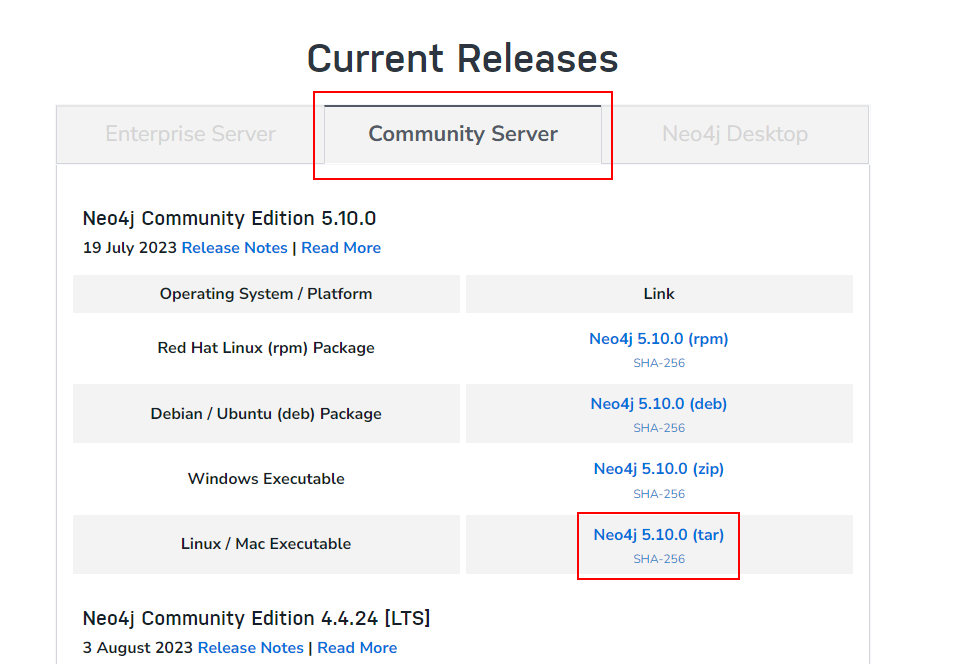
下载:https://neo4j.com/download-center/
#load csv时l路径,在前面加个#,可从任意路径读取文件

#dbms.directories.import=import

#设置JVM初始堆内存和JVM最大堆内存

dbms.memory.heap.initial_size=2g

dbms.memory.heap.max_size=5g

#可以认为这个是缓存,如果机器配置高,这个越大越好

dbms.memory.pagecache.size=2g

#去掉改行的#,可以远程通过ip访问neo4j数据库

dbms.connectors.default_listen_address=0.0.0.0

#去掉#,设置http端口为7687,端口可以自定义,只要不和其他端口冲突就行

server.bolt.listen_address=:7687

#去掉#,设置http端口为7474,端口可以自定义,只要不和其他端口冲突就行

server.http.listen_address=:7474

#去掉#,允许从远程url来load csv

dbms.security.allow_csv_import_from_file_urls=true

#设置neo4j可读可写

dbms.databases.default_to_read_only=false
[root@localhost src]# wget https://download.oracle.com/java/17/latest/jdk-17_linux-x64_bin.tar.gz

--2023-02-26 22:09:59--  https://download.oracle.com/java/17/latest/jdk-17_linux-x64_bin.tar.gz

Resolving download.oracle.com (download.oracle.com)... 23.192.208.88

Connecting to download.oracle.com (download.oracle.com)|23.192.208.88|:443... connected.

HTTP request sent, awaiting response... 200 OK

Length: 181577323 (173M) [application/x-gzip]

Saving to: ‘jdk-17_linux-x64_bin.tar.gz.1’

100%[========================================================================>] 181,577,323 1.00MB/s   in 7m 43s

2023-02-26 22:17:48 (383 KB/s) - ‘jdk-17_linux-x64_bin.tar.gz’ saved [181577323/181577323]

[root@localhost src]# tar -zxvf jdk-17_linux-x64_bin.tar.gz

jdk-17.0.6/LICENSE

jdk-17.0.6/README

jdk-17.0.6/bin/jar

...

jdk-17.0.6/man/man1/rmiregistry.1

jdk-17.0.6/man/man1/serialver.1

jdk-17.0.6/release

[root@localhost /]# vim /etc/profile

...

# jdk环境变量

export JAVA_HOME=/usr/local/src/jdk-17.0.6

export JRE_HOME=${JAVA_HOME}/jre

export CLASSPATH=.:${JAVA_HOME}/lib:${JRE_HOME}/lib

export PATH=${JAVA_HOME}/bin:$PATH

# jdk环境变量

#编辑后退出

[root@localhost /]# source /etc/profile

[root@localhost /]# java -version

java version "17.0.6" 2023-01-17 LTS

Java(TM) SE Runtime Environment (build 17.0.6+9-LTS-190)

Java HotSpot(TM) 64-Bit Server VM (build 17.0.6+9-LTS-190, mixed mode, sharing)

[root@localhost src]# ls

ifreedo_server  ifreedo_server.tar  neo4j-community-5.10.0-unix.tar.gz

[root@localhost src]# tar -axvf neo4j-community-5.10.0-unix.tar.gz

neo4j-community-5.10.0/

neo4j-community-5.10.0/run/

neo4j-community-5.10.0/conf/

...

neo4j-community-5.10.0/data/databases/

neo4j-community-5.10.0/data/transactions/

neo4j-community-5.10.0/LICENSE.txt

[root@localhost src]# ls

ifreedo_server  ifreedo_server.tar  neo4j-community-5.10.0  neo4j-community-5.10.0-unix.tar.gz

[root@localhost src]# cd neo4j-community-5.10.0

[root@localhost neo4j-community-5.10.0]# ls

bin           conf  import  lib       LICENSES.txt  logs        packaging_info  README.txt  UPGRADE.txt

certificates  data  labs    licenses  LICENSE.txt   NOTICE.txt  plugins         run

[root@localhost neo4j-community-5.10.0]# cd conf/

[root@localhost conf]# ls

neo4j-admin.conf  neo4j.conf  server-logs.xml  user-logs.xml

[root@localhost conf]# vim neo4j.conf

#编辑neo4j.conf

#*****************************************************************

# Neo4j configuration

#

# For more details and a complete list of settings, please see

# https://neo4j.com/docs/operations-manual/current/reference/configuration-settings/

#*****************************************************************

# The name of the default database

#initial.dbms.default_database=neo4j

# Paths of directories in the installation.

#server.directories.data=data

#server.directories.plugins=plugins

#server.directories.logs=logs

#server.directories.lib=lib

#server.directories.run=run

#server.directories.licenses=licenses

#server.directories.transaction.logs.root=data/transactions

# This setting constrains all `LOAD CSV` import files to be under the `import` directory. Remove or comment it out to

# allow files to be loaded from anywhere in the filesystem; this introduces possible security problems. See the

# `LOAD CSV` section of the manual for details.

server.directories.import=import

# Whether requests to Neo4j are authenticated.

# To disable authentication, uncomment this line

#dbms.security.auth_enabled=false

#********************************************************************

# Memory Settings

#********************************************************************

#

# Memory settings are specified kilobytes with the 'k' suffix, megabytes with

# 'm' and gigabytes with 'g'.

# If Neo4j is running on a dedicated server, then it is generally recommended

# to leave about 2-4 gigabytes for the operating system, give the JVM enough

# heap to hold all your transaction state and query context, and then leave the

# rest for the page cache.

# Java Heap Size: by default the Java heap size is dynamically calculated based

# on available system resources. Uncomment these lines to set specific initial

# and maximum heap size.

#server.memory.heap.initial_size=512m

#server.memory.heap.max_size=512m

# The amount of memory to use for mapping the store files.

# The default page cache memory assumes the machine is dedicated to running

# Neo4j, and is heuristically set to 50% of RAM minus the Java heap size.

#server.memory.pagecache.size=10g

# Limit the amount of memory that all of the running transaction can consume.

# The default value is 70% of the heap size limit.

#dbms.memory.transaction.total.max=256m

# Limit the amount of memory that a single transaction can consume.

# By default there is no limit.

#db.memory.transaction.max=16m

# Transaction state location. It is recommended to use ON_HEAP.

# db.tx_state.memory_allocation=ON_HEAP

#*****************************************************************

# Network connector configuration

#*****************************************************************

# With default configuration Neo4j only accepts local connections.

# To accept non-local connections, uncomment this line:

server.default_listen_address=0.0.0.0

# You can also choose a specific network interface, and configure a non-default

# port for each connector, by setting their individual listen_address.

# The address at which this server can be reached by its clients. This may be the server's IP address or DNS name, or

# it may be the address of a reverse proxy which sits in front of the server. This setting may be overridden for

# individual connectors below.

#server.default_advertised_address=localhost

# You can also choose a specific advertised hostname or IP address, and

# configure an advertised port for each connector, by setting their

# individual advertised_address.

# By default, encryption is turned off.

# To turn on encryption, an ssl policy for the connector needs to be configured

# Read more in SSL policy section in this file for how to define a SSL policy.

# Bolt connector

server.bolt.enabled=true

#server.bolt.tls_level=DISABLED

#strex开启

server.bolt.listen_address=:7687

#server.bolt.advertised_address=:7687

# HTTP Connector. There can be zero or one HTTP connectors.

server.http.enabled=true

#strex开启

server.http.listen_address=:7474

#server.http.advertised_address=:7474

# HTTPS Connector. There can be zero or one HTTPS connectors.

server.https.enabled=false

#server.https.listen_address=:7473

#server.https.advertised_address=:7473

# Number of Neo4j worker threads.

#server.threads.worker_count=

#*****************************************************************

# SSL policy configuration

#*****************************************************************

# Bolt SSL configuration

#dbms.ssl.policy.bolt.enabled=true

#dbms.ssl.policy.bolt.base_directory=certificates/bolt

#dbms.ssl.policy.bolt.private_key=private.key

#dbms.ssl.policy.bolt.public_certificate=public.crt

#dbms.ssl.policy.bolt.client_auth=NONE

# Https SSL configuration

#dbms.ssl.policy.https.enabled=true

#dbms.ssl.policy.https.base_directory=certificates/https

#dbms.ssl.policy.https.private_key=private.key

#dbms.ssl.policy.https.public_certificate=public.crt

#dbms.ssl.policy.https.client_auth=NONE

# Cluster SSL configuration

#dbms.ssl.policy.cluster.enabled=true

#dbms.ssl.policy.cluster.base_directory=certificates/cluster

#dbms.ssl.policy.cluster.private_key=private.key

#dbms.ssl.policy.cluster.public_certificate=public.crt

# Backup SSL configuration

#dbms.ssl.policy.backup.enabled=true

#dbms.ssl.policy.backup.base_directory=certificates/backup

#dbms.ssl.policy.backup.private_key=private.key

#dbms.ssl.policy.backup.public_certificate=public.crt

#*****************************************************************

# Logging configuration

#*****************************************************************

# To enable HTTP logging, uncomment this line

#dbms.logs.http.enabled=true

# To enable GC Logging, uncomment this line

#server.logs.gc.enabled=true

# GC Logging Options

# see https://docs.oracle.com/en/java/javase/11/tools/java.html#GUID-BE93ABDC-999C-4CB5-A88B-1994AAAC74D5

#server.logs.gc.options=-Xlog:gc*,safepoint,age*=trace

# Number of GC logs to keep.

#server.logs.gc.rotation.keep_number=5

# Size of each GC log that is kept.

#server.logs.gc.rotation.size=20m

#*****************************************************************

# Miscellaneous configuration

#*****************************************************************

# Determines if Cypher will allow using file URLs when loading data using

# `LOAD CSV`. Setting this value to `false` will cause Neo4j to fail `LOAD CSV`

# clauses that load data from the file system.

dbms.security.allow_csv_import_from_file_urls=true

# Value of the Access-Control-Allow-Origin header sent over any HTTP or HTTPS

# connector. This defaults to '*', which allows broadest compatibility. Note

# that any URI provided here limits HTTP/HTTPS access to that URI only.

#dbms.security.http_access_control_allow_origin=*

# Value of the HTTP Strict-Transport-Security (HSTS) response header. This header

# tells browsers that a webpage should only be accessed using HTTPS instead of HTTP.

# It is attached to every HTTPS response. Setting is not set by default so

# 'Strict-Transport-Security' header is not sent. Value is expected to contain

# directives like 'max-age', 'includeSubDomains' and 'preload'.

#dbms.security.http_strict_transport_security=

# Retention policy for transaction logs needed to perform recovery and backups.

#db.tx_log.rotation.retention_policy=2 days

# Whether or not any database on this instance are read_only by default.

# If false, individual databases may be marked as read_only using dbms.database.read_only.

# If true, individual databases may be marked as writable using dbms.databases.writable.

dbms.databases.default_to_read_only=false

# Comma separated list of JAX-RS packages containing JAX-RS resources, one

# package name for each mountpoint. The listed package names will be loaded

# under the mountpoints specified. Uncomment this line to mount the

# org.neo4j.examples.server.unmanaged.HelloWorldResource.java from

# neo4j-server-examples under /examples/unmanaged, resulting in a final URL of

# http://localhost:7474/examples/unmanaged/helloworld/{nodeId}

#server.unmanaged_extension_classes=org.neo4j.examples.server.unmanaged=/examples/unmanaged

# A comma separated list of procedures and user defined functions that are allowed

# full access to the database through unsupported/insecure internal APIs.

#dbms.security.procedures.unrestricted=my.extensions.example,my.procedures.*

# A comma separated list of procedures to be loaded by default.

# Leaving this unconfigured will load all procedures found.

#dbms.security.procedures.allowlist=apoc.coll.*,apoc.load.*,gds.*

#********************************************************************

# JVM Parameters

#********************************************************************

# G1GC generally strikes a good balance between throughput and tail

# latency, without too much tuning.

server.jvm.additional=-XX:+UseG1GC

# Have common exceptions keep producing stack traces, so they can be

# debugged regardless of how often logs are rotated.

server.jvm.additional=-XX:-OmitStackTraceInFastThrow

# Make sure that `initmemory` is not only allocated, but committed to

# the process, before starting the database. This reduces memory

# fragmentation, increasing the effectiveness of transparent huge

# pages. It also reduces the possibility of seeing performance drop

# due to heap-growing GC events, where a decrease in available page

# cache leads to an increase in mean IO response time.

...

[root@localhost conf]# cd ..

[root@localhost neo4j-community-5.10.0]# ls

bin           conf  import  lib       LICENSES.txt  logs        packaging_info  README.txt  UPGRADE.txt

certificates  data  labs    licenses  LICENSE.txt   NOTICE.txt  plugins         run

[root@localhost neo4j-community-5.10.0]# cd bin/

[root@localhost bin]# ls

completion  cypher-shell  neo4j  neo4j-admin

[root@localhost bin]# ./neo4j start

[root@localhost bin]# ./neo4j start

Directories in use:

home:         /usr/local/src/neo4j-community-5.10.0

config:       /usr/local/src/neo4j-community-5.10.0/conf

logs:         /usr/local/src/neo4j-community-5.10.0/logs

plugins:      /usr/local/src/neo4j-community-5.10.0/plugins

import:       /usr/local/src/neo4j-community-5.10.0/import

data:         /usr/local/src/neo4j-community-5.10.0/data

certificates: /usr/local/src/neo4j-community-5.10.0/certificates

licenses:     /usr/local/src/neo4j-community-5.10.0/licenses

run:          /usr/local/src/neo4j-community-5.10.0/run

Starting Neo4j.

WARNING: Max 4096 open files allowed, minimum of 40000 recommended. See the Neo4j manual.

Started neo4j (pid:2055). It is available at http://0.0.0.0:7474

There may be a short delay until the server is ready.

[root@localhost bin]# firewall-cmd --zone=public --add-port=7687/tcp --permanent

success

[root@localhost bin]# firewall-cmd --zone=public --add-port=7474/tcp --permanent

success

[root@localhost bin]# ./neo4j status

Neo4j is running at pid 2055
知识图谱(Knowledge Graph)- Neo4j 5.10.0 CentOS 安装的更多相关文章
- 哈工大知识图谱(Knowledge Graph)课程概述
一.什么是知识图谱 知识(Knowledge)可以理解为 精炼的数据,知识图谱(Knowledge Graph)即是对知识的图形化表示,本质上是一种大规模语义网络 (semantic network) ...
- 学习笔记之知识图谱 (Knowledge Graph)
Knowledge Graph - Wikipedia https://en.wikipedia.org/wiki/Knowledge_Graph The Knowledge Graph is a k ...
- IIS 10.0 无法安装 URL rewrite重写模块 2.0解决办法
[问题描述]系统升级到Windows10后,IIS是10.0的,发现无法安装 URLRewrite重写模块 2.0. [解决办法]打开注册表编辑器,在HKEY_LOCAL_MACHINE\SOFTWA ...
- Kubernetes 1.10.0离线安装
讲述如何通过离线的方式安装Kubernetes,主要用于对Kubernetes的研究学习,不建议在生产环境使用,安装包获取地址: 链接:https://pan.baidu.com/s/1nX5_mem ...
- cdh-5.10.0搭建安装
1.修改主机名为master, slave1, slave2 vim /etc/sysconfig/network HOSTNAME = master HOSTNAME = slave1 HOSTNA ...
- CDH5.10.0 离线安装(共3节点) 转
1.安装方式 CDH的离线部署安装,即Parcel包(推荐) 2.角色规划 三个节点对应的角色: 3.基本环境配置(在每个节点上都要配置) (1)关闭防火墙 #/etc/init.d/iptables ...
- request 10.0 模块安装
https://pypi.python.org/packages/49/6f/183063f01aae1e025cf0130772b55848750a2f3a89bfa11b385b35d7329d ...
- 分享ArcGIS Server 10.0修复安装心得
最近,捣腾了一阵子在xp系统上安装ArcGIS Server10.0(下方均简称server),解决了一些初学者可能面临的problem,给大家贴出来, 希望能够给初学者一些有益的帮助. 我的系统环境 ...
- IIS 10.0 无法安装 URL rewrite重写模块 2.0
打开注册表编辑器,在HKEY_LOCAL_MACHINE\SOFTWARE\Microsoft\InetStp位置 把MajorVersion的值改为9之后,就可以安装了,安装完成之后,再把Major ...
- WebStorm 10.0.3安装
转:http://www.cr173.com/soft/130969.html WebStorm 10是一款强大的HTML5编辑工具,是 JetBrains 推出的一款商业的 JavaScript 开 ...
随机推荐
- 2022-02-09:k8s安装redis,yaml如何写?
2022-02-09:k8s安装redis,yaml如何写? 答案2022-02-29: apiVersion: apps/v1 kind: Deployment metadata: labels: ...
- 2022-02-04:组合总和 Ⅳ。 给你一个由 不同 整数组成的数组 nums ,和一个目标整数 target 。请你从 nums 中找出并返回总和为 target 的元素组合的个数。 题目数据保证
2022-02-04:组合总和 Ⅳ. 给你一个由 不同 整数组成的数组 nums ,和一个目标整数 target .请你从 nums 中找出并返回总和为 target 的元素组合的个数. 题目数据保证 ...
- 2021-06-20:已知一个消息流会不断地吐出整数 1~N,但不一定按照顺序依次吐出。如果上次打印的序号为i, 那么当i+1出现时,请打印 i+1 及其之后接收过的并且连续的所有数,直到1~N全部接
2021-06-20:已知一个消息流会不断地吐出整数 1~N,但不一定按照顺序依次吐出.如果上次打印的序号为i, 那么当i+1出现时,请打印 i+1 及其之后接收过的并且连续的所有数,直到1~N全部接 ...
- Django笔记四十之运行Django环境的python脚本
本文首发于公众号:Hunter后端 原文链接:Django笔记四十之运行Django环境的python脚本 这一篇笔记介绍如何在 Django 中运行脚本. 假设说我们要实现一个功能,需要获取 blo ...
- JS中的纯函数
在JavaScript中,纯函数是指在相同的输入下,始终产生相同的输出,并且没有副作用的函数.纯函数不会修改或依赖于函数之外的状态,也不会对外部环境产生任何可观察的影响. 以下是纯函数的特点: 1. ...
- Module not found: Error: Can't resolve 'axios' in 'D:\BaiduSyncdisk\vue-cli-project\dc_vue3\src\utils'
Module not found: Error: Can't resolve 'axios' in 'D:\BaiduSyncdisk\vue-cli-project\dc_vue3\src\util ...
- 数据治理核心保障数据质量监控开源项目Apache Griffin分享
@ 目录 概述 定义 为何要做数据质量监控 基本概念 特性 架构 安装 Docker部署 Docker 镜像批处理使用 Docker 镜像流处理使用 UI界面操作 概述 定义 Apache Griff ...
- 生信服务器 | Linux 时间戳和标准时间
在 Linux 系统中,有许多场合都使用时间戳的方式表示时间,即从1970年1月1日起至当前的天数或秒数.如/etc/shadow里的密码更改日期和失效日期,还有代理服务器的访问日志对访问时间的记录等 ...
- 从 0 到 1 搭建自己的脚手架(java 后端)
一.脚手架是什么 脚手架是一种基础设施工具,用于快速生成项目的框架代码和文件结构.它是一种标准化的开发工具,使开发人员能够在项目的早期阶段快速搭建出一个具备基本功能和结构的系统. 二.脚手架的意义 主 ...
- Java并发(十一)----线程五种状态与六种状态
1.五种状态 这是从 操作系统 层面来描述的 [初始状态]仅是在语言层面创建了线程对象,还未与操作系统线程关联 [可运行状态](就绪状态)指该线程已经被创建(与操作系统线程关联),可以由 CPU 调度 ...