
前端vue监听activeMQ消息后端推送消息--实战
需求 : 工厂员工完成某道工序后,需要将消息推送给 检查人员
也可以使用 WebSockets ,前端更容易实现
思路: 使用activeMQ推送消息,前端实时接收消息
实现 :
1.基于springBoot的activeMQ 实现起来比较方便 配置文件如下
############ activemq

spring.activemq.broker-url=tcp://127.0.0.1:61616

# 账号

spring.activemq.user=xxx

# 密码

spring.activemq.password=xxx

# 等待消息发送响应的时间。设置为0等待永远。

spring.activemq.send-timeout=0

queueName=polling.queue

topicName=polling.topic

# 默认情况下activemq提供的是queue模式,若要使用topic模式需要配置下面配置

spring.jms.pub-sub-domain=true
2.java代码 配置文件


package workstation.open.config;

import org.apache.activemq.ActiveMQConnectionFactory;

import org.apache.activemq.command.ActiveMQQueue;

import org.apache.activemq.command.ActiveMQTopic;

import org.springframework.beans.factory.annotation.Value;

import org.springframework.context.annotation.Bean;

import org.springframework.context.annotation.Configuration;

import org.springframework.jms.config.JmsListenerContainerFactory;

import org.springframework.jms.config.SimpleJmsListenerContainerFactory;

import org.springframework.jms.core.JmsMessagingTemplate;

import javax.jms.ConnectionFactory;

import javax.jms.Queue;

import javax.jms.Topic;

/**

 * @author ThreeNut

 * @date 2021/5/18 13:55

 */

@Configuration

public class ActiveMQConfig {

    @Value("${queueName}")

    private String queueName;

    @Value("${topicName}")

    private String topicName;

    @Value("${spring.activemq.user}")

    private String usrName;

    @Value("${spring.activemq.password}")

    private  String password;

    @Value("${spring.activemq.broker-url}")

    private  String brokerUrl;

    @Bean

    public Queue queue(){

        return new ActiveMQQueue(queueName);

    }

    @Bean

    public Topic topic(){

        return new ActiveMQTopic(topicName);

    }

    @Bean

    public ActiveMQConnectionFactory connectionFactory() {

        return new ActiveMQConnectionFactory(usrName, password, brokerUrl);

    }

    @Bean

    public JmsMessagingTemplate jmsMessageTemplate(){

        return new JmsMessagingTemplate(connectionFactory());

    }

    // 在Queue模式中,对消息的监听需要对containerFactory进行配置

    @Bean("queueListener")

    public JmsListenerContainerFactory<?> queueJmsListenerContainerFactory(ConnectionFactory connectionFactory){

        SimpleJmsListenerContainerFactory factory = new SimpleJmsListenerContainerFactory();

        factory.setConnectionFactory(connectionFactory);

        factory.setPubSubDomain(false);

        return factory;

    }

    //在Topic模式中,对消息的监听需要对containerFactory进行配置

    @Bean("topicListener")

    public JmsListenerContainerFactory<?> topicJmsListenerContainerFactory(ConnectionFactory connectionFactory){

        SimpleJmsListenerContainerFactory factory = new SimpleJmsListenerContainerFactory();

        factory.setConnectionFactory(connectionFactory);

        factory.setPubSubDomain(true);

        return factory;

    }

}
3.java代码 消息推送 消息生产者
3.1 Queue(点到点)模式在点对点的传输方式中,消息数据被持久化,每条消息都能被消费,没有监听QUEUE地址也能被消费,数据不会丢失,一对一的发布接受策略,保证数据完整。
3.2Topic主题模式,就是订阅模式,不保证消息都能被接收到 发送方式 :群发
package workstation.open.mq;

import org.springframework.beans.factory.annotation.Autowired;

import org.springframework.jms.core.JmsMessagingTemplate;

import org.springframework.stereotype.Component;

import javax.jms.Destination;

import javax.jms.Topic;

/**

 * 消息生产

 * @author BinPeng

 * @date 2021/5/18 13:47

 */

@Component

public class PollingQueueProducer {

    @Autowired

    private JmsMessagingTemplate jmsMessagingTemplate;

    /**

     *  群发消息

     */

    @Autowired

    private Topic topic;

    public String sendQueue(String msg) {

        this.sendMessage(this.topic,msg);

        System.out.println("发送消息成功!!!");

        return "success";

    }

    private void sendMessage(Destination destination,String msg){

        jmsMessagingTemplate.convertAndSend(destination, msg);

    }

}
4.后端测试(仅用来在后端测试,看是否接收到消息)
package workstation.open.mq;

import org.springframework.jms.annotation.JmsListener;

import org.springframework.stereotype.Component;

import org.springframework.web.bind.annotation.GetMapping;

import org.springframework.web.bind.annotation.RequestMapping;

import org.springframework.web.bind.annotation.RestController;

import workstation.common.util.ReqResult;

import javax.servlet.http.Cookie;

import java.util.LinkedList;

import java.util.Queue;

@Component

public class QueueConsumer {

/**

     * queue模式的消费者

     * @param message 消息

     */

    @JmsListener(destination="${topicName}", containerFactory="topicListener")

    public ReqResult readActiveQueue(String message) {

        Queue<String> queue = new LinkedList<String>();

        queue.offer(message);

        System.out.println(message +"----------------------------------");

        return new ReqResult().put("msg",queue);

    }

}
5.基于前端VUE使用Stompjs接收ActiveMQ消息实现方法 -- 消息消费者
准备工作:
npm install stompjs
npm install net
5.1 linkparam.js 配置文件
export const MQ_SERVICE = 'ws://127.0.0.1:61614/stomp' // mq服务地址(默认监听消息端口)

export const MQ_USERNAME = 'xxx' // mq连接用户名

export const MQ_PASSWORD = 'xxx' //mq连接密码
5.2 sock.vue
<template>

  <div></div>

</template>

<script>

import Stomp from 'stompjs'

import { MQ_SERVICE, MQ_USERNAME, MQ_PASSWORD } from '../../utils/linkparam'

export default {

  name: 'entry',

  data () {

    return {

      client: Stomp.client(MQ_SERVICE),

      topic : '/topic/iqc_check_list'

    }

  },

  created () {

    this.connect()

  },

  methods: {

    onConnected: function (frame) {

      console.log('Connected: ---------' + frame.body)

      // 主题模式

      this.client.subscribe(this.topic, this.responseCallback, { id: 20210820 })

    },

    onFailed: function (frame) {

    },

    responseCallback: function (frame) {

      if(frame.body != null){

        this.$notify.info({

          showClose: true,

          message: '有新的检验单  ' + frame.body,

          position: 'bottom-right',

          duration: '3000',

          onClose: () => {

            // 执行查询方法

            this.$parent.query()

          },

        });

      }

    },

    connect: function () {

      let headers = {

        'login': MQ_USERNAME,

        'passcode': MQ_PASSWORD

      }

      // 心跳发送频率

      this.client.heartbeat.outgoing = 50000;

      // 心跳接收频率

      this.client.heartbeat.incoming = 50000;

      this.client.connect(headers, this.onConnected, this.onFailed)

    }

  }

}

</script>
5.3 在APP.vue 文件下添加(因为要在此页面展示所以添加如下,展示页面按照你自己的实际情况配置即可)
import sock from './components/sock'
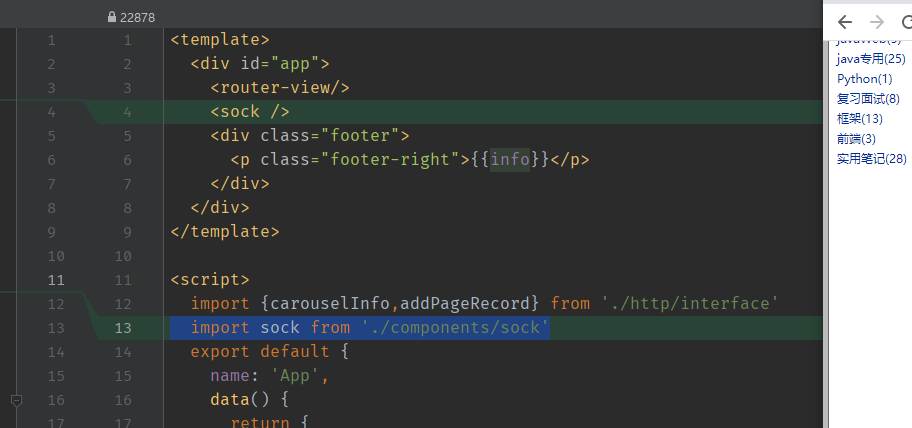
components:{
  sock
}

至此前后端配置结束
总结: 需注意 如果监听的是远程服务 需要配置为外网ip地址,端口 61614和61616加入安全组. 监听端口为: 61614
         activeMQ 客户端地址:http://localhost:8161/admin/topics.jsp
前端vue监听activeMQ消息后端推送消息--实战的更多相关文章
- iOS监听模式系列之推送消息通知
推送通知 和本地通知不同,推送通知是由应用服务提供商发起的,通过苹果的APNs(Apple Push Notification Server)发送到应用客户端.下面是苹果官方关于推送通知的过程示意图: ...
- node配置微信小程序解密消息以及推送消息
上一篇文章介绍过 微信小程序配置消息推送,没有看过的可以先去查看一下,这里就直接去把那个客服消息接口去解密那个消息了. 在这里我选择的还是json格式的加密. 也就是给小程序客服消息发送的消息都会被微 ...
- 利用socket.io实现消息实时推送
最近在写的项目中存在着社交模块,需要实现这样的一个功能:当发生了用户被点赞.评论.关注等操作时,需要由服务器向用户实时地推送一条消息.最终完成的项目地址为:socket-message-push,这里 ...
- signalr推送消息
参考:Tutorial: Getting Started with SignalR 2 and MVC 5 环境:vs2013,webapi2,entity framework6.0 实现效果:当用户 ...
- JAVA多线程(四) Executor并发框架向RabbitMQ推送消息
github代码地址: https://github.com/showkawa/springBoot_2017/tree/master/spb-demo/spb-brian-query-service ...
- spring boot 集成 websocket 实现消息主动推送
spring boot 集成 websocket 实现消息主动 前言 http协议是无状态协议,每次请求都不知道前面发生了什么,而且只可以由浏览器端请求服务器端,而不能由服务器去主动通知浏览器端,是单 ...
- spring+activemq实战之配置监听多队列实现不同队列消息消费
摘选:https://my.oschina.net/u/3613230/blog/1457227 摘要: 最近在项目开发中,需要用到activemq,用的时候,发现在同一个项目中point-to-po ...
- Android高效率编码-第三方SDK详解系列(二)——Bmob后端云开发,实现登录注册,更改资料,修改密码,邮箱验证,上传,下载,推送消息,缩略图加载等功能
Android高效率编码-第三方SDK详解系列(二)--Bmob后端云开发,实现登录注册,更改资料,修改密码,邮箱验证,上传,下载,推送消息,缩略图加载等功能 我的本意是第二篇写Mob的shareSD ...
- Spring Boot 监听 Activemq 中的特定 topic ,并将数据通过 RabbitMq 发布出去
1.Spring Boot 和 ActiveMQ .RabbitMQ 简介 最近因为公司的项目需要用到 Spring Boot , 所以自学了一下, 发现它与 Spring 相比,最大的优点就是减少了 ...
- Vue跨路由触发事件,Vue监听sessionStorage
近来,在做公司的聊天系统,引用的是极光的api.项目需求实时监听别人发过来的消息,进行渲染到页面,还有历史记录也要渲染,历史记录和实时聊天记录返回的结构体还不一样,看到需求的我欲哭无泪,首先登录是在首 ...
随机推荐
- 【Azure Logic App】添加 Storage Account 来提升 Logic App 的性能
文章原文:https://techcommunity.microsoft.com/t5/azure-integration-services-blog/scaling-logic-app-standa ...
- 【Azure 事件中心】Event Hubs如何获取其中存放的历史消息
问题描述 使用Azure Event Hub服务,除了正常的生产,消费消息以外,如果想拿到Event Hub中存储的历史消息?有什么方法呢? 问题解答 获取 Event Hubs 存储的历史消息,首先 ...
- 【Azure 批处理 】Azure Batch门户中创建自定义作业模式失败解决办法
问题描述 跟随官方文档,快速创建Azure批处理任务(快速入门:在 Azure 门户中运行第一个 Batch 作业),在添加作业时,选择"自定义模式",并添加文档中所提供的简单命令 ...
- 用 NetworkX + Gephi + Nebula Graph 分析<权力的游戏>人物关系(下篇)
在上一篇[1]中,我们通过 NetworkX 和 Gephi 展示了<权力的游戏>中的人物关系.在本篇中,我们将展示如何通过 NetworkX 访问图数据库 Nebula Graph. N ...
- 3、dubbo核心用法
https://dubbo.apache.org/zh/docs/v2.7/user/examples/preflight-check/ 1.启动时检查 在启动时检查依赖的服务是否可用 Dubbo 缺 ...
- 【风控算法】二、SQL->Python->PySpark计算KS,AUC及PSI
KS,AUC 和 PSI 是风控算法中最常计算的几个指标,本文记录了多种工具计算这些指标的方法. 生成本文的测试数据: import pandas as pd import numpy as np i ...
- vscode 尾逗号不自动删除 'comma-dangle': 'off' eslint vue
vscode 尾逗号不自动删除 'comma-dangle': 'off' eslint 外层环境说明 vscode eslint - .elintrs.js vue - vue开发 vetur - ...
- 《TencentNCNN系列》 之bin文件(网络参数文件)格式分析
PS:要转载请注明出处,本人版权所有. PS: 这个只是基于<我自己>的理解, 如果和你的原则及想法相冲突,请谅解,勿喷. 前置说明 本文作为本人csdn blog的主站的备份.(Bl ...
- vue开发小技巧
这里分享几个我使用到的vue开发小技巧 一.状态共享 使用Vue进行开发时,随着项目的复杂化,组件个数也逐渐增加,此时我们就面临着一个问题--多组件状态共享.当然有人会说使用Vuex来解决啊,但是如果 ...
- LOTO示波器电源环路增益分析客户实测
我们在之前有文章介绍过LOTO示波器+信号源扫频测电源环路增益稳定性的方法和过程,可以参考演示视频如下: https://www.ixigua.com/7135738415382790663?logT ...