
CentOS7.2安装Vim8和YouCompleteMe
1.环境
本文使用VMWare虚拟机进行实验,客户机系统是CentOS 7.2最小安装(CentOS-7-x86_64-Minimal-1511.iso)
最终实现效果:安装vim8 + python2.7(自带)+ ycm,实现C/C++的智能提示、补全、跳转。
2.需求
- Git
- GCC
- CMake(3.10以上)
- Vim
- Vundle
- YouCompleteMe
- 各种依赖库
3.安装
3.1 下载安装必要的组件
yum install -y gcc gcc-c++ ruby ruby-devel lua lua-devel  \

    ctags git python python-devel \

    tcl-devel ncurses-devel \

    perl perl-devel perl-ExtUtils-ParseXS \

    perl-ExtUtils-CBuilder \

    perl-ExtUtils-Embed
3.2 安装Vim8
访问https://github.com/vim/vim/releases,下载最新的release版本,我这里是vim-8.0.1645.tar.gz
然后解压配置编译安装
tar zxvf vim-8.0..tar.gz

cd vim-8.0.

./configure --with-features=huge \

            --enable-multibyte \

            --enable-rubyinterp=yes \

            --enable-pythoninterp=yes \

            --with-python-config-dir=/usr/lib64/python2./config \

            --enable-perlinterp=yes \

            --enable-luainterp=yes \

            --enable-cscope \

            --prefix=/usr/local

make VIMRUNTIMEDIR=/usr/local/share/vim/vim80

make install
注意: --with-python-config-dir这项要看自己的实际路径,是python-devel带的目录
更改下系统编辑器
sudo update-alternatives --install /usr/bin/editor editor /usr/local/bin/vim

sudo update-alternatives --set editor /usr/local/bin/vim

sudo update-alternatives --install /usr/bin/vi vi /usr/local/bin/vim

sudo update-alternatives --set vi /usr/local/bin/vim
3.3 安装YouCompleteMe
3.3.1 下载Vundle
git clone https://github.com/VundleVim/Vundle.vim.git ~/.vim/bundle/Vundle.vim
配置~/.vimrc文件,填入如下内容
set nocompatible              " be iMproved, required

filetype off                  " required

" set the runtime path to include Vundle and initialize

set rtp+=~/.vim/bundle/Vundle.vim

call vundle#begin()

" alternatively, pass a path where Vundle should install plugins

"call vundle#begin('~/some/path/here')

" let Vundle manage Vundle, required

Plugin 'VundleVim/Vundle.vim'

Plugin 'Valloric/YouCompleteMe'

" All of your Plugins must be added before the following line

call vundle#end()            " required

filetype plugin indent on    " required

" To ignore plugin indent changes, instead use:

"filetype plugin on

"

" Brief help

" :PluginList       - lists configured plugins

" :PluginInstall    - installs plugins; append `!` to update or just :PluginUpdate

" :PluginSearch foo - searches for foo; append `!` to refresh local cache

" :PluginClean      - confirms removal of unused plugins; append `!` to auto-approve removal

"

" see :h vundle for more details or wiki for FAQ

" Put your non-Plugin stuff after this line
3.3.2 下载YouCompleteMe
打开vim,输入如下命令
:PluginInstall
注意:这里很考验网速,可能会比较慢,下载好后,整个.vim文件夹大约150~250MB(根据时间版本不同)。
3.3.3 下载CMake(yum安装的2.8版本不行)
访问https://cmake.org/download/,我这里是cmake-3.10.3.tar.gz
解压编译安装
tar zxvf cmake-3.10..tar.gz

cd cmake-3.10.

./bootstrap && make && make install
3.3.4 编译YouCompleteMe(支持C/C++)
cd ~/.vim/bundle/YouCompleteMe/

./install.py --clang-completer
编译完成后,整个.vim文件夹大约350MB。
注意:如果使用--clang-completer选项,脚本会判断当前是否有upstream pre-build libclang.so库(不建议用系统的libclang):
如果有则用缓存的(见缓存位置);如果没有则会去下载库(见下载地址)。
看网络状况,可能会下载不全(sha256值不对),导致下面编译YouCompleteMe时出错。可以先用迅雷下载,再替换过去。
下载地址:https://dl.bintray.com/micbou/libclang/libclang-6.0.0-x86_64-linux-gnu-ubuntu-14.04.tar.bz2
缓存位置:.vim/bundle/YouCompleteMe/third_party/ycmd/clang_archives/
3.3.5 配置YouCompleteMe
编辑~/.vimrc,增加以下内容
let g:ycm_global_ycm_extra_conf='~/.ycm_extra_conf.py'  "设置全局配置文件的路径

let g:ycm_seed_identifiers_with_syntax=    " 语法关键字补全

let g:ycm_confirm_extra_conf=  " 打开vim时不再询问是否加载ycm_extra_conf.py配置

let g:ycm_key_invoke_completion = '<C-a>' " ctrl + a 触发补全,防止与其他插件冲突

set completeopt=longest,menu    "让Vim的补全菜单行为与一般IDE一致(参考VimTip1228)
nnoremap <leader>jd :YcmCompleter GoToDefinitionElseDeclaration<CR> "定义跳转快捷键
第一行所需的.ycm_extra_conf.py,可以从自带的复制一份过来,再根据需要进行配置
cp .vim/bundle/YouCompleteMe/third_party/ycmd/cpp/ycm/.ycm_extra_conf.py ~
4.运行
现在运行vim已经可以对C++进行提示补全了(因为刚才是从cpp子目录下拷贝的配置样例),
打开~/.ycm_extra_conf.py可以看到其中flags变量,就是配置项目代码补全提示的
比如(C++项目)
flags = [

'-Wall',

'-Wextra',

'-Werror',

'-fexceptions',

'-DNDEBUG',

'-std=c++11',

'-x',

'c++',

'-isystem',

'/usr/include',

'-isystem',

'/usr/local/include',

'-I',

'/root/my_proj',

]
如果是C项目,需要调整
-std=c99,-x下面的参数改为c。
解析C/C++相关的符号提示(系统的、三方库的、自己的),需要配置-isystem,'-I',参数为头文件所在目录。
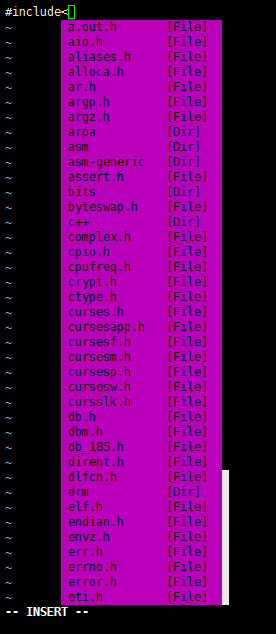
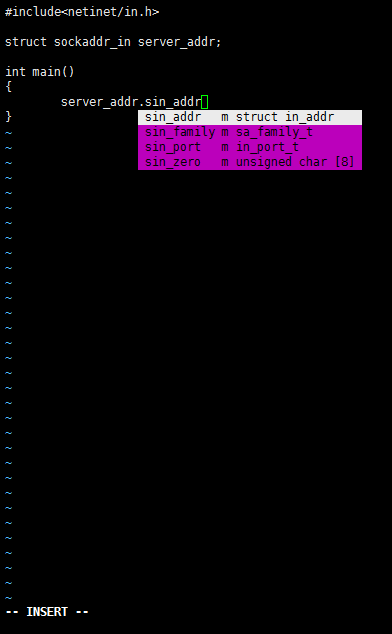
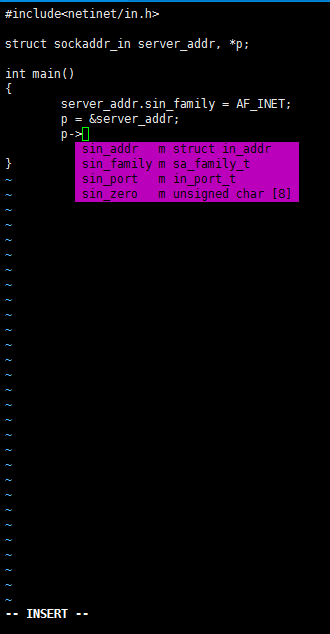
配置好后,用vim编辑一个C文件,
输入#include<会自动弹出提示窗
结构体输入.时会提示成员,
结构体指针输入->时会提示成员
YouCompleteMe默认不会像IDE那样主动提示符号补全(如输入pri提示printf),想要补全时按Ctrl+A(见上面配置)。
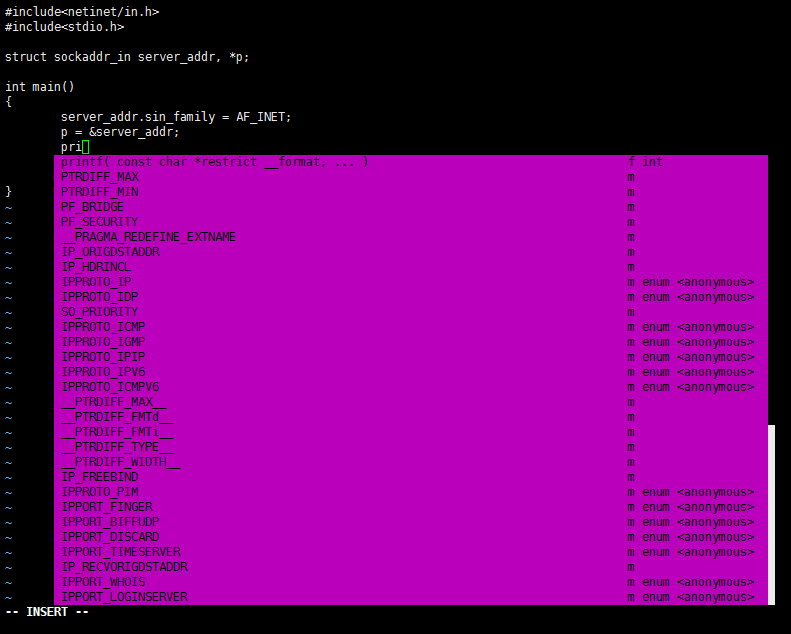
以上弹出提示窗,按Ctrl+N、Ctrl+P上下选择补全。
符号跳转
光标定位到需要跳转的符号上,输入\jd(\是默认leader),实现跳转(该跳转有条件,不一定100%成功,可见官网说明)
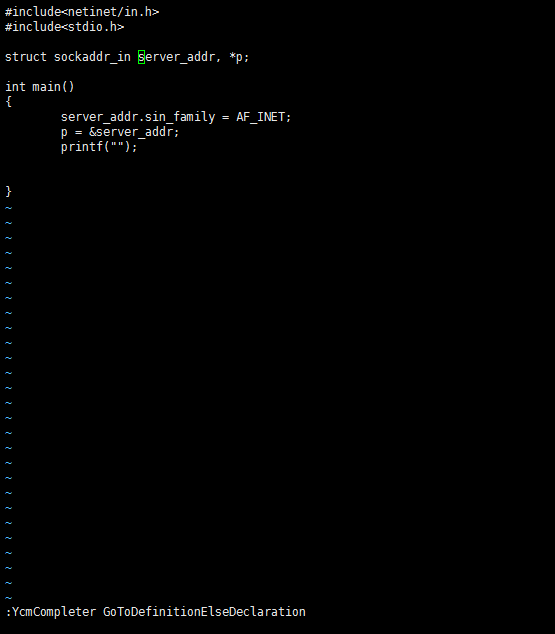
在printf上按\jd,跳转到定义
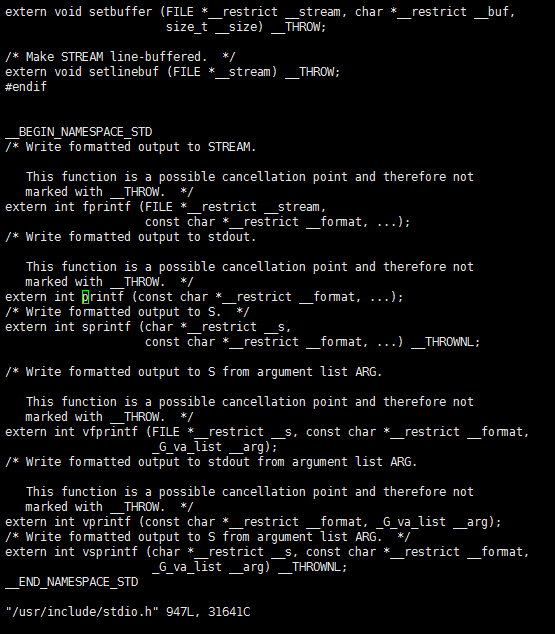
按Ctrl+o跳回之前的位置。
5.其他
实际使用每个项目单独一个.ycm_extra_conf.py配置,GitHub上有个项目可以自动生成配置文件, 有需要可以参考下。
CentOS7.2安装Vim8和YouCompleteMe的更多相关文章
- Centos7安装vim8.0 + YouCompleteMe
更新yum sudo yum upgrade sduo yum update 下载git sudo yum install git 升级vim以及gcc 升级gcc sudo yum install ...
- 学以致用八---centos7.2 安装vim8+支持python3
目的:打造基于python的vim环境 也是在地铁上突然产生的一个想法,平时都是在pycharm上练习python,但有时候会提示激活码过期,又得上网找激活码,够折腾的.那何不在linux环境下来搭建 ...
- ubuntu16.04下编译安装vim8.1
之前写过一篇centos7下编译安装vim8.0的教程,ubuntu16.04相比centos7下安装过程不同在于依赖包名字的不同,其余都是一样.下面给出ubuntu16.04编译安装vim8.0需要 ...
- Ubuntu16.04安装vim8
Ubuntu16.04安装vim8 在Ubuntu16.04下编译安装vim8,并配置vim-plug插件管理器,以及安装YouCompleteMe等插件. 安装依赖 sudo apt-get ins ...
- Ubuntu 16.04安装Vim8.0
Ubuntu 16.04安装Vim8.0 https://www.aliyun.com/jiaocheng/131859.html sudo add-apt-repository ppa:jonath ...
- 在centos7上安装Jenkins
在centos7上安装Jenkins 安装 添加yum repos,然后安装 sudo wget -O /etc/yum.repos.d/jenkins.repo http://pkg.jenkins ...
- CentOS7 Jenkins安装
CentOS7 Jenkins安装 CentOS7 Jenkins安装 Download 从Jenkins下载apache-tomcat-8.0.18.tar.gz Install 安装 上传RPM文 ...
- 在 CentOS7 上安装 zookeeper-3.4.9 服务
在 CentOS7 上安装 zookeeper-3.4.9 服务 1.创建 /usr/local/services/zookeeper 文件夹: mkdir -p /usr/local/service ...
- 在 CentOS7 上安装 MongoDB
在 CentOS7 上安装 MongoDB 1 通过 SecureCRT 连接至 CentOS7 服务器: 2 进入到 /usr/local/ 目录: cd /usr/local 3 在当前目录下创建 ...
随机推荐
- [NOI2001] 食物链 (扩展域并查集)
题目描述 动物王国中有三类动物 A,B,C,这三类动物的食物链构成了有趣的环形.A 吃 B,B 吃 C,C 吃 A. 现有 N 个动物,以 1 - N 编号.每个动物都是 A,B,C 中的一种,但是我 ...
- VMware---之网卡设置
闲来无事,扯点皮,详细说下NAT配置过程 NAT全称Network Address Translation网络地址转换,顾名思义,配置的重点也是地址转换. 步骤1.配置局域网段及网关 打开vmware ...
- hdu 1166 树状数组(线段树)
敌兵布阵 Time Limit: 2000/1000 MS (Java/Others) Memory Limit: 65536/32768 K (Java/Others)Total Submis ...
- uva 11235 RMQ范围最大值
题目大意:给一个整数上升序列,对于一系列询问区间(i,j),回答这段区间出现次数最多值所出现的次数. 分析:一个上升序列,相同的值聚集在一起,把相同的值的区间看作一个整体,假设这样的整体有n个,把他们 ...
- GridView动态添加View
activity_main.xml <?xml version="1.0" encoding="utf-8"?> <LinearLayout ...
- P3378 堆【模板】 洛谷
https://www.luogu.org/problem/show?pid=3378 题目描述 如题,初始小根堆为空,我们需要支持以下3种操作: 操作1: 1 x 表示将x插入到堆中 操作2: 2 ...
- Ubuntu官方Wiki教程资源
前言:通常学习一样新知识时,最快的方式是通过搜索引擎然后以最快的方式拿枪上战场,如果接下来还一直依赖搜索引擎去打,那么你会发现自己永远都在打游击:那么如果要解决这个问题,必须要学会系统的学习,只有连贯 ...
- android DatePicker使用
<LinearLayout xmlns:android="http://schemas.android.com/apk/res/android" xmlns:tools=&q ...
- Mac Ubuntu ----端口被占用
Mac下使用lsof(list open files)来查看端口占用情况,lsof 是一个列出当前系统打开文件的工具. 使用 lsof 会列举所有占用的端口列表: 1 $ lsof 使用less可以用 ...
- Base64的空格 + 问题...
BASE64 通过url传递到后台 加号变空格的处理方法 解决方法: 前台处理:str.replace("+", "%2B"); (错误) <scrip ...