
idea(3)-jetty配置
方式一、采用mortbay插件:
1、pom.xml
<plugin>

    <groupId>org.mortbay.jetty</groupId>

    <artifactId>jetty-maven-plugin</artifactId>

    <version>8.1.15.v20140411</version>

    <configuration>

        <stopKey>stop</stopKey>

        <stopPort>9998</stopPort>

        <scanIntervalSeconds>1</scanIntervalSeconds>

        <contextXml>${project.basedir}/src/test/resources/jetty-context.xml</contextXml>

        <webApp>

            <contextPath>/${project.artifactId}</contextPath>

        </webApp>

        <connectors>

            <connector implementation="org.eclipse.jetty.server.nio.SelectChannelConnector">

                <port>9999</port>

                <maxIdleTime>60000</maxIdleTime>

            </connector>

        </connectors>

    </configuration>

</plugin>
注:对于org.eclipse.jetty.server.nio.SelectChannelConnector,即使没引入该jar包,也没影响。
2、jetty-context.xml
关键是在${project.basedir}/src/test/resources/目录下,创建文件:jetty-context.xml
<?xml version="1.0" encoding="UTF-8"?>

<!DOCTYPE Configure PUBLIC "-//Mort Bay Consulting//DTD Configure//EN" "http://www.eclipse.org/jetty/configure.dtd">

<Configure class="org.eclipse.jetty.webapp.WebAppContext">

    <Call name="setAttribute">

        <Arg>org.eclipse.jetty.server.webapp.WebInfIncludeJarPattern</Arg>

        <Arg>.*/.*jsp-api-[^/]\.jar$|./.*jsp-[^/]\.jar$|./.*taglibs[^/]*\.jar$</Arg>

    </Call>

</Configure>
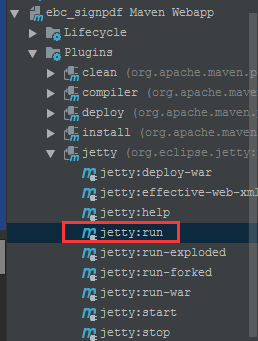
3、右上角maven窗口【刷新】,后,
方式二、采用eclipse插件:
1、jetty&jdk版本
9.3----->1.8

9.2----->1.7

8------->1.6
参考:https://www.eclipse.org/jetty/documentation/current/jetty-maven-plugin.html
2、pom.xml
<plugin>

    <groupId>org.eclipse.jetty</groupId>

    <artifactId>jetty-maven-plugin</artifactId>

    <version>9.2.26.v20180806</version>

    <configuration>

        <httpConnector>

            <port>9999</port>

        </httpConnector>

        <scanIntervalSeconds>10</scanIntervalSeconds>

        <webAppConfig>

            <contextPath>/ebc_signpdf</contextPath>

        </webAppConfig>

    </configuration>

</plugin>
我用eclipse下的jetty插件时,报错:java.lang.Exception: Timeout scanning annotations。需要每次启动时,执行
mvn jetty:run -Dorg.eclipse.jetty.annotations.maxWait=120
才能解决,但是过于麻烦,因此建议采用mortbay插件。
idea(3)-jetty配置的更多相关文章
- IntelliJ IDEA使用(二):tomcat和jetty配置
上一讲用idea创建了maven web项目,接下来我们把项目发布到tomcat和jetty运行,以便进一步地开发和调试 配置tomcat 第一.打开菜单栏 第二.点击设置按钮,添加应用服务器,选择t ...
- 阿里云服务器Linux CentOS安装配置(五)jetty配置、部署
阿里云服务器Linux CentOS安装配置(五)jetty配置.部署 1.官网下载jetty:wget http://repo1.maven.org/maven2/org/eclipse/jetty ...
- IntelliJ IDEA使用(二):tomcat和jetty配置(转自:http://www.cnblogs.com/jenkinschan/p/6052948.html)
上一讲用idea创建了maven web项目,接下来我们把项目发布到tomcat和jetty运行,以便进一步地开发和调试 配置tomcat 第一.打开菜单栏 第二.点击设置按钮,添加应用服务器,选择t ...
- idea jetty 配置
一.jetty 网址下载地:https://www.eclipse.org/jetty/ 1.如下图红色箭头--> 点击Downloads 下载 2.选择最新版 .ZIP 下载 3.选择安装路径 ...
- Jetty配置
类似TomCat 登陆官网www.eclipse.org Download下载Jetty zip压缩版 解压到文件夹,打开idea的Config->Jetty-server->Local- ...
- apache+jetty 配置web jsp服务器负载均衡
首先,查找中文资料,貌似很少,有一个网友写了点,但是1版本过老,2有些地方有错误. 经过我自己摸索,记录一下.这个图很简洁明了 第一阶段 ,配置jetty 首先从 http://download.ec ...
- maven jetty 配置
对于jdk8增加如下配置: <plugin> <groupId>org.eclipse.jetty</groupId> <artifactId>jett ...
- JDK1.7 和 jetty配置教程
系统是windows 7 64位版本,32位版本同理,xp系统的自己google设置环境变量 打开设置环境变量窗口,右键计算机->我的电脑,选择属性 点击高级系统设置 选择环境变量 红线为需要设 ...
- 内置Jetty配置JSP支持过程中的常见报错
目录 1. 常见报错及解决 1.1 JSP support not configured 1.2 JSTL标签解析 1.3 JSP编译 1.4 JSP实现依赖 1.5 EL表达式支持 2. 小结 1. ...
- Jetty配置虚拟目录,实现把web项目发布到自定义目录,指定指定上下文访问;jetty编码修改
2019-12-31 17:28:38 一般只需要把Java站点文件夹或*.war文件拷贝到Web Server的webapps文件夹下,即可启动运行该站点,但更多时候,我们并不想拷贝站点,而 ...
随机推荐
- [xdoj1007]易碎的鸟蛋(dp)
解题思路:f[n,m]表示n层楼.m个鸡蛋时所需要的最小次数,则 转移方程为:f[n,m] = min{ 1+max(f[i-1,m-1], f[n-i,m]) | i=1..n }初始条件:f[i, ...
- UWP蓝牙的例子
https://answers.microsoft.com/zh-hans/windows/forum/windows_10-networking/%e5%9c%a8win10%e7%8e%af%e5 ...
- 文本框控件JTextField和JTextArea的使用
-----------------siwuxie095 工程名:TestUI 包名:com.siwuxie095.ui 类名:TestTextF ...
- nginx 代理参数介绍
2)我们可以看到nginx文件夹内有一个conf文件夹,其中有好几个文件,其他先不管,我们打开nginx.conf,可以看到一段: 这段代码在server里面,相当于一个代理服务器,当然可以配置多个. ...
- C++面向对象类的实例题目九
题目描述: 编写一个学生和老师数据输入和显示程序,学生数据有编号.姓名.班号和成绩,教师数据有编号.姓名.职称和部门. 要求将编号.姓名.输入和显示设计成一个类person,并作为学生数据操作类stu ...
- (转)Linux网络协议栈(三)——网络设备(1)
网络设备(network device)是内核对网络适配器(硬件)的抽象与封装,并为各个协议实例提供统一的接口,它是硬件与内核的接口,它有两个特征:(1) 作为基于硬件的网络适配器与基于软件的协 ...
- hive与hbase数据类型对应关系
hive与hbase数据类型对应关系 当hbase中double,int 类型以byte方式存储时,用字符串取出来必然是乱码. 在hivd与hbase整合时也遇到这个问题:做法是:#b 1.加#b C ...
- 855C Helga Hufflepuff's Cup
传送门 题目大意 给你一棵树,可以染m种颜色,现定义一种特殊的颜色K,一棵树上最多能有x个特殊颜色.如果一个节点为特殊颜色,那么他相邻的节点的值只能选比K小的颜色,问一共有多少种染色方案. 分析 不难 ...
- Entity Framework Tutorial Basics(35):Local Data
Local Data The Local property of DBSet provides simple access to the entities that are currently bei ...
- (转)HTML&CSS——background: url() no-repeat 0 -64px;CSS中背景图片定位方法
http://blog.csdn.net/oscar92420aaa/article/details/51304067 CSS中背景图片的定位,困扰我很久了.今天总算搞懂了,一定要记下来. 在CSS中 ...