
What is Data Driven Testing? Learn to create Framework
What is Data Driven Testing?
Data-driven is a test automation framework which stores test data in a table or spread spreadsheet format. This allows automation engineers to have a single test script which can execute tests for all the test data in the table.
In this framework, input values are read from data files and are stored into a variable in test scripts. Ddt (Data Driven testing) enables building both positive and negative test cases into a single test.
In Data-driven test automation framework, input data can be stored in single or multiple data sources like xls, XML, csv, and databases.

In this tutorial, you will learn
- What is Data Driven Testing?
- Why Data Driven Testing?
- How to create a Data Driven Automation Framework
- Best practices of Data Driven testing:
- Advantages of Data-Driven testing
- Disadvantages of Data Driven testing:
Why Data Driven Testing?
Frequently we have multiple data sets which we need to run the same tests on. To create an individual test for each data set is a lengthy and time-consuming process.
Data Driven Testing framework resolves this problem by keeping the data searate from Functional tests. The same test script can execute for different combinations of input test data and generate test results.
Example:
For example, we want to test the login system with multiple input fields with 1000 different data sets.
To test this, you can take following different approaches:
Approach 1) Create 1000 scripts one for each dataset and runs each test separately one by one.
Approach 2) Manually change the value in the test script and run it several times.
Approach 3) Import the data from the excel sheet. Fetch test data from excel rows one by one and execute the script.
In the given three scenarios first two are laborious and time-consuming. Therefore, it is ideal to follow the third approach.
Thus, the third approach is nothing but a Data-Driven framework.
How to create a Data Driven Automation Framework
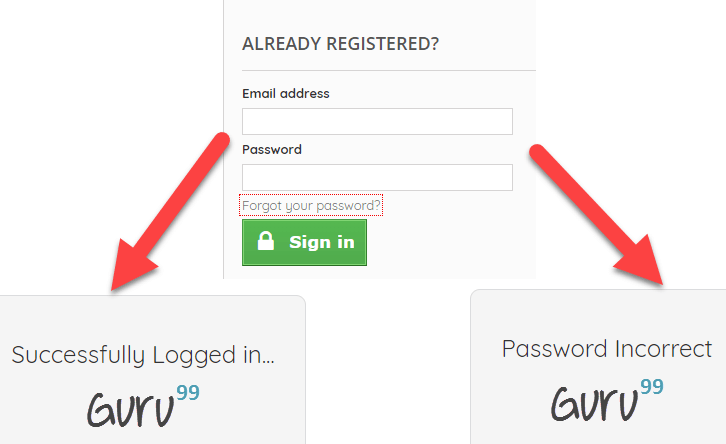
Consider you want to Test Login functionality of an application.
Step 1) Identify the Test Cases
- Input Correct username and password – Login Success
- Input incorrect username and correct password – Login Failure
- Input correct username and incorrect password - Login Failure
Step 2) Create detailed est Steps for above 3 Test Cases
| Test Case# | Description | Test Steps | Test Data | Expected Results |
|---|---|---|---|---|
| 1 | Check Login for valid credentials |
|
Username: valid password: valid | Login Success |
| 2 | Check Login for invalid credentials |
|
Username: invalid password: valid | Login Fail |
| 3 | Check Login for invalid credentials |
|
Username: valid password: invalid | Login Fail |
Step 3) Create Test Script
If you observe the Test Steps Remain common through the 3 Test Steps. You need to create a Test Script to execute these steps
// This is Pseudo Code

// Test Step 1: Launch Application

driver.get("URL of the Appliation");

// Test Step 2: Enter Password

txtbox_username.sendKeys("valid");

// Test Step 3: Enter Password

txtbox_password.sendKeys("invalid");

// Test Step 4: Check Results

If (Next Screen) print success else Fail
Step 4) Create an excel/csv with the Input Test Data

Step 5) Step Modify the Scrip to Loop over Input Test Data. The input commands should also be parameterized
// This is Pseudo Code

// Loop 3 Times

for (i = 0; i & lt; = 3; i++) {

    // Read data from Excel and store into variables

    int input_1 = ReadExcel(i, 0);

    int input_2 = ReadExcel(i, 1);

    // Test Step 1: Launch Application

    driver.get("URL of the Application");

    // Test Step 2: Enter Password

    txtbox_username.sendKeys(input_1);

    // Test Step 3: Enter Password

    txtbox_password.sendKeys(input_2);

    // Test Step 4: Check Results

    If(Next Screen) print success

    else Fail

}
Above are just 3 test cases. The test script can be used to loop over following test cases just by appending test data values to Excel
- Input incorrect username and incorrect password – Login Fail
- Input correct username and password blank – Login Fail
- Input blank username and blank password– Login Fail
And so on
Best practices of Data Driven testing:
Below given are Best testing practices for Data-Driven testing:
- It is ideal to use realistic information during the data-driven testing process
- Test flow navigation should be coded inside the test script
- Drive virtual APIs with meaningful data
- Use Data to Drive Dynamic Assertions
- Test positive as well as negative outcomes
- Repurpose Data Driven Functional Tests for Security and Performance
Advantages of Data-Driven testing
Data-Driven offer many advantages some of them are:
- Allows to test application with multiple sets of data values during Regression testing
- Test data and verification data can be organized in just one file, and it is separate from the test case logic.
- Base on the tool, it is possible to have the test scripts in a single repository. This makes the texts easy to understand, maintain and manage.
- Actions and Functions can be reused in different tests.
- Some tools generate test data automatically. This is useful when large volumes of random test data are necessary, which helps to save the time.
- Data-driven testing can perform any phase of the development. A data-driven test cares are generally merged in the single process. However, it can be used in multiple test cases.
- Allows developers and testers to have clear separation for the logic of their test cases/scripts from the test data.
- The same test cases can be executed several times which helps to reduce test case and scripts.
- Any changes in the test script do not effect the test data
Disadvantages of Data Driven testing:
Some Drawbacks of Data Driven Automation Testing method are:
- Quality of the test is depended on the automation skills of the Implementing team
- Data validation is a time-consuming task when testing large amount of data.
- Maintenance is a big issue as large amount of coding needed for Data-Driven testing.
- High-level technical skills are required. A tester may have to learn an entirely new scripting language.
- There will be more documentation. Mostly related to scripts management tests infrastructure and testing results.
- A text editor like Notepad is required to create and maintain data files.
Conclusion:
- Data-driven is a test automation framework which stores test data in a table or spread spreadsheet format.
- In Data-driven test automation framework, input data can be stored in single or multiple data sources like xls, XML, csv, and databases.
- To create an individual test for each data set is a lengthy and time-consuming process. Data Driven Testing framework resolves this issue by keeping the data separate from Functional tests.
- In Data Driven Testing, it is an ideal option to use realistic information
- It allows testing application with multiple sets of data values during Regression testing
- Drawback of this method is that it is depended on the automation skills of the Implementing team
What is Data Driven Testing? Learn to create Framework的更多相关文章
- Spock - Document - 03 - Data Driven Testing
Data Driven Testing Peter Niederwieser, The Spock Framework TeamVersion 1.1 Oftentimes, it is useful ...
- [转]Table-Driven and Data Driven Programming
What is Table-Driven and Data-Driven Programming? Data/Table-Driven programming is the technique of ...
- Data Developer Center > Learn > Entity Framework > Get Started > Loading Related Entities
Data Developer Center > Learn > Entity Framework > Get Started > Loading Related Entitie ...
- Python DDT(data driven tests)模块心得
关于ddt模块的一些心得,主要是看官网的例子,加上一点自己的理解,官网地址:http://ddt.readthedocs.io/en/latest/example.html ddt(data driv ...
- Learn to Create Everything In a Fragment Shader(译)
学习在片元着色器中创建一切 介绍 这篇博客翻译自Shadertoy: learn to create everything in a fragment shader 大纲 本课程将介绍使用Shader ...
- [Jest] Write data driven tests in Jest with test.each
Often, we end up creating multiple unit tests for the same unit of code to make sure it behaves as e ...
- spring data mongo API learn(转)
显示操作mongo的语句,log4j里面加入: log4j.logger.org.springframework.data.mongodb.core=DEBUG, mongodb log4j.appe ...
- [D3] Start Visualizing Data Driven Documents with D3 v4
It’s time to live up to D3’s true name and potential by integrating some real data into your visuali ...
- [The Basics of Hacking and Penetration Testing] Learn & Practice
Remember to consturct your test environment. Kali Linux & Metasploitable2 & Windows XP
随机推荐
- Android Studio & Butter Knife —— 快速开发
Butter Knife是一个Android的注解框架,可以帮助用户快速完成视图.资源与对象的绑定,完成事件的监听.(也就是少写findViewById()) 具体的介绍可以参考官方主页: http: ...
- js基础:关于Boolean() 与 if
最近面试比较多,但每次我问这个问题的时候,答出来的同学并不多 var a = 0; if( a) { alert(1); } 这个问题有部分人会答alert(1), 有些人会答不执行. 结果是不执 ...
- bzoj 3754: Tree之最小方差树 模拟退火+随机三分
题目大意: 求最小方差生成树.N<=100,M<=2000,Ci<=100 题解: 首先我们知道这么一个东西: 一些数和另一个数的差的平方之和的最小值在这个数是这些数的平均值时取得 ...
- java判断一个类是否公共类
Modifier.isPublic([类].getModifiers()) Modifier.isAbstract([类].getModifiers())
- HDOJ(1069)最长下降子序列
每个箱子可有3种叠加方式,所以有3*n个箱子.将箱子按长度由大到小排序,有求箱子按宽度的最长下降子序列的高度之和即可. #include<cstdio> #include<algor ...
- keepalived+nginx实现双机热备
keepalived是一个类似于layer3, 4, 5 交换机制的软件,也就是我们平时说的第3层.第4层和第5层交换.Keepalived的作用是检测web服务器的状态,如果有一台web服务器死机, ...
- Trie(前缀树/字典树)及其应用
Trie,又经常叫前缀树,字典树等等.它有很多变种,如后缀树,Radix Tree/Trie,PATRICIA tree,以及bitwise版本的crit-bit tree.当然很多名字的意义其实有交 ...
- java内存模型(netty权威指南)
1.Java内存模型 Java虚拟机规范中试图定义一种java内存模型(java Memory Model,jmm)来屏蔽掉各种操作系统.虚拟机实现厂商和硬件的内存访问差异,以确保Java程序在所有操 ...
- 【转】深刻理解render 和 redirect_to
由于最近老是在表单提交后出现没有反应的现象,发现是在action中的使用render 和 redirect_to的原因,于是就想搞清楚他两真正的区别在哪里,上一遍的blog也谈到了这二者的区别,但是有 ...
- JS ES6 -- let命令
1.ES6新增了块级作用域的let和const 这新特性let命令,用来声明变量.它的用法类似于var,但是所声明的变量,只在let命令所在的代码块内有效. for循环的计数器,就很合适使用let命令 ...