
springboot - 映射HTTP Response Status Codes 到 FreeMarker Error页面
1、总览

2、代码
1)、pom.xml
这里注意:springboot 2.2.0以后默认的freemarker文件后缀为:ftlh。本例用的是2.2.1,所以后缀为ftlh
<dependencies>

    <dependency>

        <groupId>org.springframework.boot</groupId>

        <artifactId>spring-boot-starter-web</artifactId>

    </dependency>

    <dependency>

        <groupId>org.projectlombok</groupId>

        <artifactId>lombok</artifactId>

        <optional>true</optional>

    </dependency>

    <dependency>

        <groupId>org.springframework.boot</groupId>

        <artifactId>spring-boot-starter-tomcat</artifactId>

        <scope>provided</scope>

    </dependency>

    <dependency>

        <groupId>org.springframework.boot</groupId>

        <artifactId>spring-boot-starter-test</artifactId>

        <scope>test</scope>

    </dependency>

    <dependency>

        <groupId>org.springframework.boot</groupId>

        <artifactId>spring-boot-starter-freemarker</artifactId>

    </dependency>

</dependencies>
2)、application.properties
#必须关闭whitelabel,否则无法导航到错误ftlh页面上

server.error.whitelabel.enabled=false

server.error.include-stacktrace=always
3)、java代码,与https://www.cnblogs.com/yaoyuan2/p/11873110.html一致
4)、5xx.ftlh
<!DOCTYPE html>

<html lang="en">

<head>

    <style>

        table td{

            vertical-align:top;

            border:solid 1px #888;

            padding:10px;

        }

    </style>

</head>

<body>

<h1>My FreeMarker 5xx Error Page</h1>

<table>

    <tr>

        <td>Date</td>

        <td>${timestamp?datetime}</td>

    </tr>

    <tr>

        <td>Error</td>

        <td>${error}</td>

    </tr>

    <tr>

        <td>Status</td>

        <td>${status}</td>

    </tr>

    <tr>

        <td>Message</td>

        <td>${message}</td>

    </tr>

    <tr>

        <td>Exception</td>

        <td>${exception!""}</td>

    </tr>

    <tr>

        <td>Trace</td>

        <td>

            <pre>${trace}</pre>

        </td>

    </tr>

</table>

</body>

</html>
注意:在freemarker中${exception}是空的,导致出错,进而执行不到前模板页面了。因此,此处加上了!"",表示为空或找不到时为""。
5)、404.ftlh
<!DOCTYPE html>

<html lang="en">

<head>

    <style>

        table td{

            vertical-align:top;

            border:solid 1px #888;

            padding:10px;

        }

    </style>

</head>

<body>

<h1>My FreeMarker 404 Error Page</h1>

<table>

    <tr>

        <td>Date</td>

        <td>${timestamp?datetime}</td>

    </tr>

    <tr>

        <td>Error</td>

        <td>${error}</td>

    </tr>

    <tr>

        <td>Status</td>

        <td>${status}</td>

    </tr>

    <tr>

        <td>Message</td>

        <td>${message}</td>

    </tr>

    <tr>

        <td>Exception</td>

        <td>${exception!"No exception thrown"}</td>

    </tr>

    <tr>

        <td>Trace</td>

        <td>

            <pre>${trace!"No Stacktrace available"}</pre>

        </td>

    </tr>

</table>

</body>

</html>
6)、error.ftlh
<!DOCTYPE html>

<html lang="en">

<head>

    <style>

        table td{

            vertical-align:top;

            border:solid 1px #888;

            padding:10px;

        }

    </style>

</head>

<body>

<h1>My FreeMarker Custom Global Error Page</h1>

<table>

    <tr>

        <td>Date</td>

        <td>${timestamp?datetime}</td>

    </tr>

    <tr>

        <td>Error</td>

        <td>${error}</td>

    </tr>

    <tr>

        <td>Status</td>

        <td>${status}</td>

    </tr>

    <tr>

        <td>Message</td>

        <td>${message}</td>

    </tr>

    <tr>

        <td>Exception</td>

        <td>${exception!"No exception"}</td>

    </tr>

    <tr>

        <td>Trace</td>

        <td>

            <pre>${trace!"No trace"}</pre>

        </td>

    </tr>

</table>

</body>

</html>
3、执行
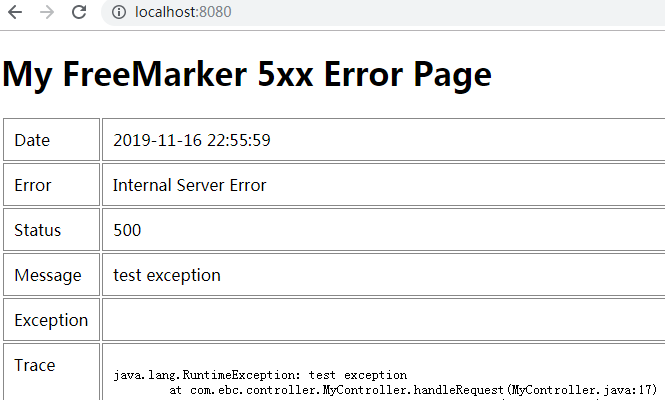

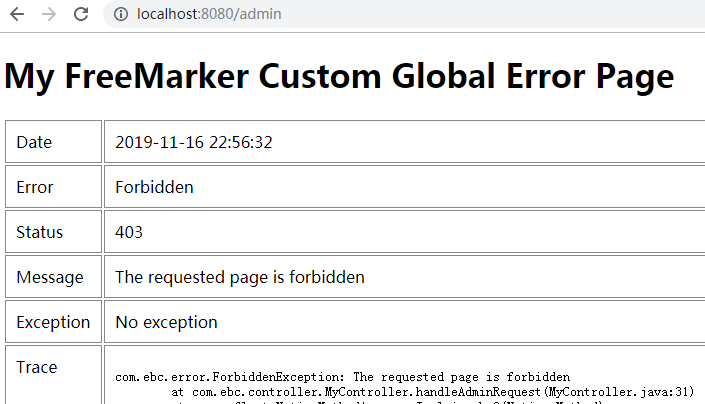

总结:
1、目录结构为:
templates
|_error.ftlh
|_error
|_5xx.ftlh
|_404.ftlh
2、application.properties中,必须加入:
server.error.whitelabel.enabled=false
如果想显示trace,也要加入:
server.error.include-stacktrace=always
springboot - 映射HTTP Response Status Codes 到 FreeMarker Error页面的更多相关文章
- springboot - 映射HTTP Response Status Codes 到 静态 HTML页面
1.总览 2.代码 1).pom.xml <dependencies> <dependency> <groupId>org.springframework.boot ...
- springboot - 映射 HTTP Response Status Codes 到自定义 JSP Error 页面
1.总览 2.代码 1).pom.xml <dependencies> <dependency> <groupId>org.springframework.boot ...
- HTTP状态码(HTTP Status codes)简介
HTTP可能大家都熟悉,就是超文本传输协议.浏览器通过HTTP与WEB Server通讯(也有一些其它软件比如IM使用HTTP协议传递数据),把我们的请求(HTTP Request)传递给服务器,服务 ...
- HTTP response status
The status code is a 3-digit number: 1xx (Informational): Request received, server is continuing the ...
- C#、JAVA操作Hadoop(HDFS、Map/Reduce)真实过程概述。组件、源码下载。无法解决:Response status code does not indicate success: 500。
一.Hadoop环境配置概述 三台虚拟机,操作系统为:Ubuntu 16.04. Hadoop版本:2.7.2 NameNode:192.168.72.132 DataNode:192.168.72. ...
- IIS SMTP status codes
Here are the meaning of SMTP status codes. Status Code Description 211 System status, or system help ...
- HTTP常见返回代码(HTTP Status codes)的分类和含义
HTTP错误主要分成三类:用户设备问题.Web服务器问题和连接问题.当客户端向Web服务器发送一个HTTP请求时,服务器都会返回一个响应代码.而这些响应代码主要分成五类. HTTP状态码中定义了5大类 ...
- returned a response status of 403 OR 409
当我们使用jersy把图片上传到我们的图片服务器中[tomcat],我们可能会有以下的错误: returned a response status of 403 OR 409 403和409我都遇到过 ...
- RobotFramework下的http接口自动化Get Response Status 关键字的使用
Get Response Status 关键字用来获取http请求返回的http状态码. 示例1:访问苏宁易购网站上的http推荐接口,使用Get Response Status 关键字来获取返回的h ...
随机推荐
- 一个小白对auth的理解
---恢复内容开始--- PS:最近需要做一个验证用户权限的功能,在官方和百度看了下,发现大家都是用auth来做验证,官方有很多auth的使用教程,但是都不全面,我也提问了几个关于auth的问题 也没 ...
- vagrant 添加带版本号的 box
众所周知,vagrant添加box的时候要从外网下载,那速度...(说多了都是泪),所以只好用下载工具下载到本地之后再添加. 如何搭建 homestead:https://laravelacademy ...
- android7.0关于TelephonyManager.getDeviceId()返回null的问题
在android7.0的系统下发现TelephonyManager.getDeviceId()在权限允许的情况下取得返回值也为null,解决方法如下: public static String get ...
- english-phoneme
1. 声音概述 2. 音素phoneme与音标 2.1 音素与音标 2.2 音素与字母 2.3 字母发音-字母自然发音对照表 2.4 音标表 2.5 元音字母-辅音字母表 2.6 单元音发音口形趋势表 ...
- Windows篇:链接linux->"Xmanager"
Windows篇:链接linux->"Xmanager" Xmanager是什么? Xmanager是一款小巧.便捷的浏览远端X窗口系统的工具.在工作中经常使用Xmanage ...
- lnmp1.5下安装mongodb
一.安装mongodb .下载MongoDB 2.6.0二进制发行版 $ curl -O http://downloads.mongodb.org/linux/mongodb-linux-x86_64 ...
- 七:日期类Date、日期格式化SimpleDateFormat、日历Calendar
日期的格式转换:
- arm linux 移植 udhcp 与 使用
背景 在一些网络环境下,需要静态IP不够现实,需要使用DHCP进行自动获取IP地址. udhcpc是一个面向嵌入式系统的非常小的DHCP客户端,字母的缩写微μ- DHCP -客户端client(μDH ...
- 使用Spring Data JPA的Spring Boot
本文教你开始使用Spring Data JPA.来自优锐课JAVA架构专业讲师精心整理. 欢迎使用带有Spring Data JPA的Spring Boot教程!在本教程中,我们将看到Spring D ...
- VS2019 添加控制器 主机运行转换时出现问题
问题: 解决方案: 更换低版本VS,亲测VS2017可行(其它未实测) VS2019目前没找到解决方案,VS版本问题 原文链接