
Linux命令学习总结:rm命令
命令简介:
该命令用来删除Linux系统中的文件或目录。通常情况下rm不会删除目录,你必须通过指定参数-r或-R来删除目录。另外rm通常可以将该文件或目录恢复(注意,rm删除文件其实只是将指向数据块的索引点(information nodes)释放,只要不被覆盖,数据其实还在硬盘上。如果想要保证文件的内容无法复原,可以使用命令shred 。 另外一般还是要慎用rm -rf *这样的命令。
执行权限 :All User
指令所在路径:/bin/rm
命令语法:
rm [OPTION]... FILE...
命令参数:
|
参数 |
长参数 |
描叙 |
|
-f |
--force |
强制删除,忽略不存在的文件,从不给出提示。 |
|
-i |
--interactive |
交互模式删除文件,删除文件前给出提示。 |
|
-r |
--recursive |
递归的删除目录下面文件以及子目录下文件。 |
|
-R |
--recursive |
递归的删除目录下面文件以及子目录下文件。 |
|
-v |
--verbose |
显示运行时详细信息 |
|
--help |
显示命令在线帮助 |
|
|
--version |
显示命令版本信息 |
使用示例:
1:查看获取rm命令的帮助信息。
[root@DB-Server kerry]# man rm
RM(1) User Commands RM(1)
NAME
rm - remove files or directories
SYNOPSIS
rm [OPTION]... FILE...
DESCRIPTION
This manual page documents the GNU version of rm. rm removes each specified file. By default, it does not remove directories.
If a file is unwritable, the standard input is a tty, and the -f or --force option is not given, rm prompts the user for whether to remove the file. If
the response is not affirmative, the file is skipped.
OPTIONS
Remove (unlink) the FILE(s).
-f, --force
ignore nonexistent files, never prompt
-i, --interactive
prompt before any removal
--no-preserve-root do not treat 鈥?鈥?specially (the default)
--preserve-root
fail to operate recursively on 鈥?鈥?
-r, -R, --recursive
remove directories and their contents recursively
-v, --verbose
explain what is being done
--help display this help and exit
--version
output version information and exit
By default, rm does not remove directories. Use the --recursive (-r or -R) option to remove each listed directory, too, along with all of its contents.
To remove a file whose name starts with a 鈥?鈥? for example 鈥?foo鈥? use one of these commands:
rm -- -foo
rm ./-foo
Note that if you use rm to remove a file, it is usually possible to recover the contents of that file. If you want more assurance that the contents are
truly unrecoverable, consider using shred.
AUTHOR
Written by Paul Rubin, David MacKenzie, Richard Stallman, and Jim Meyering.
REPORTING BUGS
Report bugs to <bug-coreutils@gnu.org>.
COPYRIGHT
Copyright 漏 2006 Free Software Foundation, Inc.
This is free software. You may redistribute copies of it under the terms of the GNU General Public License <http://www.gnu.org/licenses/gpl.html>. There
is NO WARRANTY, to the extent permitted by law.
SEE ALSO
chattr(1), shred(1)
The full documentation for rm is maintained as a Texinfo manual. If the info and rm programs are properly installed at your site, the command
info rm
should give you access to the complete manual.
rm 5.97 June 2011 RM(1)
[root@DB-Server kerry]# rm --help
Usage: rm [OPTION]... FILE...
Remove (unlink) the FILE(s).
-f, --force ignore nonexistent files, never prompt
-i, --interactive prompt before any removal
--no-preserve-root do not treat `/' specially (the default)
--preserve-root fail to operate recursively on `/'
-r, -R, --recursive remove directories and their contents recursively
-v, --verbose explain what is being done
--help display this help and exit
--version output version information and exit
By default, rm does not remove directories. Use the --recursive (-r or -R)
option to remove each listed directory, too, along with all of its contents.
To remove a file whose name starts with a `-', for example `-foo',
use one of these commands:
rm -- -foo
rm ./-foo
Note that if you use rm to remove a file, it is usually possible to recover
the contents of that file. If you want more assurance that the contents are
truly unrecoverable, consider using shred.
Report bugs to bug-coreutils@gnu.org.
2:删除指定文件
如下所示,该目录下有20个文件,删除指定文件后,只剩下19个文件了。
[oracle@DB-Server bdump]$ ls -lrt | wc -l
20
[oracle@DB-Server bdump]$ rm gsp_lgwr_7826.trc
[oracle@DB-Server bdump]$ ls -lrt | wc -l
19
3:删除文件显示运行时详细信息
[oracle@DB-Server bdump]$ rm -v gsp_lgwr_4617.trc
removed `gsp_lgwr_4617.trc'
4:交互模式下删除文件
如下所示,输入y后就会删除文件,不想删除则数据n
[oracle@DB-Server bdump]$ rm -iv gsp_lgwr_5005.trc
rm: remove regular file `gsp_lgwr_5005.trc'? y
removed `gsp_lgwr_5005.trc'
[oracle@DB-Server bdump]$ rm -iv gsp_lgwr_7826.trc
rm: remove regular file `gsp_lgwr_7826.trc'? n
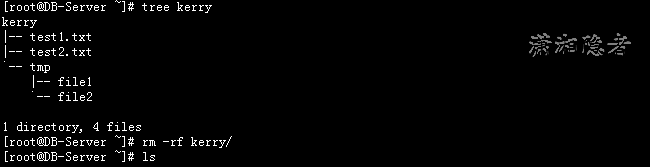
5: 递归删除某个目录下文件以及子目录
如下所示,kerry目录下有test1.txt、 test2.txt 文件,以及子目录tmp, 而子目录下又有文件file1、file2.
[root@DB-Server ~]# tree kerry
kerry
|-- test1.txt
|-- test2.txt
`-- tmp
|-- file1
`-- file2
1 directory, 4 files
[root@DB-Server ~]# rm -rf kerry/
6: 删除空目录
[root@DB-Server ~]# mkdir kerry
[root@DB-Server ~]# rm -r kerry/
rm: remove directory `kerry/'? y
7:删除目录bdump下的所有trc文件类型的文件。
[oracle@DB-Server bdump]$ ls
alert_GSP.log gsp_lgwr_20025.trc gsp_lgwr_5023.trc gsp_p000_4637.trc gsp_p000_4718.trc gsp_p000_5025.trc gsp_p001_4639.trc gsp_p001_4720.trc gsp_p001_5027.trc
gsp_lgwr_19915.trc gsp_lgwr_4719.trc gsp_lgwr_5089.trc gsp_p000_4682.trc gsp_p000_4739.trc gsp_p000_5043.trc gsp_p001_4684.trc gsp_p001_4741.trc gsp_p001_5045.trc
[oracle@DB-Server bdump]$ rm -v *.trc
removed `gsp_lgwr_19915.trc'
removed `gsp_lgwr_20025.trc'
removed `gsp_lgwr_4719.trc'
removed `gsp_lgwr_5023.trc'
removed `gsp_lgwr_5089.trc'
removed `gsp_p000_4637.trc'
removed `gsp_p000_4682.trc'
removed `gsp_p000_4718.trc'
removed `gsp_p000_4739.trc'
removed `gsp_p000_5025.trc'
removed `gsp_p000_5043.trc'
removed `gsp_p001_4639.trc'
removed `gsp_p001_4684.trc'
removed `gsp_p001_4720.trc'
removed `gsp_p001_4741.trc'
removed `gsp_p001_5027.trc'
removed `gsp_p001_5045.trc'
参考资料:
http://www.cnblogs.com/peida/archive/2012/10/26/2740521.html
Linux命令学习总结:rm命令的更多相关文章
- Linux初学习之 rm 命令
现在我们来仔细的学习一下linux的rm命令,这个命令顾名思义(我猜的,嘻嘻,是remove) 命令格式: rm [OPTION]... FILE... Remove (unlink) the FIL ...
- Linux 命令学习之rm
功能说明: rm 命令是对文件或目录进行删除操作. 语法:rm [-dfirv][--help][--version][文件或目录...] 补充说明:执行rm指令可删除文件或目录,如欲删除目录必须加上 ...
- linux每天一小步---rm命令详解
1 命令功能 rm命令用于删除文件或者目录,值得注意的是linux下的删除不弯曲等同于windows系统下的删除操作,linux系统下一旦删除了文件或者目录那么它将消失,而windows系统下我们还可 ...
- linux shell 学习笔记--内部命令学习
.基本命令 新手必须要掌握的初级命令 ls 基本的列出所有文件的命令.但是往往就是因为这个命令太简单,所以我们总是低估它.比如 ,用 -R 选项,这是递归选项,ls 将会以目录树的形式列出所有文件, ...
- LINUX基础学习之基础命令(4)和 文件的inode信息 --2019-11-28
一.inode是什么? 理解inode,要从文件储存说起. 文件储存在硬盘上,硬盘的最小存储单位叫做”扇区”(Sector).每个扇区储存512字节(相当于0.5KB). 操作系统读取硬盘的时候,不会 ...
- Linux基础学习之基础命令(1)--2019-11-14
查看命令路径其他方法: which 命令: which [options] [--] programname [...] -a:显示所有匹配的程序文件,而非第一个: --skip-alias:略过别名 ...
- Linux命令学习神器!命令看不懂直接给你解释!
大家都知道,Linux 系统有非常多的命令,而且每个命令又有非常多的用法,想要全部记住所有命令的所有用法,恐怕是一件不可能完成的任务. 一般情况下,我们学习一个命令时,要么直接百度去搜索它的用法,要么 ...
- linux每日命令(6):rm命令
rm是常用的命令,该命令的功能为删除一个目录中的一个或多个文件或目录,它也可以将某个目录及其下的所有文件及子目录均删除.对于链接文件,只是删除了链接,原有文件均保持不变. rm是一个危险的命令,使用的 ...
- Linux命令学习之xargs命令
xargs命令是给其他命令传递参数的一个过滤器,也是组合多个命令的一个工具.它擅长将标准输入数据转换成命令行参数,xargs能够处理管道或者stdin并将其转换成特定命令的命令参数.xargs也可以将 ...
- Linux命令学习笔记- vmstat命令实战详解
vmstat命令是最常见的Linux/Unix监控工具,可以展现给定时间间隔的服务器的状态值,包括服务器的CPU使用率,内存使用,虚拟内存交换情况,IO读写情况.这个命令是我查看Linux/Unix最 ...
随机推荐
- Linux NFS 服务部署
系统环境:Oracle Linux 5.7 服务端:192.168.1.111 客户端:192.168.1.171 一.服务端配置 二.客户端配置 一.服务端配置 1.依次启动portmap和nfs服 ...
- Easyui datagrid editor为combobox时指定数据源
当在datagrid行内部应用添加编辑操作时,引入combobox是非常方便的操作,我在引入combobox时对数据源这快做个总结,在做demo的过程中遇到个问题,就是当你选择了下拉框的值后点击保存, ...
- JS几种排序算法
一.冒泡排序 var bubble = function(arr){ ;i<;i++){ ;j<-i;j++){ ]){ temp = arr[j]; arr[j] = arr[j+]; ...
- HTML元素坐标定位,这些知识点得掌握
文档坐标和视口坐标 视口坐标是相对于窗口的坐标,而文档坐标是相对于整个文档而言.例如,在文档坐标中如果一个元素的相对于文档的Y坐标是200px,并且用户已经把浏览器向下滚动了75px,那么视口坐标中元 ...
- 创建ASP.NET Core MVC应用程序(5)-添加查询功能 & 新字段
创建ASP.NET Core MVC应用程序(5)-添加查询功能 & 新字段 添加查询功能 本文将实现通过Name查询用户信息. 首先更新GetAll方法以启用查询: public async ...
- hotcss用法
1.0 GitHub下载地址: https://github.com/imochen/hotcss 或者我的百度网盘:http://pan.baidu.com/s/1pKlLqHX 使用方法看demo ...
- 比较牛X的互联网公司都有哪些作死的行为
以下为近乎家的小近吐血整理: 1流氓行为 臭表碾说的就是你们! 百度 还有这种伪造网页弹窗: 360 不经同意,也不弹窗提醒,直接给我们安装推广软件.比较典型的是 腾讯 腾讯一直走在行业最前端,买 ...
- ArcGIS10.2 应用服务器搭建
操作系统:Windows Server2012R2 DataCenter 软件环境:ArcGIS Desktop10.2,ArcSDE10.2,ArcGIS Server10.2,win64_11gR ...
- Eclipse切换SVN用户
1. 点击windows --> preference --> Team --> SVN,查看当前的SVN接口. 2. 如果SVN接口是JavaHL,那么找到C:\Documents ...
- Cats(1)- 从Free开始,Free cats
cats是scala的一个新的函数式编程工具库,其设计原理基本继承了scalaz:大家都是haskell typeclass的scala版实现.当然,cats在scalaz的基础上从实现细节.库组织结 ...