
django-实现登录短信验证
功能演示
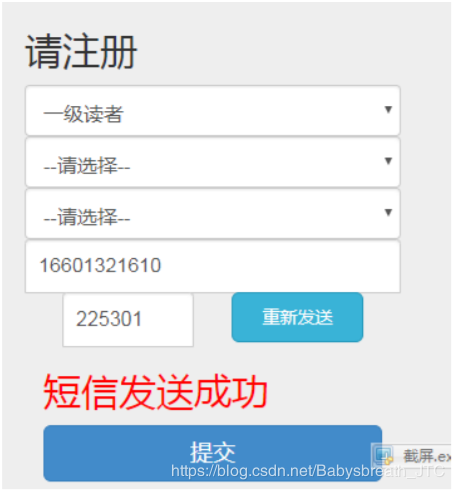
核心任务
- 前端功能:
- 点击按钮Ajax调用发送验证码功能
- 输完验证码后Ajax调用验证功能
- 后端功能:
- 功能1:发送验证码功能
- 功能2:验证码检查
- 后台核心逻辑(不需要手写)
- 功能3:发短信
- 功能4:生成短信验证码(随机生成6位数字)
- 集成Redis
- 使用Redis代替session缓存, 存储数据!
- Redis集成到Django中!
- 扩展功能:
- 统一接口返回结果的规范方法!
功能1:Django集成Redis
因为我们短信验证码生命周期控制的非常严格!而且数据用完后不需要存储. 所以建议直接把数据存储在缓存/内存中!
- 方案1: 使用session或cookie存储! session在当前浏览器有效! cookie 存储在用户本地不安全!session和cookie操作复杂,时间控制不精准!,存储的数据量非常有限!
- 方案2: 使用Redis/Mongdb等key:value数据库!读写非常快, 存储数据量非常庞大, 有效期控制非常精准!
第一步: 下载django-redis模块
pip install django-redis
第二步: 配置setting.py中写配置
配置Redis为Django的缓存,替换原来的session
#配置Redis为Django缓存

CACHES = {

"default": {

"BACKEND": "django_redis.cache.RedisCache",

"LOCATION": "redis://127.0.0.1:6379/0", #地址

"OPTIONS": {

"CLIENT_CLASS": "django_redis.client.DefaultClient",

}

}

}

# 将session缓存在Redis中

SESSION_ENGINE = "django.contrib.sessions.backends.cache"

SESSION_CACHE_ALIAS = "default"

# session 设置(可以不写)

SESSION_COOKIE_AGE = 60 * 60 * 12 # 12小时

SESSION_SAVE_EVERY_REQUEST = True

SESSION_EXPIRE_AT_BROWSER_CLOSE = True # 关闭浏览器,则COOKIE失效
第三步: views导入缓存cache模块
from django.core.cache import cache
第四步: 使用
def test_redis(request):

	# 存储数据

	chache.set("name", "tom", 20) # 该值的有效期为20s

	# 判断Redis中是否存在

	print(cache.has_kay("name"))  # 包含: true

	# 获取

	print(cache.get("name"))  # 返回: tom  无返回null

	return HttpResponse("测试Redis")
功能2: 短信下发
第一步: 申请短信服务
参考文档 申请阿里云短信服务.pdf文档
第二步: 独立发送短信和生成验证码的模块
#!/usr/bin/env python

#coding=utf-8

import random

from aliyunsdkcore.client import AcsClient

from aliyunsdkcore.request import CommonRequest

from utils import restful

def send_sms(phone,code):

	client = AcsClient('mxTYXZ4QDQecJQDN', 'znxNezmm4zfA9kPyqx1WrpznjCaJFT', 'cnhangzhou')

	#phone = '17600950805'

	#aa= '222222'

	code = "{'code':%s}"%(code)

	request = CommonRequest()

	request.set_accept_format('json')

	request.set_domain('dysmsapi.aliyuncs.com')

	request.set_method('POST')

	request.set_protocol_type('https') # https | http

	request.set_version('2017-05-25')

	request.set_action_name('SendSms')

	request.add_query_param('RegionId', 'cn-hangzhou')

	request.add_query_param('PhoneNumbers', phone)

	request.add_query_param('SignName', '北网')

	request.add_query_param('TemplateCode', 			'SMS_162738723')

	request.add_query_param('TemplateParam',code )

	response = client.do_action(request)

	# python2: print(response)

	print(str(response, encoding = 'utf-8'))

	return str(response, encoding = 'utf-8')

#数字表示生成几位, True表示生成带有字母的 False不带字母的

def get_code(n=6,alpha=True):

	s = '' # 创建字符串变量,存储生成的验证码

	for i in range(n): # 通过for循环控制验证码位数

			num = random.randint(0,9) # 生成随机数字0-9

			if alpha: # 需要字母验证码,不用传参,如果不需要字母的,关键字alpha=False

				upper_alpha = chr(random.randint(65,90))

				lower_alpha = chr(random.randint(97,122))

				num = random.choice([num,upper_alpha,lower_alpha])

			s = s + str(num)

	return s

if __name__ == '__main__':

	send_sms('18434288349', get_code(6,False))

	print(get_code(6,False)) # 打印6位数字验证码

	print(get_code(6,True)) # 打印6位数字字母混合验证码

	print(get_code(4,False)) # 打印4位数字验证码

	print(get_code(4,True)) # 打印4位数字字母混合验证码
功能3: 后台功能: 发送短信接口
流程:
获取手机号---->生成6位验证码–>缓存验证码到Redis—>发短信–>返回状态
# 发短信接口

def sms_send(request):

	# http://localhost:8000/duanxin/duanxin/sms_send/?phone=18434288349

	# 1 获取手机号

	phone = request.GET.get('phone')

	# 2 生成6位验证码

	code = aliyunsms.get_code(6, False)

	# 3 缓存到Redis

	cache.set(phone,code,60) #60s有效期

	print('判断缓存中是否有:',cache.has_key(phone))

	print('获取Redis验证码:',cache.get(phone))

	# 4 发短信

	result = aliyunsms.send_sms(phone, code)

	return HttpResponse(result)
功能4: 短信验证码校验
流程:
获取前台电话和验证码----> 获取Redis中存的验证码—>对比是否相等–>返回结果
# 短信验证码校验

def sms_check(request):

	# /duanxin/sms_check/?phone=xxx&code=xxx

	# 1. 电话和手动输入的验证码

	phone = request.GET.get('phone')

	code = request.GET.get('code')

	# 2. 获取redis中保存的code

	print('缓存中是否包含:',cache.has_key(phone))

	print('取值:',cache.get(phone))

	cache_code = cache.get(phone)

	# 3. 判断

	if code == cache_code:

		return HttpResponse(json.dumps({'result':'OK'}))

	else:

		return HttpResponse(json.dumps({'result':'False'}))
手动在浏览器上给假设的参数进行测试:
http://localhost:8000/duanxin/sms_send/?phone=手机号
http://localhost:8000/duanxin/sms_check/?phone=手机号&code=验证码
功能5: 统一接口的数据格式:
独立restful.py 接口模块!
参考:
https://blog.csdn.net/xyy1028/article/details/84981627
https://www.runoob.com/w3cnote/restful-architecture.html
统一的接口模块restful.py
#encoding: utf-8

from django.http import JsonResponse

class HttpCode(object):

	ok = 200

	pageerror = 404

	methoderror = 405

	servererror = 500

# {"code":400,"message":"","data":{}}

def result(code=HttpCode.ok,message="",data=None,kwargs=None):

	json_dict = {"code":code,"message":message,"result":data}

	if kwargs and isinstance(kwargs,dict) and kwargs.keys():

		json_dict.update(kwargs)

	return JsonResponse(json_dict,json_dumps_params={'ensure_ascii': False})

def ok(message='OK',data=None):

	return result(code=HttpCode.ok,message=message,data=data)

def page_error(message="",data=None):

	return result(code=HttpCode.pageerror,message=message,data=data)

def method_error(message='',data=None):

	return result(code=HttpCode.methoderror,message=message,data=data)

def server_error(message='',data=None):

	return result(code=HttpCode.servererror,message=message,data=data)
任何接口的返回结果,都是用resutful.py方法进行规整
# 短信验证码校验

def sms_check(request):

	# /duanxin/sms_check/?phone=xxx&code=xxx

	# 1. 电话和手动输入的验证码

	phone = request.GET.get('phone')

	code = request.GET.get('code')

	# 2. 获取redis中保存的code

	print('缓存中是否包含:',cache.has_key(phone))

	print('取值:',cache.get(phone))

	cache_code = cache.get(phone)

	# 3. 判断

	if code == cache_code:

		#格式统一调整后的

		return restful.ok("OK",data=None)

	else:

		#格式统一调整后的

		return restful.params_error("验证码错误", data=None)
功能6:前端短信Ajax两个
<script type="text/javascript">

            //倒计时

            var countdown=60;

            function sendemail(){

                var obj = $("#btn");

                settime(obj);

                }

            function settime(obj) { //发送验证码倒计时

                if (countdown == 0) {

                    obj.attr('disabled',false);

                    //obj.removeattr("disabled");

                    obj.val("免费获取验证码");

                    countdown = 60;

                    return;

                } else {

                    obj.attr('disabled',true);

                    obj.val("重新发送(" + countdown + ")");

                    countdown--;

                }

            setTimeout(function() {

                settime(obj) }

                ,1000)

            }

        </script>

     <script>

            //验证码

            $('#btn').click(function () {

                phone = $('#phone').val();

                if (phone == "") {

                    alert("请输入手机号");

                    return false;

                }

                //ajax

                $.ajax({

                    type: "get",

                    url: "/user/sms_send",

                    data: "phone="+phone,

                    success: function (msg) {

                        console.log("Data Saved: "+msg);

                        //转换为json

                        obj = eval("("+msg+")");

                        console.log('结果: '+obj.Message);

                        if (obj.Message == "OK") {

                            $('#msg').html("短信发送成功")

                        }else{

                            $('#msg').html("短信发送失败")

                        }

                    },

                    error: function (res) {

                        //状态码

                        console.log(res.status)

                    }

                });

            })

        </script>

<script>

          //短信验证码校验

            $('#smscode').change(function () {

                phone = $('#phone').val();

                code = $('#smscode').val();

                $.ajax({

                    type: "get",

                    url: "/user/sms_check",

                    data: "phone="+phone+"&code="+code,

                    success: function (msg) {

                        console.log("Data Saved: "+msg);

                        if (msg.code == '200') {

                            alert('成功');

                        }else{

                            $('#msg').html("手机验证码错误")

                        }

                    },

                    error: function (res) {

                        console.log(res.status)

                    }

                });

            })

        </script>
转载自:https://blog.csdn.net/Babysbreath_JTC/article/details/89319048
django-实现登录短信验证的更多相关文章
- 注册登录页面修订-Python使用redis-手机验证接口-发送短信验证
登录页面修订 views.Login.vue <template> <div class="login box"> <img src="@/ ...
- JAVA短信验证登录
短信验证登陆 1.点击触发,以电话号码为参数调用发送验证登录短信方法 2.默认模板为验证模板 生成6位验证码 3.将生成的验证码和手机号码放入缓存,(已经设置好缓存存放时间) 4.调用发送模板短信方法 ...
- Luffy之注册认证(容联云通讯短信验证)
用户的注册认证 前端显示注册页面并调整首页头部和登陆页面的注册按钮的链接. 注册页面Register,主要是通过登录页面进行改成而成. 先构造前端页面 <template> <div ...
- Thinkphp5使用阿里大于短信验证
现在各种平台登录验证很多时候会使用短信验证,快捷安全,有很多平台提供短信验证服务,相比较而言阿里大于价格比较便宜,快捷,所以在在千锋日常的php教学中多以此为例来说明短信验证的使用.下面我们在tp5中 ...
- ASP.NET MVC+Bootstrap 实现短信验证
短信验证大家都已经非常熟悉了,基本上每天都在接触手机短信的验证码,比方某宝,某东购物.站点注冊,网上银行等等,都要验证我们的手机号码真实性.这样做有什么优点呢. 曾经咱们在做站点的时候.为了提高用户注 ...
- Springboot下实现阿里云短信验证功能(含代码)
Springboot下实现阿里云短信验证功能 一 开通阿里云短信服务 阿里云官网注册登录 找到短信服务并开通 打开短信服务的管理台 在国内消息那栏中添加签名管理和模板管理(按照格式要求去写) 在右上角 ...
- Mob.com 短信验证的简单使用
1.环境配置 http://wiki.sharesdk.cn/android-短信sdk集成文档/ a.sdk下载 http://www.mob.com/#/downloadDetail/SMS/an ...
- python基于LeanCloud的短信验证
python基于LeanCloud的短信验证 1. 获取LeanCloud的Id.Key 2. 安装Flask框架和Requests库 pip install flask pip install re ...
- thinkphp实现短信验证注册
前言 注册时经常需要用到短信验证码,本文记录一下思路和具体实现. 短信验证平台使用云片,短信验证码的生成使用thinkphp. 思路 1.用户输入手机号,请求获取短信验证码. 2.thinkphp生成 ...
随机推荐
- NUMPY的学习之路(2)——索引,合并,分割,赋值
一.索引 1.1numpy数组的转置 A=np.arange(3,15).reshape(3,4) print(A) print(A[2][0]) print(A[2,1]) print(A[2,:] ...
- Spring - MVC - thymeleaf 缓存关闭
1. 概述 spring 配合 thymeleaf 关闭页面缓存 2. 背景 最近复习 spring 找了本书叫 spring in action 5th 本人水平有限 书还写得那么难 调试中遇到了问 ...
- CSS学习(8)盒模型
box:盒子,每个元素在页面中都会生成一个矩形区域(盒子) 盒子类型: 1.行盒,display属性=inline的元素,不换行(默认值) 2.块盒,display属性=block的元素,换行 浏览器 ...
- Speech Bandwidth Extension With WaveNet
利用WAVENET扩展语音带宽 作者:Archit Gupta, Brendan Shillingford, Yannis Assael, Thomas C. Walters 博客地址:https:/ ...
- 设置textarea不可拉伸
默认情况下,我们将鼠标移动到textarea的右下角时发现文本域是可以通过拖动的方式改变其大小的,这会影响我们原本的页面布局.若想设置其不可拖动,可为其添加如下属性: style="resi ...
- Web.config和App.config配置连接字符串
读取配置文件,获取连接字符串 <!-- 第一种 --> <connectionStrings> <add name="connString" conn ...
- 「CSP-S模拟赛」2019第一场
目录 T1 小奇取石子 题目 考场思路 正解 T2 「CCO 2017」专业网络 题目 考场思路 题解 T3 「ZJOI2017」线段树 题目 考场思路 正解 这场考试感觉很奇怪. \(T1.T2\) ...
- 攻防世界 simple——js
simple_js [原理] javascript的代码审计 [目地] 掌握简单的javascript函数 [环境] windows [工具] firefox [步骤] 1.打开页面,查看源代码,可以 ...
- numpy-sum函数
看一个例子就懂了 c = array([[[0, 1, 2, 0, 1, 2]], [[0, 1, 2, 0, 1, 2]]]) print('{0}\n'.format(c.shape)) prin ...
- BZOJ-1563-郁闷的出纳员(权值线段树)
偏移量要考虑清楚. #include <bits/stdc++.h> using namespace std; const int N=4e5+10; const int BASE=1e5 ...