
吴裕雄 python 神经网络——TensorFlow 图、张量及会话
import tensorflow as tf

g1 = tf.Graph()

with g1.as_default():

    v = tf.get_variable("v", [1], initializer = tf.zeros_initializer()) # 设置初始值为0

g2 = tf.Graph()

with g2.as_default():

    v = tf.get_variable("v", [1], initializer = tf.ones_initializer())  # 设置初始值为1

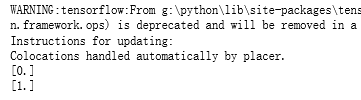
with tf.Session(graph = g1) as sess:

    tf.global_variables_initializer().run()

    with tf.variable_scope("", reuse=True):

        print(sess.run(tf.get_variable("v")))

with tf.Session(graph = g2) as sess:

    tf.global_variables_initializer().run()

    with tf.variable_scope("", reuse=True):

        print(sess.run(tf.get_variable("v")))
import tensorflow as tf

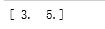
a = tf.constant([1.0, 2.0], name="a")

b = tf.constant([2.0, 3.0], name="b")

result = a + b

print result

sess = tf.InteractiveSession ()

print(result.eval())

sess.close()

# 创建一个会话。

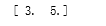
sess = tf.Session()

# 使用会话得到之前计算的结果。

print(sess.run(result))

# 关闭会话使得本次运行中使用到的资源可以被释放。

sess.close()
with tf.Session() as sess:

    print(sess.run(result))

sess = tf.Session()

with sess.as_default():

     print(result.eval())

sess = tf.Session()

# 下面的两个命令有相同的功能。

print(sess.run(result))

print(result.eval(session=sess))

sess = tf.InteractiveSession ()

print(result.eval())

sess.close()
config=tf.ConfigProto(allow_soft_placement=True, log_device_placement=True)

sess1 = tf.InteractiveSession(config=config)

sess2 = tf.Session(config=config)
吴裕雄 python 神经网络——TensorFlow 图、张量及会话的更多相关文章
- 吴裕雄 python 神经网络——TensorFlow 循环神经网络处理MNIST手写数字数据集
#加载TF并导入数据集 import tensorflow as tf from tensorflow.contrib import rnn from tensorflow.examples.tuto ...
- 吴裕雄 python 神经网络——TensorFlow 训练过程的可视化 TensorBoard的应用
#训练过程的可视化 ,TensorBoard的应用 #导入模块并下载数据集 import tensorflow as tf from tensorflow.examples.tutorials.mni ...
- 吴裕雄 python 神经网络——TensorFlow 使用卷积神经网络训练和预测MNIST手写数据集
import tensorflow as tf import numpy as np from tensorflow.examples.tutorials.mnist import input_dat ...
- 吴裕雄 python 神经网络——TensorFlow实现搭建基础神经网络
import numpy as np import tensorflow as tf import matplotlib.pyplot as plt def add_layer(inputs, in_ ...
- 吴裕雄 python 神经网络——TensorFlow图片预处理调整图片
import numpy as np import tensorflow as tf import matplotlib.pyplot as plt def distort_color(image, ...
- 吴裕雄 python 神经网络TensorFlow实现LeNet模型处理手写数字识别MNIST数据集
import tensorflow as tf tf.reset_default_graph() # 配置神经网络的参数 INPUT_NODE = 784 OUTPUT_NODE = 10 IMAGE ...
- 吴裕雄 python 神经网络——TensorFlow pb文件保存方法
import tensorflow as tf from tensorflow.python.framework import graph_util v1 = tf.Variable(tf.const ...
- 吴裕雄 python 神经网络——TensorFlow ckpt文件保存方法
import tensorflow as tf v1 = tf.Variable(tf.random_normal([1], stddev=1, seed=1)) v2 = tf.Variable(t ...
- 吴裕雄 python 神经网络——TensorFlow 数据集高层操作
import tempfile import tensorflow as tf train_files = tf.train.match_filenames_once("E:\\output ...
随机推荐
- Mike and strings
Mike has n strings s1, s2, ..., sn each consisting of lowercase English letters. In one move he can ...
- D3新学习
1. Python Web(1):建立第一个Web项目 直接将d3 index.html代码拷贝进index.html中即可. 2. D3入门教程; D3.js的v5版本入门教程
- (转)数据库分片Shard操作
2.1.1什么是数据切分 "Shard" 这个词英文的意思是"碎片",而作为数据库相关的技术用语,似乎最早见于大型多人在线角色扮演游戏中."Shard ...
- SpringMVC请求乱码问题
今天做一个项目实现插入数据的功能,最开始没有添加FilterEncoding处理字符集乱码了,那是正常的,后来我添加过之后依然还是乱码,让我 百思不得其解,代码配置如下: EncodingFilter ...
- linux 创建svn版本库,并在svn上配置checkstyle做代码风格检查
一.创建SVN版本库 1.安装svn服务器 yum install subversion 2.查看版本 svnserve --version 3.建立SVN版本库目录(即你的SVN服务器里面的文件存放 ...
- C#String类型转换成Brush类型
C#String类型转换成Brush类型: using System.Windows.Media; BrushConverter brushConverter = new BrushConverter ...
- js打开新窗口,js打开居中窗口,js打开自定义窗口
================================ ©Copyright 蕃薯耀 2020-01-07 https://www.cnblogs.com/fanshuyao/ var is ...
- Python基础与科学计算常用方法
Python基础与科学计算常用方法 本文使用的是Jupyter Notebook,Python3.你可以将代码直接复制到Jupyter Notebook中运行,以便更好的学习. 导入所需要的头文件 i ...
- 【Python】【爬虫】爬取酷狗音乐网络红歌榜
原理:我的上篇博客 import requests import time from bs4 import BeautifulSoup def get_html(url): ''' 获得 HTML ' ...
- 熬最深的夜喝最劣的酒————浅谈生成器(generator)
测试(test)def s(): print("stup1") n = "第一步" yield n # 类似于return 但是又不同于 赖克宝,剁一下,跳一下 ...