
006 Android XML 文件布局及组件属性设置技巧汇总
1.textview 组件文本实现替换(快速实现字符资源的调用)
android 应用资源位置在 project(工程名)--->app--->res--->values

在strings.xml文件中进行相关设置,即可快速修改textview组件的文本内容

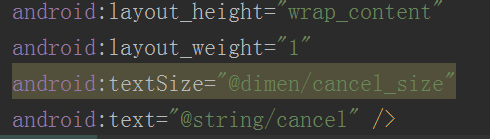
2.textview 组件字体大小修改(调用字符大小设置资源dimen.xml)
<1>首先在project(工程名)--->app--->res--->values目录下新建dimen.xml

<2>然后在activity_main.xml文件中设置对应关系
3.textview 组件字体颜色修改
<1>首先在project(工程名)--->app--->res--->values目录下调用colors.xml
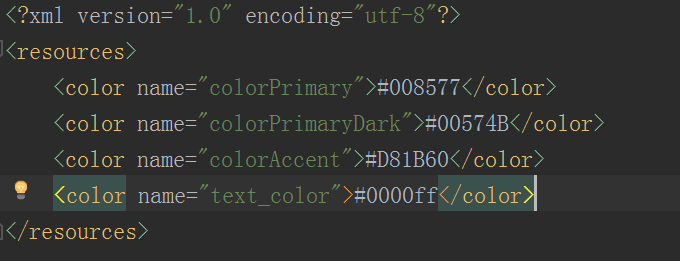
<2>然后在activity_main.xml文件中设置对应关系

5.关于android布局属性tools:context最通俗的解释
一般在根布局文件中会出现 tools:context = 某个activity名称。
这个属性的意思是:如果你在AndroidManifest.xml文件中为某个activity设置了Theme样式,那么,一般情况下,你在layout布局里面是无法直接看到这个效果的。因为一份layout布局可以提供给很多个activity用,layout无法知道自己提供给了哪个activity,而这个activity又设置了怎样的样式。所以,我们要为layout设置这样一个属性,来告诉layout当前提供给了哪个activity使用,从而实时显示这个activity所设置的样式效果(如果有)。
也就是,layout ----> activity ---->Theme,建立起了链接。否则,即使你为activity设置了样式,你的layout布局文件也是不知道的。
6.背景颜色设置
android:background="#fffff0"
注意:区别前景与背景的不同
   <!--android:background="#ff00" 设置背景颜色-->

    <!--android:src="@mipmap/ic_launcher" 设置前景图片-->

    <ImageButton

        android:src="@mipmap/ic_launcher"

        android:background="#ff00"

        android:layout_width="match_parent"

        android:layout_height="wrap_content" />
效果图:
红色为背景,Android图标为前景。

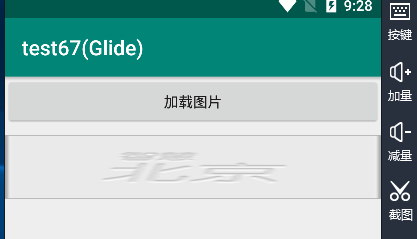
7.设置ImageView图片控件布满整个屏幕
(1)xml文件设置(方式1)
android:scaleType="fitXY"
(2)java后台设置
iv_pic.setScaleType(ImageView.ScaleType.FIT_XY); //设置图片的缩放方式,宽高填充父控件
(3)使得图片自适应imageview的大小(通过裁减的方式)
<ImageView

        android:src="@mipmap/image_demo"

        android:scaleType="centerCrop"

        android:layout_width="100dp"

        android:layout_height="60dp" />
效果图:
8.组件的嵌套模板
<android.support.v7.widget.Toolbar

        android:id="@+id/toolbar"

        android:layout_width="match_parent"

        android:layout_height="wrap_content"

        android:background="?attr/colorPrimary"

        android:minHeight="?attr/actionBarSize"

        android:theme="?attr/actionBarTheme">

        <TextView

            android:id="@+id/textView"

            android:layout_width="wrap_content"

            android:layout_height="wrap_content"

            android:layout_gravity="center"

            android:text="TextView" />

    </android.support.v7.widget.Toolbar>
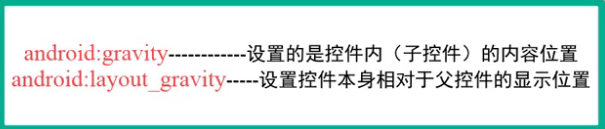
注意:android:layout_gravity="center" 这句代码实现了子容器在父容器内居中的效果
9.子容器放置于父容器的底部
app:layout_constraintBottom_toBottomOf="parent"
10. 组件常用的width(宽度)、height(高度)设置
wrap_content 自适应大小,将强制性地使视图扩展以显示全部内容。以TextView和ImageView控件为例,设置为wrap_content将完整显示其内部的文本和图像。布局元素将根据内容更改大小。
match_parent 将强制性地使构件扩展,以填充布局单元内尽可能多的空间
11.设置多个按钮在页面居中
<LinearLayout

        android:layout_width="match_parent"

        android:layout_height="wrap_content"

        android:gravity="center_horizontal"

        android:orientation="horizontal">

        <Button

            android:id="@+id/btRg_exit"

            android:layout_width="wrap_content"

            android:layout_height="wrap_content"

            android:text="退出" />

        <Button

            android:id="@+id/btRg_submit"

            android:layout_width="wrap_content"

            android:layout_height="wrap_content"

            android:text="提交"

            android:layout_marginLeft="20dp"/>

    </LinearLayout>
android:gravity="center_horizontal" //这句的作用:设置该线性布局内的组件居中(即设置子容器在父容器内居中)
android:layout_marginLeft="20dp" //这句的作用:设置组件与组件的间距(也可以设置子容器距离父容器的左边距,这样可以实现页面垂直方向对齐的效果)
<TextView

        android:layout_width="wrap_content"

        android:layout_height="wrap_content"

        android:text="您的手机防盗卫士:"

        android:gravity="center_vertical"                               //设置textview控件中的文字垂直方向上居中

        android:drawableLeft="@android:drawable/star_big_on"            //在textview控件中放置一张图片,该图片位于文字的左边

        android:textColor="#000"

        android:layout_margin="5dp"

        android:textSize="18dp" />
12.让listview控件占满页面的剩余部分
<!--让listview占满页面的剩余部分-->

    <ListView

        android:layout_width="match_parent"

        android:layout_height="0dp"

        android:layout_weight="1">

    </ListView>
将android:layout_height这个属性设置为0dp 且android:layout_weight="1" 即可实现需求。
注意:
layout_weight(权重):剩余空间的分配规则。
layout_weight 用于给一个线性布局中的诸多视图的重要度赋值。所有的视图都有一个layout_weight值,默认为零,意思是需要显示多大的视图就占据多大的屏幕空 间。若赋一个高于零的值,则将父视 图中的可用空间分割,分割大小具体取决于每一个视图的layout_weight 值以及该值在当前屏幕布局的整体 layout_weight值和在其它视图屏幕布局的layout_weight值中所占的比率而定。
13.将checkbox这个控件设置为无法选中状态
android:clickable="false"
android:focusableInTouchMode="false"
android:focusable="false"
以上3行设置checkbox为无法选中状态
<CheckBox

        android:id="@+id/cb_process_manager"

        android:layout_alignParentRight="true"

        android:layout_centerVertical="true"

        android:clickable="false"

        android:focusableInTouchMode="false"

        android:focusable="false"

        android:layout_width="wrap_content"

        android:layout_height="wrap_content" />
006 Android XML 文件布局及组件属性设置技巧汇总的更多相关文章
- 个人经验 - Android的RelativeLayout布局的layout_height属性设置为wrap_content时的坑
Android的RelativeLayout布局的layout_height属性设置为wrap_content时的坑: 此坑出现的条件: 1.RelativeLayout布局的layout_heigh ...
- Android XML文件布局各个属性详解
第一常用类:属性值为true或false android:layout_centerHrizontal 水平居中 android:layout_centerVertical 垂直居中 android: ...
- Java jdom解析xml文件带冒号的属性
Java jdom解析xml文件带冒号的属性 转载请标明出处: https://dujinyang.blog.csdn.net/article/details/99644824 本文出自:[奥特曼超人 ...
- 《!--suppress ALL --> 在Android XML 文件中的用途是什么?
<!--suppress ALL --> 在Android XML 文件中的用途是什么? 警告一次又一次地出现在谷歌地图的 XML 文件中,但是当我使用时,所有警告都被禁用.那么压制所有评 ...
- Android中TextView和EditView常用属性设置
Android中TextView和EditView常用属性设置 点击跳转
- 004 Android XML文件常用五大页面布局方式
1.线性布局(LinearLayout)最常用 <1>使用线性布局,首先在xml文件中修改布局为LinearLayout 修改完成后,可在Component Tree中看见如下内容: &l ...
- Android中fragment_main.xml文件里的组件获取的问题
package com.dhy.phonedial; import android.app.Activity; import android.app.Fragment; import android. ...
- android xml文件
一.布局文件:在layout目录下,使用比较广泛: 我们可以为应用定义两套或多套布局,例如:可以新建目录layout_land(代表手机横屏布局),layout_port(代表手机竖屏布局),系统会根 ...
- Android 控件布局常用的属性
<!--单个控件经常用到android:id —— 为控件指定相应的IDandroid:text —— 指定控件当中显示的文字,需要注意的是,这里尽量使用strings.xml文件当中的字符串a ...
随机推荐
- js 事件冒泡、事件捕获及事件委托
简介 事件冒泡:从触发事件的节点一直到document,自下而上的去触发事件. 事件捕获:从document到触发事件的节点,自上而下的去触发事件. 事件委托:事件委托就是利用事件冒泡,只指定一个事件 ...
- python小程序:备份文件
设计程序,有以下步骤: 需要备份的文件和目录由一个列表指定. 备份应该保存在主备份目录中. 文件备份成一个zip文件. zip存档的名称是当前的日期和时间. 解决方案: 版本一: #!/usr/bin ...
- Gym101350 J Lazy Physics Cat
参考博客:https://blog.csdn.net/lengqiu2015/article/details/76855681#reply 题意 给出一个长度为n的01串 我们定义F(x,y)是区间[ ...
- Docker学习笔记_进入正在运行的Docker容器
如何进入正在运行的Docker容器? 这里记录一种方法. 1.先查看container ID,并确认这个容器已经启动 docker ps -a #列出懿创建的所有容器 docker ps ...
- 安装 SQL Server 2014 Express
安装 SQL Server 2014 Express 我的电脑系统: Windows 10 64位 一 . 下载 安装Microsoft SQL Server 2014 Express 软甲下载地址: ...
- PC建立WIFI热点
netsh wlan set hostednetwork ssid=test key =12345678netsh wlan start hostednetwork
- 23、sed常用命令
1.匹配与不匹配: n p ! sed -n '/ATTGC/p' file1 ##-n打印匹配到的行输出,默认所有行输出. sed -n '/AT\|GC/p' fil ...
- 黑盒测试实践--Day5 11.29
黑盒测试实践--Day5 11.29 今天完成任务情况: 分析系统需求,完成场景用例设计 小组负责测试的同学学习安装自动测试工具--QTP,并在线学习操作 小黄 今天的任务是完成场景测试用例的设计.在 ...
- HttpUploader2 -chrome 45+安装教程
HttpUploader2-Chrome 45+安装说明 步骤如下: a.先安装HttpUploader2.exe,HttpUploader2.exe为插件集成安装包. b.再安装HttpUpload ...
- JS和JQuery的比较
一. Jquery它是javascript的一个轻量级框架,是对javascript进行封装. 二.JQuery和JS都有加载函数,但表达方式不同. 1.JS中的加载函数: //整个文档加载完毕后执行 ...