
【Android学习】实现卡片式ListView
效果: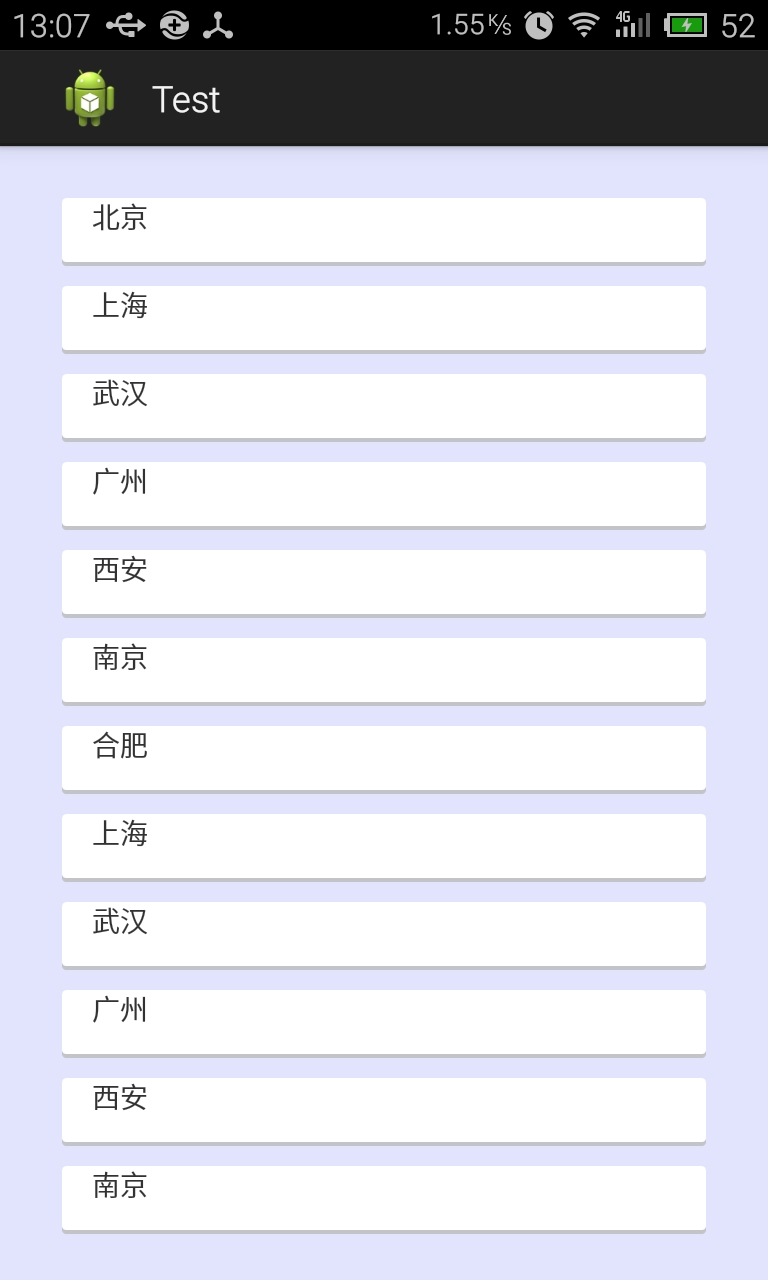
主要是设置xml文件
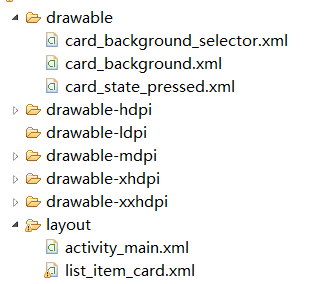
两种状态下的item
card_background.xml
<?xml version="1.0" encoding="utf-8"?>

<layer-list xmlns:android="http://schemas.android.com/apk/res/android" >

	<!-- 一个层叠效果,通过阴影表现出立体效果 -->

    <item><!-- 阴影效果 -->

        <shape android:shape="rectangle" >

            <solid android:color="#CABBBBBB" /><!-- 阴影的颜色 -->

            <corners android:radius="2dp" /><!-- 圆角 -->

        </shape>

    </item>

    <item

        android:bottom="2dp"

        android:left="0dp"

        android:right="0dp"

        android:top="0dp"><!-- 距底部2dp,漏出上面那个item,使其可以显现出阴影 -->

        <shape android:shape="rectangle" >

            <solid android:color="@android:color/white" /><!-- item颜色 -->

            <corners android:radius="2dp" />

        </shape>

    </item>

</layer-list>
card_state_pressed.xml
<?xml version="1.0" encoding="utf-8"?>

<layer-list xmlns:android="http://schemas.android.com/apk/res/android" >

    <item>

        <shape android:shape="rectangle" >

            <solid android:color="#ca39883d" />

            <corners android:radius="2dp" />

        </shape>

    </item>

    <item

        android:bottom="2dp"

        android:left="0dp"

        android:right="0dp"

        android:top="0dp">

        <shape android:shape="rectangle" >

            <solid android:color="#ca4fbb5f" />

            <corners android:radius="2dp" />

        </shape>

    </item>

</layer-list>
card_background_selector
<?xml version="1.0" encoding="utf-8"?>

<selector xmlns:android="http://schemas.android.com/apk/res/android" >

    <item android:drawable="@drawable/card_state_pressed" android:state_pressed="true" />

    <item android:drawable="@drawable/card_background" />

</selector>
list_item_card.xml
<?xml version="1.0" encoding="utf-8"?>

<FrameLayout

	xmlns:android="http://schemas.android.com/apk/res/android"

	android:layout_width="match_parent"

	android:layout_height="wrap_content"

	android:paddingLeft="15dp"

	android:paddingRight="15dp"

	android:descendantFocusability="beforeDescendants"><!-- 为突出卡片效果,需设置左右padding,上下通过listView的divider设置 -->

	<LinearLayout

		android:orientation="vertical"

		android:layout_width="match_parent"

		android:layout_height="wrap_content"

		android:paddingLeft="15dp"

		android:paddingTop="15dp"

		android:paddingBottom="15dp"

		android:paddingRight="15dp"

		android:background="@drawable/card_background_selector"

		android:descendantFocusability="afterDescendants"><!-- 给每个item增加background -->

		<TextView

			android:id="@+id/line1"

			android:layout_width="wrap_content"

			android:layout_height="wrap_content"

			android:text="Text"/>

	</LinearLayout>

</FrameLayout>
MainActivity.java
package com.example.cardstylelistview;

import android.app.Activity;

import android.os.Bundle;

import android.view.View;

import android.widget.ArrayAdapter;

import android.widget.ListView;

public class MainActivity extends Activity

{

	private ListView listView;

	private static final String[] data = { "北京", "上海", "武汉", "广州", "西安", "南京", "合肥","上海", "武汉", "广州", "西安", "南京", "合肥" };

	@Override

	public void onCreate(Bundle savedInstanceState)

	{

		super.onCreate(savedInstanceState);

		setContentView(R.layout.activity_main);

		listView = (ListView) findViewById(R.id.card_listView);

		/*添加头和尾*/

		listView.addHeaderView(new View(this));

		listView.addFooterView(new View(this));

		listView.setAdapter(new ArrayAdapter<String>(this, R.layout.list_item_card, R.id.line1, data));

	}

}
这样 卡片ListView就做好了
【Android学习】实现卡片式ListView的更多相关文章
- android学习--视图列表(ListView和ListActivity)
说明: 视图列表(ListView和ListActivity)与AutoComplete.Spinner类似,它们都须要一个供显示的列表项,能够须要借助于内容Adapter提供显示列表项 创建List ...
- Android学习笔记(20)————利用ListView制作带竖线的多彩表格
http://blog.csdn.net/conowen/article/details/7421805 /********************************************** ...
- Android学习之sqlite与listview
在android系统中使用的是sqlite数据库,前面的简易登录系统已经讲述了数据库的应用.本例的重点是实现数据库与listview的绑定.demo的数据是将个人的信息绑定到listview中,并存在 ...
- Android学习----自定义Adapter实现ListView
前言: 对于ListView而言,自定义的Adapter对于显示复杂的界面有很大的灵活性 .使用自定义的Adapter需要继承BaseAdapter,然后重写getCount(),getView(), ...
- Android学习笔记之ListView复用机制
PS:满打满算,差不多三个月没写博客了...前一阵忙的不可开交...总算是可以抽出时间研究研究其他事情了... 学习内容: 1.ListView的复用机制 2.ViewHolder的概念 1.List ...
- Android学习笔记(十)——ListView的使用(上)
//此系列博文是<第一行Android代码>的学习笔记,如有错漏,欢迎指正! ListView绝对可以称得上是 Android中最常用的控件之一,ListView允许用户通过手指上下滑动的 ...
- Android学习随笔--ListView的分页功能
第一次写博客,可能格式,排版什么的会非常不美观,不过我主要是为了记录自己的Android学习之路,为了以后能有些东西回顾.既然是为了学习,那我肯定会吸收各位大大们的知道经验,有不足的地方请指出. 通过 ...
- Android学习系列(15)--App列表之游标ListView(索引ListView)
游标ListView,提供索引标签,使用户能够快速定位列表项. 也可以叫索引ListView,有的人称也为Tweaked ListView,可能更形象些吧. 一看图啥都懂了: 1. ...
- [置顶] Android学习系列-把文件保存到SD卡上面(6)
Android学习系列-把文件保存到SD卡上面(5) 一般多媒体文件,大文件需要保存到SD卡中.关键点如下: 1,SD卡保存目录:mnt/sdcard,一般采用Environment.getExter ...
随机推荐
- junit基础学习
学习地址一:http://blog.csdn.net/andycpp/article/details/1327147/ 学习地址二:http://blog.csdn.net/zen99t/articl ...
- 微信H5支付 EasyWechat
其中如果想在一个laravel中使用多个不同主题的支付账户,可以在方法实例对象时,将对应的参数进行修改配置. 其中小程序支付,已得到验证. 1.公众号支付等资格申请 2.公众号对应的支付商户主体申请 ...
- 【转】 Pro Android学习笔记(九五):AsyncTask(4):执行情况
目录(?)[-] 两个AsyncTask对象的运行情况 多次执行的异常 文章转载只能用于非商业性质,且不能带有虚拟货币.积分.注册等附加条件.转载须注明出处:http://blog.csdn.net/ ...
- split的用法回顾,快忘记了@ →@
split:用for循环时不要忘记是数组名.length package com.aaa; //split的用法把指定的字符串按指定的分割符进行分割,然后返回字符串 数组 public class f ...
- Spring Session实现Session共享下的坑与建议
相信用过spring-session做session共享的朋友都很喜欢它的精巧易用-不依赖具体web容器.不需要修改已成项目的代码.笔者在使用spring-session的过程中也对spring-se ...
- python学习(十三) 数据库支持
13.1 Python数据库编程接口(API) 13.1.1 全局变量 13.1.2 异常 13.1.3 连接和游标 13.1.4 类型 13.2 SQLite和PySQlite 13.2.1 入门 ...
- springboot成神之——springboot+mybatis+mysql搭建项目简明demo
springboot+mybatis+mysql搭建项目简明demo 项目所需目录结构 pom.xml文件配置 application.properties文件配置 MyApplication.jav ...
- MongoDB 学习笔记(一)—— 安装入门
注:我的环境是win7 32位. 下载安装 http://www.mongodb.org/downloads 解压即可.这里我重命名“mongodb”,存放的目录为E:\mongodb. 新建数据文件 ...
- JAXB 专题二(BSP接口实战)
BSP下单接口 1.xml格式如下 <?xml version="1.0" encoding="utf-8"?> <Request servi ...
- 如何将serialport接收的字符串转换成十六进制数c#
关注 baihe_591 baihe_591 本版等级: #1 得分:0回复于: 2008-06-02 09:44:00 Byte[] byte=new Byte[1];byte=0xf1;por ...