
XtraEditors四、TextEdit、ButtonEdit、PictureEdit、RadioGroup、PopupContainerEdit
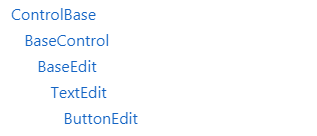
一、TextEdit控件
以文本框的形式绑定各种形式的选择框;
文本框设置 输入 密码 字符 时, 要有 * 号掩盖输入的字符,
代码如下:
textEdit1.Properties.PasswordChar = ’ * ’;
二、ButtonEdit 控件
以 button按钮的形式 绑定各种形式的选择框;
1、控件样式
截图
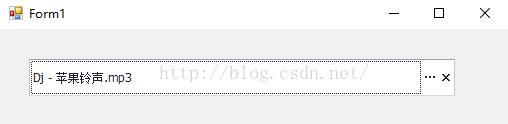
2、设置文本框右侧的按钮
在属性中Properties下的Buttons项,进入EditorButton集合编辑器,
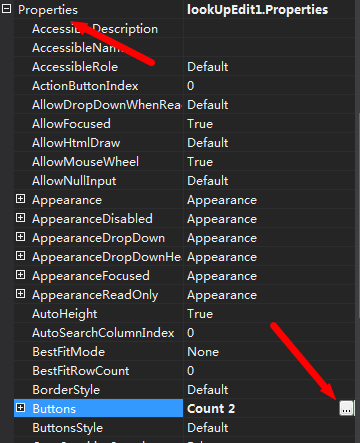
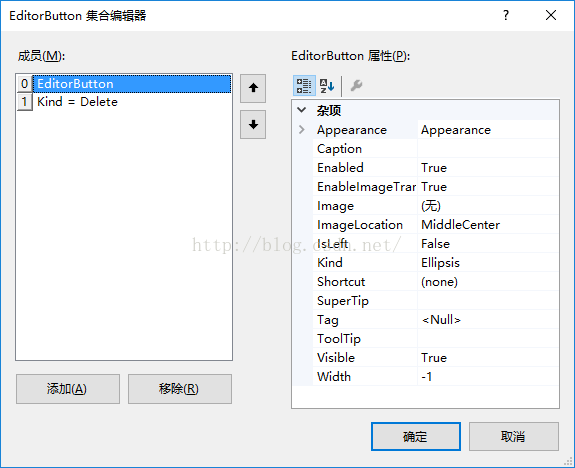
ButtonEdit的文本框右侧的按钮可以有多个,在EditorButton集合编辑器中都可以进行设置。
在文本框右侧的按钮,全是DevExpress.XtraEditors.Controls.EditorButton类型的。
注意: Caption和Kind选项
3、按钮类型
在每个按钮的Kind属性中,可以设置按钮的类型。
按钮类型保存在枚举DevExpress.XtraEditors.Controls.ButtonPredefines中,该枚举包括如下枚举值(共计19个):
Close,一个x型图案
Delete,一个x型图案,线条比Close要细一些
SpinRight,右三角形箭头
SpinLeft,左三角形箭头
SpinDown,下三角形箭头
SpinUp,上三角形箭头
Combo,同SpinDown
Right,同SpinRight
Left,同SpinLeft
Up,同SpinUp
Down,同SpinDown
DropDown,同SpinDown
Glyph,图案可由Image属性指定(当Kind被设置为Glyph时,可以通过设置Image属性来指定图案)
Ellipsis,省略号,三个点,(默认图案)
OK,一个√型图案
Plus,一个+型图案
Minus,一个-型图案
Redo,撤销图案,一个顺时针转动最后指向右侧的箭头
Undo,重做图案,一个逆时针转动最后指向右侧的箭头
4、按钮的点击事件
可以在属性管理器中事件里Properties下的ButtonClick事件中指定

这里面就存在一个问题,如果文本框中放置了多个按钮,该如何分辨出我点的是哪个按钮呢?
可以在事件中根据Caption、Kind等属性判断当前鼠标点击的是哪个Button,再执行相应的逻辑。
如下所示:
包括两个按钮(类型分别是Ellipsis和Delete),其中Ellipsis类型的按钮用于浏览文件,Delete类型的按钮用于清空选中数据。
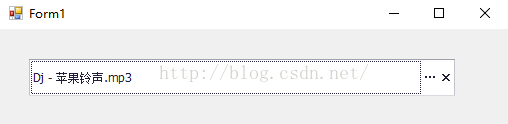
判断按钮类型(Kind)执行相应逻辑的代码如下:
private void buttonEdit1_Properties_ButtonClick(

    object sender, DevExpress.XtraEditors.Controls.ButtonPressedEventArgs e)

{

    if (e.Button.Kind == DevExpress.XtraEditors.Controls.ButtonPredefines.Ellipsis)

    {

        OpenFileDialog openFileDialog = new OpenFileDialog();

        openFileDialog.AutoUpgradeEnabled = true;

        openFileDialog.CheckFileExists = true;

        openFileDialog.CheckPathExists = true;

        openFileDialog.ReadOnlyChecked = false;

        openFileDialog.Multiselect = false;

        openFileDialog.FileName = "";

        openFileDialog.Filter = "所有文件|*.*";

        openFileDialog.Title = "浏览";

        if (openFileDialog.ShowDialog() == DialogResult.OK)

        {

            this.buttonEdit1.Text = openFileDialog.FileName;

        }

    }

    else if (e.Button.Kind == DevExpress.XtraEditors.Controls.ButtonPredefines.Delete)

    {

        this.buttonEdit1.Text = "";

    }

}
三、PictureEdit控件
可在控件里添加图片
PictureEdit 可以直接绑定Image 或者 Byte Array
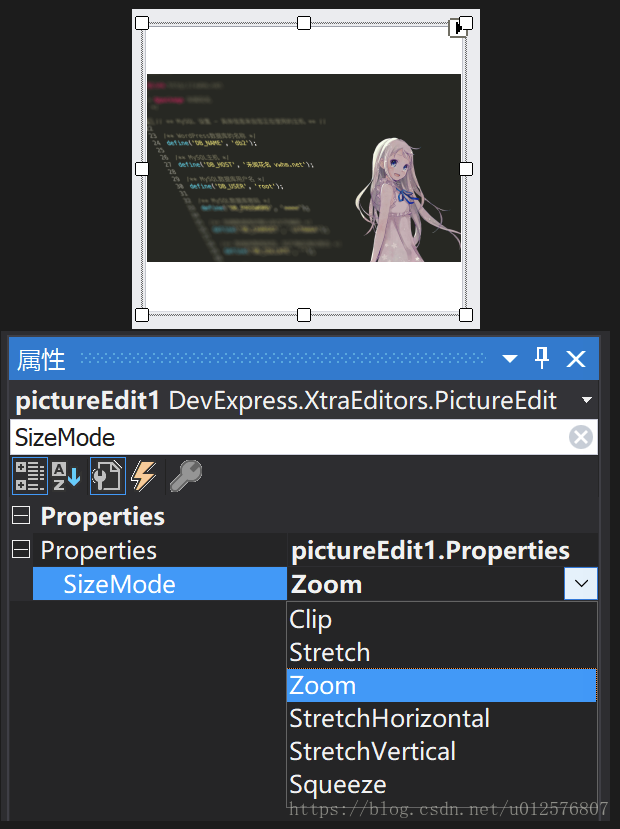
当我们在PictureEdit中放置一个较大图片的时候,SizeMode属性可以设置为Zoom等
四、RadioGroup控件

其Columns属性决定显示的列数, 默认值为: 0时,效果如下:
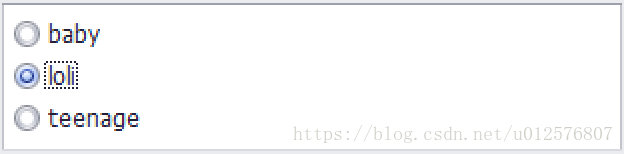
示例代码:
private void CommonControlsForm_Load(object sender, EventArgs e)

        {

            object[] ageArr = new object[] { 8, 12, 16 };

            string[] descriptionArr = new string[] { "baby", "loli", "teenage" };

            for(int i = 0; i < ageArr.Length; i++)

            {

                RadioGroupItem item = new RadioGroupItem(ageArr[i], descriptionArr[i]);

                radioGroup1.Properties.Items.Add(item);

            }

            //

            radioGroup1.EditValue = 12;

        }
当Columns属性值为2时,效果如下:
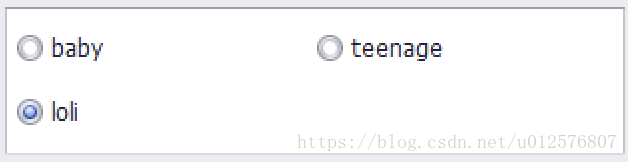
相关代码
void Main()

{

    //生成一个radioGroup,动态生成选项

    RadioGroup radioGroupY = new RadioGroup();

    foreach (TitleModel s in nodeYList)

    {

        //每一个单元按钮对应的选项item

        RadioGroupItem item = new RadioGroupItem();

        //设置选项的value值

        item.Value = s.TitleKey;

        //设置选项的描述值 即 要显示的值

        item.Description = s.Title;

        //使选项启用

        item.Enabled = true;

        //将新增的选项添加到radiogroup的Items中

        radioGroupY.Properties.Items.Add(item);

    }

    //设置默认选中值

    radioGroupY.EditValue = yList[i].TitleKey;//设置value

    //获取选中项的值:RadioGroup.Properties.Items[RadioGroup.SelectIndex].Value

    //获取选中项的显示值:

    this.radioGroup1.Properties.Items[RadioGroup.SelectIndex].Description

this.radioGroup1.Properties.Items.GetItemByValue(Convert.ToInt32(radioGroup1.EditValue)).Description;

}

//时间

private void chkReviewResultTotal_SelectedIndexChanged(object sender, EventArgs e)

{

    if (chkReviewResultTotal.SelectedIndex == )

    {

        //----

    }

}
五、PopupControlContainer控件
1、 概述
PopupControlContainer控件能够以面板的形式包含其他控件,或者以DropDownButton控件的下拉框的形式出现。
PopupControlContainer控件通过DropDownButton控件的DropDownControl属性进行绑定,在绑定后, PopupControlContainer控件的AllowDrop属性要设成True;
2、 用法
- 与 DropDownButton组合使用 ,指派container 到DropDownButton.DropDownControl 属性。
- 与 bar button组合使用 , 指派container 到 BarButtonItem.DropDownControl 属性。
- 与 Ribbon Form中的Application Button 组合使用 , 指派container 到 RibbonControl.ApplicationButtonDropDownControl属性。
下拉弹出控件PopupContainerEdit 经常与 PopupContainerControl 组合使用
效果如下:
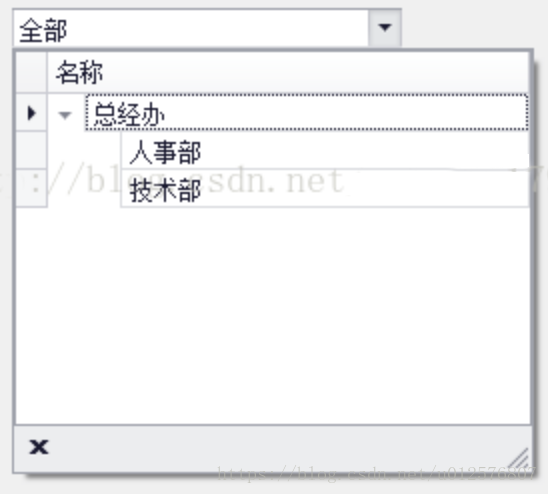
主要功能是在界面中点击PopupContainerEdit右侧的下拉箭头,然后,会弹出下拉弹窗控件PopupContainerControl,
最后选择完数据后关闭弹窗。
popupContainerControl1.OwnerEdit.ClosePopup();
主要用到的控件有 PopupContainerEdit 和 PopupContainerControl
PopupContainerControl主要负责显示下拉弹窗中的内容
PopupContainerEdit类似一个文本框,右边有一个下拉箭头。
PopupContainerEdit和PopupContainerControl产生关联,主要通过以下代码实现
this.popupContainerEdit1.Properties.PopupControl = this.popupContainerControl1;
相关代码:
using System;

using System.Collections.Generic;

using System.ComponentModel;

using System.Data;

using System.Drawing;

using System.Linq;

using System.Text;

using System.Threading.Tasks;

using System.Windows.Forms;

namespace WindowsFormsApplication1

{

    public partial class Form4 : Form

    {

        public Form4()

        {

            InitializeComponent();

        }

        private void treeList1_FocusedNodeChanged(object sender, DevExpress.XtraTreeList.FocusedNodeChangedEventArgs e)

        {

            var name = e.Node["Name"].ToString();

            if (popupContainerEdit1.IsPopupOpen)

            {

                // 设置名称

                popupContainerEdit1.Text = name;

                // 关闭弹窗

                popupContainerEdit1.ClosePopup();

            }

        }

        private void Form4_Load(object sender, EventArgs e)

        {

            treeList1.ExpandAll();

            popupContainerEdit1.Text = "全部";

        }

    }

}
XtraEditors四、TextEdit、ButtonEdit、PictureEdit、RadioGroup、PopupContainerEdit的更多相关文章
- Android高仿qq及微信底部菜单的几种实现方式
最近项目没那么忙,想着开发app的话,有很多都是重复,既然是重复的,那就没有必要每次都去写,所以就想着写一个app通用的基本框架,这里说的框架不是什么MVC,MVP,MVVM这种,而是app开发的通用 ...
- android 基础学习笔记1
1.控件 XML种控件必须带有Layoutwidth 和height 1.textview 常用属性 text,textcolor,textsize Android 种颜色用十六进制数表示,共四种形式 ...
- DevExpress.XtraEditors.TextEdit 设为密码输入框
DevExpress.XtraEditors.TextEdit 设为密码输入框,解决办法: 设计窗口-->属性Properties-->Mask节点-->PasswordChar输入 ...
- [DevExpress] - 使得 XtraEditors.TextEdit 失去焦点(LostFocus)的方法
场景 WinForm 应用,使用了 DevExpress.XtraEditors.TextEdit 控件的 KeyPress 和 Leave 事件.期望在 TextEdit 上按下回车键或者当 Tex ...
- DevExpress的TextEdit、RadioGroup、ColorPickEdit设置默认值
场景 Winform中实现ZedGraph的多条Y轴(附源码下载): https://blog.csdn.net/BADAO_LIUMANG_QIZHI/article/details/1001322 ...
- Winform中实现更改DevExpress的RadioGroup的选项时更改其他控件(TextEdit、ColorPickEdit)的值
场景 Winform中实现读取xml配置文件并动态配置ZedGraph的RadioGroup的选项: https://blog.csdn.net/BADAO_LIUMANG_QIZHI/article ...
- XtraEditors一、总体介绍
一.所有编辑器的公共功能 全部都可以绑定数据: 全部都可以独立使用或用于由 Developer Express 提供的容器控件 (XtraGrid.XtraVerticalGrid.XtraTreeL ...
- 在DevExpress程序中使用PopupContainerEdit和PopupContainer实现数据展示
在一些数据的即时查询场景中,我们可能需要对输入信息进行模糊查询并进行选择,例如在一些文本输入场景,如输入某个站点编码或者设备编码,然后获取符合的列表供用户选择的场景,本篇随笔介绍在DevExpress ...
- RadioGroup实现导航栏
[声明] 欢迎转载,但请保留文章原始出处→_→ 生命壹号:http://www.cnblogs.com/smyhvae/ 文章来源:http://www.cnblogs.com/smyhvae/p/ ...
随机推荐
- 24.ArrayBuffer
ArrayBuffer ArrayBuffer ArrayBuffer对象.TypedArray视图和DataView视图是 JavaScript 操作二进制数据的一个接口.这些对象早就存在,属于独立 ...
- Redis-其他命令
1.排序 SORT : SORT sourcekey [BY pattern] [LIMIT offset count] [GET pattern [GET pattern ...]] [A ...
- Redis 缓存设计原则
基本原则 只应将热数据放到缓存中 所有缓存信息都应设置过期时间 缓存过期时间应当分散以避免集中过期 缓存key应具备可读性 应避免不同业务出现同名缓存key 可对key进行适当的缩写以节省内存空间 选 ...
- weex stream 之fetch的get、post获取Json数据
无论何种平台,网络数据的获取都是十分重要的,最近学习weex,不可避免的要学习weex的数据请求方法了.网址 个人感觉,weex stream相较于其他平台,还算比较简单了,但是由于文档以及官方代码中 ...
- Android---TextView实现图文混排一
TextView使用ImageSpan显示图片 SpannableStringBuilder spannableStringBuilder = new SpannableStringBuilder() ...
- MySQL的相关应用
本文主要介绍数据库中MySQL的基础知识,包括数据插入.数据更新.数据删除.数据查询.函数.CASE语句.表连接.子查询. 一.数据插入(insert 语句) 首先我创建一个表,如下: 接着,进行数据 ...
- 解决访问 jar 包里面的字体报错:OTS parsing error: incorrect file size in WOFF header
前言:jar 包里面的字体加载,浏览器 console 中报警告信息,这里记录一下解决方案. 附:自己的一个 jar 包源码 https://github.com/yuleGH/querydb 错误问 ...
- iostart 命令
Linux系统中的 iostat命令可以对系统的磁盘IO和CPU使用情况进行监控.iostat属于sysstat软件包,可以用yum -y install sysstat 直接安装. 格式: iost ...
- 排错-Ad Hoc Distributed Queries组件被禁用的解决办法
Ad Hoc Distributed Queries组件被禁用的解决办法 by:授客 QQ:1033553122 SQL Server 阻止了对组件 'Ad Hoc Distributed Queri ...
- Flutter:修改TextField的高度,以及无边框圆角
修改TextField的高度可以通过decoration: InputDecoration的contentPadding进行修改,代码如下 new TextField( decoration: Inp ...