
Apache Tomcat 9 Installation on Linux (RHEL and clones)
Apache Tomcat 9 is not available from the standard RHEL distributions, so this article provides information about the manual installation and basic configuration of Apache Tomcat 9 on RHEL and its clones from tarballs. The tarball approach to installation is largely unchanged compared to previous tomcat versions.
- Downloads
- Installation
- Checking the Status of Tomcat
- Configuration Files
- Enabling HTML Management Access
- Deploying Applications
Related articles.
- Apache Tomcat 7 Installation on Linux (RHEL and clones)
- Apache Tomcat 8 Installation on Linux (RHEL and clones)
Downloads
Download the following software. This article assumes these downloads are present in the "/tmp" directory on the server.
- Java SE Development Kit 8 Downloads (I used jdk-8u131-linux-x64.tar.gz)
- Apache Tomcat (I used apache-tomcat-9.0.0.M22.tar.gz)
Installation
Create a user called "tomcat" to own the Tomcat installation.
# useradd tomcat
Install the JDK from the tarball under the tomcat user.
# su - tomcat
$ tar xzf /tmp/jdk-8uu131-linux-x64.gz
Install Tomcat from the tarball under the home directory of the "tomcat" user.
$ tar xzf /tmp/apache-tomcat-9.0.0.M22.tar.gz
Set the following environment variables and append them to the "/home/tomcat/.bash_profile" so they are set for subsequent logins.
export JAVA_HOME=/home/tomcat/jdk1.8.0_131
export CATALINA_HOME=/home/tomcat/apache-tomcat-9.0.0.M22
export CATALINA_BASE=$CATALINA_HOME
Start and stop Tomcat using the following scripts.
$ $CATALINA_HOME/bin/startup.sh
$ $CATALINA_HOME/bin/shutdown.sh
The Tomcat logs are written to the "$CATALINA_HOME/logs/" directory by default.
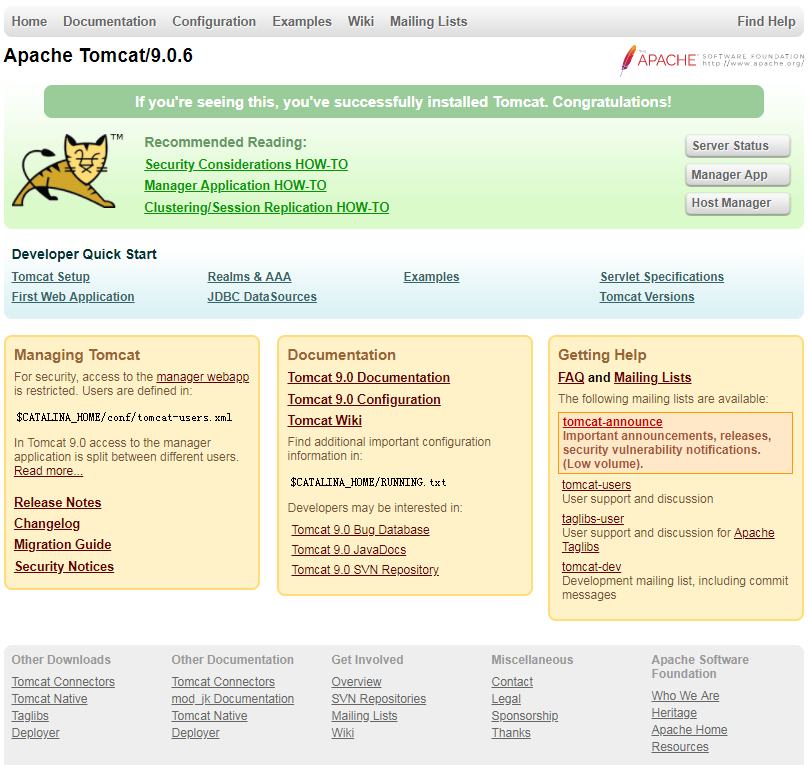
Once Tomcat is started, the following URL should be available. Configuration for the management URLs is discussed below.
http://localhost:8080/
http://localhost:8080/manager/html
http://localhost:8080/manager/status
Remember to open up the port on the firewall if you want to access the site from other servers on the network. Information about the Linux firewall is available here.
Checking the Status of Tomcat
There are several ways to check the status of the service.
$ netstat -nlp | grep 8080
tcp 0 0 :::8080 :::* LISTEN 4470/java
$
$ ps -ef | grep tomcat
tomcat 17848 1 7 10:43 pts/0 00:00:14 /u01/java/jdk1.8.0_131/bin/java -Djava.util.logging.config.file=/home/tomcat/apache-tomcat-9.0.0.M22/conf/logging.properties -Djava.util.logging.manager=org.apache.juli.ClassLoaderLogManager -Djdk.tls.ephemeralDHKeySize=2048 -Djava.protocol.handler.pkgs=org.apache.catalina.webresources -classpath /home/tomcat/apache-tomcat-9.0.0.M22/bin/bootstrap.jar:/home/tomcat/apache-tomcat-9.0.0.M22/bin/tomcat-juli.jar -Dcatalina.base=/home/tomcat/apache-tomca -9.0.0.M22 -Dcatalina.home=/home/tomcat/apache-tomcat-9.0.0.M22 -Djava.io.tmpdir=/home/tomcat/apache-tomcat-9.0.0.M22/temp org.apache.catalina.startup.Bootstrap start
tomcat 18055 17257 0 10:43 pts/0 00:00:00 ps -ef
tomcat 18056 17257 0 10:43 pts/0 00:00:00 grep tomcat
$
$ curl -I http://localhost:8080
HTTP/1.1 200
Content-Type: text/html;charset=UTF-8
Transfer-Encoding: chunked
Date: Thu, 13 Jul 2017 09:49:56 GMT
$
The status is also available from the HTML management page.
Configuration Files
The main locations of configuration and log information are shown below.
Release Notes : $CATALINA_HOME
Config : $CATALINA_HOME/conf
Bin Directory : $CATALINA_HOME/bin
Webapps : $CATALINA_HOME/webapps
Logs : $CATALINA_HOME/logs
Enabling HTML Management Access
Edit the "$CATALINA_HOME/conf/tomcat-users.xml" file, adding the following entries inside "tomcat-users" tag. Adjust the password as required.
<role rolename="manager-gui"/>
<role rolename="admin-gui"/>
<user username="tomcat" password="MyPassw0rd!" roles="manager-gui,admin-gui"/>
Edit the "$CATALINA_HOME/webapps/manager/META-INF/context.xml" and "$CATALINA_HOME/webapps/host-manager/META-INF/context.xml" file, disable the "Value" tag.
<!--
<Valve className="org.apache.catalina.valves.RemoteAddrValve"
allow="127\.\d+\.\d+\.\d+|::1|0:0:0:0:0:0:0:1" />
-->
Restart Tomcat for the configuration to take effect.
$ $CATALINA_HOME/bin/shutdown.sh
$ $CATALINA_HOME/bin/startup.sh
The management application is now available from the "http://localhost:8080/manager/html" URL.
Deploying Applications
You can get a sample application WAR file to test with from "http://tomcat.apache.org/tomcat-9.0-doc/appdev/sample/".
If this is a redeployment, delete the existing deployment from the "$CATALINA_HOME/webapps" directory.
# rm -Rf $CATALINA_HOME/webapps/sample
Place the "sample.war" file in the "$CATALINA_HOME/webapps" directory and Tomcat with automatically deploy it. You will see a "sample" directory appear.
You don't need to stop and start Tomcat for this to work, but you can if you want.
$ $CATALINA_HOME/bin/shutdown.sh
$ $CATALINA_HOME/bin/startup.sh
For more information see:
- Apache Tomcat
- Apache Tomcat 7 Installation on Linux (RHEL and clones)
- Apache Tomcat 8 Installation on Linux (RHEL and clones)
Hope this helps. Regards Tim...
来自 <https://oracle-base.com/articles/linux/apache-tomcat-9-installation-on-linux>
Apache Tomcat 9 Installation on Linux (RHEL and clones)的更多相关文章
- 一步一步教你如何在linux下配置apache+tomcat(转)
一步一步教你如何在linux下配置apache+tomcat 一.安装前准备. 1. 所有组件都安装到/usr/local/e789目录下 2. 解压缩命令:tar —vxzf 文件名(. ...
- Linux平台上搭建apache+tomcat负载均衡集群
传统的Java Web项目是通过tomcat来运行和发布的.但在实际的企业应用环境中,采用单一的tomcat来维持项目的运行是不现实的.tomcat 处理能力低,效率低,承受并发小(1000左右).当 ...
- linux下一个apache+tomcat负载均衡和集群
先说一下我的环境 一个ubuntu虚拟机, 一个apache2.2示例 两tomcat1.7示例 1.安装apacheserver sudo apt-get install apache2 假设要重新 ...
- Linux CentOS 7 下 Apache Tomcat 7 安装与配置
前言 记录一下Linux CentOS 7安装Tomcat7的完整步骤. 下载 首先需要下载tomcat7的安装文件,地址如下: http://mirror.bit.edu.cn/apache/tom ...
- Linux中Apache+Tomcat+JK实现负载均衡和群集的完整过程
人原创,一个字一个字地码的,尊重版权,转载请注明出处! http://blog.csdn.net/chaijunkun/article/details/6987443 最近在开发的项目需要承受很高的并 ...
- Eclipse配置tomcat8.5.7报错:The Apache Tomcat installation at this directory is version 8.5.27. A Tomcat 8.0 installation is...
Eclipse配置tomcat8.5.7报错:The Apache Tomcat installation at this directory is version 8.5.27. A Tomcat ...
- 朝圣Java(问题集锦)之:The Apache Tomcat installation at this directory is version 8.5.32. A Tomcat 8.0 inst
最近开始学Java了.有C#底子,但是学起来Java还是很吃力,感觉别人架好了各种包,自己只要调用就行了,结果还有各种bug出现.掩面中. 启动Tomcat的时候,报错The Apache Tomca ...
- linux环境下Apache+Tomcat集群配置
写在前面 apache配置多个tomcat,实现请求分流,多个tomcat服务均衡负载,增加服务的可靠性.最近研究了一下,遇到许多问题,记录一下,方便以后查阅,不喜欢apache,nginx也是可以做 ...
- The Apache Tomcat installation at this directory is version 8.5.24 Tomcat 8.0 installation is expect
在一台新电脑上搭建Java开发环境,JDK 是1.8,Tomcat下载了Tomcat 8.5.24,已经配置好了Java和Tomcat的环境变量,开发工具是Eclipse MARS,准备在Eclips ...
随机推荐
- MYSQL数据库链接层- SUMMER-SQL
2015年3月31日 18:27:34 最后编辑: 2016年4月17日 00:22:00 星期日 最后编辑: 2018-4-25 16:58:44 星期三 最新代码: https://gitee.c ...
- easyui tree:根据属性格式化树节点名称
$('#resourceTree').tree({ method : 'post', animate : true, onContextMenu : function(e, node) { e.pre ...
- java 异常的限制
一. 1.) 在覆盖方法的时候,只能抛出在基类方法的异常说明里列出的那些异常 2.) 在基类构造器声明的异常,在子类必须抛出,子类的构造器可以抛出任何异常,但是必须抛出基类构造器的异常 3.) 在基类 ...
- .NetCore 中使用AppMetrics向InfluxDB中添加监控数据并通过Grafana图像分析
考虑到分布式部署监控环境是所有的请求情况,所以这一块一般在网关GateWay里面加比较省事,聚合在一起的,如果放在api服务中,如果只有1个还好,一旦部署Node多是很痛苦的事情 这天需要添加的Nug ...
- 大数据技术之_16_Scala学习_02_变量
第二章 变量2.1 变量是程序的基本组成单位2.2 Scala 变量的介绍2.2.1 概念2.2.2 Scala 变量使用的基本步骤2.3 Scala 变量的基本使用2.4 Scala 变量使用说明2 ...
- 反射调用 java bean的set和get方法
一.使用java.beans.PropertyDescriptor import java.beans.IntrospectionException; import java.beans.Proper ...
- JedisConnectionException: java.net.ConnectException: Connection refused
出现问题 我遇到的一个问题,在连接redis的时候出现了错误!错误如下: JedisConnectionException: java.net.ConnectException: Connection ...
- UI自动化测试(六)TestNG操作详解
在编写TestNG代码的时候,若没有下载TestNG的jar包的话,代码会出错,下载jar包方法见该链接中java+selenium环境搭建的第二步即可:http://www.cnblogs.com/ ...
- html (第四本书第八章参考)
上机1 <!DOCTYPE html> <html> <head lang="en"> <meta charset="UTF-8 ...
- scheme的split实现
再chez中并未找到一个split函数,基于尾递归,自己实现了了一个用于字符串拆分的split. (define split (lambda (str sep) (define loop (lambd ...