
Project 03- STM32F4xx PID controller
Project 03- STM32F4xx PID controller
CMSIS files from ARM provides ARM Math functions.
There are also PID controller functions in different formats for f32, q31 and q7.
This tutorial/project will talk about how to implement PID controller on STM32F4xx using PID functions from ARM.
PID Controller
Fast about PID controller.
PID stands for Proportional-Integral-Derivative controller.
This is a control loop feedback mechanism widely used in industrial control systems.
It calculates the error between measured value and the desired setpoint value.
According to the error, it then calculates output value to minimize this error.
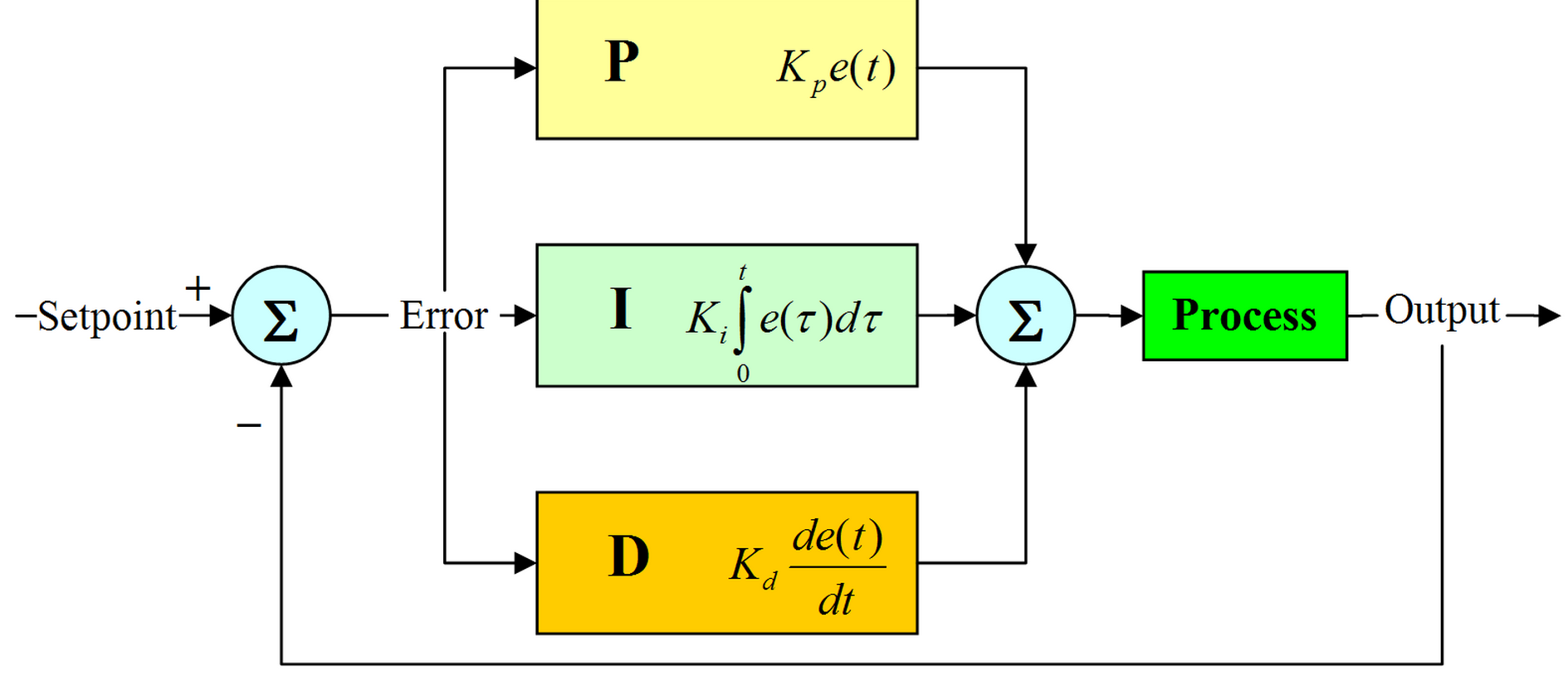
I will not go step-by-step on how PID works. More you can look on the sites below:
ARM PID library
ARM company provides 3 different PID controller functions:
- f32: float
- q31: integer
- q7: char
For each of the three types, you have three functions:
- f32
- arm_pid_init_f32
- arm_pid_reset_f32
- arm_pid_f32
- q31
- arm_pid_init_q31
- arm_pid_reset_q31
- arm_pid_q31
- q7
- arm_pid_init_q7
- arm_pid_reset_q7
- arm_pid_q7
There are also ARM PID structure, where you pass PID parameters.
More in project example below.
If you need additional info about these functions, you have detailed manual here.
PID Sample project
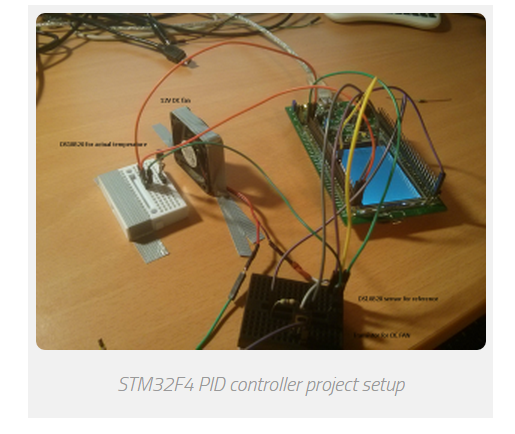
In the project, 2 DS18B20 temperature sensors are used.
They are configured in 12bit resolution, so delay between 2 calculations is about ~750ms.
If you read about PID controller, you realize that you cannot calculate PID controller results every x microcontroller,
because it has integral part which is used to sum all the errors in period.
More calculations you have, more integral error you have.
We have one device connected as “reference” temperature.
Second sensor is placed near DC FAN,
so when DC fan is turned ON, it is cooling the second DS18B20.
The goal is, that both temperatures are the same.
In my case, it was about 23°C on the reference sensor.
Then, I touched the second DS18B20 near DC fan and I heated them. DC fan was turned on.
Everything is displayed via USART to computer.
FAN is controlled via 1kHz PWM output.
According to the error between both sensors, more error, more duty cycle to DC fan.
This is just a sample project, so PID parameters are not set optimal.
For every project you have to set parameters for specific project.
This example successfully works on all STM32F4xx development board such as Discovery and Nucleo.
In the example, 1 PID controller is used.
If you need to control more than just one thing,
you can add additional ARM PID instances and
you can use more than just one PID controller at a time.
Pinout
- Both DS18B20 sensors are connected to the same pin: PA6
- DC fan PWM pin (controlled via transistor): PA5
- USART output: PB6, 115200baud
Example
/**

 *    Keil project for DS18B20 & ARM PID example

 *

 *    Before you start, select your target, on the right of the "Load" button

 *

 *    @author        Tilen Majerle

 *    @email        tilen@majerle.eu

 *    @website    http://stm32f4-discovery.com

 *    @ide        Keil uVision 5

 *    @packs        STM32F4xx Keil packs version 2.2.0 or greater required

 *    @stdperiph    STM32F4xx Standard peripheral drivers version 1.4.0 or greater required

 *

 *    Additional defines in "Options for Target" > "C/C++" > "Defines"

 *        - ARM_MATH_CM4

 *        - __FPU_PRESENT = 1

 */

/* Include core modules */

#include "stm32f4xx.h"

/* Include my libraries here */

#include "defines.h"

#include "tm_stm32f4_delay.h"

#include "tm_stm32f4_onewire.h"

#include "tm_stm32f4_ds18b20.h"

#include "tm_stm32f4_disco.h"

#include "tm_stm32f4_usart.h"

#include "tm_stm32f4_pwm.h"

#include <stdio.h>

/* Include ARM math */

#include "arm_math.h"

/* How many sensors we are expecting on 1wire bus? */

#define EXPECTING_SENSORS    2

#define TEMP_CURRENT        temps[1]    /* Temperature we actually have */

#define TEMP_WANT            temps[0]    /* Temperature we want to have */

/* Choose PID parameters */

#define PID_PARAM_KP        100            /* Proporcional */

#define PID_PARAM_KI        0.025        /* Integral */

#define PID_PARAM_KD        20            /* Derivative */

int main(void) {

    /* Timer data for PWM */

    TM_PWM_TIM_t TIM_Data;

    char buf[];

    uint8_t devices, i, count;

    /* DS18B20 devices ID */

    uint8_t device[EXPECTING_SENSORS][];

    /* Temperatures from 2 sensors */

    float temps[EXPECTING_SENSORS];

    /* PID error */

    float pid_error;

    /* Duty cycle for PWM */

    float duty = ;

    /* ARM PID Instance, float_32 format */

    arm_pid_instance_f32 PID;

    /* One wire instance */

    TM_OneWire_t OneWire;

    /* Set PID parameters */

    /* Set this for your needs */

    PID.Kp = PID_PARAM_KP;        /* Proporcional */

    PID.Ki = PID_PARAM_KI;        /* Integral */

    PID.Kd = PID_PARAM_KD;        /* Derivative */

    /* Initialize PID system, float32_t format */

    arm_pid_init_f32(&PID, );

    /* Initialize system */

    SystemInit();

    /* Initialize delay */

    TM_DELAY_Init();

    /* Initialize Leds */

    TM_DISCO_LedInit();

    /* Initialize USART1, TX: PB6, 115200 baud */

    TM_USART_Init(USART1, TM_USART_PinsPack_2, );

    /* Initialize TIM2, 1kHz frequency */

    TM_PWM_InitTimer(TIM2, &TIM_Data, );

    /* Initialize TIM2, Channel 1, PinsPack 2 = PA5 */

    TM_PWM_InitChannel(&TIM_Data, TM_PWM_Channel_1, TM_PWM_PinsPack_2);

    /* Set default duty cycle */

    TM_PWM_SetChannelPercent(&TIM_Data, TM_PWM_Channel_1, duty);

    /* Initialize OneWire, pin PA6 */

    TM_OneWire_Init(&OneWire, GPIOA, GPIO_PIN_6);

    /* Checks for any device on 1-wire */

    count = ;

    devices = TM_OneWire_First(&OneWire);

    while (devices) {

        /* Get full ROM value, 8 bytes, give location of first byte where to save */

        TM_OneWire_GetFullROM(&OneWire, device[count]);

        /* Increase count for devices */

        count++;

        /* Get next device */

        devices = TM_OneWire_Next(&OneWire);

    }

    /* We need 2 devices */

    if (count != ) {

        TM_USART_Puts(USART1, "We expect 2 devices on 1-wire. Quiting!\n");

        /* While */

        while ();

    }

    /* Go through all connected devices and set resolution to 12bits */

    for (i = ; i < count; i++) {

        TM_DS18B20_SetResolution(&OneWire, &device[i][], TM_DS18B20_Resolution_12bits);

    }

    /* Start temperature conversion on all devices */

    TM_DS18B20_StartAll(&OneWire);

    while () {

        /* If all sensors are done with conversion */

        /* This will happen about every 750ms, because DS18B20 needs ~750ms for conversion in 12bit resolution mode */

        if (TM_DS18B20_AllDone(&OneWire)) {

            /* Read temperature 1, reference temperature */

            TM_DS18B20_Read(&OneWire, device[], &TEMP_WANT);

            /* Read temperature 2, actual temperature */

            TM_DS18B20_Read(&OneWire, device[], &TEMP_CURRENT);

            /* Start new temperature conversion on all devices */

            TM_DS18B20_StartAll(&OneWire);

            /* Set LEDs according to the which temperature is higher */

            if (TEMP_CURRENT > TEMP_WANT) {

                TM_DISCO_LedOn(LED_GREEN);

                TM_DISCO_LedOff(LED_RED);

            } else if (TEMP_CURRENT < TEMP_WANT) {

                TM_DISCO_LedOn(LED_RED);

                TM_DISCO_LedOff(LED_GREEN);

            } else {

                TM_DISCO_LedOff(LED_ALL);

            }

            /* Calculate error */

            pid_error = TEMP_CURRENT - TEMP_WANT;

            /* Calculate PID here, argument is error */

            /* Output data will be returned, we will use it as duty cycle parameter */

            duty = arm_pid_f32(&PID, pid_error);

            /* Check overflow, duty cycle in percent */

            if (duty > ) {

                duty = ;

            } else if (duty < ) {

                duty = ;

            }

            /* Set PWM duty cycle for DC FAN to cool down sensor for "TEMP_CURRENT" */

            TM_PWM_SetChannelPercent(&TIM_Data, TM_PWM_Channel_1, duty);

            /* Format string */

            sprintf(buf, "Expected:   %2.3f C\nActual:     %2.3f C\nError:      %2.3f C\nDuty cycle: %3.2f %%\n----\n", TEMP_WANT, TEMP_CURRENT, pid_error, duty);

            /* Send to USART */

            TM_USART_Puts(USART1, buf);

        }

    }

}
2 PID controller
2.1 Description
The proportional-integral-derivative or PID controller is commonly used in the industry.
It is a feedback loop controller that manages the process command with a view to reducing the error
between the desired set point and the measured process variable.
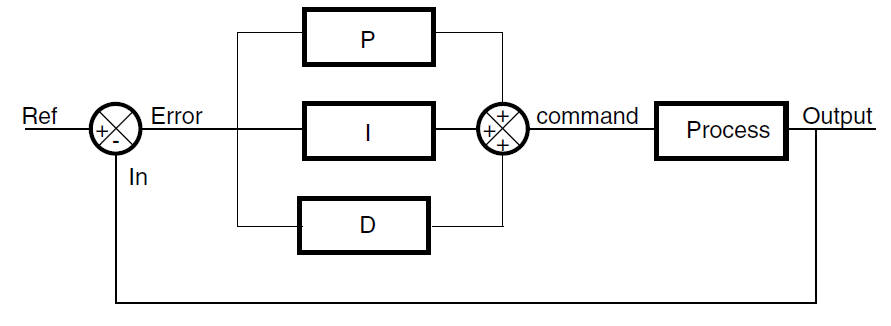
The following block diagram shows the parallel structure of a PID controller.
This is the structure implemented in this DSP library.
Figure 1. Block diagram of PID controller
DSP library functions
The DSP library provides three PID functions:
● DoPID: a PID core loop coded in C (the error is computed outside the function)
● DoFullPID: a full PID controller coded in C (with error computing)
● PID_stm32: an optimized PID core loop written in assembly
Project 03- STM32F4xx PID controller的更多相关文章
- SpringMVC学习03(控制器Controller)
3.控制器Controller 3.1 控制器Controller 控制器复杂提供访问应用程序的行为,通常通过接口定义或注解定义两种方法实现. 控制器负责解析用户的请求并将其转换为一个模型. 在Spr ...
- 《Symfony 5全面开发》教程03、使用Controller创建第一个页面
我们使用Phpstorm打开我们的项目目录,展开项目目录文件夹. Symfony项目其实也是composer项目,如果你新拿到一个Symfony项目, 你可以在控制台中使用composer insta ...
- PID控制器(比例-积分-微分控制器)- II
Table of Contents Practical Process Control Proven Methods and Best Practices for Automatic PID Cont ...
- Be a Smart Project Manager
The key to being a smart project manager is to remember how you are going to manage your project, to ...
- 增量与位置PID
转载:http://blog.sina.com.cn/s/blog_408540af0100b17n.html http://bbs.ednchina.com/BLOG_ARTICLE_211739. ...
- MATLAB-离散系统的数字PID控制仿真
%PID Controller clear all; close all; ts=0.001; %采样时间=0.001s sys=tf(,]); %建立被控对象传递函数 dsys=c2d(sys,t ...
- PID算法(c 语言)(转)
PID算法(c 语言)(来自老外) #include <stdio.h> #include<math.h> //定义PID 的结构体 struct _pid { int pv; ...
- PID算法(c 语言)(来自老外)
#include <stdio.h> #include<math.h> //定义PID 的结构体 struct _pid { int pv; // integer that c ...
- PID控制器(比例-积分-微分控制器)- IV
调节/测量放大电路电路图:PID控制电路图 如图是PlD控制电路,即比例(P).积分(I).微分(D)控制电路. A1构成的比例电路与环路增益有关,调节RP1,可使反相器的增益在0·5一∞范围内变化; ...
随机推荐
- CSS border系列
本文更新版链接 一.border 关于border的3个属性,分别为border-width.border-style.border-color. 其中,border-color默认为元素内容的前景色 ...
- 恶意代码分析实战-PE资源提取
场景 1.提取恶意代码中的资源部分内容 思路 存在Loadresource函数的时候说明有一部分内容在资源里. 技术点 Lab1-4 ResourceHacker打开保存资源,载入IDA查看
- 【技巧总结】理解XXE从基础到盲打
原文:http://agrawalsmart7.com/2018/11/10/Understanding-XXE-from-Basic-to-Blind.html 这篇文章中将讨论以下问题. XXE是 ...
- python版本管理工具pyenv和包管理工具pipenv
一.pyenv版本管理工具 pyenv是一个python版本管理工具,可以实现轻松切换多个python版本 它可根据每个用户更改全局python版本,也可以为每个项目指定python版本,还可以管理v ...
- trove远程连接mongodb
创建数据库 <pre> [root@a581c7388dca /]# trove database-create e50f3b40-5165-4ccc-af9f-c121089fd902 ...
- Python 单例模式讲解
Python 单例模式讲解 本节内容: classmethod用途 单例模式方法一 类__new__方法讲解 单例模式方法二 前言: 使用单例方法的好处:对于一个类,多次实例化会产生多个对象,若使用单 ...
- Python_oldboy_自动化运维之路_socket编程(十)
链接:http://www.cnblogs.com/linhaifeng/articles/6129246.html 1.osi七层 引子: 须知一个完整的计算机系统是由硬件.操作系统.应用软件三者组 ...
- python实战之原生爬虫(爬取熊猫主播排行榜)
""" this is a module,多行注释 """ import re from urllib import request # B ...
- metasploit利用漏洞渗透攻击靶机
1.网络测试环境构建 首先需要先配置好一个渗透测试用的网络环境,包括如图1所示的运行Kali Linux系统的计算机,如图2所示的老师给的Windows Server 2000系统的计算机.这两台计算 ...
- K8S Dashborad登陆认证文档
K8S Dashboard是官方的一个基于WEB的用户界面,专门用来管理K8S集群,并可展示集群的状态.因为我们使用kubeadm搭建的集群会默认开启RABC(角色访问控制机制),所以我们必须要进行额 ...