
ASP.Net GridView 基础 Template模板
一、了解Template
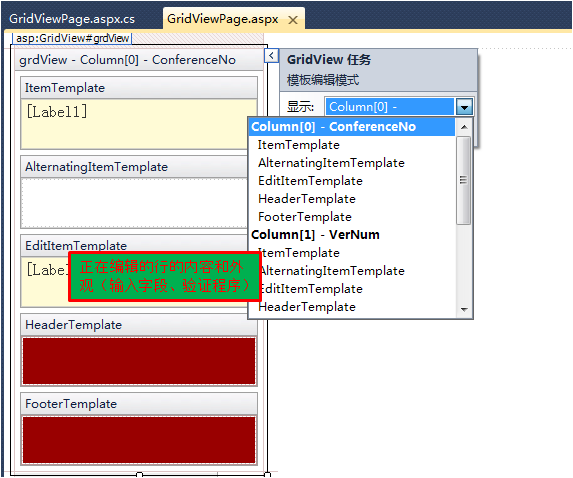
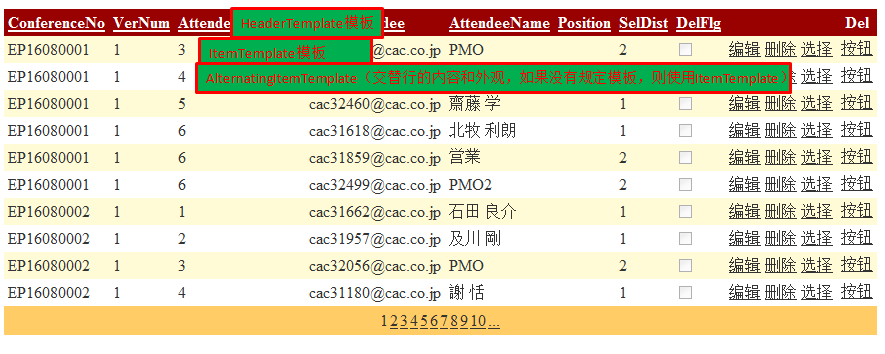
AlternatingItemTemplate定义交替行的内容和外观,如果没有规定模板,则使用ItemTemplate;
EditItemTemplate定义当前正在编辑的行的内容和外观。该模板包含输入字段,而且还可能包含验证程序;
FooterTemplate定义该行的页脚的内容和外观;
HeaderTemplate定义该行的标题的内容和外观;
ItemTemplate定义该行的默认内容和外观。
二、模板应用
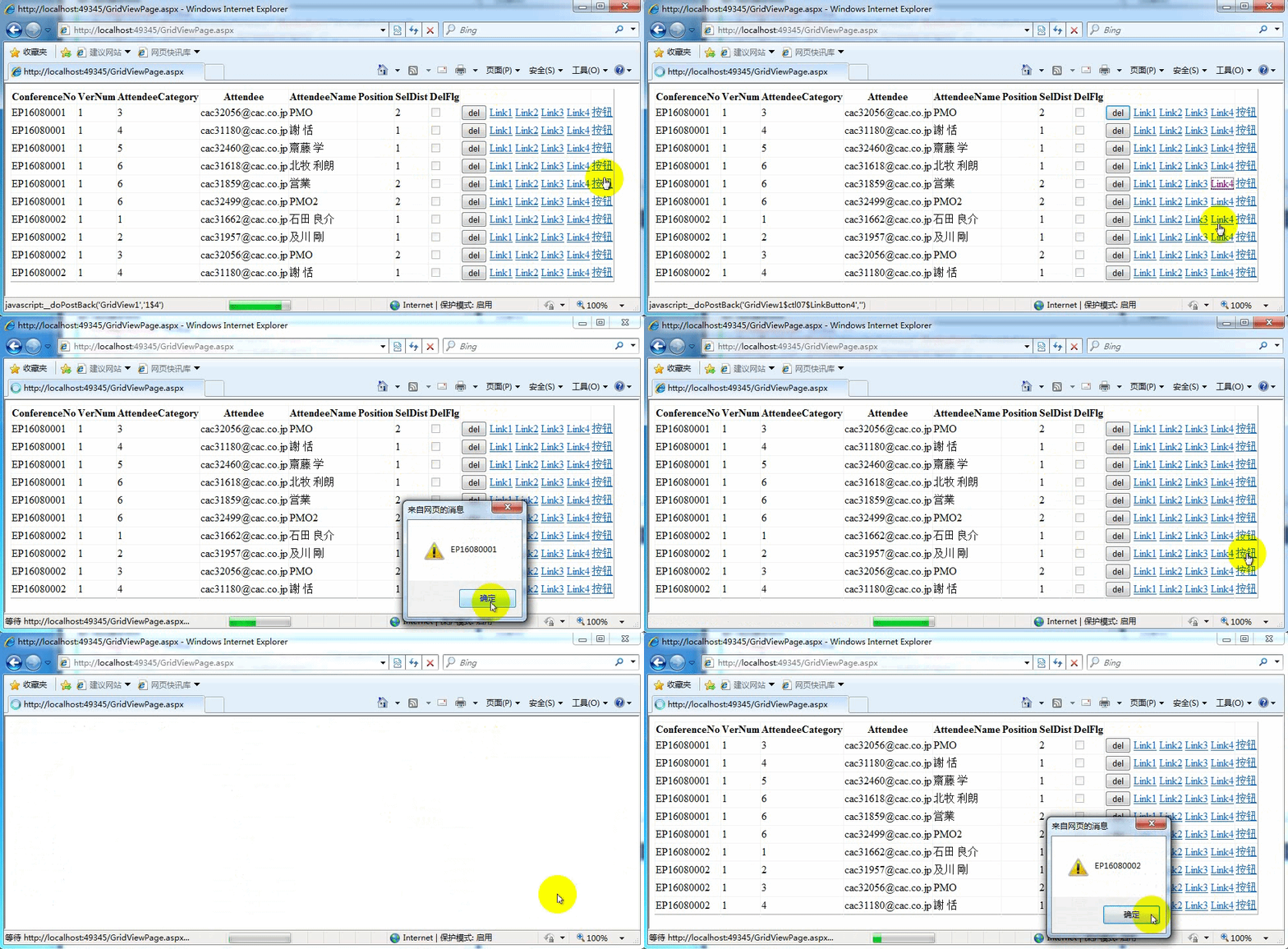
aspx代码
<asp:GridView ID="GridView1" runat="server" AutoGenerateColumns="False"

            DataKeyNames="ConferenceNo,VerNum,AttendeeCategory,Attendee"

            DataSourceID="SqlDataSource1" onrowcommand="GridView1_RowCommand"

            onrowdatabound="GridView1_RowDataBound"

            onrowcreated="GridView1_RowCreated">

            <Columns>

                其它字段

                <asp:TemplateField>

                    <ItemTemplate>

                        <asp:Button ID="btnDel" runat="server"

                            CommandArgument='<%# Eval("ConferenceNo") %>' onclick="btnDel_Click"

                            Text="del" />

                        <asp:LinkButton ID="LinkButton1" runat="server"

                            CommandArgument='<%# Eval("ConferenceNo") %>' CommandName="2">Link1</asp:LinkButton>

                        <asp:LinkButton ID="LinkButton2" runat="server" CommandName="3">Link2</asp:LinkButton>

                        <asp:LinkButton ID="LinkButton3" runat="server"

                            CommandArgument='<%# ((GridViewRow)Container).RowIndex %>' CommandName="4">Link3</asp:LinkButton>

                        <asp:LinkButton ID="LinkButton4" runat="server">Link4</asp:LinkButton>

                    </ItemTemplate>

                </asp:TemplateField>

                <asp:ButtonField CommandName="1" Text="按钮"  />

            </Columns>

        </asp:GridView>
aspx.cs代码
        /// <summary>

        /// 2、模板中自定义Button和CommandArgument

        /// </summary>

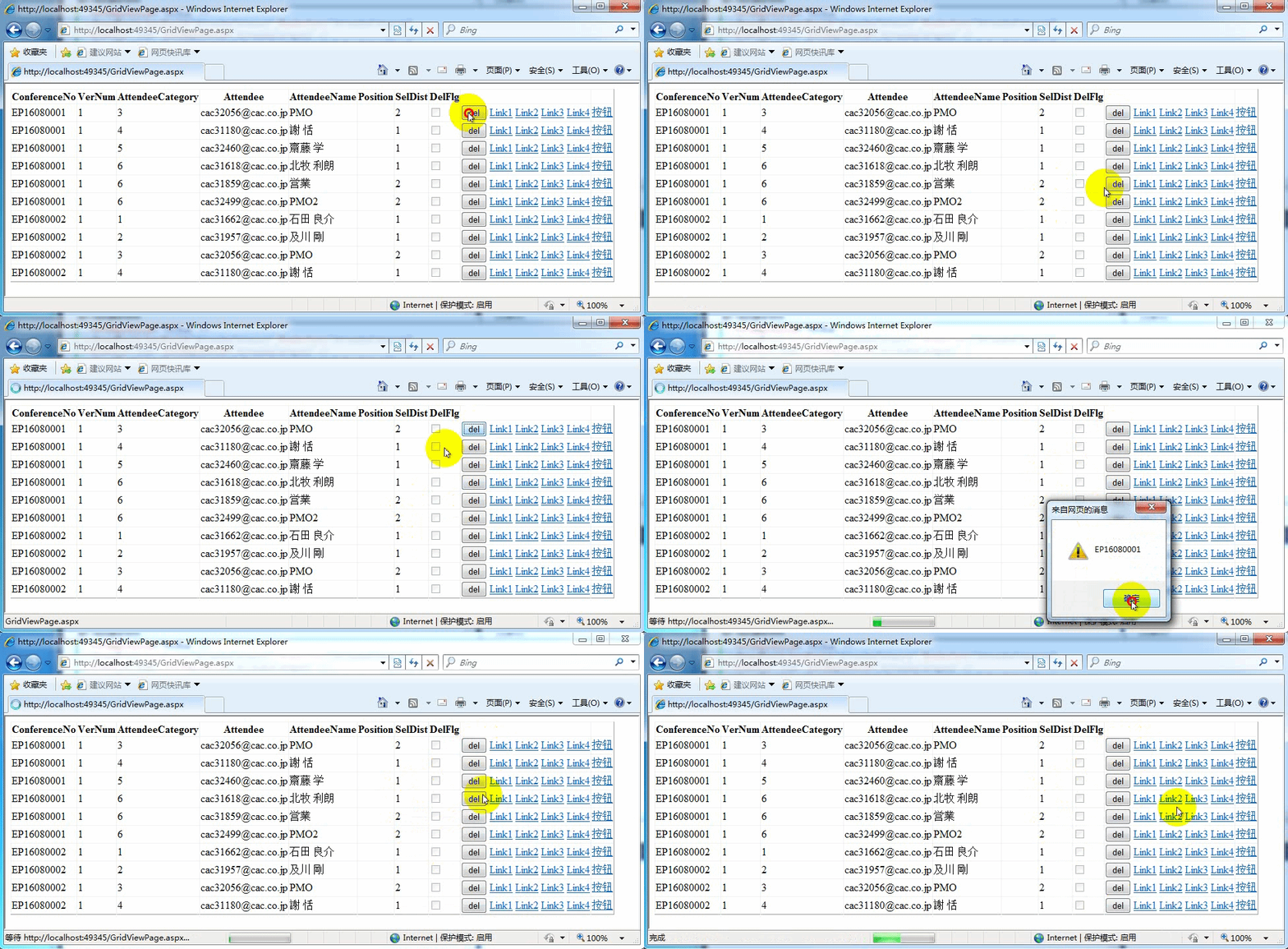
        protected void btnDel_Click(object sender, EventArgs e)

        {

            string strCommandArgument = ((Button)sender).CommandArgument;

            ClientScript.RegisterStartupScript(this.GetType(), "alter", "alert('" + strCommandArgument + "')",true);

        }

        /// <summary>

        /// 1、ButtonField和RowCommand

        /// </summary>

        protected void GridView1_RowCommand(object sender, GridViewCommandEventArgs e)

        {

            //1、ButtonField和RowCommand

            if (e.CommandName == "1")

            {

                //在ButtonField中CommandArgument属性是当前行索引(RowIndex)不需要开发人员设置

                int intRowIndex = int.Parse(e.CommandArgument.ToString());

                string strConferenceNo = GridView1.Rows[intRowIndex].Cells[0].Text.ToString();

                ClientScript.RegisterStartupScript(this.GetType(), "alter", "alert('" + strConferenceNo + "')", true);

            }

            //3、模板中自定义Button和RowCommand

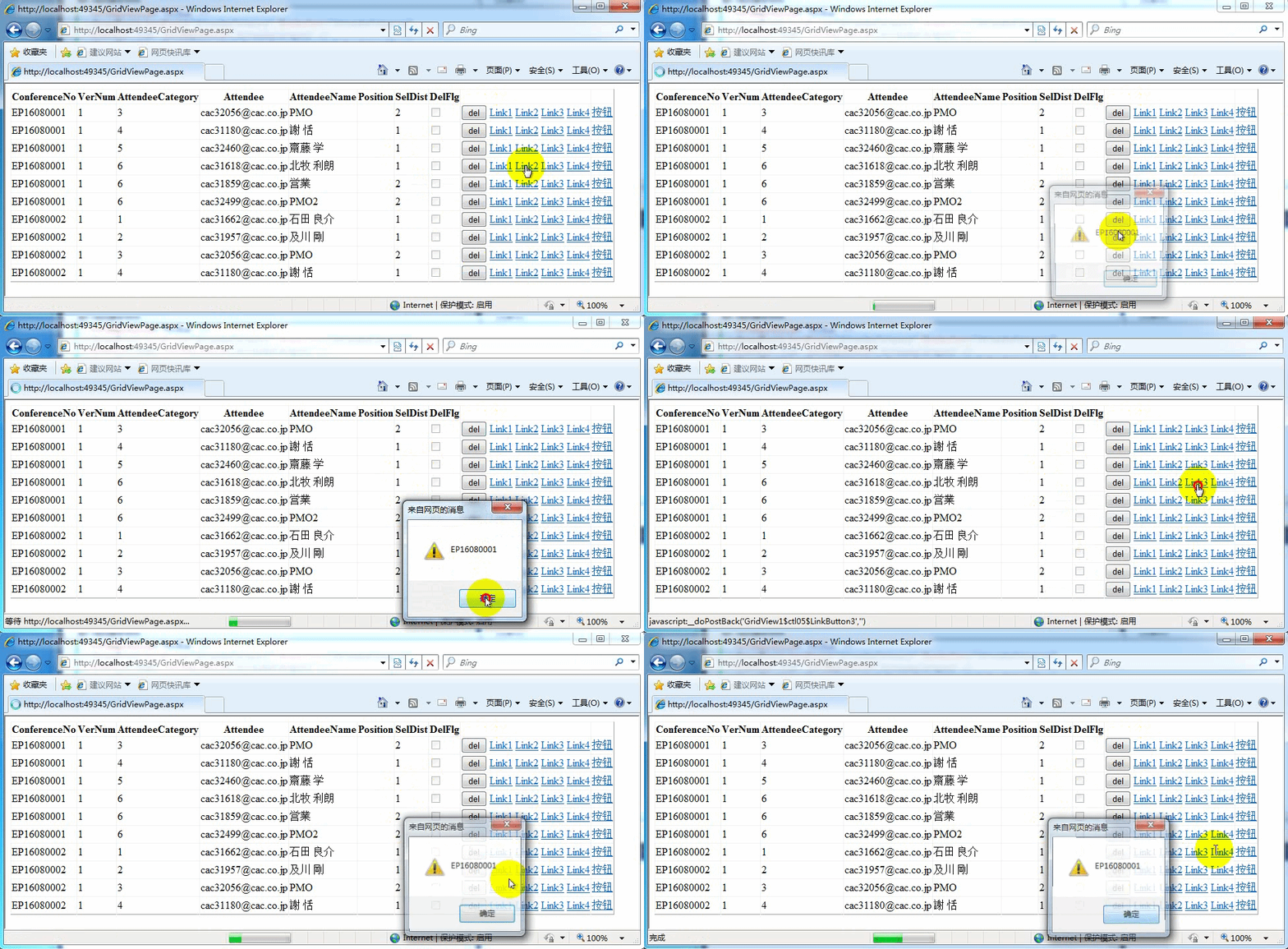
            if (e.CommandName == "2")

            {

                //自定义Button中CommandArgument属性是开发人员设置

                string strConferenceNo = e.CommandArgument.ToString();

                ClientScript.RegisterStartupScript(this.GetType(), "alter", "alert('" + strConferenceNo + "')", true);

            }

            //4、模板中自定义Button和RowCommand

            if (e.CommandName == "3")

            {

                //在RowDataBound针对模板中自定义Button的CommandArgument赋值

                int intRowIndex = int.Parse(e.CommandArgument.ToString());

                string strConferenceNo = GridView1.Rows[intRowIndex].Cells[0].Text.ToString();

                ClientScript.RegisterStartupScript(this.GetType(), "alter", "alert('" + strConferenceNo + "')", true);

            }

            //5、模板中自定义Button和RowCommand

            if (e.CommandName == "4")

            {

                //CommandArgument='<%# ((GridViewRow)Container).RowIndex %>'

                int intRowIndex = int.Parse(e.CommandArgument.ToString());

                string strConferenceNo = GridView1.Rows[intRowIndex].Cells[0].Text.ToString();

                ClientScript.RegisterStartupScript(this.GetType(), "alter", "alert('" + strConferenceNo + "')", true);

            }

        }

        /// <summary>

        /// 行绑定事件

        /// 1、常用于行选择事件注册

        /// 2、特殊数据处理

        /// </summary>

        protected void GridView1_RowDataBound(object sender, GridViewRowEventArgs e)

        {

            //4、针对模板中自定义Button的CommandArgument赋值

            if (e.Row.RowType == DataControlRowType.DataRow)

            {

                LinkButton lnk = (LinkButton)e.Row.FindControl("LinkButton2");

                lnk.CommandArgument = e.Row.RowIndex.ToString();

            }

        }

        /// <summary>

        /// GridView行创建后

        /// </summary>

        protected void GridView1_RowCreated(object sender, GridViewRowEventArgs e)

        {

            //5、针对模板中自定义Button的CommandArgument赋值

            if (e.Row.RowType == DataControlRowType.DataRow)

            {

                LinkButton lnk = (LinkButton)e.Row.FindControl("LinkButton4");

                lnk.Click += new EventHandler(lnk_Click);//按+=再按2次Tab键,实现快速注册事件

            }

        }

        void lnk_Click(object sender, EventArgs e)

        {

            //获取当前行

            GridViewRow grdRow = (GridViewRow)((LinkButton)sender).Parent.Parent;

            string strConferenceNo = grdRow.Cells[0].Text.ToString();

            ClientScript.RegisterStartupScript(this.GetType(), "alter", "alert('" + strConferenceNo + "')", true);

        }
ASP.Net GridView 基础 Template模板的更多相关文章
- ASP.Net GridView 基础 绑定字段
通过以前的学习,我们实现了效果如下: 现在我想修改显示/隐藏部分列,有两种做法: 一.在配置数据源的时候不是有查询哪些字段的吗,去除不需要的字段,重新绑定. 二.就是直接编辑列 下面是分析每种字段类型 ...
- ASP.Net GridView 基础
SP.NET 在开发过程中经常使用的微软提供的服务器控件(GridView),但在开发中很少使用界面化来操作.导致了有点不太会使用界面化操作了,还有就是一些不经常使用的属性也没什么印象了,在网上找了好 ...
- ASP.Net GridView 基础 属性和事件
GridView 控件激发的事件: 我们后期重点看的是RowCommand.RowCreated.RowDataBound这三个事件.
- django基础2: 路由配置系统,URLconf的正则字符串参数,命名空间模式,View(视图),Request对象,Response对象,JsonResponse对象,Template模板系统
Django基础二 request request这个参数1. 封装了所有跟请求相关的数据,是一个对象 2. 目前我们学过1. request.method GET,POST ...2. reques ...
- Django框架——基础之模板系统(template文件夹)
---恢复内容开始--- 1. 常用语法 需要记住两组特殊符号:{{ }} 和 {% %}. 在运用到变量的时候使用{{ }},如果是跟逻辑相关的话就使用{% %}. 在Django模板(t ...
- Vue基础项目模板
https://github.com/wanglong/vue-element-admin.git 优化 Vue CLI 3 构建的前端项目模板(1)- 基础项目模板介绍 一站式开源运维平台,分享给大 ...
- ASP.NET MVC基础学习
ASP.NET MVC基础学习 传统的MVC概念 模型:组类,描述了要处理的数据以及修改和操作数据的业务规则 视图:定义应用程序用户界面的显示方式 控制器:一组类,用来处理来自用户,整个应用程序流以及 ...
- 微信小程序新闻列表功能(读取文件、template模板使用)
微信小程序新闻列表功能(读取文件.template) 不忘初心,方得始终.初心易得,始终难守. 在之前的项目基础上进行修改,实现读取文件内容作为新闻内容进行展示. 首先,修改 post.wxml 文件 ...
- ASP.NET MVC 学习笔记-2.Razor语法 ASP.NET MVC 学习笔记-1.ASP.NET MVC 基础 反射的具体应用 策略模式的具体应用 责任链模式的具体应用 ServiceStack.Redis订阅发布服务的调用 C#读取XML文件的基类实现
ASP.NET MVC 学习笔记-2.Razor语法 1. 表达式 表达式必须跟在“@”符号之后, 2. 代码块 代码块必须位于“@{}”中,并且每行代码必须以“: ...
随机推荐
- docker 无法启动容器,run容器后状态为restarting
问题:如题,无法进入容器,docker logs 容器id 发现 哦 ,原来缺少个文件,这些就容易了
- sql:sql server,MySQL,PostgreSQL的表,视图,存储过程结构查询
sql server 2005: --SQL SERVER 2005 生成代码需要知道的SQL语句 use LibrarySystem --查询当前数据库所有表和其的主键字段,字段类型,长度,是否为空 ...
- 用CSS3/JS绘制自己想要的按钮
我认为按钮的绘制分以下三个步骤 第一步,绘制按钮的轮廓 选择合适的html标签,设置轮廓的CSS /* html代码 */ <a href="#" class="b ...
- Cloud Computing Causing Digital Business Transformation
2015-04-13 Cloud Computing Causing Digital Business Transformation We hear all about the cloud, and ...
- jetty插件实现 热部署
<plugin> <groupId>org.eclipse.jetty</groupId> <artifactId>jetty-maven-plugin ...
- 【html/css】模态框的实现
<!DOCTYPE html> <html> <head> <meta charset="utf-8"> <title> ...
- Android 编辑框插入表情图片
首先,把整理好的表情图片以及布局用到的一些图片导入到项目的res/drawable目录中. 然后,编辑res/layout目录下布局.xml文件,这里我把oschina客户端的布局代码贴上来,供大家参 ...
- Software Testing Techniques Homework 1
I have met some errors in recent years, one of them which impress me most. It happend when I try to ...
- Exchange 接收连接器(Client、Default)区别,OUtlook实际测试
CAS就是接收连接器(110,995): Server Config--Client Access:POP3 and IMAP4:POP3设置 HUB就是发送连接器(25,587) Server Co ...
- Python学习---Django重点之静态资源配置
[官网静态文件介绍] https://docs.djangoproject.com/en/1.10/howto/static-files/ # settings.py 配置静态资源文件 # STATI ...