
Restful风格wcf调用2——增删改查
写在前面
上篇文章介绍如何将wcf项目,修改成restful风格的接口,并在上面提供了查询的功能,上篇文章中也感谢园友在评论中的提的建议,自己也思考了下,确实是那个道理。在urltemplate中,定义的url确实不规范,虽然能实现功能,但是缺少点专业性。rest风格的请求,是通过post,delete,get,put等请求方法来区别的,而不是通过在url中取不同的名字来进行区别。这里再次感谢@~Js园友提醒。
在这篇文章中将最新的代码贴出来,方便查看。
系列文章
Restful风格wcf调用 (其中代码中的uritemplate定义不规范,建议参考本文)
代码示例
using System;

using System.Collections.Generic;

using System.Linq;

using System.Runtime.Serialization;

using System.ServiceModel;

using System.ServiceModel.Web;

using System.Text;

using System.Web.Script.Services;

namespace Wolfy.WCFRestfuleDemo

{

    // NOTE: You can use the "Rename" command on the "Refactor" menu to change the interface name "IService1" in both code and config file together.

    [ServiceContract]

    public interface IUserService

    {

        /// <summary>

        /// 获得所有的用户信息

        /// </summary>

        /// <returns>json或者xml</returns>

        [OperationContract]

        [WebGet(UriTemplate = "api/users", ResponseFormat = WebMessageFormat.Xml)]

        List<UserInfo> QueryList();

        /// <summary>

        /// 根据id查询用户信息

        /// </summary>

        /// <param name="where"></param>

        /// <returns></returns>

        [OperationContract]

        [WebGet(UriTemplate = "api/users/{where}", ResponseFormat = WebMessageFormat.Json)]

        UserInfo Query(string where);

        /// <summary>

        /// 根据编号删除用户信息

        /// </summary>

        /// <param name="id"></param>

        /// <returns></returns>

        [OperationContract]

        [WebInvoke(UriTemplate = "api/users/{id}", Method = "DELETE", ResponseFormat = WebMessageFormat.Xml)]

        bool Delete(string id);

        /// <summary>

        /// 添加用户信息

        /// </summary>

        /// <param name="userInfo"></param>

        /// <returns></returns>

        [OperationContract]

        [WebInvoke(UriTemplate = "api/users", Method = "POST", ResponseFormat = WebMessageFormat.Xml, RequestFormat = WebMessageFormat.Json)]

        bool Insert(UserInfo userInfo);

        /// <summary>

        /// 更新用户信息

        /// </summary>

        /// <param name="userInfo"></param>

        /// <returns></returns>

        [OperationContract]

        [WebInvoke(UriTemplate = "api/users", Method = "PUT", ResponseFormat = WebMessageFormat.Xml, RequestFormat = WebMessageFormat.Json)]

        bool Update(UserInfo userInfo);

    }

}
修改的地方:uriTemplate,以名词组成,具体的操作通过Method谓词进行区分,另外参数中UserInfo,为其WebInvoke设置RequestFormat(请求数据类型)属性,设置为json格式的数据,这样在服务端介绍到数据后,系统内部将对齐进行反序列化为具体的实体类。还有合并按照id和name查询的接口,因为原来设置的uritemplate为api/users/{id}和api/users/{name}而且请求的方法都是get方法,无法区别到底调用哪个,所以将两个方法合并为了一个方法。
1、删除Http(delete),根据id找到用户信息,并从集合中移除。
        /// <summary>

         /// 根据编号删除用户信息

         /// </summary>

         /// <param name="id"></param>

         /// <returns></returns>

         public bool Delete(string id)

         {

             //当前操作上下文

             WebOperationContext woc = WebOperationContext.Current;

             //状态码

             woc.OutgoingResponse.StatusCode = System.Net.HttpStatusCode.OK;

             try

             {

                 if (string.IsNullOrEmpty(id))

                 {

                     throw new ArgumentNullException("id");

                 }

                 var users = QueryList();

                 int iId = Convert.ToInt32(id);

                 var user = users.Where(x => x.ID == iId).FirstOrDefault();

                 woc.OutgoingResponse.StatusCode = System.Net.HttpStatusCode.Accepted;

                 return users.Remove(user);

             }

             catch (Exception ex)

             {

                 //异常 输出状态

                 woc.OutgoingResponse.StatusCode = System.Net.HttpStatusCode.ExpectationFailed;

                 woc.OutgoingResponse.StatusDescription = ex.Message;

                 return false;

             }

         }
2、添加Http(post),POST里的数据格式通过RequestFormat定义为Json,WCF框架接受到Json数据的请求,会自动反序列化成UserInfo实例。
         /// <summary>

         /// 添加用户信息

         /// </summary>

         /// <param name="userInfo"></param>

         /// <returns></returns>

         public bool Insert(UserInfo userInfo)

         {

             var users = QueryList();

             WebOperationContext woc = WebOperationContext.Current;

             woc.OutgoingResponse.StatusCode = System.Net.HttpStatusCode.OK;

             try

             {

                 users.Add(userInfo);

                 woc.OutgoingResponse.StatusCode = System.Net.HttpStatusCode.Created;

                 return true;

             }

             catch (Exception ex)

             {

                 //异常 输出状态

                 woc.OutgoingResponse.StatusCode = System.Net.HttpStatusCode.ExpectationFailed;

                 woc.OutgoingResponse.StatusDescription = ex.Message;

                 return false;

             }

         }
3、修改(Http/Put),根据id找到要修改的对象,对该对象重新赋值。
        /// <summary>

         /// 更新用户信息

         /// </summary>

         /// <param name="userInfo"></param>

         /// <returns></returns>

         public bool Update(UserInfo userInfo)

         {

             var users = QueryList();

             WebOperationContext woc = WebOperationContext.Current;

             try

             {

                 var user = users.Where(x => x.ID == userInfo.ID).FirstOrDefault();

                 if (user != null)

                 {

                     user = userInfo;

                     woc.OutgoingResponse.StatusCode = System.Net.HttpStatusCode.Accepted;

                     return true;

                 }

                 else

                 {

                     woc.OutgoingResponse.StatusCode = System.Net.HttpStatusCode.NotFound;

                     return false;

                 }

             }

             catch (Exception ex)

             {

                 //异常 输出状态

                 woc.OutgoingResponse.StatusCode = System.Net.HttpStatusCode.ExpectationFailed;

                 woc.OutgoingResponse.StatusDescription = ex.Message;

                 return false;

             }

         }
4、查询(http/get)
  /// <summary>

        /// 获得所有的用户信息

        /// </summary>

        /// <returns>json或者xml</returns>

        public List<UserInfo> QueryList()

        {

            return new List<UserInfo>() {

                new UserInfo() { ID = , Name = "wofly", Age = , Birthday = DateTime.Now, Gender = true },

                  new UserInfo() { ID = , Name = "san zhang", Age = , Birthday = DateTime.Now, Gender = true },

                    new UserInfo() { ID = , Name = "wukong sun", Age = , Birthday = DateTime.Now, Gender = false },

                      new UserInfo() { ID = , Name = "zi ma", Age = , Birthday = DateTime.Now, Gender = true }

            };

        }
服务端的异常处理中通过 OutgoingResponse.StatusCode 返回不同的Code。
查询成功 —— System.Net.HttpStatusCode.OK (默认)。
创建成功 —— System.Net.HttpStatusCode.Created
更新或者删除成功 —— System.Net.HttpStatusCode.Accepted
当然,HttpStatusCode枚举不止这几个。感兴趣的可以查看这个枚举。你会发现,包揽了常见的一些状态枚举。
   // Summary:

    //     Contains the values of status codes defined for HTTP.

    public enum HttpStatusCode

    {

        // Summary:

        //     Equivalent to HTTP status 100. System.Net.HttpStatusCode.Continue indicates

        //     that the client can continue with its request.

        Continue = ,

        //

        // Summary:

        //     Equivalent to HTTP status 101. System.Net.HttpStatusCode.SwitchingProtocols

        //     indicates that the protocol version or protocol is being changed.

        SwitchingProtocols = ,

        //

        // Summary:

        //     Equivalent to HTTP status 200. System.Net.HttpStatusCode.OK indicates that

        //     the request succeeded and that the requested information is in the response.

        //     This is the most common status code to receive.

        OK = ,

        //

        // Summary:

        //     Equivalent to HTTP status 201. System.Net.HttpStatusCode.Created indicates

        //     that the request resulted in a new resource created before the response was

        //     sent.

        Created = ,

        //

        // Summary:

        //     Equivalent to HTTP status 202. System.Net.HttpStatusCode.Accepted indicates

        //     that the request has been accepted for further processing.

        Accepted = ,

        //

        // Summary:

        //     Equivalent to HTTP status 203. System.Net.HttpStatusCode.NonAuthoritativeInformation

        //     indicates that the returned metainformation is from a cached copy instead

        //     of the origin server and therefore may be incorrect.

        NonAuthoritativeInformation = ,

        //

        // Summary:

        //     Equivalent to HTTP status 204. System.Net.HttpStatusCode.NoContent indicates

        //     that the request has been successfully processed and that the response is

        //     intentionally blank.

        NoContent = ,

        //

        // Summary:

        //     Equivalent to HTTP status 205. System.Net.HttpStatusCode.ResetContent indicates

        //     that the client should reset (not reload) the current resource.

        ResetContent = ,

        //

        // Summary:

        //     Equivalent to HTTP status 206. System.Net.HttpStatusCode.PartialContent indicates

        //     that the response is a partial response as requested by a GET request that

        //     includes a byte range.

        PartialContent = ,

        //

        // Summary:

        //     Equivalent to HTTP status 300. System.Net.HttpStatusCode.MultipleChoices

        //     indicates that the requested information has multiple representations. The

        //     default action is to treat this status as a redirect and follow the contents

        //     of the Location header associated with this response.

        MultipleChoices = ,

        //

        // Summary:

        //     Equivalent to HTTP status 300. System.Net.HttpStatusCode.Ambiguous indicates

        //     that the requested information has multiple representations. The default

        //     action is to treat this status as a redirect and follow the contents of the

        //     Location header associated with this response.

        Ambiguous = ,

        //

        // Summary:

        //     Equivalent to HTTP status 301. System.Net.HttpStatusCode.MovedPermanently

        //     indicates that the requested information has been moved to the URI specified

        //     in the Location header. The default action when this status is received is

        //     to follow the Location header associated with the response.

        MovedPermanently = ,

        //

        // Summary:

        //     Equivalent to HTTP status 301. System.Net.HttpStatusCode.Moved indicates

        //     that the requested information has been moved to the URI specified in the

        //     Location header. The default action when this status is received is to follow

        //     the Location header associated with the response. When the original request

        //     method was POST, the redirected request will use the GET method.

        Moved = ,

        //

        // Summary:

        //     Equivalent to HTTP status 302. System.Net.HttpStatusCode.Found indicates

        //     that the requested information is located at the URI specified in the Location

        //     header. The default action when this status is received is to follow the

        //     Location header associated with the response. When the original request method

        //     was POST, the redirected request will use the GET method.

        Found = ,

        //

        // Summary:

        //     Equivalent to HTTP status 302. System.Net.HttpStatusCode.Redirect indicates

        //     that the requested information is located at the URI specified in the Location

        //     header. The default action when this status is received is to follow the

        //     Location header associated with the response. When the original request method

        //     was POST, the redirected request will use the GET method.

        Redirect = ,

        //

        // Summary:

        //     Equivalent to HTTP status 303. System.Net.HttpStatusCode.SeeOther automatically

        //     redirects the client to the URI specified in the Location header as the result

        //     of a POST. The request to the resource specified by the Location header will

        //     be made with a GET.

        SeeOther = ,

        //

        // Summary:

        //     Equivalent to HTTP status 303. System.Net.HttpStatusCode.RedirectMethod automatically

        //     redirects the client to the URI specified in the Location header as the result

        //     of a POST. The request to the resource specified by the Location header will

        //     be made with a GET.

        RedirectMethod = ,

        //

        // Summary:

        //     Equivalent to HTTP status 304. System.Net.HttpStatusCode.NotModified indicates

        //     that the client's cached copy is up to date. The contents of the resource

        //     are not transferred.

        NotModified = ,

        //

        // Summary:

        //     Equivalent to HTTP status 305. System.Net.HttpStatusCode.UseProxy indicates

        //     that the request should use the proxy server at the URI specified in the

        //     Location header.

        UseProxy = ,

        //

        // Summary:

        //     Equivalent to HTTP status 306. System.Net.HttpStatusCode.Unused is a proposed

        //     extension to the HTTP/1.1 specification that is not fully specified.

        Unused = ,

        //

        // Summary:

        //     Equivalent to HTTP status 307. System.Net.HttpStatusCode.RedirectKeepVerb

        //     indicates that the request information is located at the URI specified in

        //     the Location header. The default action when this status is received is to

        //     follow the Location header associated with the response. When the original

        //     request method was POST, the redirected request will also use the POST method.

        RedirectKeepVerb = ,

        //

        // Summary:

        //     Equivalent to HTTP status 307. System.Net.HttpStatusCode.TemporaryRedirect

        //     indicates that the request information is located at the URI specified in

        //     the Location header. The default action when this status is received is to

        //     follow the Location header associated with the response. When the original

        //     request method was POST, the redirected request will also use the POST method.

        TemporaryRedirect = ,

        //

        // Summary:

        //     Equivalent to HTTP status 400. System.Net.HttpStatusCode.BadRequest indicates

        //     that the request could not be understood by the server. System.Net.HttpStatusCode.BadRequest

        //     is sent when no other error is applicable, or if the exact error is unknown

        //     or does not have its own error code.

        BadRequest = ,

        //

        // Summary:

        //     Equivalent to HTTP status 401. System.Net.HttpStatusCode.Unauthorized indicates

        //     that the requested resource requires authentication. The WWW-Authenticate

        //     header contains the details of how to perform the authentication.

        Unauthorized = ,

        //

        // Summary:

        //     Equivalent to HTTP status 402. System.Net.HttpStatusCode.PaymentRequired

        //     is reserved for future use.

        PaymentRequired = ,

        //

        // Summary:

        //     Equivalent to HTTP status 403. System.Net.HttpStatusCode.Forbidden indicates

        //     that the server refuses to fulfill the request.

        Forbidden = ,

        //

        // Summary:

        //     Equivalent to HTTP status 404. System.Net.HttpStatusCode.NotFound indicates

        //     that the requested resource does not exist on the server.

        NotFound = ,

        //

        // Summary:

        //     Equivalent to HTTP status 405. System.Net.HttpStatusCode.MethodNotAllowed

        //     indicates that the request method (POST or GET) is not allowed on the requested

        //     resource.

        MethodNotAllowed = ,

        //

        // Summary:

        //     Equivalent to HTTP status 406. System.Net.HttpStatusCode.NotAcceptable indicates

        //     that the client has indicated with Accept headers that it will not accept

        //     any of the available representations of the resource.

        NotAcceptable = ,

        //

        // Summary:

        //     Equivalent to HTTP status 407. System.Net.HttpStatusCode.ProxyAuthenticationRequired

        //     indicates that the requested proxy requires authentication. The Proxy-authenticate

        //     header contains the details of how to perform the authentication.

        ProxyAuthenticationRequired = ,

        //

        // Summary:

        //     Equivalent to HTTP status 408. System.Net.HttpStatusCode.RequestTimeout indicates

        //     that the client did not send a request within the time the server was expecting

        //     the request.

        RequestTimeout = ,

        //

        // Summary:

        //     Equivalent to HTTP status 409. System.Net.HttpStatusCode.Conflict indicates

        //     that the request could not be carried out because of a conflict on the server.

        Conflict = ,

        //

        // Summary:

        //     Equivalent to HTTP status 410. System.Net.HttpStatusCode.Gone indicates that

        //     the requested resource is no longer available.

        Gone = ,

        //

        // Summary:

        //     Equivalent to HTTP status 411. System.Net.HttpStatusCode.LengthRequired indicates

        //     that the required Content-length header is missing.

        LengthRequired = ,

        //

        // Summary:

        //     Equivalent to HTTP status 412. System.Net.HttpStatusCode.PreconditionFailed

        //     indicates that a condition set for this request failed, and the request cannot

        //     be carried out. Conditions are set with conditional request headers like

        //     If-Match, If-None-Match, or If-Unmodified-Since.

        PreconditionFailed = ,

        //

        // Summary:

        //     Equivalent to HTTP status 413. System.Net.HttpStatusCode.RequestEntityTooLarge

        //     indicates that the request is too large for the server to process.

        RequestEntityTooLarge = ,

        //

        // Summary:

        //     Equivalent to HTTP status 414. System.Net.HttpStatusCode.RequestUriTooLong

        //     indicates that the URI is too long.

        RequestUriTooLong = ,

        //

        // Summary:

        //     Equivalent to HTTP status 415. System.Net.HttpStatusCode.UnsupportedMediaType

        //     indicates that the request is an unsupported type.

        UnsupportedMediaType = ,

        //

        // Summary:

        //     Equivalent to HTTP status 416. System.Net.HttpStatusCode.RequestedRangeNotSatisfiable

        //     indicates that the range of data requested from the resource cannot be returned,

        //     either because the beginning of the range is before the beginning of the

        //     resource, or the end of the range is after the end of the resource.

        RequestedRangeNotSatisfiable = ,

        //

        // Summary:

        //     Equivalent to HTTP status 417. System.Net.HttpStatusCode.ExpectationFailed

        //     indicates that an expectation given in an Expect header could not be met

        //     by the server.

        ExpectationFailed = ,

        //

        UpgradeRequired = ,

        //

        // Summary:

        //     Equivalent to HTTP status 500. System.Net.HttpStatusCode.InternalServerError

        //     indicates that a generic error has occurred on the server.

        InternalServerError = ,

        //

        // Summary:

        //     Equivalent to HTTP status 501. System.Net.HttpStatusCode.NotImplemented indicates

        //     that the server does not support the requested function.

        NotImplemented = ,

        //

        // Summary:

        //     Equivalent to HTTP status 502. System.Net.HttpStatusCode.BadGateway indicates

        //     that an intermediate proxy server received a bad response from another proxy

        //     or the origin server.

        BadGateway = ,

        //

        // Summary:

        //     Equivalent to HTTP status 503. System.Net.HttpStatusCode.ServiceUnavailable

        //     indicates that the server is temporarily unavailable, usually due to high

        //     load or maintenance.

        ServiceUnavailable = ,

        //

        // Summary:

        //     Equivalent to HTTP status 504. System.Net.HttpStatusCode.GatewayTimeout indicates

        //     that an intermediate proxy server timed out while waiting for a response

        //     from another proxy or the origin server.

        GatewayTimeout = ,

        //

        // Summary:

        //     Equivalent to HTTP status 505. System.Net.HttpStatusCode.HttpVersionNotSupported

        //     indicates that the requested HTTP version is not supported by the server.

        HttpVersionNotSupported = ,

    }
public enum HttpStatusCode
因为REST 是基于HTTP的, 所以对于 REST 的客户端的开发者,无法像使用传统的 WebService或者其他的WCF服务通过引用wsdl,享受“奢侈”的代码生成,而使用强类型的本地代理调用服务。开发者只能使用Http请求来进行请求,而使得客户端真正是语言无关的。
Microsoft.Http.dll 和 Microsoft.Http.Extensions.dll,它们是微软提供的REST客户端包。可以更加方便地操作 HttpRequest/Response,你可以在这里下到: http://aspnet.codeplex.com/releases/view/24644
下载:WCF REST Starter Kit Preview 2.msi
安装之后,在这里C:\Program Files (x86)\Microsoft WCF REST\WCF REST Starter Kit Preview 2\Assemblies(默认安装的) 你可以找到相关的程序集
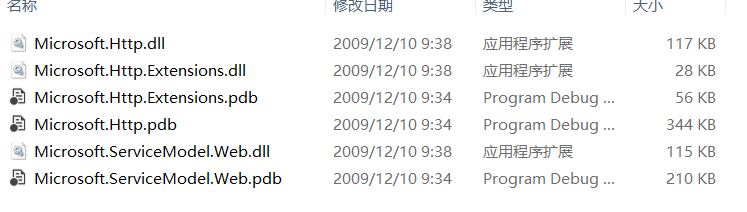
代码片段
查询:HttpClient.Get方法发送get请求,返回的是HttpResponseMessage,HttpResponseMessage.Content 返回的是你在服务端设置ResponseFormat = WebMessageFormat.Xml数据,当然也可以返回json数据。
            var client = new HttpClient();

            var strUrl = "http://localhost:21074/userInfo/api/users";

            var response = client.Get(strUrl);

            response.EnsureStatusIsSuccessful();

            var xml = response.Content.ReadAsString();

            Console.WriteLine(xml);

            Console.Read();

添加数据,将数据序列化成Json格式放进 HttpContent 再使用 HttpClient.Post 提交 HttpContent 数据。
HttpContent 需要指定 ContentType 是Json格式的。
            var client = new HttpClient();

            var strPostUrl = "http://localhost:21074/userInfo/api/users";

            var postData = new { ID = , Name = "zhang san", Gender = true, Birthday = DateTime.Now, Age =  };

            System.Web.Script.Serialization.JavaScriptSerializer jss = new JavaScriptSerializer();

            HttpContent content = HttpContent.Create(Encoding.UTF8.GetBytes(jss.Serialize(postData)),"application/json");

            HttpResponseMessage responseMessage = client.Post(strPostUrl, content);

            Console.WriteLine(responseMessage.EnsureStatusIsSuccessful().StatusCode);
服务端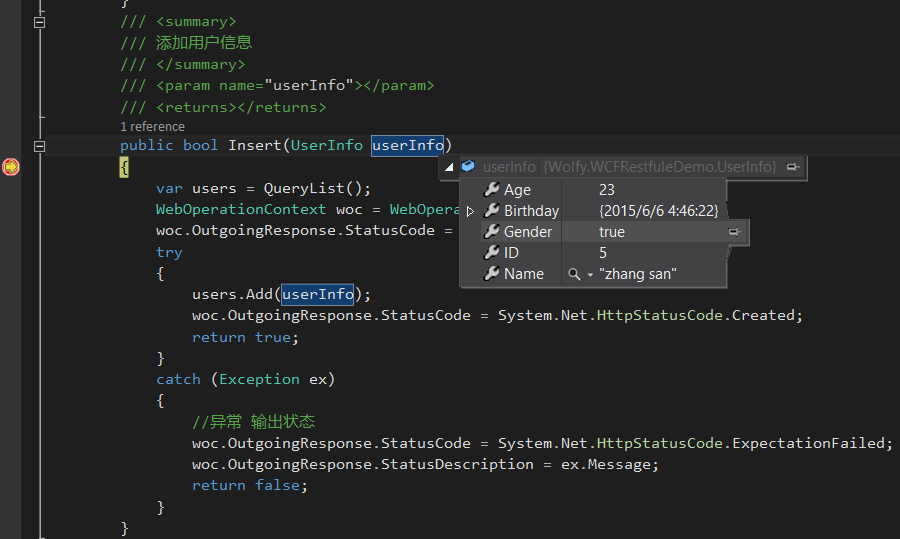
客户端

更新数据:找到id为1的用户信息,并修改。
            var client = new HttpClient();

            var strPostUrl = "http://localhost:21074/userInfo/api/users";

            var postData = new { ID = , Name = "zhang san", Gender = true, Birthday = DateTime.Now, Age =  };

            System.Web.Script.Serialization.JavaScriptSerializer jss = new JavaScriptSerializer();

            HttpContent content = HttpContent.Create(Encoding.UTF8.GetBytes(jss.Serialize(postData)), "application/json");

            HttpResponseMessage responseMessage = client.Put(strPostUrl, content);

            Console.WriteLine(responseMessage.EnsureStatusIsSuccessful().StatusCode);
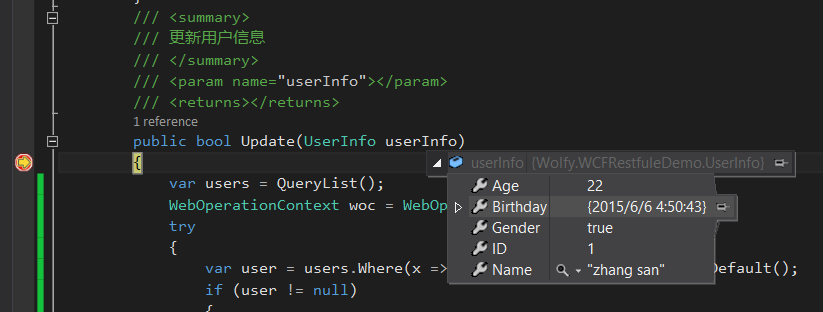
客户端

删除数据:找到id为1的,删除它
            var client = new HttpClient();

            var strPostUrl = "http://localhost:21074/userInfo/api/users/{0}";

            HttpResponseMessage responseMessage = client.Delete(string.Format(strPostUrl,));

            Console.WriteLine(responseMessage.EnsureStatusIsSuccessful().StatusCode);

            Console.Read();
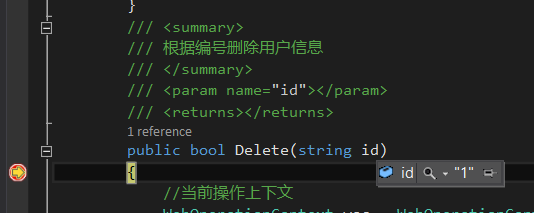
总结
这里将restful的增删改查操作重新修改了下,需要注意的地方是,操作的处理是以Method方法而定,而不是url,post(增加),get(查询),delete(删除),put(更改),通过上面的例子你也会发现,请求的url相同,但是不同的请求谓词(post,get,delete,put)带来的操作并不相同。另外本文也介绍了客户但HttpClient的使用。
参考文章:
http://blog.csdn.net/fangxing80/article/details/6247297
Restful风格wcf调用2——增删改查的更多相关文章
- Restful风格wcf调用4——权限认证
写在前面 在前面的三篇文章,已经介绍了restful风格wcf,如何实现增删改查以及文件的上传下载操作.本篇文章将介绍一下,调用restful的权限认证的内容.在调用的接口,为了安全,总会需要对请求进 ...
- Restful风格wcf调用
文章:Restful风格wcf调用 作者相当于把wcf服务改造成rest风格. Restful风格wcf调用2——增删改查 这篇文章在第一篇的基础上,进行了优化. Restful风格wcf调用3——S ...
- Restful风格wcf调用3——Stream
写在前面 上篇文章介绍了restful接口的增删改查,本篇文章将介绍,如何通过数据流进行文件的上传及下载操作. 系列文章 Restful风格wcf调用 Restful风格wcf调用2——增删改查 一个 ...
- restful 架构风格的curd(增删改查)
restful架构 概念:REST指的是一组架构约束条件和原则,如果一个架构符合REST的约束条件和原则,就称之为RESTful架构. restful不是一个专门的技术,他是一个规范.规范就是写写代码 ...
- Yii框架实现restful 接口调用,增删改查
创建模块modules; 在main.php中配置文件:(1) (2)控制器层: namespace frontend\modules\v1\controllers;use frontend\modu ...
- REST风格的增删改查(1)
一.RESTFUL风格的CRUD(增删改查)案例 1.需求: ①显示所有员工信息:URI:emps,请求方式:GET ②添加员工所有信息:显示添加页面:URI:emp,请求方式:GET, 添加员工信息 ...
- SpringMVC4+MyBatis3+SQLServer 2014 整合(包括增删改查分页)
前言 说起整合自然离开ssm,我本身并不太喜欢ORM,尤其是MyBatis,把SQL语句写在xml里,尤其是大SQL,可读性不高,出错也不容易排查. 开发环境 idea2016.SpringMVC4. ...
- nodejs+express+mysql实现restful风格的增删改查示例
首先,放上项目github地址:https://github.com/codethereforam/express-mysql-demo 一.前言 之前学的java,一直用的ssm框架写后台.前段时间 ...
- 进入全屏 nodejs+express+mysql实现restful风格的增删改查示例
首先,放上项目github地址:https://github.com/codethereforam/express-mysql-demo 一.前言 之前学的java,一直用的ssm框架写后台.前段时间 ...
随机推荐
- IIS7Appcmd 命令详解
IIS7 Appcmd 命令详解 废话不说!虽然有配置界面管理器!但是做安装包的时候命令创建是必不可少的!最近使用NSIS制作安装包仔细研究了一下Appcmd的命令,可谓是功能齐全. 上网查了些资料, ...
- column count of mysql.proc is wrong. expected 20,found 16. the table is probably corruptd.
1558 1547 column count of mysql.proc is wrong. expected 20,found 16. the table is probably corruptd. ...
- VS2013编译64位OpenSSL(附32位)
安装ActivePerl 这个没什么好说的,直接运行msi即可. 编译OpenSSL 1.使用Visual Studio Tool中的“VS2013 x64 本机工具命令提示”来打开控制台:也可以打开 ...
- TF54000: 由于服务器时钟设置可能不正确,无法更新数据解决方案(补充)
此问题出现的原因: 服务器时间比本地时间大.由于TFS源代码的Source Control会根据签入时间做判断.如果后续签入的时间小于变更集的最新版本的时间,就会报错误“TF54000”,并拒绝签入. ...
- Android网络请求
HTTP请求与响应 HTTP请求包结构 例: POST /meme.php/home/user/login HTTP/1.1 Host: 114.215.86.90 Cache-Control: no ...
- [转][C#]压缩解压缩类 GZipStream
本文来自:https://msdn.microsoft.com/zh-cn/library/system.io.compression.gzipstream(v=vs.100).aspx using ...
- Hive文件的存储格式
hive文件存储格式包括以下几类: TEXTFILE SEQUENCEFILE RCFILE 自定义格式 其中TEXTFILE为默认格式,建表时不指定默认为这个格式,导入数据时会直接把数据文件拷贝到h ...
- Windows 上用IntelliJ Idea调试百度大数据分析框架Apache Doris FE
A. 环境准备 1. 安装jdk1.8+, Intelij IDEA 2. linux上编译好fe前端代码,主要目的是获取自动生成的代码,加入到前段工程里面去用于在idea中编译fe工程.具体编译请参 ...
- blktrace btt结果分析
对于btt的结果分析十分的困难,我和同事花了很多的时间在网上查找btt输出的每一项参数的意义,试图更好的分析bio的统计信息,但网上文章一大抄,翻来覆去就是那几篇文章. 本文中内容参考了以下网址: 1 ...
- Eclipse去掉对jQuery的错误提示
1.I have found that I can leave the JavaScript Validator enable and ignore specific files by adding ...