
pyqt5 菜单,工具栏,线程,matplotlib
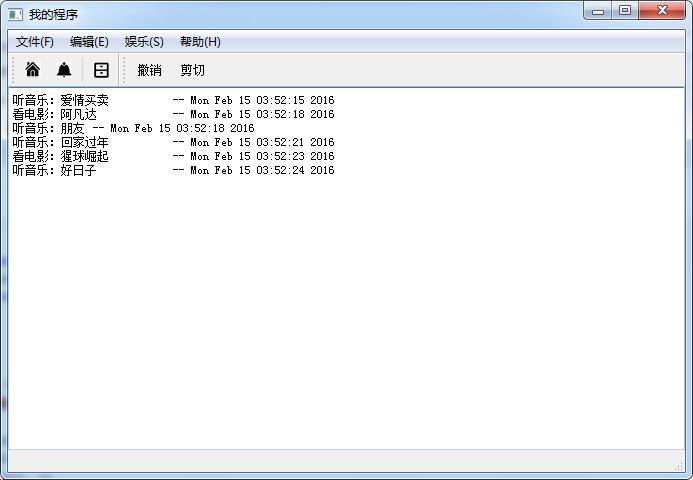
import sys

from PyQt5.QtGui import QIcon

from PyQt5.QtWidgets import QMainWindow, QMenuBar, QToolBar, QTextEdit, QAction, QApplication, qApp, QMessageBox

from PyQt5.QtCore import Qt

import threading

import time

songs = ['爱情买卖','朋友','回家过年','好日子']

films = ['阿凡达','猩球崛起']

class MyWindow(QMainWindow):

    def __init__(self):

        super().__init__()

        self.resize(677, 442)

        self.setWindowTitle("我的程序")

        self.createUI()

        self.createAction()

        self.createStatusbar()

        self.createMenu()

        self.createToolbar()

    def createUI(self):

        self.textedit = QTextEdit()

        self.setCentralWidget(self.textedit)

    # 动作

    def createAction(self):

        self.exit_action = QAction(QIcon("ico_new.jpg"), "退出", self, triggered=qApp.quit)

        self.exit_action.setStatusTip("退出程序")

        self.exit_action.setShortcut("Ctrl+Q")

        self.exit_action.triggered.connect(qApp.quit)

    # 状态栏

    def createStatusbar(self):

        self.statusBar()

    # 菜单栏

    def createMenu(self):

        #menubar = QMenuBar(self)

        menubar = self.menuBar()

        menu = menubar.addMenu("文件(F)")

        menu.addAction(QAction(QIcon("ico_new_16_16.jpg"), "新建", self, triggered=qApp.quit)) # 带图标,文字

        menu.addAction(QAction(QIcon("ico_open_16_16.jpg"), "打开", self, triggered=qApp.quit))

        menu.addAction(QAction(QIcon("ico_save_16_16.jpg"), "保存", self, triggered=qApp.quit))

        menu.addSeparator()

        menu.addAction(QAction(QIcon("ico_close_16_16.jpg"), "关闭", self, triggered=lambda :QMessageBox.about(self, '关闭','关闭。。。')))

        menu = menubar.addMenu("编辑(E)")

        menu.addAction(QAction("撤销", self, triggered=qApp.quit)) # 不带图标

        menu.addAction(QAction("剪切", self, triggered=qApp.quit))

        menu.addAction(QAction("复制", self, triggered=qApp.quit))

        menu.addAction(QAction("粘贴", self, triggered=qApp.quit))

        menu = menubar.addMenu("娱乐(S)")

        menu.addAction(QAction("音乐", self, triggered=lambda :self.thread_it(self.music, songs))) # 线程

        menu.addAction(QAction("电影", self, triggered=lambda :self.thread_it(self.movie, films)))

        menu = menubar.addMenu("帮助(H)")

        menu.addAction('&New', lambda :QMessageBox.about(self, 'New','新建。。。'), Qt.CTRL + Qt.Key_N) # 注意快捷键

        menu.addAction('关于', lambda :QMessageBox.about(self, '关于','关于。。。'), Qt.CTRL + Qt.Key_Q)

    # 工具栏

    def createToolbar(self):

        toolbar = self.addToolBar('文件')

        toolbar.addAction(QAction(QIcon("ico_new_16_16.jpg"), "新建", self, triggered=qApp.quit)) # 带图标,文字

        toolbar.addAction(QAction(QIcon("ico_open_16_16.jpg"), "打开", self, triggered=qApp.quit))

        toolbar.addSeparator()

        toolbar.addAction(QAction(QIcon("ico_save_16_16.jpg"), "打开", self, triggered=qApp.quit))

        toolbar = self.addToolBar("编辑")

        toolbar.addAction(QAction("撤销", self, triggered=qApp.quit)) # 不带图标

        toolbar.addAction(QAction("剪切", self, triggered=qApp.quit))

    # 逻辑:听音乐

    def music(self, songs):

        for x in songs:

            self.textedit.append("听音乐:%s \t-- %s" %(x, time.ctime()))

            time.sleep(3)

    # 逻辑:看电影

    def movie(self, films):

        for x in films:

            self.textedit.append("看电影:%s \t-- %s" %(x, time.ctime()))

            time.sleep(5)

    # 打包进线程(耗时的操作)

    @staticmethod

    def thread_it(func, *args):

        t = threading.Thread(target=func, args=args)

        t.setDaemon(True)   # 守护--就算主界面关闭,线程也会留守后台运行(不对!)

        t.start()           # 启动

        # t.join()          # 阻塞--会卡死界面!

app = QApplication(sys.argv)

win = MyWindow()

win.show()

sys.exit(app.exec_())
pyqt5 菜单,工具栏,线程,matplotlib的更多相关文章
- 基于 SailingEase WinForm Framework 开发客户端程序(3:实现菜单/工具栏按钮的解耦及状态控制)
本系列文章将详细阐述客户端应用程序的设计理念,实现方法. 本系列文章以 SailingEase WinForm Framework 为基础进行设计并实现,但其中的设计理念及方法,亦适用于任何类型的客 ...
- 菜单工具栏wxPython菜单与工具栏基础示例
这两天一直在学习菜单工具栏之类的问题,上午正好有机会和大家讨论一下. 1.基本的api介绍 Package wx :: Class Menu Type Menu Method Summary Menu ...
- Python+PyQT5的子线程更新UI界面的实例《新手必学》
今天小编就为大家分享一篇Python+PyQT5的子线程更新UI界面的实例,具有很好的参考价值,希望对大家有所帮助.一起跟随小编过来看看吧子线程里是不能更新UI界面的,在移动端方面.Android的U ...
- pyqt5 -——菜单和工具栏
一. 状态栏 # -*- coding: utf-8 -*-# @Time : 2018/12/22 12:37# @Author : Bo# @Email : mat_wu@163.com# @Fi ...
- PyQt5 QSerialPort子线程操作
环境: python3.6 pyqt5 只是简单的一个思路,请忽略脆弱的异常防护: # -*- coding: utf-8 -*- import sys from PyQt5.QtWidgets im ...
- WindowsForm菜单工具栏--2016年12月6日
ContextMenuStrip 添加控件后可在其他空间属性中进行绑定 MenuStrip 设置热键:在编辑的时候输入(&F) 设置快捷键:选中菜单项--右键属性--S ...
- 菜单 & 工具栏 & 状态栏
MFC中ON_UPDATE_COMMAND_UI和ON_COMMAND消息区别 CCmdUI 加载状态栏 加载工具栏
- pyqt5 重启相同线程错误:QThread: Destroyed while thread is still running
背景: 把一个基于QObject的类的槽运行在另一个线程,我们可以用moveToThread的方法. 1 新建一个子线程类,编写槽函数和信号,MyClass *m_MyClass=new MyClas ...
- PyQt 5菜单和工具栏
QMainWindow类提供主要应用程序的窗口,有添加状态栏.工具栏.菜单栏等功能 状态栏 self.statusBar().showMessage('Ready') # 创建一个状态栏 # 状态栏显 ...
随机推荐
- Java虚拟机14:类加载器
类与类加载器 虚拟机设计团队把类加载阶段张的"通过一个类的全限定名来获取此类的二进制字节流"这个动作放到Java虚拟机外部去实现,以便让应用程序自己决定如何去获取所需要的类.实现这 ...
- Python的getattr(),setattr(),delattr(),hasattr()及类内建__getattr__应用
@Python的getattr(),setattr(),delattr(),hasattr() 先转一篇博文,参考.最后再给出一个例子 getattr()函数是Python自省的核心函数,具体使用大体 ...
- Redis命令、数据结构场景、配置文件总结
本文大纲 一.常用数据类型简介二.redis操作命令三.redis配置文件详解四.redis数据类型使用场景 一.常用数据类型简介 redis常用五种数据类型:string,hash,list,set ...
- 死磕salt系列-salt 常用modules
saltstack 常用模块介绍 file模块 被控主机文件常见操作,包括文件读写.权限.查找.校验等 salt '*' file.get_sum /etc/resolv.conf md5 salt ...
- 转载:monkeyrunner之eclipse中运行monkeyrunner脚本之环境搭建(四)
转载自:lynnLi 的monkeyrunner之eclipse中运行monkeyrunner脚本之环境搭建(四) monkeyrunner脚本使用Python语法编写,但它实际上是通过Jython来 ...
- 修改Xcode工程名称
概述 有的时候需要在现有的项目上面开发一个新的项目,如果新建工程的话,就比较麻烦了,所以一般是直接现有的工程上面直接修改名字步骤如下: 1.修改工程名字 在这里修改完之后,会弹出一个对话框,点击Ren ...
- ubuntu 14.04 将窗体button移到右边
刚刚安装了Ubuntu 14.04,想改动窗体button的位置.但依照曾经的办法发现不行了,在gconftool-->apps中找不到metacity. 多方查找后找到解决方式,例如以下 Ub ...
- Vcenter虚拟化三部曲----VMWare ESXi 5.5安装及配置
VMWare ESXi 5.5安装大概过程如下:制作虚拟化ESXi系统的USB启动盘,安装ESXi系统到USB,用USB启动ESXi系统.比较难理解,下面图解过程. 下载UNetbootin (下 ...
- @property & @synthesize & @dynamic 及相关属性作用探究
@property : iOS6 引入关键词. @property name; 指示编译器自动生成 name 的 setter 和 getter 方法 : - (NSString *)name; - ...
- float(浮动)的属性和使用方法
1float浮动的属性值 left:向左浮动 right:向右浮动 2.当父元素未浮动,子元素浮动时,就会造成浮动塌陷 实例: 父元素: #mainDiv{ border: 5px solid red ...