
Salesforce Lightning开发学习(三)Component表单初解
初步了解了Lightning的组件开发流程后,我们来认识下lightning的表单
点击对象管理器,选择对象:电影(Movie__c),创建字段
| 标签 | API | 数据类型 |
| 票价 | Number__c | 数字(16,2) |
| 是否上映 | Flag__c | 复选框 |
关于对象电影的相关内容及相关组件请参考之前的博客内容:http://www.cnblogs.com/luqinghua/p/8979893.html
1.创建组件:MyTest_CreateMovie
 <aura:component Controller="MyTestMovieController">

     <aura:attribute name="movieList" type="Movie__c[]"/>

     <aura:attribute name="movie" type="Movie__c"

                     default="{'sobjectType':'Movie__c',

                              'Name':'',

                              'Director__c':'',

                              'ToStar__c':'',

                              'ShowTime__c':'',

                              'Number__c':0,

                              'Flag__c':false}"/>

     <!-- 表头 -->

      <lightning:layout class="slds-page-header slds-page-header--object-home">

         <lightning:layoutItem >

             <lightning:icon iconName="standard:scan_card" alternativeText="新电影"/>

         </lightning:layoutItem>

         <lightning:layoutItem padding="horizontal-small">

             <div class="page-section page-header">

                 <h1 class="slds-text-heading--label">电影</h1>

                 <h1 class="slds-text-heading--medium">新电影</h1>

             </div>

         </lightning:layoutItem>

     </lightning:layout>

     <!-- 电影字段列表    -->

     <lightning:layout >

         <lightning:layoutItem padding="around-small" size="6">

             <div aria-labelledby="newMovieForm">

                 <fieldset class="slds-box slds-theme--default slds-container--small">

                     <legend id="newMovieForm" class="slds-text-heading--small slds-p-vertical--medium">

                         新建电影

                     </legend>

                     <form class="slds-form--stacked">

                         <lightning:input aura:id="MovieForm" label="名称"

                                          name="movieName"

                                          value="{!v.movie.Name}"

                                          required="true"/>

                         <lightning:input aura:id="MovieForm" label="导演"

                                          name="movieDirector"

                                          value="{!v.movie.Director__c}"

                                          placeholder="请输入导演名称"/>

                          <lightning:input aura:id="MovieForm" label="主演"

                                          name="movieToStar"

                                          value="{!v.movie.ToStar__c}"

                                          placeholder="请输入主演名称"/>

                         <lightning:input type="number" aura:id="MovieForm" label="票价"

                                          name="movieNumber"

                                          formatter="currency"

                                          min="1"

                                          step="0.5"

                                          value="{!v.movie.Number__c}"

                                          messageWhenRangeUnderflow="票价最低1元"/>

                         <lightning:input type="date" aura:id="MovieForm" label="上映时间"

                                          name="movieShowTime"

                                          value="{!v.movie.ShowTime__c}"/>

                         <lightning:input type="checkbox" aura:id="MovieForm" label="是否上映"

                                          name="movieFlag"

                                          checked="{!v.movie.Flag__c}"/>

                         <lightning:button label="加入电影列表"

                                           class="slds-m-top--medium"

                                           variant="brand"

                                           onclick="{!c.AddToList}"/>

                     </form>

                 </fieldset>

             </div>

         </lightning:layoutItem>

     </lightning:layout>

 </aura:component>
将该组件放在 My_Test.app中并预览
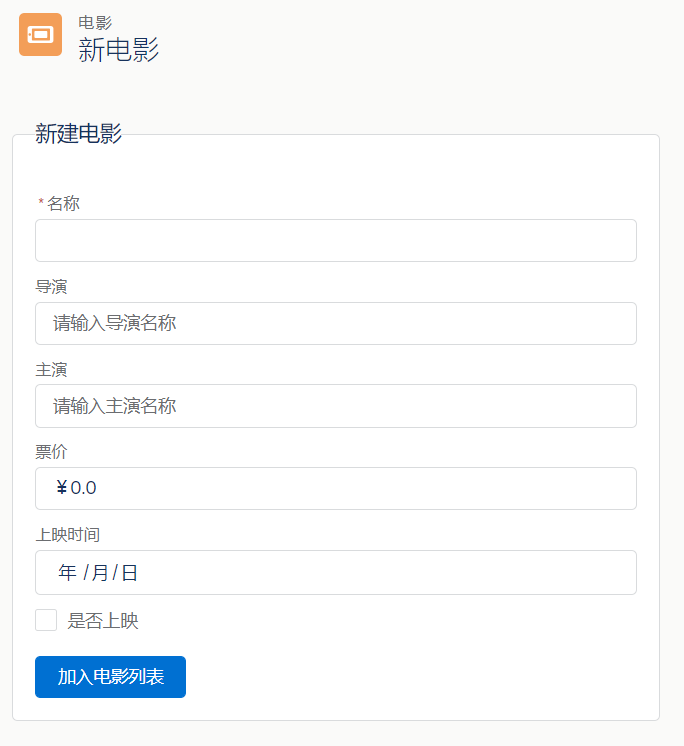
可以看到如上图所示的一个表单,包含了常用的复选框,日期,数字,文本等类型,然后是完成后面的创建方法
2.补充MyTest_CreateMovieController.js
 ({

     AddToList : function(component, event, helper) {

         //系统提供的校验错误信息的标准方法可校验必填项以及最小值等等

         var validExpense = component.find('MovieForm').reduce(function (validSoFar, inputCmp) {

             // 显示填写错误的字段消息

             inputCmp.showHelpMessageIfInvalid();

             return validSoFar && inputCmp.get('v.validity').valid;

         }, true);

          // 通过字段校验后继续创建的逻辑

         if(validExpense){

             // 创建一条记录

             var movie = component.get("v.movie");

             console.log("传入的电影信息: " + JSON.stringify(movie));

             helper.createMovie(component, movie);

             //将表单重置

              component.set("v.movie",{'sobjectType':'Movie__c',

                              'Name':'',

                              'Director__c':'',

                              'ToStar__c':'',

                              'ShowTime__c':'',

                              'Number__c':0,

                              'Flag__c':false});

         }

     }

 })
在MyTest_CreateMovieController.js中完成对表单数据的基本校验,比如表单的必填项,以及设置的票价不小于1元等等
3.补充MyTest_CreateMovieHelper.js
({

    createMovie : function(component, movie) {

        //调用Apex类中的方法

        var action = component.get("c.saveMovie");

        //传递参数

        action.setParams({

            "movie": movie

        });

        //方法调用

        action.setCallback(this, function(response){

            //方法调用状态

            var state = response.getState();

            if (state === "SUCCESS") {

                var movieList = component.get("v.movieList");

                movieList.push(response.getReturnValue());

                component.set("v.movieList", movie);

            }

        });

        var movie = component.get("v.movie");

        $A.enqueueAction(action);

    }

})
MyTest_CreateMovieHelper.js中主要是与后台APEX控制类中的方法进行交互,将数据存入数据库中保存起来
4.更新MyTestMovieController类,在其中加入saveMovie方法
 /*********

      *  Author:ricardo

      *  Time:2018-03-21

      *  Function:MyTest_Movie 后台控制类

      *  Test:

      */

 public class MyTestMovieController{

     //初始化

     @AuraEnabled

     public static List<Movie__c> GetAll(){

         List<Movie__c> movieList = new List<Movie__c>();

         movieList = [select ShowTime__c,ToStar__c,Theme__c,Director__c,Name from Movie__c limit 50];

         return movieList;

     }

     //创建记录

     @AuraEnabled

     public static Movie__c saveMovie(Movie__c movie) {

         // Perform isUpdatable() checking first, then

         upsert movie;

         return movie;

     }

 }
综上所示,一个简单的创建电影条目的表单就完成了,打开组件MyTest_Movie就能看到我们新创建的电影记录位列其中,如有遗漏欢迎指正,有问题可在评论区留言
Salesforce Lightning开发学习(三)Component表单初解的更多相关文章
- Salesforce Lightning开发学习(一)Hello World开发实践
一:什么是Lightning Component framework Lightning Component framework 简称Lightning,是Salesforce封装的一个前端框架,开发 ...
- Salesforce Lightning开发学习(四)重写新建/更新按钮
重写新建/更新按钮的原因是因为项目需要用户在新建数据时从接口对数据进行校验,保证数据的有效性,同时获取接口返回的部分数据完成信息填充,而Sales force的trigger仅支持@future方法异 ...
- Flask学习 三 web表单
web表单 pip install flask-wtf 实现csrf保护 app.config['SECRET_KEY']='hard to guess string' # 可以用来存储框架,扩展,程 ...
- Web jsp开发学习——Servlet提交表单时用法
实现提交表单以后判断输入的信息是否符合条件 若符合条件 先新建servlet Sevlet的两种声明方式,二选一即可 再到web.xml里注册 register.jsp就是表单的界 ...
- Salesforce Lightning开发学习(二)Component组件开发实践
lightning的组件区分标准组件.自定义组件和AppExchange组件.标准组件由SF提供,自定义组件由developer自行开发,AppExchange组件由合作伙伴建立.下面我们写一个简单的 ...
- vue 学习三 v-model 表单绑定输入 以及修饰符的用处
v-model 指定使用过vue的同学都应该是很熟悉的了,这里就不多介绍,本章主要就是记录一些v-model非常实用的修饰符和对于v-model在html文本框,多行文本框,选择框,单选框,复选框上对 ...
- Java开发学习(三十六)----SpringBoot三种配置文件解析
一. 配置文件格式 我们现在启动服务器默认的端口号是 8080,访问路径可以书写为 http://localhost:8080/books/1 在线上环境我们还是希望将端口号改为 80,这样在访问的时 ...
- Bootstrap学习笔记(二) 表单
在Bootstrap学习笔记(一) 排版的基础上继续学习Bootstrap的表单,编辑器及head内代码不变. 3-1 基础表单 单中常见的元素主要包括:文本输入框.下拉选择框.单选按钮.复选按钮.文 ...
- SpringMVC学习系列 之 表单标签
http://www.cnblogs.com/liukemng/p/3754211.html 本篇我们来学习Spring MVC表单标签的使用,借助于Spring MVC提供的表单标签可以让我们在视图 ...
随机推荐
- 【计算机组成原理】中央处理器CPU
一.CPU的功能和基本结构 1.功能 当用计算机解决某个问题是,我们首先必须为他编写程序,程序是一个指令序列,这个序列明确告诉计算机应该执行什么操作,在什么地方找到用来操作的数据,一旦把程序装入内存器 ...
- 【spring boot】spring boot 基于redis pipeline 管道,批量操作redis命令
spring boot 2.x 使用RedisTemplate 操作 =================================== 1.pom.xml <!--spring2.0集成r ...
- 排序算法Java代码实现(五)—— 快速排序
本篇内容: 快速排序 快速排序 算法思想: 通过一趟排序将要排序的数据分割成独立的两部分, 其中一部分的所有数据都比另外一部分的所有数据都要小, 然后再按此方法对这两部分数据分别进行快速排序, 整个排 ...
- [個人紀錄] regular 搜集
判斷有理數 ^(0|[1-9]([0-9]{1,5})?)((\.(([0-9]{1,5})?[1-9])))?$
- 史上最全的音视频SDK包分享给大家
史上最全的音视频SDK包分享给大家 概述一下SDK功能: 项目 详情视频通信 支持多种分辨率的视频通信语音通信 提供语音通信,可支持高清宽带语音动态创建房间 可以根据需要,随时创建房间H5 支持 ...
- 简单的sql语句汇总(sqlserver)
1.修改字段的默认值 alter table 表名 add default 默认值 for 字段名称 例子: for Age; alter table 表名 add constraint DF_TAB ...
- 彻底搞懂B树、B+树、B*树、R 树
出处:http://blog.csdn.net/v_JULY_v . 第一节.B树.B+树.B*树1.前言: 动态查找树主要有:二叉查找树(Binary Search Tree),平衡二叉查找树(Ba ...
- 【USACO题库】1.3.4 Prime Cryptarithm牛式
好久没有发题解了,今天发一个很久很久之前写过得题吧 题目其实莫名的难 但是理解后,原来就是一只纸老虎 题目加工中~~~~(缩短题目) 加工完成:已知数字1-9组成集合的一个子集,求满足题意乘法步骤的情 ...
- mybatis中集成sharing-jdbc采坑
1. mybatis中集成sharing-jdbc采坑 1.1. 错误信息 Caused by: org.apache.ibatis.binding.BindingException: Invalid ...
- 来自数组原型 Array.prototype 的遍历函数
1. Array.prototype.forEach() forEach() 是一个专为遍历数组而生的方法,它没有返回值,也不会改变原数组,只是简单粗暴的将数组遍历一次 参数: callback() ...