
第十六节:Asp.Net Core中Session的使用、扩展、进程外Session
一. 简介
关于Session的原理可参照Asp.Net版本Session的文章,去查阅。
1. 普通用法
(1).通过Nuget引入【Microsoft.AspNetCore.Http】程序集,Core Mvc中已经默认引入了,在哪使用using一下即可。
(2).注入Session相关的服务。
A:在ConfigureService注册基于服务器内存的Session, services.AddDistributedMemoryCache(); services.AddSession(); 在Configure中进行启用Session,app.UseSession();
注:一定要在mvc前面进行注入,进程外Session的注入后面介绍。
B:如果项目中使用了CookiePolicyOptions,一定要将里面true改为false,如: options.CheckConsentNeeded = context => false; 或者配置Session的性质,options.Cookie.IsEssential = true;(表示cookie是必须的),否则chrome中拿不到Session值
解释:这是个GDRP条例,让用户自己选择使用用cookie,详见 http://www.zhibin.org/archives/667 或 https://www.cnblogs.com/GuZhenYin/p/9154447.html
C:在控制器中通过 HttpContext.Session 来向Session中读写各种值。
注册和启用相关的代码:
  public void ConfigureServices(IServiceCollection services)

  {

             services.Configure<CookiePolicyOptions>(options =>

             {

                 // This lambda determines whether user consent for non-essential cookies is needed for a given request.

                 options.CheckConsentNeeded = context => false;       //改为false或者直接注释掉,上面的Session才能正常使用

                 options.MinimumSameSitePolicy = SameSiteMode.None;

             });

             //注册Session服务

             //基于内存的Session

             services.AddDistributedMemoryCache();

             //默认过期时间为20分钟,每次访问都会重置

             services.AddSession();

             services.AddMvc().SetCompatibilityVersion(CompatibilityVersion.Version_2_2);

   }

   public void Configure(IApplicationBuilder app, IHostingEnvironment env)

   {

             if (env.IsDevelopment())

             {

                 app.UseDeveloperExceptionPage();

             }

             else

             {

                 app.UseExceptionHandler("/Home/Error");

             }

             app.UseStaticFiles();

             app.UseCookiePolicy();

             //启用Session管道

             app.UseSession();

             app.UseMvc(routes =>

             {

                 routes.MapRoute(

                     name: "default",

                     template: "{controller=CoreSession}/{action=Index6}/{id?}");

             });

   }
测试代码:
       public IActionResult Index()

         {

             string userName = HttpContext.Session.GetString("userName");

             if (string.IsNullOrEmpty(userName))

             {

                 userName = "ypf";

                 HttpContext.Session.SetString("userName", userName);

             }

             var t1 = HttpContext.Session.GetString("userName");

             ViewBag.userName = userName;

             return View();

         }

         public IActionResult Index2()

         {

             string userName = HttpContext.Session.GetString("userName");

             ViewBag.userName = userName;

             return View();

         }
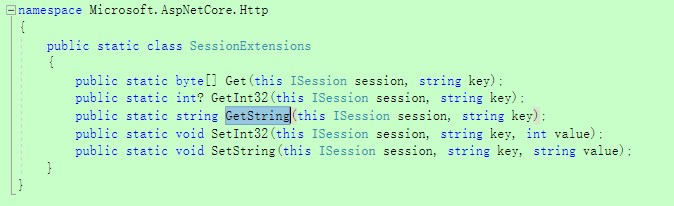
补充Session默认提供的方法:

2. 全局注册使用
(1).背景:通常便于管理,我们将Session进行全局统一注入,方便管理。
(2).步骤:
A: 在普通用法的前提下,在ConfigureService中进行统一对象的注册, services.AddSingleton<IHttpContextAccessor, HttpContextAccessor>();
B:在控制器利用构造函数进行注入。
C:正常使用即可,案例详见项目的Index3和Index4
代码分享:

  public class CoreSessionController : Controller

     {

         private readonly IHttpContextAccessor httpContextAccessor;

         private ISession MySession => httpContextAccessor.HttpContext.Session;

         public CoreSessionController(IHttpContextAccessor httpContextAccessor)

         {

             this.httpContextAccessor = httpContextAccessor;

         }

         #region 02-测试统一注入的用法

         /// <summary>

         /// 下面是统一注入使用的写法

         /// </summary>

         /// <returns></returns>

         public IActionResult Index3()

         {

             string userName = MySession.GetString("userName");

             if (string.IsNullOrEmpty(userName))

             {

                 userName = "ypf";

                 MySession.SetString("userName", userName);

             }

             var t1 = MySession.GetString("userName");

             ViewBag.userName = userName;

             return View();

         }

         public IActionResult Index4()

         {

             string userName = MySession.GetString("userName");

             ViewBag.userName = userName;

             return View();

         }

         #endregion

     }
二. 高级
1. Session的扩展
(1).背景
我们发现系统默认提供的Session方法,仅能存储byte、string、int类型,很不灵活,我们想能存储任何对象,这个时候就需要我们自行扩展。 对SessionExtensions类进行扩展
(2).利用Newtonsoft.Json进行扩展
A. 扩展代码详见SessionExtensions中的Set和Get方法
B. 案例详见Index5
(3).利用protobuf-net进行扩展
A. 通过Nuget安装程序集【protobuf-net】,这是谷歌的一个程序集,序列化和反序列效率更高
B. 扩展代码详见SessionExtensions中的Set2和Get2方法, 如果写入的是个类,类名上要加 [ProtoContract],属性上要加 [ProtoMember(1)] [ProtoMember(2)]等等, 如:UserInfor2
C. 案例详见Index6
扩展代码:
   public static class SessionExtensions

     {

         #region 01-利用Newtonsoft.Json进行扩展

         public static void Set<T>(this ISession session, string key, T value)

         {

             session.SetString(key, JsonConvert.SerializeObject(value));

         }

         public static T Get<T>(this ISession session, string key)

         {

             var value = session.GetString(key);

             return value == null ? default(T) : JsonConvert.DeserializeObject<T>(value);

         }

         #endregion

         #region 02-利用protobuf-net进行扩展

         public static void Set2<T>(this ISession session, string key, T value)

         {

             using (MemoryStream stream = new MemoryStream())

             {

                 Serializer.Serialize(stream, value);

                 byte[] byteArrary = stream.ToArray();

                 session.Set(key, byteArrary);

             }

         }

         public static T Get2<T>(this ISession session, string key)

         {

             byte[] byteArray = session.Get(key);

             if (byteArray == null)

             {

                 return default(T);

             }

             else

             {

                 using (MemoryStream stream = new MemoryStream(byteArray))

                 {

                     return Serializer.Deserialize<T>(stream);

                 }

             }

         }

         #endregion

     }
类代码:
  public class UserInfor1

     {

         public string id { get; set; }

         public string userName { get; set; }

     }

     [ProtoContract]

     public class UserInfor2

     {

         [ProtoMember()]

         public string id { get; set; }

         [ProtoMember()]

         public string userName { get; set; }

     }
测试代码:
   #region 03-测试Newtonsoft.Json进行扩展

         public IActionResult Index5()

         {

             UserInfor1 user = HttpContext.Session.Get<UserInfor1>("u1");

             if (user == null)

             {

                 user = new UserInfor1();

                 user.id = "";

                 user.userName = "Marren";

                 HttpContext.Session.Set<UserInfor1>("u1", user);

             }

             ViewBag.id = user.id;

             ViewBag.userName = user.userName;

             return View();

         }

         #endregion

         #region 04-测试protobuf-net进行扩展

         public IActionResult Index6()

         {

             UserInfor2 user = HttpContext.Session.Get2<UserInfor2>("u2");

             if (user == null)

             {

                 user = new UserInfor2();

                 user.id = "";

                 user.userName = "Marren";

                 HttpContext.Session.Set2<UserInfor2>("u2", user);

             }

             ViewBag.id = user.id;

             ViewBag.userName = user.userName;

             return View();

         }

         #endregion
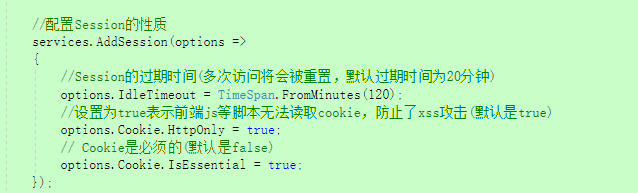
2.Session的性质
(1). Session的过期时间(多次访问将会被重置,默认过期时间为20分钟)
如:options.IdleTimeout = TimeSpan.FromMinutes(120);
(2). 设置为true表示前端js等脚本无法读取cookie,防止了xss攻击(默认是true)
如:options.Cookie.HttpOnly = true;
(3). Cookie是必须的(默认是false),可以覆盖上面的cookie策略
如:options.Cookie.IsEssential = true;
3. 如何在普通类中使用Session对象?
(1).说明
再普通类中如何调用Session,大约有两种思路:以构造函数的注入进去,但是如果这个类不是过滤器,使用的时候就需要实例化,又需要传入对象进去,如CheckLogin类,很麻烦,所以建议用第二种方案,直接吧实例好的Session传入进去,直接使用即可,如CheckLogin2.
(2). 方案一
先统一注入, services.AddSingleton<IHttpContextAccessor, HttpContextAccessor>();,然后再在控制器中进行构造函数注入,但调用的时候还需要传入进去。
PS:过滤器中可以直接context.httpContext.Session来设置
(3). 方案二
直接把实例好的Session传进去
  public class CheckLogin2

     {

         private ISession MySession { get; set; }

         public CheckLogin2(ISession mySession)

         {

             MySession = mySession;

         }

         public bool isLogin()

         {

             string userName = MySession.GetString("userName");

             if (string.IsNullOrEmpty(userName))

             {

                 return false;

             }

             return true;

         }

     }

三. 进程外Session
关于进程外Session的好处、解决了什么痛点问题,可以参考Asp.Net 中的进程外Session,去查阅。 (解决了IIS重启Session丢失的问题,解决了Session空间有限容易被挤爆的问题,但不能解决浏览器重启找不到Session的问题!)
特别说明:基于SQLServer或Redis数据的进程外Session 的数据库方面的配置和前面分布式缓存章节数据库的配置完全相同,去查阅。
1. 基于SQLServer
(1). 安装【Microsoft.Extensions.Caching.SqlServer】程序集,如果是Core MVC程序,自带的Microsoft.AspNetCore.App包里已经涵盖了该程序集,无需重复安装。
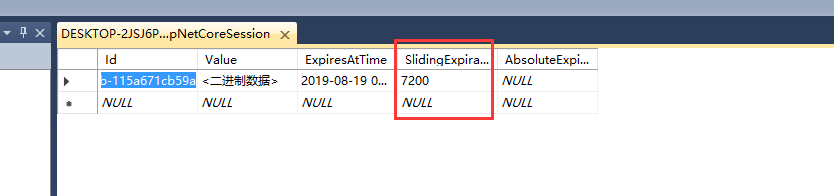
(2). 首先要有个目标数据库中(比如CacheDB数据库),然后以管理员身份cmd运行下面指令,会创建一张名叫“AspNetCoreSession”表,相应的Session信息都存在于这张表中。
【dotnet sql-cache create "Server=localhost;User=sa;Password=123456;Database=CacheDB" dbo AspNetCoreSession】成功后会提示:Table and index were created successfully.

PS:补充表的结构和含义, 分别是键、值、到期时刻(有问题)、滑动过期时间、绝对过期时间。

(3). 将原先基于内存的Session代码( services.AddDistributedMemoryCache(); )替换成基于SqlServer的代码,如下:
             //01-基于内存的Session

             //services.AddDistributedMemoryCache();

             //02-基于SQLServer的Session

             services.AddDistributedSqlServerCache(options =>

             {

                 options.ConnectionString = Configuration["SqlSeverConnectionString"];

                 options.SchemaName = "dbo";

                 options.TableName = "AspNetCoreSession";

             });
 {

   "Logging": {

     "LogLevel": {

       "Default": "Warning"

     }

   },

   "AllowedHosts": "*",

   "SqlSeverConnectionString": "Server=localhost;User=sa;Password=123456;Database=CacheDB"

 }
(4). 其它的配置都不变,正常使用即可。
2. 基于Redis
(1). 安装【Microsoft.Extensions.Caching.StackExchangeRedis】程序集,Core MVC中这个也是不包含的。
(2). 下载Redis程序,打开redis-server.exe,启动Redis。

(3). 将原先基于内存的Session代码 ( services.AddDistributedMemoryCache(); ) 替换成基于Redis的代码,如下:
            //01-基于内存的Session

            //services.AddDistributedMemoryCache();

            //03-基于Redis的Session

            services.AddStackExchangeRedisCache(options =>

            {

                options.Configuration = "localhost";

                options.InstanceName = "SampleInstance";

            });
(4). 其它配置都不变,正常使用即可。
!
- 作 者 : Yaopengfei(姚鹏飞)
- 博客地址 : http://www.cnblogs.com/yaopengfei/
- 声 明1 : 本人才疏学浅,用郭德纲的话说“我是一个小学生”,如有错误,欢迎讨论,请勿谩骂^_^。
- 声 明2 : 原创博客请在转载时保留原文链接或在文章开头加上本人博客地址,否则保留追究法律责任的权利。
第十六节:Asp.Net Core中Session的使用、扩展、进程外Session的更多相关文章
- [EXTJS5学习笔记]第二十六节 在eclipse/myeclipse中使用sencha extjs的插件
本文地址:http://blog.csdn.net/sushengmiyan/article/details/40507383 插件下载: http://download.csdn.net/detai ...
- 第二十九节: Asp.Net Core零散获取总结(不断补充)
1. IWebHostEnvironment获取常用属性 (1).获取项目的根目录 _env.ContentRootPath 等价于 Directory.GetCurrentDirectory() ( ...
- 在ASP.NET Core中用HttpClient(六)——ASP.NET Core中使用HttpClientFactory
到目前为止,我们一直直接使用HttpClient.在每个服务中,我们都创建了一个HttpClient实例和所有必需的配置.这会导致了重复代码.在这篇文章中,我们将学习如何通过使用HttpClient ...
- [08]ASP.NET Core 中 launchsettings.json 启动配置文件
ASP.NET Core launchsettings.json 启动配置文件 本文作者:梁桐铭- 微软最有价值专家(Microsoft MVP) 文章会随着版本进行更新,关注我获取最新版本 本文出自 ...
- 第十五节:Asp.Net Core中的各种过滤器(授权、资源、操作、结果、异常)
一. 简介 1. 说明 提到过滤器,通常是指请求处理管道中特定阶段之前或之后的代码,可以处理:授权.响应缓存(对请求管道进行短路,以便返回缓存的响应). 防盗链.本地化国际化等,过滤器用于横向处理业务 ...
- 第十四节:Asp.Net Core 中的跨域解决方案(Cors、jsonp改造、chrome配置)
一. 整体说明 1. 说在前面的话 早在前面的章节中,就详细介绍了.Net FrameWork版本下MVC和WebApi的跨域解决方案,详见:https://www.cnblogs.com/yaope ...
- ASP.NET MVC深入浅出系列(持续更新) ORM系列之Entity FrameWork详解(持续更新) 第十六节:语法总结(3)(C#6.0和C#7.0新语法) 第三节:深度剖析各类数据结构(Array、List、Queue、Stack)及线程安全问题和yeild关键字 各种通讯连接方式 设计模式篇 第十二节: 总结Quartz.Net几种部署模式(IIS、Exe、服务部署【借
ASP.NET MVC深入浅出系列(持续更新) 一. ASP.NET体系 从事.Net开发以来,最先接触的Web开发框架是Asp.Net WebForm,该框架高度封装,为了隐藏Http的无状态模 ...
- 第三百三十六节,web爬虫讲解2—urllib库中使用xpath表达式—BeautifulSoup基础
第三百三十六节,web爬虫讲解2—urllib库中使用xpath表达式—BeautifulSoup基础 在urllib中,我们一样可以使用xpath表达式进行信息提取,此时,你需要首先安装lxml模块 ...
- centos shell脚本编程2 if 判断 case判断 shell脚本中的循环 for while shell中的函数 break continue test 命令 第三十六节课
centos shell脚本编程2 if 判断 case判断 shell脚本中的循环 for while shell中的函数 break continue test 命令 ...
随机推荐
- Vue.js项目实战-打造线上商城
首先上一下完成后的效果: 首页: 商品详情页: 购物车页(其实还有个订单页,只是和购物车页基本类似,所以就不截图啦): 开始项目: 由于涉及的是前后端分离,所以我们的后台数据就模拟存储于浏览器端(co ...
- Invalid attempt to spread non-iterable instance
问题在于对数据的操作,或数据类型,或数据名称
- 在verilog中使用格雷码
格雷码的一些知识: https://baike.baidu.com/item/%E6%A0%BC%E9%9B%B7%E7%A0%81/6510858?fr=aladdin 绿色框起来的是0--15的格 ...
- android studio学习---Android studio 导入github工程
无论是那种方式,都最好是先把github上的工程项目下载到本地,然后修改文件再import 首先要知道 自己的build.gradle,在project下面的版本号是多少,比如我的: depende ...
- 【数据库】数据库入门(四): SQL查询 - SELETE的进阶使用
集合操作常用的集合操作主要有三种:UNION(联合集).INTERSECT(交叉集).EXCEPT(求差集).以上三种集合的操作都是直接作用在两个或者多个 SQL 查询语句之间,将所有的元组按照特定的 ...
- 找出所有文件最小可resize尺寸
--找出所有文件最小可resize尺寸 SELECT a.file_id, CEIL( ( NVL( hwm,1 ) * blksize ) / 1024 / 1024 ) smallest_M, C ...
- Java实现Redis的消息订阅和发布
1. 首先需要一个消息监听器类 package com.sogou.baike.testimport.testSubscribe; import redis.clients.jedis.JedisP ...
- django 自定义分页,网址存储缓存,CBV
1. 通过切片控制分页 自定义分页: from django.shortcuts import render # Create your views here. from app01.models i ...
- Linux下bash的一些总结
关于"交互式-非交互式"与"登录-非登陆"shell的总结 关于".bash_profile"和".bashrc"区别的 ...
- Caused by: java.lang.ClassNotFoundException: Cannot find class:
Caused by: org.apache.ibatis.builder.BuilderException: Error resolving class. Cause: org.apache.ibat ...