
CSS伪对象选择符整理
1. E::selection
设置对象被选择时的样式。
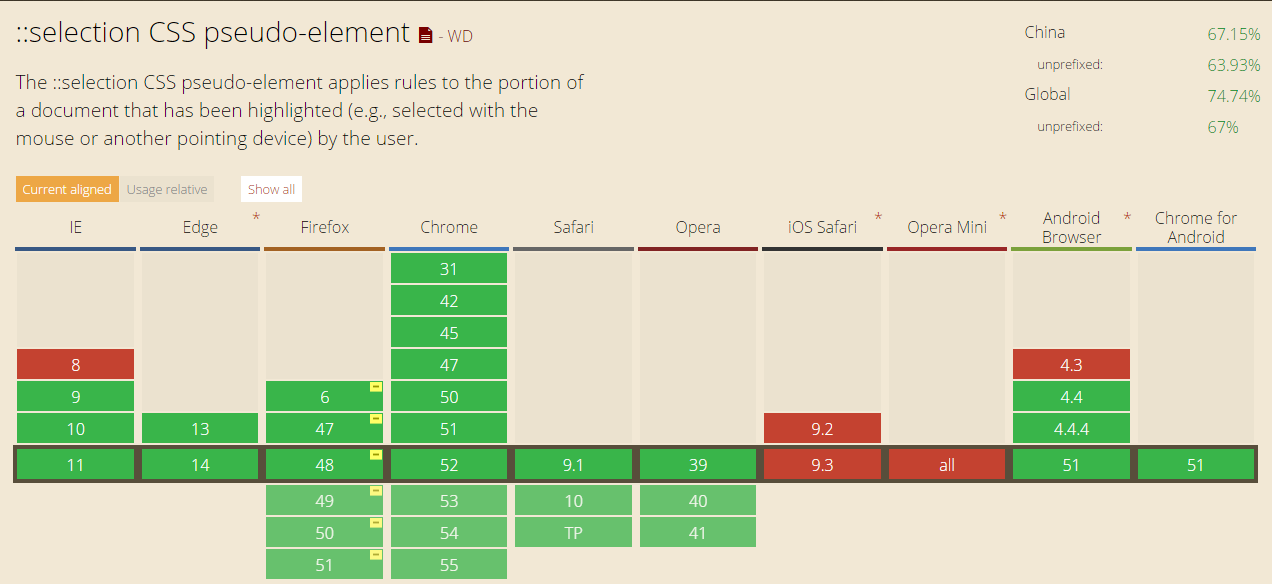
需要注意的是,::selection只能定义被选择时的background-color,color及text-shadow(IE11尚不支持定义该属性)。
兼容性:
<div class="_selection">

        <p>1. Selecting master branch will publish your site from the master branch. This is useful for repositories dedicated to website content.</p>

        <p>2. Selecting master branch /docs folder will publish from the /docs folder of your master branch. </p>

        <p>3. This lets you maintain documentation and code together on one branch, and open source maintainers can accept contributions for both in a single pull request.</p>

    </div>
._selection p::selection{

    background: #eb4960;

    color: #ffffff;

}
预览:

2. E::placeholder
设置对象文字占位符的样式
::placeholder 伪元素用于控制表单输入框占位符的外观,它允许开发者/设计师改变文字占位符的样式,默认的文字占位符为浅灰色。
当表单背景色为类似的颜色时它可能效果并不是很明显,那么就可以使用这个伪元素来改变文字占位符的颜色。
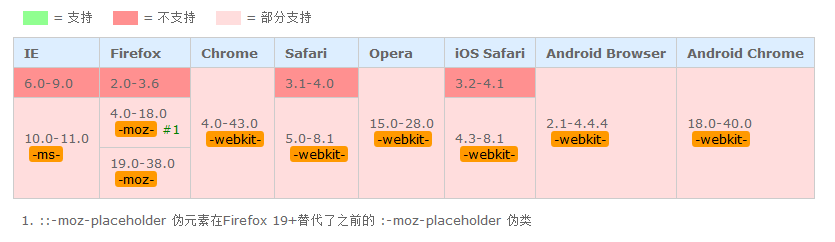
需要注意的是,除了Firefox是 ::[prefix]placeholder,其他浏览器都是使用 ::[prefix]input-placeholder
Firefox支持该伪元素使用text-overflow属性来处理溢出问题。
兼容性:
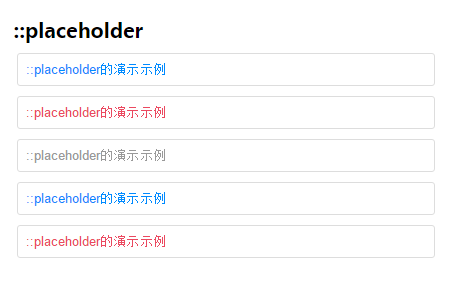
代码示例
<div class="_placeholder">

        <h1>::placeholder</h1>

        <input type="text" placeholder="::placeholder的演示示例"/>

        <input type="text" placeholder="::placeholder的演示示例"/>

        <input type="text" placeholder="::placeholder的演示示例"/>

        <input type="text" placeholder="::placeholder的演示示例"/>

        <input type="text" placeholder="::placeholder的演示示例"/>

    </div>
._placeholder input {

    width: 400px;

    margin-bottom: 10px;

}

._placeholder input:nth-child(3n)::-webkit-input-placeholder {

    color: #eb4960;

}

._placeholder input:nth-child(3n):-ms-input-placeholder { /* IE10+ */

    color: #eb4960;

}

._placeholder input:nth-child(3n):-moz-placeholder{  /* Firefox4-18 */

    color: #eb4960;

}

._placeholder input:nth-child(3n)::-moz-placeholder{  /* Firefox19+*/

    color: #eb4960;

}

._placeholder input:nth-child(3n+1)::-webkit-input-placeholder {

    color: #999999;

}

._placeholder input:nth-child(3n+1):-ms-input-placeholder { /* IE10+ */

    color: #999999;

}

._placeholder input:nth-child(3n+1):-moz-placeholder{  /* Firefox4-18 */

    color: #999999;

}

._placeholder input:nth-child(3n+1)::-moz-placeholder{  /* Firefox19+*/

    color: #999999;

}

._placeholder input:nth-child(3n+2)::-webkit-input-placeholder {

    color:#008aff;

}

._placeholder input:nth-child(3n+2):-ms-input-placeholder { /* IE10+ */

    color:#008aff;

}

._placeholder input:nth-child(3n+2):-moz-placeholder{  /* Firefox4-18 */

    color:#008aff;

}

._placeholder input:nth-child(3n+2)::-moz-placeholder{  /* Firefox19+*/

    color:#008aff;

}
效果:
CSS伪对象选择符整理的更多相关文章
- #8.10.16总结# 属性选择符 伪对象选择符 CSS的常用样式
属性选择符 E[att] E[att="val"] E[att~="val"] E[att^="val"] E[att$="val ...
- CSS Pseudo-Element Selectors伪对象选择符
一: CSS3将伪对象选择符(Pseudo-Element Selectors)前面的单个冒号(:)修改为双冒号(::)用以区别伪类选择符(Pseudo-Classes Selectors),但以前的 ...
- css伪类选择符
1):link/:visited/:hover/:active (爱恨原则 love/hate)2):first-child/:last-child/:only-child/:nth-child(n) ...
- CSS(二)选择符
2019-04-11 22:14:23 1.类型选择符(标签选择符) html中所有的标签都可以直接对元素选择 p em i a html body..... 特点:对页面中所有当前类型的元 ...
- CSS3初学篇章_2(伪类选择符)
id与class选择符 id与class选择符都是自定义标签名字的选择符,但id是唯一的,class却可重复使用. id选择符以"#"定义 class选择符以".&quo ...
- CSS那些事儿-阅读随笔1(CSS简介与选择符)
最近开始详细钻研CSS有关的知识,参考资料是<CSS那些事儿>.将把在此过程中的收获进行记录,方便以后的学习. 一.CSS简介 1.什么是CSS CSS全称为Cascading Style ...
- CSS知识点:选择符
一.选择符的种类 1)通配选择符 它用来给页面所有的元素设置样式 *{margin:0;padding:0;}.但是实际当中不建议这么用,页面中用到了哪些样式,就统一设置样式,因为*影响性能.也可以给 ...
- CSS选择符-----伪类选择符
Element:hover E:hover { sRules } 设置元素在其鼠标悬停时的样式 <!DOCTYPE html> <html> <head> < ...
- 学习CSS记录:选择符优先级
1.标有!important 关键字声明属性. 2.HTML中的CSS样式属性. 3.作者编辑的CSS文件模式属性. 4.用户设置的样式. 5.浏览器默认的样式. ------------------ ...
随机推荐
- UVA 1484 - Alice and Bob's Trip(树形DP)
题目链接:1484 - Alice and Bob's Trip 题意:BOB和ALICE这对狗男女在一颗树上走,BOB先走,BOB要尽量使得总路径权和大,ALICE要小,可是有个条件,就是路径权值总 ...
- Python 读写文件和file对象(转)
1.open使用open打开文件后一定要记得调用文件对象的close()方法.比如可以用try/finally语句来确保最后能关闭文件. file_object = open('thefile.txt ...
- windows下如何github ssh 公钥
windows下如何github ssh 公钥 1. 安装git,从程序目录打开 "Git Bash" 2. 键入命令:ssh-keygen -t rsa -C " ...
- 【ZZ】快速學會開發Android App
http://www.cc.ntu.edu.tw/chinese/epaper/0022/20120920_2209.html 作者:吳玉舒 / 臺灣大學計算機及資訊網路中心程式設計組幹事 智慧型手機 ...
- 四元数(Quaternion)和旋转
四元数介绍 旋转,应该是三种坐标变换——缩放.旋转和平移,中最复杂的一种了.大家应该都听过,有一种旋转的表示方法叫四元数.按照我们的习惯,我们更加熟悉的是另外两种旋转的表示方法——矩阵旋转和欧拉旋转. ...
- 实现O(1)获取最大最小值的栈----java
原文:http://blog.csdn.net/sheepmu/article/details/38459165 实现O(1)获取最大最小值的栈和队列----java 一.如何实现包含获取最小值函数的 ...
- Linux中如何使用gThumb批量调整图片大小
Linux中如何使用gThumb批量调整图片大小 导读 如果你的工作涉及到图片编辑和处理,就一定会有同时对多张图片进行批量大小调整的经历.虽然大多数图片编辑应用都能够非常容易地批量调整多张图片,但对于 ...
- iOS (UIButton封装)仿糯米首页缩放“按钮”效果
前言 过年期间,少不了各种聚会,当下聚会大多数情况下自然是团购,然后就是用各种APP...使用度娘糯米时(不是广告,不是广告,不是广告!),偶然注意到了它的首页中一个有意思的效果,就是那些“按钮”点击 ...
- javascript实现经纬度与地址的互转
最近项目中会用到将地址转换为经纬的.从出来,还一直未遇到过这类问题,下来自己提前学习了,将自己所学的记录在案. 在网上找了很多资料,最后确定了,百度的API,有实现相关的接口(API地址).使用API ...
- [JavaEE] Hibernate ORM
一. Hibernate的简要介绍 Hibernate是轻量级Java EE应用的持久层解决方案,Hibernate不仅管理者Java类到数据库表的映射(包括Java 数据类型到SQL数据类型的映射) ...