
10_Jaxws使用自定义pojo发布服务
【简述】
查询三天的天气信息(天气概况、日期、温度),测试jaxws是否支持自定义pojo发布服务。
【开发过程】
服务端:
1.自定义pojo(天气概况、日期、温度)
2.开发SEI接口及实现类
3.发布服务
客户端:(采用service类标准方法调用webService)
1.根据wsdl说明书生成客户端调用代码。
2.将生成代码拷贝到工程中,编写客户端类。
【服务端工程截图】
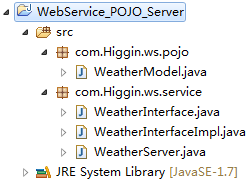
【WeatherModel.java】
package com.Higgin.ws.pojo;

import java.util.Date;

public class WeatherModel {

    //天气概况

    private String detail;

    //日期

    private Date date;

    //最高温度

    private  int  temperature_max;

    //最低温度

    private int temperature_min;

    //忽略get/set方法...........

}
【WeatherInterface.java】
package com.Higgin.ws.service;

import java.util.List;

import com.Higgin.ws.pojo.WeatherModel;

public interface WeatherInterface {

    public List<WeatherModel> queryWeatheer(String cityName);

}
【WeatherInterfaceImpl.java】
package com.Higgin.ws.service;

import java.util.ArrayList;

import java.util.Calendar;

import java.util.Date;

import java.util.List;

import javax.jws.WebService;

import com.Higgin.ws.pojo.WeatherModel;

@WebService

public class WeatherInterfaceImpl implements WeatherInterface{

    @Override

    public List<WeatherModel> queryWeatheer(String cityName) {

        //构造三天天气

        List<WeatherModel> list =new ArrayList<WeatherModel>();

        Calendar calendar=Calendar.getInstance();

        int day=calendar.get(Calendar.DATE);

        WeatherModel weatherModel_1=new WeatherModel();

        weatherModel_1.setDetail("晴天");

        weatherModel_1.setDate(new Date());

        weatherModel_1.setTemperature_max(10);

        weatherModel_1.setTemperature_min(-10);

        WeatherModel weatherModel_2=new WeatherModel();

        weatherModel_2.setDetail("阴天");

        calendar.set(Calendar.DATE, day+1);

        weatherModel_2.setDate(calendar.getTime());

        weatherModel_2.setTemperature_max(6);

        weatherModel_2.setTemperature_min(-2);

        WeatherModel weatherModel_3=new WeatherModel();

        weatherModel_3.setDetail("晴天");

        calendar.set(Calendar.DATE, day+2);

        weatherModel_3.setDate(calendar.getTime());

        weatherModel_3.setTemperature_max(30);

        weatherModel_3.setTemperature_min(3);

        list.add(weatherModel_1);

        list.add(weatherModel_2);

        list.add(weatherModel_3);

        return list;

    }

}
【WeatherServer.java】
package com.Higgin.ws.service;

import javax.xml.ws.Endpoint;

public class WeatherServer {

    public static void main(String[] args) {

        Endpoint.publish("http://127.0.0.1:12345/weather", new WeatherInterfaceImpl());

    }

}
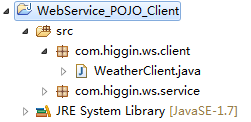
【客户端工程截图】
已经使用Wsimport生成了相应的客户端代码
【WeatherClient.java】
package com.higgin.ws.client;

import java.net.MalformedURLException;

import java.net.URL;

import java.text.SimpleDateFormat;

import java.util.Date;

import java.util.List;

import javax.xml.namespace.QName;

import javax.xml.ws.Service;

import com.higgin.ws.service.WeatherInterfaceImpl;

import com.higgin.ws.service.WeatherModel;

public class WeatherClient {

    public static void main(String[] args) throws MalformedURLException {

        //使用说明书

        URL wsdlDocumentLocation =new URL("http://127.0.0.1:12345/weather?wsdl");

        QName serviceName=new QName("http://service.ws.Higgin.com/", "WeatherInterfaceImplService");

        //创建服务视图

        Service service=Service.create(wsdlDocumentLocation,serviceName);

        //创建portType对象

        WeatherInterfaceImpl weatherInterfaceImpl=service.getPort(WeatherInterfaceImpl.class);

        //调用WeatherInterfaceImpl方法

        List<WeatherModel> list=weatherInterfaceImpl.queryWeatheer("杭州");

        for(WeatherModel weatherModel:list){

            System.out.println(weatherModel.getDetail());

            Date date=weatherModel.getDate().toGregorianCalendar().getTime();

            System.out.println(new SimpleDateFormat("yyyy-MM-dd").format(date));

            System.out.println(weatherModel.getTemperatureMax());

            System.out.println(weatherModel.getTemperatureMin());

        }

    }

}
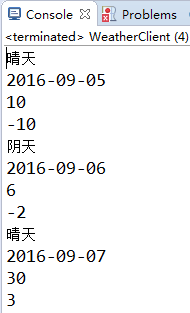
【运行结果】
10_Jaxws使用自定义pojo发布服务的更多相关文章
- 自定义及发布一个webservice服务
自定义及发布一个webservice服务 - 声明 某个业务服务为webservice服务 通过@webservice 注解来声明 - 发布webservice服务 ...
- Dubbo2.7源码分析-如何发布服务
Dubbo的服务发布逻辑是比较复杂的,我还是以Dubbo自带的示例讲解,这样更方便和容易理解. Provider配置如下: <?xml version="1.0" encod ...
- ArcGIS 将自定义工具发布到ArcGIS Server,作为Geoprocessing Service
新建自定义工具过程可参考上一篇博客:http://www.cnblogs.com/oceanking/p/3933681.html 1.执行自定义工具.此步骤不可省略 打开ArcCatalog,双击自 ...
- ServiceStack.Redis订阅发布服务的调用(Z)
1.Redis订阅发布介绍Redis订阅发布是一种消息通信模式:发布者(publisher)发送消息,订阅者(Subscriber)接受消息.类似于设计模式中的观察者模式.发布者和订阅者之间使用频 ...
- ArcGIS Server开发教程系列(2)配置ARCMAP和ARCCatalog发布服务
1. Arc catalog的配置 打开catalog,如图新增刚刚创建的server 1. Use GIS services: 用户身份连接 使用此种连接,可以浏览.使用站点内发布的所有 ...
- ServiceStack.Redis订阅发布服务的调用
1.Redis订阅发布介绍 Redis订阅发布是一种消息通信模式:发布者(publisher)发送消息,订阅者(Subscriber)接受消息.类似于设计模式中的观察者模式. 发布者和订阅者之间使用频 ...
- ArcGIS发布服务时缓存切片设置
[文件]>[共享]>[服务]>[覆盖原有服务]或[创建新服务] 设置好相关参数后,会弹出"服务编辑框": 进入"缓存" 1."绘制此 ...
- 使用expect脚本语言写一键发布服务(代码发布、所有服务重启)
互联网服务有很多台服务,但是在上线的时候需要将这些服务版本都更新与个个都重启,下面的脚本语言,就是一键发布服务~ 1.在/home/weihu/deploy/ 目录下建下publish .publis ...
- PHPRPC jsp发布服务
PHPRPC是面向服务的高性能远程过程调用协议.PHPRPC for java 是此协议的一种实现,详细请到官方看PHPRPC的介绍 ,以其它rpc协议的性能对比请:Java.PHPRPC.Hessi ...
随机推荐
- C#下实现软件欢迎界面
找到几种简约的欢迎界面的制作方法,存此记录. 方法一:双线程,用第二个线程启动欢迎界面 原文:http://www.cnblogs.com/xiaoshatian/archive/2010/09/07 ...
- zxing 生成二维码
一.zxing介绍 zxing是google提供生成.解析一维码.二维码的开源库. 二.使用 2.1 maven pom 配置 <dependency> <groupId>co ...
- CAS Tomcat实现单点登录
转贴: http://www.cnblogs.com/ja-net/archive/2012/07/25/2608536.html 最近这两天在搞单点登录,第一次使用老出状况.以下是配置过程: 1.安 ...
- Java数据抓取经验【转载】
本人担任职友集的java工程师五年,其中抓取数据占主要的一部分,抓取的信息只要有两部分,职位和简历,其中职位的抓取量为日均插入量为30万,更新量 为60万,抓取全国300多个人才网站.职友集(现在改名 ...
- Android中定时器的3种实现方法
原文:http://blog.csdn.net/wulianghuan/article/details/8507221 在Android开发中,定时器一般有以下3种实现方法: 一.采用Handler与 ...
- 微软Hololens学院教程- Holograms 100: Getting Started with Unity【微软教程已经更新,本文是老版本】
这是老版本的教程,为了不耽误大家的时间,请直接看原文,本文仅供参考哦!原文链接:https://developer.microsoft.com/EN-US/WINDOWS/HOLOGRAPHIC/ho ...
- 聊一聊ES5数组(Array)新增的那些方法
一.前言 ES5中新增的一些处理数组(Array)的方法, 对于用JavaScript处理数据非常有用.我总结了一下,给这些方法分了类,大体如下: 2个索引方法:indexOf() 和 lastInd ...
- MySQL(3):数据库操作
1.创建数据库: 数据定义语言(DDL): create database db_name[数据库选项] 注:数据库命名规则:大小写取决于当前操作系统,见名知意,推荐下划线 标识符的字符: 使用任意字 ...
- 使用Mou 编写Markdown编辑器博客
Mou Overview Mou, the missing Markdown editor for web developers. Syntax Strong and Emphasize strong ...
- linux内核结构
Linux内核子系统: 分别是:进程调度(SCHED).进程间通信(IPC).虚拟文件系统(VFS).内存管理(MM).网络通信(NET) 进程调度与内存管理之间的关系:这两个子系统互相依赖.在多道程 ...