
iOS--XML三种解析方法( XMLDictionary)、(GDataXMLNode)、(NSXMLParser)
iOS9之后,默认网络请求是https,所有我们要设置一下网络安全,具体设置如下
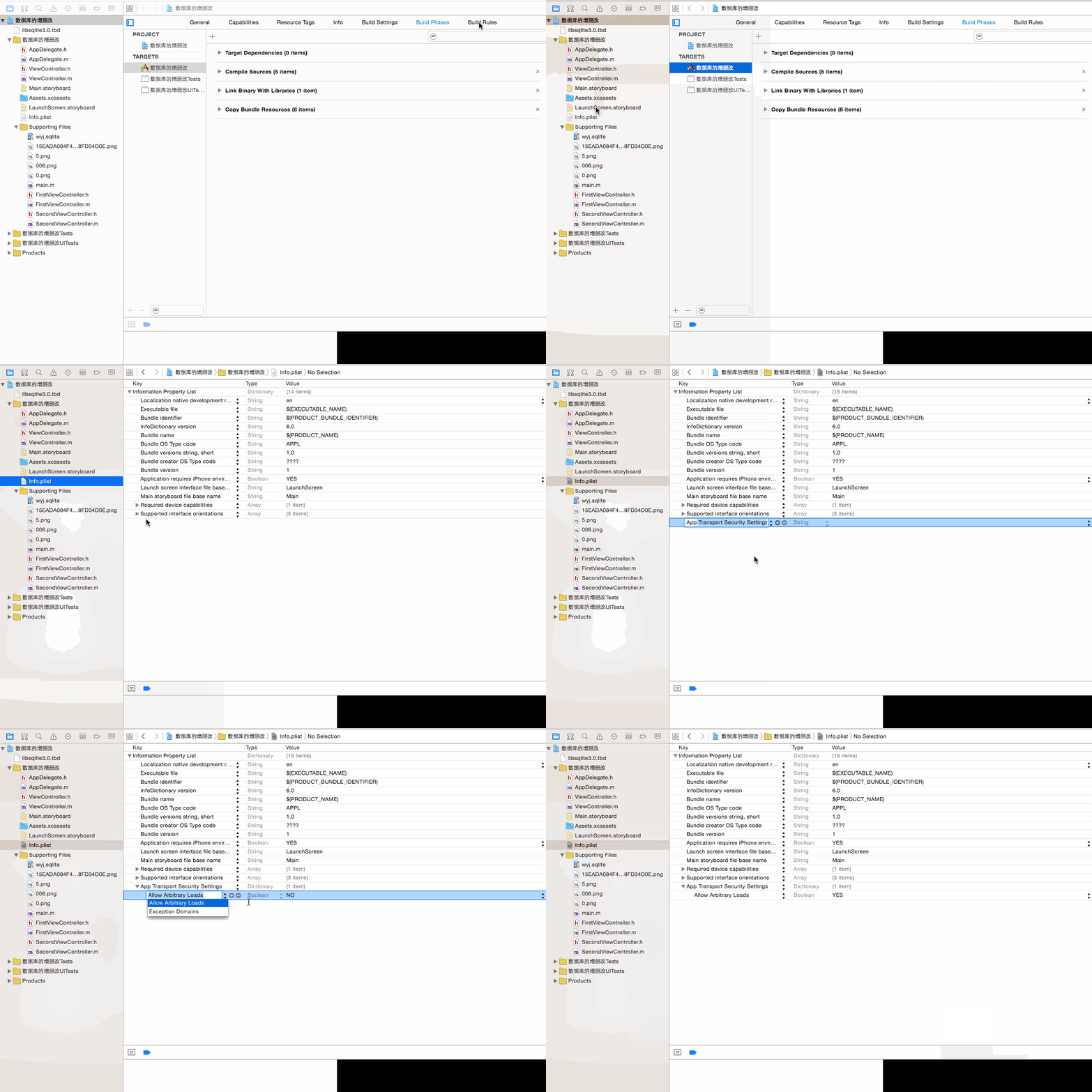
1.第三方类库 XMLDictionary
下载地址:
https://github.com/nicklockwood/XMLDictionary
所用到的xml文件
http://www.meituan.com/api/v1/divisions?mtt=1.help%2Fapi.0.0.im7eandj
效果如下:
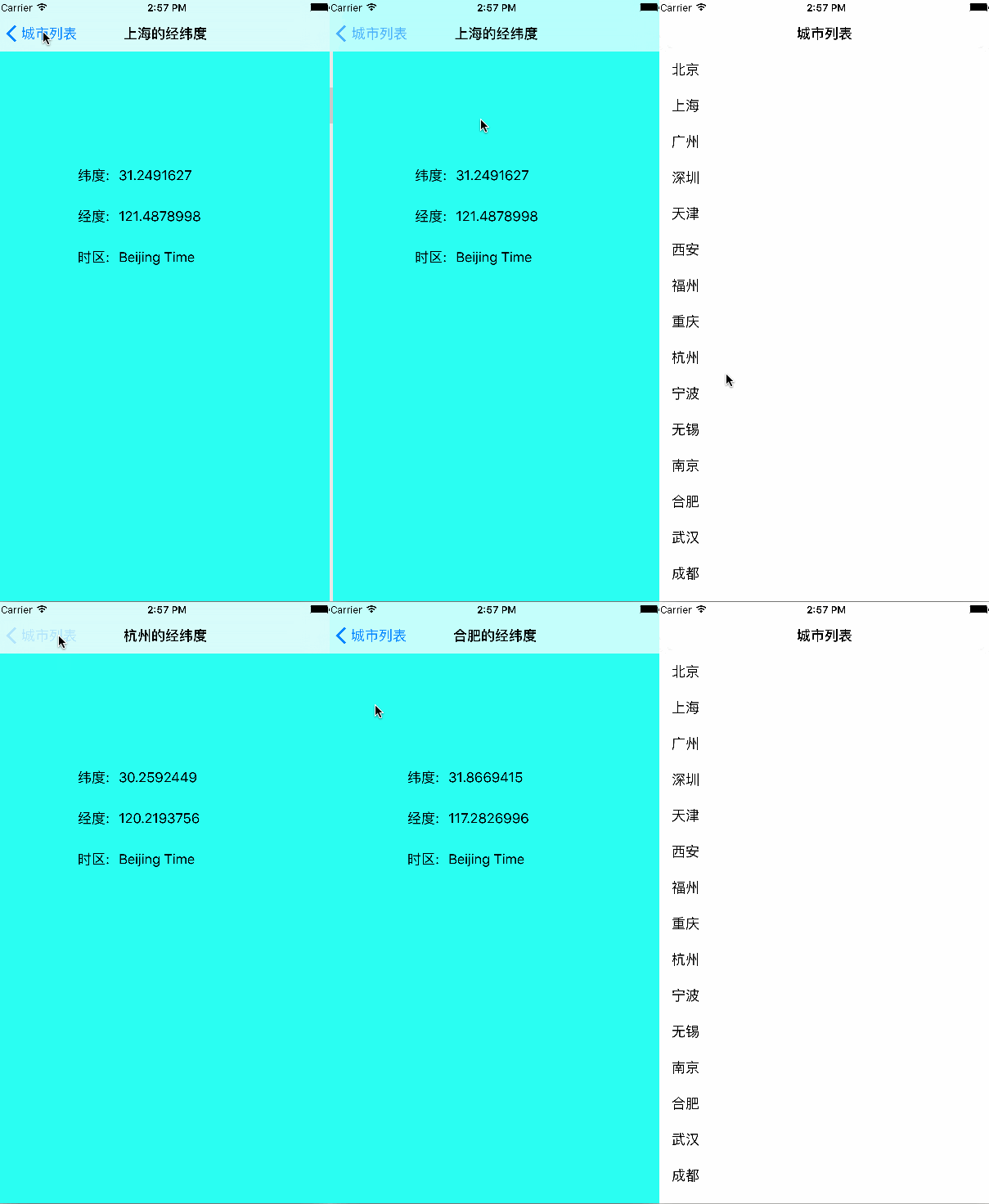
代码实现:
根视图:
rootTableViewController.m文件

#import "rootTableViewController.h"

#import "XMLDictionary.h"

#import "secondViewController.h"

@interface rootTableViewController ()

@property(nonatomic,strong)NSArray *cityArr;

@end

@implementation rootTableViewController

- (void)viewDidLoad {

    [super viewDidLoad];

    NSString *path=@"http://www.meituan.com/api/v1/divisions?mtt=1.help%2Fapi.0.0.im77fqda";

    NSURL *url=[NSURL URLWithString:path];

    NSData *data=[NSData dataWithContentsOfURL:url];

    XMLDictionaryParser *parser=[[XMLDictionaryParser alloc]init];

    NSDictionary *dic=[parser dictionaryWithData:data];

    self.cityArr=[NSArray arrayWithArray:dic[@"divisions"][@"division"]];

    NSLog(@"%@",self.cityArr);

    [self.tableView registerClass:[UITableViewCell class] forCellReuseIdentifier:@"reuseIdentifier"];

    self.title=@"城市列表";

    // Uncomment the following line to preserve selection between presentations.

    // self.clearsSelectionOnViewWillAppear = NO;

    // Uncomment the following line to display an Edit button in the navigation bar for this view controller.

//     self.navigationItem.rightBarButtonItem = self.editButtonItem;

}

- (void)didReceiveMemoryWarning {

    [super didReceiveMemoryWarning];

    // Dispose of any resources that can be recreated.

}

- (NSInteger)tableView:(UITableView *)tableView numberOfRowsInSection:(NSInteger)section {

    return self.cityArr.count;

}

- (UITableViewCell *)tableView:(UITableView *)tableView cellForRowAtIndexPath:(NSIndexPath *)indexPath {

    UITableViewCell *cell = [tableView dequeueReusableCellWithIdentifier:@"reuseIdentifier" forIndexPath:indexPath];

    cell.textLabel.text=self.cityArr[indexPath.row][@"name"];

    return cell;

}

-(void)tableView:(UITableView *)tableView didSelectRowAtIndexPath:(nonnull NSIndexPath *)indexPath{

    secondViewController *sec=[[secondViewController alloc]init];

    sec.location=self.cityArr[indexPath.row][@"location"];

    sec.title=self.cityArr[indexPath.row][@"name"];

    [self.navigationController pushViewController:sec animated:YES];

}

@end
第二个视图:secondViewController.h
#import <UIKit/UIKit.h>

@interface secondViewController : UIViewController

@property(nonatomic,strong)NSDictionary *location;

@property(nonatomic,strong)NSString *title;

@end
secondViewController.m文件
#import "secondViewController.h"

@interface secondViewController ()

@property(nonatomic,strong)UILabel *latitudeName;

@property(nonatomic,strong)UILabel *longitudeName;

@property(nonatomic,strong)UILabel *timezoneName;

@property(nonatomic,strong)UILabel *latitude;

@property(nonatomic,strong)UILabel *longitude;

@property(nonatomic,strong)UILabel *timezone;

@end

@implementation secondViewController

- (void)viewDidLoad {

    [super viewDidLoad];

    [self setKongjian];

    self.title=[NSString stringWithFormat:@"%@的经纬度",self.title];

    self.view.backgroundColor=[UIColor colorWithRed:0.148 green:1.000 blue:0.946 alpha:1.000];

}

-(void)setKongjian{

    self.latitudeName=[[UILabel alloc]initWithFrame:CGRectMake(100, 200, 100, 30)];

    self.latitudeName.text=@"纬度:";

    self.latitude=[[UILabel alloc]initWithFrame:CGRectMake(150, 200, 200, 30)];

    self.latitude.text=self.location[@"latitude"];

    self.longitudeName=[[UILabel alloc]initWithFrame:CGRectMake(100, 250, 100, 30)];

    self.longitudeName.text=@"经度:";

    self.longitude=[[UILabel alloc]initWithFrame:CGRectMake(150, 250, 200, 30)];

    self.longitude.text=self.location[@"longitude"];

    self.timezoneName=[[UILabel alloc]initWithFrame:CGRectMake(100, 300, 100, 30)];

    self.timezoneName.text=@"时区:";

    self.timezone=[[UILabel alloc]initWithFrame:CGRectMake(150, 300, 200, 30)];

    self.timezone.text=self.location[@"timezone"];

    [self.view addSubview:self.latitudeName];

    [self.view addSubview:self.longitudeName];

    [self.view addSubview:self.timezoneName];

    [self.view addSubview:self.latitude];

    [self.view addSubview:self.longitude];

    [self.view addSubview:self.timezone];

}

- (void)didReceiveMemoryWarning {

    [super didReceiveMemoryWarning];

    // Dispose of any resources that can be recreated.

}

@end
2.GDataXMLNode类库
具体配置过程如下

核心代码
#import "rootTableViewController.h"

#import "GDataXMLNode.h"

#import "secondViewController.h"

@interface rootTableViewController ()

@property(nonatomic,strong)NSMutableDictionary *location;

@property(nonatomic,strong)NSMutableArray *locationArr;

@end

@implementation rootTableViewController

- (void)viewDidLoad {

    [super viewDidLoad];

    self.locationArr=[NSMutableArray array];

//    获取网络上的xml

    NSURL *url=[NSURL URLWithString:@"http://www.meituan.com/api/v1/divisions?mtt=1.help%2Fapi.0.0.im7envub"];

    NSData *data=[NSData dataWithContentsOfURL:url];

//   使用NSData对象初始化

    GDataXMLDocument *doc=[[GDataXMLDocument alloc]initWithData:data options:0 error:nil];

//    获取根节点

    GDataXMLElement *rootElement=[doc rootElement];

//    获取根节点以下的节点

    GDataXMLElement *divisions=[[rootElement elementsForName:@"divisions"] objectAtIndex:0];

    NSArray *division=[divisions elementsForName:@"division"];

//          NSLog(@"%@",division);

    for (GDataXMLElement *div in division) {

        self.location=[NSMutableDictionary dictionary];

//        获取name的节点

        GDataXMLElement *nameElement=[[div elementsForName:@"name"] objectAtIndex:0];

        NSString *name=[nameElement stringValue];

//    获取location 的节点

        GDataXMLElement *location=[[div elementsForName:@"location"] objectAtIndex:0];

//        获取latitude 的节点

        GDataXMLElement *latitudeElement=[[location elementsForName:@"latitude"] objectAtIndex:0];

            NSString *latitude=[latitudeElement stringValue];

//       获取longitude 的节点

        GDataXMLElement *longitudeElement=[[location elementsForName:@"longitude"] objectAtIndex:0];

        NSString *longitude=[longitudeElement stringValue];

//        把他们的值加到一个=字典中

        [self.location setObject:name forKey:@"name"];

        [self.location setObject:latitude forKey:@"latitude"];

        [self.location setObject:longitude forKey:@"longitude"];

//        把字典添加到可变集合中

        [self.locationArr addObject:self.location];

    }

    self.title=@"城市列表";

    [self.tableView registerClass:[UITableViewCell class] forCellReuseIdentifier:@"reuseIdentifier"];

}

- (void)didReceiveMemoryWarning {

    [super didReceiveMemoryWarning];

    // Dispose of any resources that can be recreated.

}

#pragma mark - Table view data source

- (NSInteger)tableView:(UITableView *)tableView numberOfRowsInSection:(NSInteger)section {

    return self.locationArr.count;

}

- (UITableViewCell *)tableView:(UITableView *)tableView cellForRowAtIndexPath:(NSIndexPath *)indexPath {

    UITableViewCell *cell = [tableView dequeueReusableCellWithIdentifier:@"reuseIdentifier" forIndexPath:indexPath];

    cell.textLabel.text=self.locationArr[indexPath.row][@"name"];

    return cell;

}

-(void)tableView:(UITableView *)tableView didSelectRowAtIndexPath:(nonnull NSIndexPath *)indexPath{

    secondViewController *sec=[[secondViewController alloc]init];

//    把字典传递到第二个页面

    sec.location=self.locationArr[indexPath.row];

            [self.navigationController pushViewController:sec animated:YES];

}

@end
第二个页面类似
3.系统自带的
核心代码
#import "rootTableViewController.h"

#import "secondViewController.h"

@interface rootTableViewController ()<NSXMLParserDelegate>

@property(nonatomic,strong)NSMutableArray *arr;

@property(nonatomic,strong)NSMutableDictionary *dic;

@property(nonatomic,strong)NSString *str;

@end

@implementation rootTableViewController

- (void)viewDidLoad {

    [super viewDidLoad];

    NSURL *url=[NSURL URLWithString:@"http://www.meituan.com/api/v1/divisions?mtt=1.help%2Fapi.0.0.im7mg21x"];

    NSData *data=[NSData dataWithContentsOfURL:url];

    NSXMLParser *parser=[[NSXMLParser alloc]initWithData:data];

    parser.delegate=self;

    BOOL bol=[parser parse];

    NSLog(@"%d",bol);

    self.title=@"城市列表";

    [self.tableView registerClass:[UITableViewCell class] forCellReuseIdentifier:@"reuseIdentifier"];

}

-(void)parserDidStartDocument:(NSXMLParser *)parser{

    NSLog(@"start");

    self.arr=[NSMutableArray array];

}

-(void)parserDidEndDocument:(NSXMLParser *)parser{

    NSLog(@"end");

    NSLog(@"%@",self.arr);

}

-(void)parser:(NSXMLParser *)parser didStartElement:(NSString *)elementName namespaceURI:(NSString *)namespaceURI qualifiedName:(NSString *)qName attributes:(NSDictionary<NSString *,NSString *> *)attributeDict{

    if ([elementName isEqualToString:@"division"]) {

        self.dic=[NSMutableDictionary dictionary];

        [self.dic setDictionary:attributeDict];

    }

}

-(void)parser:(NSXMLParser *)parser didEndElement:(NSString *)elementName namespaceURI:(NSString *)namespaceURI qualifiedName:(NSString *)qName{

    if ([elementName isEqualToString:@"name" ]||[elementName isEqualToString:@"latitude"]||[elementName isEqualToString:@"longitude"]) {

        [self.dic setObject:self.str forKey:elementName];

    }else if ([elementName isEqualToString:@"division"]){

        [self.arr addObject:self.dic];

    }

}

-(void)parser:(NSXMLParser *)parser foundCharacters:(NSString *)string{

    self.str=string;

}

- (void)didReceiveMemoryWarning {

    [super didReceiveMemoryWarning];

    // Dispose of any resources that can be recreated.

}

#pragma mark - Table view data source

- (NSInteger)tableView:(UITableView *)tableView numberOfRowsInSection:(NSInteger)section {

    return self.arr.count;

}

- (UITableViewCell *)tableView:(UITableView *)tableView cellForRowAtIndexPath:(NSIndexPath *)indexPath {

    UITableViewCell *cell = [tableView dequeueReusableCellWithIdentifier:@"reuseIdentifier" forIndexPath:indexPath];

    cell.textLabel.text=self.arr[indexPath.row][@"name"];

    return cell;

}

-(void)tableView:(UITableView *)tableView didSelectRowAtIndexPath:(NSIndexPath *)indexPath{

    secondViewController *sec=[[secondViewController alloc]init];

    sec.location=self.arr[indexPath.row];

    [self.navigationController pushViewController:sec animated:YES];

}

@end
iOS--XML三种解析方法( XMLDictionary)、(GDataXMLNode)、(NSXMLParser)的更多相关文章
- iOS中 三种随机数方法详解
ios 有如下三种随机数方法: //第一种 srand((unsigned)time(0)); //不加这句每次产生的随机数不变 int i = rand() % 5; //第二种 srandom(t ...
- iOS xml文件的解析方式 XMLDictionary,GDataXMLNode,NSXMLParser
iOS9之后,默认网络请求是https,所有我们要设置一下网络安全,具体设置如下 1.第三方类库 XMLDictionary 下载地址: https://github.com/nicklockwood ...
- QT XML文档的解析 QXmlStreamReader, DOM,SAX 三种解析方法 简单示例
0. xml文档如下 <?xml version="1.0"?> <bookindex> <entry term="sidebearings ...
- Python_XML的三种解析方法
什么是XML? XML 指可扩展标记语言(eXtensible Markup Language). XML 被设计用来传输和存储数据. XML是一套定义语义标记的规则,这些标记将文档分成许多部件并对这 ...
- <爬虫实战>豆瓣电影TOP250(三种解析方法)
1.豆瓣电影排行.py # 目标:爬取豆瓣电影排行榜TOP250的电影信息 # 信息包括:电影名字,上映时间,主演,评分,导演,一句话评价 # 解析用学过的几种方法都实验一下①正则表达式.②Beaut ...
- Android平台中实现对XML的三种解析方式
本文介绍在Android平台中实现对XML的三种解析方式. XML在各种开发中都广泛应用,Android也不例外.作为承载数据的一个重要角色,如何读写XML成为Android开发中一项重要的技能. 在 ...
- iOS——浅谈iOS中三种生成随机数方法
ios 有如下三种随机数方法:
- Qt中三种解析xml的方式
在下面的随笔中,我会根据xml的结构,给出Qt中解析这个xml的三种方式的代码.虽然,这个代码时通过调用Qt的函数实现的,但是,很多开源的C++解析xml的库,甚至很多其他语言解析xml的库,都和下面 ...
- iOS-浅谈iOS中三种生成随机数方法
ios 有如下三种随机数方法:
随机推荐
- SpringAOP使用扩展
在<初识Spring>中我们了解到Spring支持AOP且可配置方法的前置曾强和后置曾强,但其实Spring支持多种曾强类型.下面同过一些例子来介绍Spring的几种常用的曾强(前置增强和 ...
- 这些HTML、CSS知识点,面试和平时开发都需要 No8-No9
系列知识点汇总 这些HTML.CSS知识点,面试和平时开发都需要 No1-No4(知识点:HTML.CSS.盒子模型.内容布局) 这些HTML.CSS知识点,面试和平时开发都需要 No5-No7(知识 ...
- 基于git的源代码管理模型——git flow
基于git的源代码管理模型--git flow A successful Git branching model
- 8.Fluent API in Code-First【Code-First系列】
在前面的章节中,我们已经看到了各种不同的数据注解特性.现在我们来学习一下Fluent API. Fluent API是另外一种配置领域类的方式,它提供了更多的配置相比数据注解特性. Mappings[ ...
- Dapper学习 - Dapper.Rainbow(一) - Create
Dapper这个ORM有许多扩展, 我自己用过两种, 也算是比较主流的两种, Rainbow和Extension, 这里就先介绍下Rainbow吧, 毕竟这个先用, 当然, 由于我使用的是mysql数 ...
- Oracle创建用户、表空间并设置权限
代码: //dba账户登录 sqlplus 请输入用户名:dpp_data as sysdba 请输入口令:dpp_data //创建账号 create user techrpt_data ident ...
- iOS阶段学习第15天笔记(NSDictionary与NSMutableDictionary 字典)
iOS学习(OC语言)知识点整理 一.OC中的字典 1)字典:是一个容器对象,元素是以键-值对(key-value)形式存放的,key和value是任意类型的对象,key是唯一的,value可以重复 ...
- C# Redis使用之StackExchange
第1章 安装 在.NET平台使用Redis需要做如下准备工作: 创建一个新的Visual Studio应用或者打开一个已经存在的Visual Studio应用. 打开NuGet程序包 搜索并添加S ...
- jquery.autocomplete自动补齐和自定义格式
1.简单的下拉自动补齐,可以使用本地或远程数据源 <input name="autoTag" id="autoTag" /> var source ...
- vs2012运行项目报未能加载文件或程序集“System.Web.Mvc, Version=4.0.0.1,Culture=neutral”问题和解决方法
原先本地项目版本(4.0.0.1)高于服务器版本(4.0.0.0),本地项目改成服务器版本4.0.0.0时,发布后的项目报这个错误