
iOS xml文件的解析方式 XMLDictionary,GDataXMLNode,NSXMLParser
iOS9之后,默认网络请求是https,所有我们要设置一下网络安全,具体设置如下
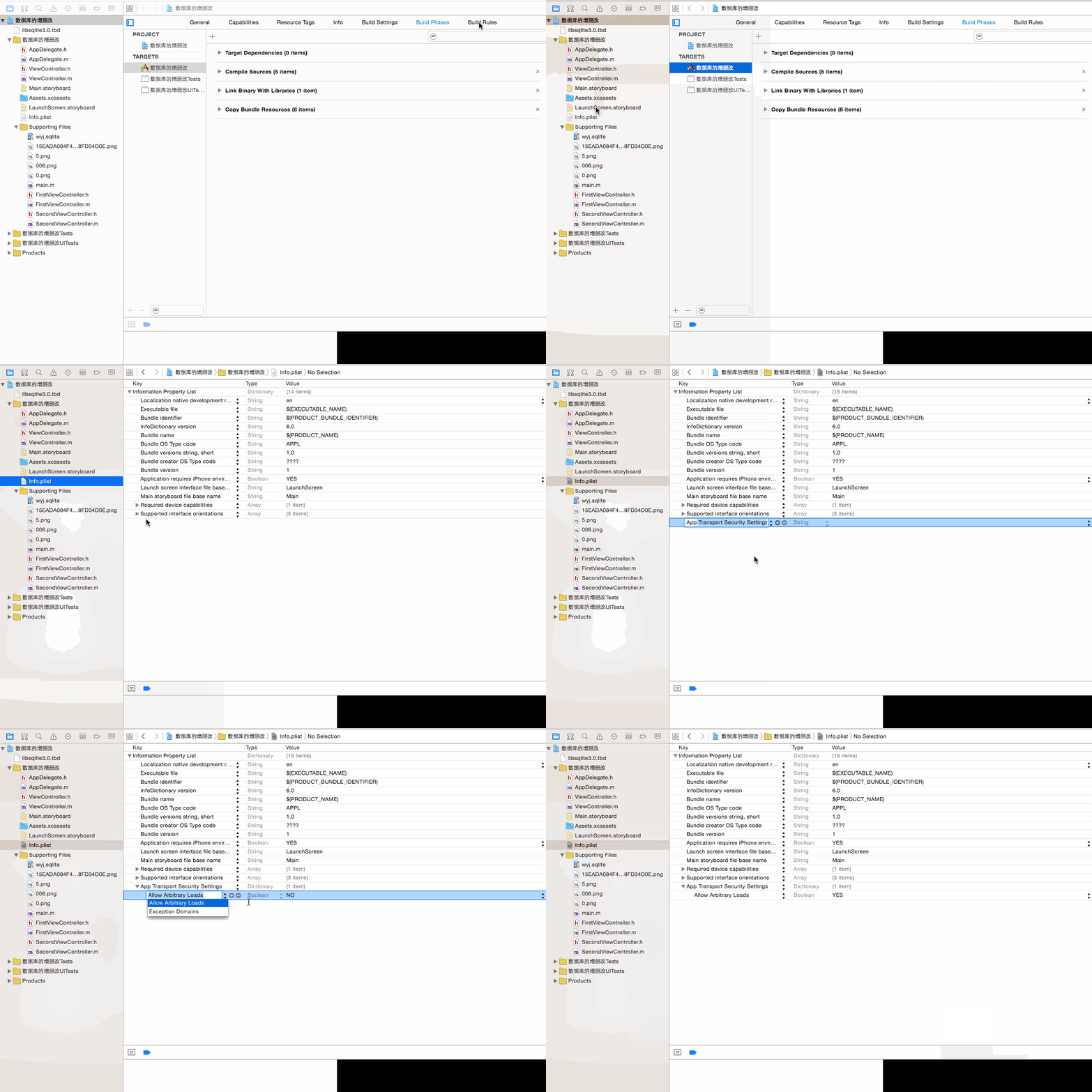
1.第三方类库 XMLDictionary
下载地址:
https://github.com/nicklockwood/XMLDictionary
所用到的xml文件
http://www.meituan.com/api/v1/divisions?mtt=1.help%2Fapi.0.0.im7eandj
效果如下:

代码实现:
根视图:
rootTableViewController.m文件
#import "rootTableViewController.h"

#import "XMLDictionary.h"

#import "secondViewController.h"

@interface rootTableViewController ()

@property(nonatomic,strong)NSArray *cityArr;

@end

@implementation rootTableViewController

- (void)viewDidLoad {

    [super viewDidLoad];

    NSString *path=@"http://www.meituan.com/api/v1/divisions?mtt=1.help%2Fapi.0.0.im77fqda";

    NSURL *url=[NSURL URLWithString:path];

    NSData *data=[NSData dataWithContentsOfURL:url];

    XMLDictionaryParser *parser=[[XMLDictionaryParser alloc]init];

    NSDictionary *dic=[parser dictionaryWithData:data];

    self.cityArr=[NSArray arrayWithArray:dic[@"divisions"][@"division"]];

    NSLog(@"%@",self.cityArr);

    [self.tableView registerClass:[UITableViewCell class] forCellReuseIdentifier:@"reuseIdentifier"];

    self.title=@"城市列表";

    // Uncomment the following line to preserve selection between presentations.

    // self.clearsSelectionOnViewWillAppear = NO;

    // Uncomment the following line to display an Edit button in the navigation bar for this view controller.

//     self.navigationItem.rightBarButtonItem = self.editButtonItem;

}

- (void)didReceiveMemoryWarning {

    [super didReceiveMemoryWarning];

    // Dispose of any resources that can be recreated.

}

- (NSInteger)tableView:(UITableView *)tableView numberOfRowsInSection:(NSInteger)section {

    return self.cityArr.count;

}

- (UITableViewCell *)tableView:(UITableView *)tableView cellForRowAtIndexPath:(NSIndexPath *)indexPath {

    UITableViewCell *cell = [tableView dequeueReusableCellWithIdentifier:@"reuseIdentifier" forIndexPath:indexPath];

    cell.textLabel.text=self.cityArr[indexPath.row][@"name"];

    return cell;

}

-(void)tableView:(UITableView *)tableView didSelectRowAtIndexPath:(nonnull NSIndexPath *)indexPath{

    secondViewController *sec=[[secondViewController alloc]init];

    sec.location=self.cityArr[indexPath.row][@"location"];

    sec.title=self.cityArr[indexPath.row][@"name"];

    [self.navigationController pushViewController:sec animated:YES];

}

/*

// Override to support conditional editing of the table view.

- (BOOL)tableView:(UITableView *)tableView canEditRowAtIndexPath:(NSIndexPath *)indexPath {

    // Return NO if you do not want the specified item to be editable.

    return YES;

}

*/

/*

// Override to support editing the table view.

- (void)tableView:(UITableView *)tableView commitEditingStyle:(UITableViewCellEditingStyle)editingStyle forRowAtIndexPath:(NSIndexPath *)indexPath {

    if (editingStyle == UITableViewCellEditingStyleDelete) {

        // Delete the row from the data source

        [tableView deleteRowsAtIndexPaths:@[indexPath] withRowAnimation:UITableViewRowAnimationFade];

    } else if (editingStyle == UITableViewCellEditingStyleInsert) {

        // Create a new instance of the appropriate class, insert it into the array, and add a new row to the table view

    }

}

*/

/*

// Override to support rearranging the table view.

- (void)tableView:(UITableView *)tableView moveRowAtIndexPath:(NSIndexPath *)fromIndexPath toIndexPath:(NSIndexPath *)toIndexPath {

}

*/

/*

// Override to support conditional rearranging of the table view.

- (BOOL)tableView:(UITableView *)tableView canMoveRowAtIndexPath:(NSIndexPath *)indexPath {

    // Return NO if you do not want the item to be re-orderable.

    return YES;

}

*/

/*

#pragma mark - Navigation

// In a storyboard-based application, you will often want to do a little preparation before navigation

- (void)prepareForSegue:(UIStoryboardSegue *)segue sender:(id)sender {

    // Get the new view controller using [segue destinationViewController].

    // Pass the selected object to the new view controller.

}

*/

@end
第二个视图:secondViewController.h
#import <UIKit/UIKit.h>

@interface secondViewController : UIViewController

@property(nonatomic,strong)NSDictionary *location;

@property(nonatomic,strong)NSString *title;

@end
secondViewController.m文件
#import "secondViewController.h"

@interface secondViewController ()

@property(nonatomic,strong)UILabel *latitudeName;

@property(nonatomic,strong)UILabel *longitudeName;

@property(nonatomic,strong)UILabel *timezoneName;

@property(nonatomic,strong)UILabel *latitude;

@property(nonatomic,strong)UILabel *longitude;

@property(nonatomic,strong)UILabel *timezone;

@end

@implementation secondViewController

- (void)viewDidLoad {

    [super viewDidLoad];

    [self setKongjian];

    self.title=[NSString stringWithFormat:@"%@的经纬度",self.title];

    self.view.backgroundColor=[UIColor colorWithRed:0.148 green:1.000 blue:0.946 alpha:1.000];

}

-(void)setKongjian{

    self.latitudeName=[[UILabel alloc]initWithFrame:CGRectMake(, , , )];

    self.latitudeName.text=@"纬度:";

    self.latitude=[[UILabel alloc]initWithFrame:CGRectMake(, , , )];

    self.latitude.text=self.location[@"latitude"];

    self.longitudeName=[[UILabel alloc]initWithFrame:CGRectMake(, , , )];

    self.longitudeName.text=@"经度:";

    self.longitude=[[UILabel alloc]initWithFrame:CGRectMake(, , , )];

    self.longitude.text=self.location[@"longitude"];

    self.timezoneName=[[UILabel alloc]initWithFrame:CGRectMake(, , , )];

    self.timezoneName.text=@"时区:";

    self.timezone=[[UILabel alloc]initWithFrame:CGRectMake(, , , )];

    self.timezone.text=self.location[@"timezone"];

    [self.view addSubview:self.latitudeName];

    [self.view addSubview:self.longitudeName];

    [self.view addSubview:self.timezoneName];

    [self.view addSubview:self.latitude];

    [self.view addSubview:self.longitude];

    [self.view addSubview:self.timezone];

}

- (void)didReceiveMemoryWarning {

    [super didReceiveMemoryWarning];

    // Dispose of any resources that can be recreated.

}

/*

#pragma mark - Navigation

// In a storyboard-based application, you will often want to do a little preparation before navigation

- (void)prepareForSegue:(UIStoryboardSegue *)segue sender:(id)sender {

    // Get the new view controller using [segue destinationViewController].

    // Pass the selected object to the new view controller.

}

*/

@end
2.GDataXMLNode类库
具体配置过程如下

核心代码
#import "rootTableViewController.h"

#import "GDataXMLNode.h"

#import "secondViewController.h"

@interface rootTableViewController ()

@property(nonatomic,strong)NSMutableDictionary *location;

@property(nonatomic,strong)NSMutableArray *locationArr;

@end

@implementation rootTableViewController

- (void)viewDidLoad {

    [super viewDidLoad];

    self.locationArr=[NSMutableArray array];

//    获取网络上的xml

    NSURL *url=[NSURL URLWithString:@"http://www.meituan.com/api/v1/divisions?mtt=1.help%2Fapi.0.0.im7envub"];

    NSData *data=[NSData dataWithContentsOfURL:url];

//   使用NSData对象初始化

    GDataXMLDocument *doc=[[GDataXMLDocument alloc]initWithData:data options: error:nil];

//    获取根节点

    GDataXMLElement *rootElement=[doc rootElement];

//    获取根节点以下的节点

    GDataXMLElement *divisions=[[rootElement elementsForName:@"divisions"] objectAtIndex:];

    NSArray *division=[divisions elementsForName:@"division"];

//          NSLog(@"%@",division);

    for (GDataXMLElement *div in division) {

        self.location=[NSMutableDictionary dictionary];

//        获取name的节点

        GDataXMLElement *nameElement=[[div elementsForName:@"name"] objectAtIndex:];

        NSString *name=[nameElement stringValue];

//    获取location 的节点

        GDataXMLElement *location=[[div elementsForName:@"location"] objectAtIndex:];

//        获取latitude 的节点

        GDataXMLElement *latitudeElement=[[location elementsForName:@"latitude"] objectAtIndex:];

            NSString *latitude=[latitudeElement stringValue];

//       获取longitude 的节点

        GDataXMLElement *longitudeElement=[[location elementsForName:@"longitude"] objectAtIndex:];

        NSString *longitude=[longitudeElement stringValue];

//        把他们的值加到一个=字典中

        [self.location setObject:name forKey:@"name"];

        [self.location setObject:latitude forKey:@"latitude"];

        [self.location setObject:longitude forKey:@"longitude"];

//        把字典添加到可变集合中

        [self.locationArr addObject:self.location];

    }

    self.title=@"城市列表";

    [self.tableView registerClass:[UITableViewCell class] forCellReuseIdentifier:@"reuseIdentifier"];

}

- (void)didReceiveMemoryWarning {

    [super didReceiveMemoryWarning];

    // Dispose of any resources that can be recreated.

}

#pragma mark - Table view data source

- (NSInteger)tableView:(UITableView *)tableView numberOfRowsInSection:(NSInteger)section {

    return self.locationArr.count;

}

- (UITableViewCell *)tableView:(UITableView *)tableView cellForRowAtIndexPath:(NSIndexPath *)indexPath {

    UITableViewCell *cell = [tableView dequeueReusableCellWithIdentifier:@"reuseIdentifier" forIndexPath:indexPath];

    cell.textLabel.text=self.locationArr[indexPath.row][@"name"];

    return cell;

}

-(void)tableView:(UITableView *)tableView didSelectRowAtIndexPath:(nonnull NSIndexPath *)indexPath{

    secondViewController *sec=[[secondViewController alloc]init];

//    把字典传递到第二个页面

    sec.location=self.locationArr[indexPath.row];

            [self.navigationController pushViewController:sec animated:YES];

}

/*

// Override to support conditional editing of the table view.

- (BOOL)tableView:(UITableView *)tableView canEditRowAtIndexPath:(NSIndexPath *)indexPath {

    // Return NO if you do not want the specified item to be editable.

    return YES;

}

*/

/*

// Override to support editing the table view.

- (void)tableView:(UITableView *)tableView commitEditingStyle:(UITableViewCellEditingStyle)editingStyle forRowAtIndexPath:(NSIndexPath *)indexPath {

    if (editingStyle == UITableViewCellEditingStyleDelete) {

        // Delete the row from the data source

        [tableView deleteRowsAtIndexPaths:@[indexPath] withRowAnimation:UITableViewRowAnimationFade];

    } else if (editingStyle == UITableViewCellEditingStyleInsert) {

        // Create a new instance of the appropriate class, insert it into the array, and add a new row to the table view

    }

}

*/

/*

// Override to support rearranging the table view.

- (void)tableView:(UITableView *)tableView moveRowAtIndexPath:(NSIndexPath *)fromIndexPath toIndexPath:(NSIndexPath *)toIndexPath {

}

*/

/*

// Override to support conditional rearranging of the table view.

- (BOOL)tableView:(UITableView *)tableView canMoveRowAtIndexPath:(NSIndexPath *)indexPath {

    // Return NO if you do not want the item to be re-orderable.

    return YES;

}

*/

/*

#pragma mark - Navigation

// In a storyboard-based application, you will often want to do a little preparation before navigation

- (void)prepareForSegue:(UIStoryboardSegue *)segue sender:(id)sender {

    // Get the new view controller using [segue destinationViewController].

    // Pass the selected object to the new view controller.

}

*/

@end
第二个页面类似
3.系统自带的
核心代码
#import "rootTableViewController.h"

#import "secondViewController.h"

@interface rootTableViewController ()<NSXMLParserDelegate>

@property(nonatomic,strong)NSMutableArray *arr;

@property(nonatomic,strong)NSMutableDictionary *dic;

@property(nonatomic,strong)NSString *str;

@end

@implementation rootTableViewController

- (void)viewDidLoad {

    [super viewDidLoad];

    NSURL *url=[NSURL URLWithString:@"http://www.meituan.com/api/v1/divisions?mtt=1.help%2Fapi.0.0.im7mg21x"];

    NSData *data=[NSData dataWithContentsOfURL:url];

    NSXMLParser *parser=[[NSXMLParser alloc]initWithData:data];

    parser.delegate=self;

    BOOL bol=[parser parse];

    NSLog(@"%d",bol);

    self.title=@"城市列表";

    [self.tableView registerClass:[UITableViewCell class] forCellReuseIdentifier:@"reuseIdentifier"];

    // Uncomment the following line to preserve selection between presentations.

    // self.clearsSelectionOnViewWillAppear = NO;

    // Uncomment the following line to display an Edit button in the navigation bar for this view controller.

    // self.navigationItem.rightBarButtonItem = self.editButtonItem;

}

-(void)parserDidStartDocument:(NSXMLParser *)parser{

    NSLog(@"start");

    self.arr=[NSMutableArray array];

}

-(void)parserDidEndDocument:(NSXMLParser *)parser{

    NSLog(@"end");

    NSLog(@"%@",self.arr);

}

-(void)parser:(NSXMLParser *)parser didStartElement:(NSString *)elementName namespaceURI:(NSString *)namespaceURI qualifiedName:(NSString *)qName attributes:(NSDictionary<NSString *,NSString *> *)attributeDict{

    if ([elementName isEqualToString:@"division"]) {

        self.dic=[NSMutableDictionary dictionary];

        [self.dic setDictionary:attributeDict];

    }

}

-(void)parser:(NSXMLParser *)parser didEndElement:(NSString *)elementName namespaceURI:(NSString *)namespaceURI qualifiedName:(NSString *)qName{

    if ([elementName isEqualToString:@"name" ]||[elementName isEqualToString:@"latitude"]||[elementName isEqualToString:@"longitude"]) {

        [self.dic setObject:self.str forKey:elementName];

    }else if ([elementName isEqualToString:@"division"]){

        [self.arr addObject:self.dic];

    }

}

-(void)parser:(NSXMLParser *)parser foundCharacters:(NSString *)string{

    self.str=string;

}

- (void)didReceiveMemoryWarning {

    [super didReceiveMemoryWarning];

    // Dispose of any resources that can be recreated.

}

#pragma mark - Table view data source

- (NSInteger)tableView:(UITableView *)tableView numberOfRowsInSection:(NSInteger)section {

    return self.arr.count;

}

- (UITableViewCell *)tableView:(UITableView *)tableView cellForRowAtIndexPath:(NSIndexPath *)indexPath {

    UITableViewCell *cell = [tableView dequeueReusableCellWithIdentifier:@"reuseIdentifier" forIndexPath:indexPath];

    cell.textLabel.text=self.arr[indexPath.row][@"name"];

    return cell;

}

-(void)tableView:(UITableView *)tableView didSelectRowAtIndexPath:(NSIndexPath *)indexPath{

    secondViewController *sec=[[secondViewController alloc]init];

    sec.location=self.arr[indexPath.row];

    [self.navigationController pushViewController:sec animated:YES];

}

/*

// Override to support conditional editing of the table view.

- (BOOL)tableView:(UITableView *)tableView canEditRowAtIndexPath:(NSIndexPath *)indexPath {

    // Return NO if you do not want the specified item to be editable.

    return YES;

}

*/

/*

// Override to support editing the table view.

- (void)tableView:(UITableView *)tableView commitEditingStyle:(UITableViewCellEditingStyle)editingStyle forRowAtIndexPath:(NSIndexPath *)indexPath {

    if (editingStyle == UITableViewCellEditingStyleDelete) {

        // Delete the row from the data source

        [tableView deleteRowsAtIndexPaths:@[indexPath] withRowAnimation:UITableViewRowAnimationFade];

    } else if (editingStyle == UITableViewCellEditingStyleInsert) {

        // Create a new instance of the appropriate class, insert it into the array, and add a new row to the table view

    }

}

*/

/*

// Override to support rearranging the table view.

- (void)tableView:(UITableView *)tableView moveRowAtIndexPath:(NSIndexPath *)fromIndexPath toIndexPath:(NSIndexPath *)toIndexPath {

}

*/

/*

// Override to support conditional rearranging of the table view.

- (BOOL)tableView:(UITableView *)tableView canMoveRowAtIndexPath:(NSIndexPath *)indexPath {

    // Return NO if you do not want the item to be re-orderable.

    return YES;

}

*/

/*

#pragma mark - Navigation

// In a storyboard-based application, you will often want to do a little preparation before navigation

- (void)prepareForSegue:(UIStoryboardSegue *)segue sender:(id)sender {

    // Get the new view controller using [segue destinationViewController].

    // Pass the selected object to the new view controller.

}

*/

@end
iOS xml文件的解析方式 XMLDictionary,GDataXMLNode,NSXMLParser的更多相关文章
- 用java操作XML文件(DOM解析方式)
XML 可扩展标记语言(Extensible Markup Language),是独立于软件和硬件的传输工具. XML的作用: (1)用作配置文件 (2)简化数据共享 (3)简化数据传输 XML DO ...
- XML文件的解析方式
XML文件4种解析方式分别是:DOM解析,SAX解析,JDOM解析,DOM4J解析.1.基础方法:DOM:与平台无关的官方的解析方式.SAX:Java平台提供的基于事件驱动的解析方式.2.扩展方法(在 ...
- [置顶] Android开发之XML文件的解析
Android系统开发之XML文件的解析 我们知道Http在网络传输中的数据组织方式有三种分别为:XML方式.HTML方式.JSON方式.其中XML为可扩展标记语言,如下: <?xml vers ...
- mybatis源码-解析配置文件(一)之XML的DOM解析方式
目录 简介 Java 中 XML 文件解析 解析方式 DOM 解析 XML 新建 XML 文件 DOM 操作相关类 Java 读取 XML 文件 一起学 mybatis @ 简介 在之前的文章< ...
- 用SAX和PULL进行XML文件的解析与生成
XML解析有传统的dom方法还有Jsoup,SAX,PULL等,这里讲的是比较省内存的SAX和PULL方法.Android中极力推荐用PULL的方式来解析,我个人觉得pull确实比较简单,但其内部的逻 ...
- 【文件处理】xml 文件 DOM解析
一.Java解析xml.解析xml四种方法.DOM.SAX.JDOM.DOM4j.XPath 此文针对其中的DOM方法具体展开介绍及代码分析 sax.dom是两种对xml文档进行解析的方法(没有具体实 ...
- 使用java代码动态配置与xml文件结合的方式使用mybatis-generator生成代码配置
1.使用java代码动态配置与xml文件结合的方式使用mybatis-generator生成代码配置 2.上代码:在resources目录下新建:generatorConfiguration.xml文 ...
- JDOM方法实现对XML文件的解析
首先要下载JDOM.jar包,下载地址:http://download.csdn.net/detail/ww6055/8880371 下载到JDOM.jar包之后导入到工程中去. 实例程序: book ...
- iOS Crash文件的解析
iOS Crash文件的解析 开发程序的过程中不管我们已经如何小心,总是会在不经意间遇到程序闪退.脑补一下当你在一群人面前自信的拿着你的App做功能预演的时候,流畅的操作被无情地Crash打断.联想起 ...
随机推荐
- Kafka1 利用虚拟机搭建自己的Kafka集群
前言: 上周末自己学习了一下Kafka,参考网上的文章,学习过程中还是比较顺利的,遇到的一些问题最终也都解决了,现在将学习的过程记录与此,供以后自己查阅,如果能帮助到其他人,自然是更好的. ...
- 借助亚马逊S3和RapidMiner将机器学习应用到文本挖掘
本挖掘典型地运用了机器学习技术,例如聚类,分类,关联规则,和预测建模.这些技术揭示潜在内容中的意义和关系.文本发掘应用于诸如竞争情报,生命科学,客户呼声,媒体和出版,法律和税收,法律实施,情感分析和趋 ...
- 我的架构设计~用层关系图说说mvc,mvvm,soa,ddd
下面是按着我所接触的架构模式,开始一个一个的说一下 第一 标准架构 三层结构
- 使用 Swagger 自动生成 ASP.NET Core Web API 的文档、在线帮助测试文档(ASP.NET Core Web API 自动生成文档)
对于开发人员来说,构建一个消费应用程序时去了解各种各样的 API 是一个巨大的挑战.在你的 Web API 项目中使用 Swagger 的 .NET Core 封装 Swashbuckle 可以帮助你 ...
- nodejs模块中exports和module.exports的区别
通过Node.js的官方API可以看到Node.js本身提供了很多核心模块 http://nodejs.org/api/ ,这些核心模块被编译成二进制文件,可以require('模块名')去获取:核心 ...
- BootStrap_04之jQuery插件(导航、轮播)、以及Less
1.列偏移与列排序: ①列偏移:控制列出现的位置,某列偏移后,后序列会随之偏移--只能右偏移: col-lg/md/sm/xs-offset-*; ②列排序:控制某一列的位置,该列可以左(pull)右 ...
- 细说Promise
一.前言 JavaScript是单线程的,固,一次只能执行一个任务,当有一个任务耗时很长时,后面的任务就必须等待.那么,有什么办法,可以解决这类问题呢?(抛开WebWorker不谈),那就是让代码异步 ...
- ITTC数据挖掘平台介绍(五) 数据导入导出向导和报告生成
一. 前言 经过了一个多月的努力,软件系统又添加了不少新功能.这些功能包括非常实用的数据导入导出,对触摸进行优化的画布和画笔工具,以及对一些智能分析的报告生成模块等.进一步加强了平台系统级的功能. 马 ...
- Sass:初识Sass与Koala工具的使用
一.下载Koala(找到合适的系统版本)并安装 二.先新建一个css文件夹,并在里面新建一个文本文档(.txt),将其命名为demo.scss 三.打开Koala,将css文件夹拽进来,可以修改一下输 ...
- ArrayAdapter
Android Adapter:ArrayAdapter篇 版权声明:本文为博主原创文章,未经博主允许不得转载.微博:厉圣杰源码:AndroidDemo/Notification文中如有纰漏,欢迎大家 ...