
UI键盘通知
#import "ViewController.h"
@interface ViewController ()
@property (nonatomic,strong) UITextField *tf;
@end
@implementation ViewController
- (void)viewDidLoad {
[super viewDidLoad];
// Do any additional setup after loading the view, typically from a nib.
_tf = [[UITextField alloc]initWithFrame:CGRectMake(10, self.view.bounds.size.height - 40, 300, 30)];
_tf.borderStyle = UITextBorderStyleRoundedRect;
[self.view addSubview:_tf];
/*
通知中心(单例)
通知中心是一对多的,即同一个广播可以被多个收音机接收
代理是一对一
作用:1.用来接收广播和发起广播
2.用通知的名字作为频道
*/
/*
参数一:响应的类
参数二:类中响应的方法
参数三:通知的名字(即频道)
参数四:接收类型 [注意]nil代表任何类型
*/
//:UIKeyboardWillShowNotification接收键盘将要显示的通知
[[NSNotificationCenter defaultCenter] addObserver:self selector:@selector(keyBoardWillShow:) name:UIKeyboardWillShowNotification object:nil];
//UIKeyboardWillHideNotification接收键盘将要隐藏的通知
[[NSNotificationCenter defaultCenter] addObserver:self selector:@selector(keyBoardWillHide:) name:UIKeyboardWillHideNotification object:nil];
}
#pragma mark - UIKeyboardWillHideNotification
//键盘将要隐藏
-(void)keyBoardWillHide:(NSNotification *)noti
{
//noti.userInfo是一个字典,大家可以输出来看看字典里面包含了什么
//NSLog(@"%@",noti.userInfo);
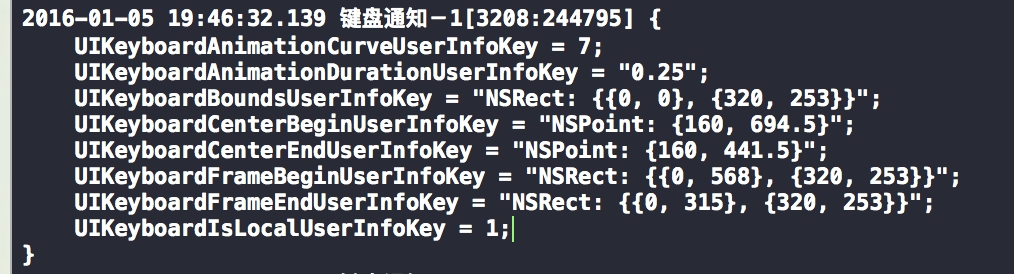
//获得弹下去后的坐标[注意是弹下后的]
CGRect keyBoardEndFrame = [[noti.userInfo objectForKey:UIKeyboardFrameEndUserInfoKey] CGRectValue];
//NSLog(@"--%@",NSStringFromCGRect(keyBoardEndFrame));
[UIView animateWithDuration:2 animations:^{
//改变文本框的位置,让它跟着键盘一起弹起来
CGRect tfRext = _tf.frame;
tfRext.origin.y = keyBoardEndFrame.origin.y-_tf.bounds.size.height-10;
_tf.frame = tfRext;
}];
}
#pragma mark - UIKeyBoard notification
//接收到的是通知,所以参数用NSNotification
//键盘将要显示
-(void)keyBoardWillShow:(NSNotification *)noti
{
CGRect keyBoardFrame = [[noti.userInfo objectForKey:UIKeyboardFrameEndUserInfoKey] CGRectValue];
//可以通过以下方法输出CGRect
//NSStringFromCGRect将CGRect转化为字符串的方式获取Frame
//NSLog(@"%@",NSStringFromCGRect(keyBoardFrame));
//获取键盘的动画持续时间
//CGFloat keyBoardDuration = [noti.userInfo[UIKeyboardAnimationDurationUserInfoKey] floatValue];
[UIView animateWithDuration:2 animations:^{
CGRect tfRect = _tf.frame;
tfRect.origin.y = keyBoardFrame.origin.y - _tf.bounds.size.height -10;
_tf.frame = tfRect;
}];
}
#pragma mark - 当手指触碰屏幕任何一地方时被调用
-(void)touchesBegan:(NSSet<UITouch *> *)touches withEvent:(UIEvent *)event
{
//利用结束编辑来隐藏键盘
[self.view endEditing:YES];
}
@end
UI键盘通知的更多相关文章
- AJ学IOS(18)UI之QQ聊天布局_键盘通知实现自动弹出隐藏_自动回复
AJ分享,必须精品 先看图片 第一步完成tableView和Cell的架子的图 完善图片 键盘弹出设置后图片: 自动回复图: 粗狂的架子 tableView和Cell的创建 首相tableView为了 ...
- IOS开发-键盘通知自定义键盘
利用键盘通知可实现效果如下: 1.UIKeyboardWillShowNotification: 当点击到可输入的控件上(一般是UITextField)时,键盘会自动显示,并且触发UIKeyboard ...
- WPF 模拟UI 键盘录入
原文:WPF 模拟UI 键盘录入 版权声明:本文为博主原创文章,未经博主允许不得转载. https://blog.csdn.net/yangyisen0713/article/details/1835 ...
- ios-利用键盘通知处理键盘出现时遮挡控件问题
-(void)viewDidLoad { NSNotificationCenter *center = [NSNotificationCenter defaultCenter]; //注册键盘显示通知 ...
- 【代码笔记】iOS-只让textField使用键盘通知
代码: #import "ViewController.h" @interface ViewController () @end @implementation ViewContr ...
- iOS开发——UI进阶篇(六)键盘处理
一.键盘通知我们经常需要在键盘弹出或者隐藏的时候做一些特定的操作,因此需要监听键盘的状态 键盘状态改变的时候,系统会发出一些特定的通知UIKeyboardWillShowNotification // ...
- iOS开发——UI进阶篇(五)通知、代理、kvo的应用和对比,购物车
一.通知 1.通知中心(NSNotificationCenter)每一个应用程序都有一个通知中心(NSNotificationCenter)实例,专门负责协助不同对象之间的消息通信任何一个对象都可以向 ...
- iOS键盘监听的通知
#pragma mark - 键盘通知回调方法 // 监听键盘的通知 [[NSNotificationCenter defaultCenter] addObserver:self selector: ...
- iOS边练边学--通知机制和键盘处理
一.通知中心(NSNotificationCenter) 每一个程序都有一个通知中心实例,专门负责协助不同对象之间的消息通信 任何一个对象都可以想通知中心发布通知(NSNotification),描述 ...
随机推荐
- mina2线程详解
1主要流程 read in data: IO读入(IoProcessor)---日志记录.解码.threadPool(IoFilter)---业务逻辑处理(IoHandler) write ou ...
- Windows Azure Traffic Manager (6) 使用Traffic Manager,实现本地应用+云端应用的高可用
<Windows Azure Platform 系列文章目录> 注意:本文介绍的是使用国内由世纪互联运维的Azure China服务. 以前的Traffic Manager,背后的Serv ...
- C#指定时间和当前时间的相差的月份、天数
DateTime 类型有时间的 年月日时分秒等属性,但是获取两个DateTime的 相差月份,就需要自己写了: public static int GetSubMonth(DateTime speci ...
- Asp.net Core的代码移植技巧,半天将SqlSugarORM转成Core
.net core中有哪些被抛弃的类 1.DataTable DataRow SqlDataAdapter DataRow DataColumn DataColumn 虽然这些类不是我ORM核心功能 ...
- 小meta的大作用
meta是用来在HTML文档中模拟HTTP协议的响应头报文.meta 标签用于网页的<head>与</head>中,meta 标签的用处很多.meta 的属性有两种:name和 ...
- 《ASP.NET SignalR系列》第二课 SignalR的使用说明
从现在开始相关文章请到: http://lko2o.com/moon 接续上一篇:<ASP.NET SignalR系列>第一课 认识SignalR (还没有看的话,建议您先看看) 一.指定 ...
- 【Android】Fragment的简单笔记
被虐了,做某公司笔试时,发现自己连个Fragment的生命周期都写不详细.平时敲代码,有开发工具的便利,有网上各大神的文章,就算忘了也很容易的可以查到,但当要自己不借助外界,却发现自己似乎对该知识点并 ...
- Python语言特性之5:自省
自省是Python中非常耀眼的特性. 自省就是面向对象的语言所写的程序在运行时,所能知道对象的类型.简单一句就是运行时能够获得对象的类型.比如 type() dir() getattr() hasat ...
- 在jQuery代码中,实现转跳
隐藏转跳,浏览器不产生历史记录(replace).代码片段: window.location.replace("http://insus.cnblogs.com"); 当然我们还不 ...
- 基于Ionic2的开源项目
项目介绍 基于Ionic2的Ionic中文论坛客户端,该应用也是边学边做的,为了将更多常用东西加入到APP中,有些逻辑不通之处,敬请包涵. 开源地址 https://github.com/zxj963 ...