
SilverLight: 数据绑定(1)-绑定到数据对象
| ylbtech-SilverLight-DataBinding: Binding to Data Objects(绑定到数据对象) |
- 1.A, Building a Data Object(创建一个数据对象)
- 1.B, Displaying a Data Object with Datacontext(显示一个数据对象与DataContext)
- 1.C, Storing a Data Object as a Resource(存储一个数据对象作为一个资源)
- 1.D, Editing with Two-Way Bindings(编辑与双向绑定)[未实现]
| 1.A, Building a Data Object(创建一个数据对象)返回顶部 |
using System;

using System.Collections.Generic;

using System.Linq;

using System.ComponentModel.DataAnnotations;

namespace SLYlbtechApp.Access

{

    /// <summary>

    /// 产品类

    /// </summary>

    public class Product

    {

        int productId;

        /// <summary>

        /// 编号【PK】

        /// </summary>

        public int ProductId

        {

            get { return productId; }

            set { productId = value; }

        }

        string productName;

        /// <summary>

        /// 产品名称

        /// </summary>

        public string ProductName

        {

            get

            {

                return productName;

            }

            set

            {

                if (value=="") throw new ArgumentException("不能为空");

                productName = value;

            }

        }

        string quantityPerUnit;

        /// <summary>

        /// 产品规格

        /// </summary>

        public string QuantityPerUnit

        {

            get { return quantityPerUnit; }

            set { quantityPerUnit = value; }

        }

        /// <summary>

        /// 单位价格

        /// 注意 不要使用 decimal 类型,在 UserControl.Resounrce 资源绑定是引发类型转换异常

        /// </summary>

        double unitPrice;

        [Display(Name="价格",Description="价格不能小于0")]

        public double UnitPrice

        {

            get { return unitPrice; }

            set

            {

                if (value < ) throw new ArgumentException("不能小于0");

                unitPrice = value;

            }

        }

        string description;

        /// <summary>

        /// 描述

        /// </summary>

        public string Description

        {

            get { return description; }

            set { description = value; }

        }

        string productImagePath;

        /// <summary>

        /// 产品图片地址

        /// </summary>

        public string ProductImagePath

        {

            get { return productImagePath; }

            set { productImagePath = value; }

        }

        string categoryName;

        /// <summary>

        /// 类别名称

        /// </summary>

        public string CategoryName

        {

            get { return categoryName; }

            set { categoryName = value; }

        }

        /// <summary>

        /// 空参构造

        /// </summary>

        public Product()

        { }

        /// <summary>

        /// 全参构造

        /// </summary>

        /// <param name="productId"></param>

        /// <param name="productName"></param>

        /// <param name="quantityPerUnit"></param>

        /// <param name="unitPrice"></param>

        /// <param name="description"></param>

        /// <param name="productImagePath"></param>

        /// <param name="categoryName"></param>

        public Product(int productId, string productName, string quantityPerUnit, double unitPrice, string description

            , string productImagePath, string categoryName)

        {

            ProductId = productId;

            ProductName=productName;

            QuantityPerUnit=quantityPerUnit;

            UnitPrice=unitPrice;

            Description=description;

            ProductImagePath=productImagePath;

            CategoryName=categoryName;

        }

        /// <summary>

        /// 获取全部产品

        /// </summary>

        /// <returns></returns>

        public static IList<Product> GetAll()

        {

            IList<Product> dals = new List<Product>();

            string categoryName = string.Empty;

            string productImagePath = string.Empty;

            string description = "嗟夫!草木无情,有时飘零。人为动物,惟物之灵。百忧感其心,万事劳其形,有动于中,必摇其精。而况思其力之所不及,忧其智之所不能,宜其渥然丹者为槁木,黟然黑者为星星。奈何以非金石之质,欲与草木而争荣?念谁为之戕贼,亦何恨乎秋声!";

            #region Add Product

            #region 饮料

            categoryName = "饮料";

            productImagePath = "../Images/pencil.jpg";

            dals.Add(new Product()

            {

                ProductId = ,

                ProductName = "啤酒",

                QuantityPerUnit = "1箱*6听",

                UnitPrice = 10d,

                CategoryName = categoryName

                ,

                ProductImagePath = productImagePath,

                Description = description

            });

            dals.Add(new Product()

            {

                ProductId = ,

                ProductName = "绿茶",

                QuantityPerUnit = "500ml",

                UnitPrice = 3d,

                CategoryName = categoryName

                ,

                ProductImagePath = productImagePath,

                Description = description

            });

            dals.Add(new Product()

            {

                ProductId = ,

                ProductName = "红茶",

                QuantityPerUnit = "500ml",

                UnitPrice = 3d,

                CategoryName = categoryName

                ,

                ProductImagePath = productImagePath,

                Description = description

            });

            dals.Add(new Product()

            {

                ProductId = ,

                ProductName = "纯净水",

                QuantityPerUnit = "500ml",

                UnitPrice = 1.5d,

                CategoryName = categoryName

                ,

                ProductImagePath = productImagePath,

                Description = description

            });

            #endregion

            #region 零食

            categoryName = "零食";

            productImagePath = "../Images/pencil2.jpg";

            dals.Add(new Product()

            {

                ProductId = ,

                ProductName = "奥利奥巧克力饼干",

                QuantityPerUnit = "10 boxes x 20 bags",

                UnitPrice = 30d,

                CategoryName = categoryName

                ,

                ProductImagePath = productImagePath,

                Description = description

            });

            dals.Add(new Product()

            {

                ProductId = ,

                ProductName = "玻璃 海苔",

                QuantityPerUnit = "20g",

                UnitPrice = 13d,

                CategoryName = categoryName

                ,

                ProductImagePath = productImagePath,

                Description = description

            });

             dals.Add(new Product()

             {

                 ProductId = ,

                 ProductName = "好丽友 薯片",

                 QuantityPerUnit = "100g",

                 UnitPrice = 3d,

                 CategoryName = categoryName

                 ,

                 ProductImagePath = productImagePath,

                 Description = description

             });

             dals.Add(new Product()

             {

                 ProductId = ,

                 ProductName = "统一 老坛酸菜面",

                 QuantityPerUnit = "1 盒",

                 UnitPrice = 8.5d,

                 CategoryName = categoryName

                 ,

                 ProductImagePath = productImagePath,

                 Description = description

             });

            #endregion

            #endregion

             return dals;

        }

        /// <summary>

        /// GetModel

        /// </summary>

        /// <returns></returns>

        public static Product GetModel()

        {

            Product dal = null;

            string categoryName = string.Empty;

            string productImagePath = string.Empty;

            string description = "嗟夫!草木无情,有时飘零。人为动物,惟物之灵。百忧感其心,万事劳其形,有动于中,必摇其精。而况思其力之所不及,忧其智之所不能,宜其渥然丹者为槁木,黟然黑者为星星。奈何以非金石之质,欲与草木而争荣?念谁为之戕贼,亦何恨乎秋声!";

            categoryName = "饮料";

            productImagePath = "Images/pencil.jpg";

            dal = new Product()

            {

                ProductId = ,

                ProductName = "啤酒",

                QuantityPerUnit = "1箱*6听",

                UnitPrice=3.5,

                CategoryName = categoryName

                ,

                ProductImagePath = productImagePath,

                Description = description

            };

            //dal._unitPrice = 10d;

            return dal;

        }

        /// <summary>

        /// GetModel

        /// </summary>

        /// <param name="id">产品编号</param>

        /// <returns></returns>

        public static Product GetModel(int id)

        {

            Product dal = null;

            IList<Product> dals = GetAll();

            try

            {

                dal = dals.Single(p => p.ProductId == id);

            }

            catch { }

            finally

            {

                dals = null;

            }

            return dal;

        }

    }

}
4,
| 1.B, Displaying a Data Object with Datacontext(显示一个数据对象与DataContext)返回顶部 |
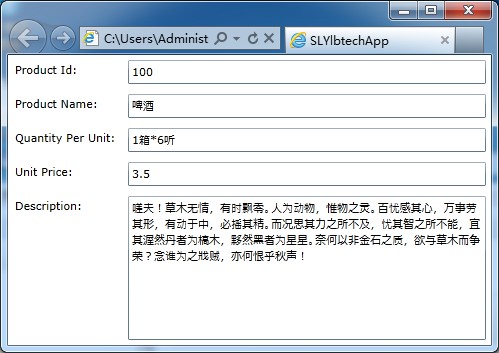
<Grid x:Name="gridDetailProduct">

    <Grid.RowDefinitions>

        <RowDefinition Height="Auto"></RowDefinition>

        <RowDefinition Height="Auto"></RowDefinition>

        <RowDefinition Height="Auto"></RowDefinition>

        <RowDefinition Height="Auto"></RowDefinition>

        <RowDefinition Height="Auto"></RowDefinition>

        <RowDefinition Height="*"></RowDefinition>

    </Grid.RowDefinitions>

    <Grid.ColumnDefinitions>

        <ColumnDefinition Width="115"></ColumnDefinition>

        <ColumnDefinition Width="*"></ColumnDefinition>

    </Grid.ColumnDefinitions>

    <TextBlock Grid.Row="0" Grid.Column="0" Margin="7">Product Id:</TextBlock>

    <TextBox Grid.Row="0" Grid.Column="1" Margin="5" Text="{Binding ProductId}"></TextBox>

    <TextBlock Grid.Row="1" Grid.Column="0" Margin="7">Product Name:</TextBlock>

    <TextBox Grid.Row="1" Grid.Column="1" Margin="5" Text="{Binding ProductName}"></TextBox>

    <TextBlock Grid.Row="2" Grid.Column="0" Margin="7">Quantity Per Unit:</TextBlock>

    <TextBox Grid.Row="2" Grid.Column="1" Margin="5" Text="{Binding QuantityPerUnit}"></TextBox>

    <TextBlock Grid.Row="3" Grid.Column="0" Margin="7">Unit Price:</TextBlock>

    <TextBox Grid.Row="3" Grid.Column="1" Margin="5" Text="{Binding UnitPrice}"></TextBox>

    <TextBlock Grid.Row="4" Grid.Column="0" Margin="7">Description:</TextBlock>

    <TextBox Grid.Row="4" Grid.Column="1" Grid.RowSpan="2" Margin="5"

             Text="{Binding Description}" TextWrapping="Wrap" ></TextBox>

</Grid>
2.3/3,
using System.Windows.Controls;

using SLYlbtechApp.Access;

namespace SLYlbtechApp.ABindingToDataObjects

{

    public partial class Template1 : UserControl

    {

        public Template1()

        {

            InitializeComponent();

            this.gridDetailProduct.DataContext = Product.GetModel(); //显示一个数据对象与DataContext

        }

    }

}
3,
| 1.C, Storing a Data Object as a Resource(存储一个数据对象作为一个资源)返回顶部 |
xmlns:local="clr-namespace:SLYlbtechApp.Access"
2.2/3,
<!--用户空间资源 begin-->

<!--remark:请在UserControl 里注册引用空间 xmlns:local="clr-namespace:SLYlbtechApp.Access"-->

<!--Problem:UnitPrice 类型转换异常-->

<UserControl.Resources>

    <local:Product x:Name="resourceProduct" ProductId="100" ProductName="苹果" QuantityPerUnit="1斤" UnitPrice="7"

                    Description="一天一个苹果,病害远离我。"></local:Product>

</UserControl.Resources>

<!--用户空间资源 end-->

<Grid x:Name="LayoutRoot" Background="White">

    <Grid x:Name="gridDetailProduct" DataContext="{StaticResource resourceProduct}">

        <Grid.RowDefinitions>

            <RowDefinition Height="Auto"></RowDefinition>

            <RowDefinition Height="Auto"></RowDefinition>

            <RowDefinition Height="Auto"></RowDefinition>

            <RowDefinition Height="Auto"></RowDefinition>

            <RowDefinition Height="Auto"></RowDefinition>

            <RowDefinition Height="*"></RowDefinition>

        </Grid.RowDefinitions>

        <Grid.ColumnDefinitions>

            <ColumnDefinition Width="115"></ColumnDefinition>

            <ColumnDefinition Width="*"></ColumnDefinition>

        </Grid.ColumnDefinitions>

        <TextBlock Grid.Row="0" Grid.Column="0" Margin="7">Product Id:</TextBlock>

        <TextBox Grid.Row="0" Grid.Column="1" Margin="5" Text="{Binding ProductId}"></TextBox>

        <TextBlock Grid.Row="1" Grid.Column="0" Margin="7">Product Name:</TextBlock>

        <TextBox Grid.Row="1" Grid.Column="1" Margin="5"

                    Text="{Binding ProductName,Source={StaticResource resourceProduct}}"></TextBox>

        <TextBlock Grid.Row="2" Grid.Column="0" Margin="7">Quantity Per Unit:</TextBlock>

        <TextBox Grid.Row="2" Grid.Column="1" Margin="5" Text="{Binding QuantityPerUnit}"></TextBox>

        <TextBlock Grid.Row="3" Grid.Column="0" Margin="7">Unit Price:</TextBlock>

        <TextBox Grid.Row="3" Grid.Column="1" Margin="5" Text="{Binding UnitPrice}"></TextBox>

        <TextBlock Grid.Row="4" Grid.Column="0" Margin="7">Description:</TextBlock>

        <TextBox Grid.Row="4" Grid.Column="1" Grid.RowSpan="2" Margin="5"

                    Text="{Binding Description}" TextWrapping="Wrap" ></TextBox>

    </Grid>

</Grid>
2.3/3,[无]
<TextBox Grid.Row="1" Grid.Column="1" Margin="5" Text="{Binding ProductName,Source={StaticResource resourceProduct}}"></TextBox>
| 1.D, Editing with Two-Way Bindings(编辑与双向绑定)[未实现]返回顶部 |
| 1.E, 返回顶部 |
 |
作者:ylbtech 出处:http://ylbtech.cnblogs.com/ 本文版权归作者和博客园共有,欢迎转载,但未经作者同意必须保留此段声明,且在文章页面明显位置给出原文连接,否则保留追究法律责任的权利。 |
SilverLight: 数据绑定(1)-绑定到数据对象的更多相关文章
- Silverlight数据绑定之 绑定一个int类型的属性
还就真心不会啊! 在类FunctionPanel中作如下定义: /// <summary> /// 鼠标状态 属性 /// </summary> public Dependen ...
- class 绑定的数据对象不必内联定义在模板里
<!DOCTYPE html> <html lang="en"> <head> <meta charset="UTF-8&quo ...
- Silverlight数据绑定之DataGrid
Silverlight数据绑定之DataGrid 时间:2011-08-03 01:59来源:网易博客 作者:Wilson. 点击:次 注:所有代码以C#为例 DataGrid绑定的数据对象: 1.D ...
- Angular4.x 创建组件|绑定数据|绑定属性|数据循环|条件判断|事件|表单处理|双向数据绑定
Angular4.x 创建组件|绑定数据|绑定属性|数据循环|条件判断|事件|表单处理|双向数据绑定 创建 angular 组件 https://github.com/angular/angular- ...
- WPFS数据绑定(要是后台类对象的属性值发生改变,通知在“client界面与之绑定的控件值”也发生改变须要实现INotitypropertyChanged接口)
WPFS数据绑定(要是后台类对象的属性值发生改变,通知在"client界面与之绑定的控件值"也发生改变须要实现INotitypropertyChanged接口) MainWindo ...
- 背水一战 Windows 10 (20) - 绑定: DataContextChanged, UpdateSourceTrigger, 对绑定的数据做自定义转换
[源码下载] 背水一战 Windows 10 (20) - 绑定: DataContextChanged, UpdateSourceTrigger, 对绑定的数据做自定义转换 作者:webabcd 介 ...
- 绑定: DataContextChanged, UpdateSourceTrigger, 对绑定的数据做自定义转换
介绍背水一战 Windows 10 之 绑定 DataContextChanged - FrameworkElement 的 DataContext 发生变化时触发的事件 UpdateSourceTr ...
- Silverlight实例教程 – Datagrid,Dataform数据验证和ValidationSummary(转载)
Silverlight 4 Validation验证实例系列 Silverlight实例教程 - Validation数据验证开篇 Silverlight实例教程 - Validation数据验证基础 ...
- SpringMVC数据绑定全面示例(复杂对象,数组等)
点击链接查询原文 http://www.xdemo.org/springmvc-data-bind/ 已经使用SpringMVC开发了几个项目,平时也有不少朋友问我数据怎么传输,怎么绑定之类的话题,今 ...
随机推荐
- loj2001 「SDOI2017」树点涂色
there #include <iostream> #include <cstdio> using namespace std; int n, m, dfn[100005], ...
- 如何打造一个"逼格"的web前端项目
最近利用空余的时间(坐公交车看教程视频),重新了解了前后端分离,前端工程化等概念学习,思考如何打造一个“逼格”的web前端项目. 前端准备篇 前端代码规范:制定前端开发代码规范文档. PS:重中之中, ...
- webdriver高级应用- 启动带有用户配置信息的firefox浏览器窗口
由于WebDriver启动FireFox浏览器时会启用全新的FireFox浏览器窗口,导致当前机器的FireFox浏览器已经配置的信息在测试中均无法生效,例如已经安装的浏览器插件.个人收藏夹等.为了解 ...
- Python面试题(练习一)
1.Python的可变类型和不可变类型? 可变类型:list.dict(列表和字典) 不可变类型:数字.字符串.元组 2.求结果: v = dict.fromkeys(['k1','k2'],[]) ...
- 基于 FPGA 的图像边缘检测
本文主要内容是实现图像的边缘检测功能 目录 mif文件的制作 调用 ip 核生成rom以及在 questasim 仿真注意问题 灰度处理 均值滤波:重点是3*3 像素阵列的生成 sobel边缘检测 图 ...
- Vmware占用宿主机硬盘越来越大
Vmware占用宿主机硬盘越来越大 root /usr/bin/vmware-toolbox-cmd disk shrink /
- ruby操作mysql
require "win32ole" require 'pathname' require 'mysql2' excel = WIN32OLE.new('excel.applica ...
- NOJ——聊天止于呵呵(string流重定向+map,水题)
[1645] 聊天止于呵呵 时间限制: 5000 ms 内存限制: 65535 K 问题描述 (现代版)俗话说:流言止于智者,聊天止于呵呵.输入一段聊天记录,你的任务是数一数有 多少段对话“止于呵呵” ...
- NOJ——1669xor的难题(详细的树状数组扩展—异或求和)
[1669] xor的难题 时间限制: 1000 ms 内存限制: 65535 K 问题描述 最近Alex学长有个问题被困扰了很久,就是有同学给他n个数,然后给你m个查询,然后每个查询给你l和r(左下 ...
- Eclipse + Apache Axis2 发布RESTful WebService(一)基础知识
1.什么是WebService 学习 WebService 第一步:体系结构.三元素SOAP/WSDL/UDDI 2.什么是Axis2 Axis2是Apache一套崭新的WebService引擎(框架 ...