
C#自定义MessageBox 按钮的Text
运行效果:
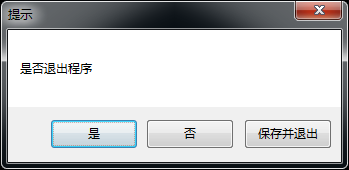
代码:
using System;

using System.Drawing;

using System.Runtime.InteropServices;

using System.Text;

using System.Windows.Forms;

namespace Sphinx.Utils

{

    public class MessageBoxEx

    {

        public static DialogResult Show(string text, string caption, MessageBoxButtons buttons, string[] buttonTitles)

        {

            MessageForm frm = new MessageForm(buttons, buttonTitles);

            frm.Show();

            frm.WatchForActivate = true;

            DialogResult result = MessageBox.Show(frm, text, caption, buttons);

            frm.Close();

            return result;

        }

        public static DialogResult Show(string text, string caption, MessageBoxButtons buttons,

            MessageBoxIcon icon, MessageBoxDefaultButton defaultButton, string[] buttonTitles)

        {

            MessageForm frm = new MessageForm(buttons, buttonTitles);

            frm.Show();

            frm.WatchForActivate = true;

            DialogResult result = MessageBox.Show(frm, text, caption, buttons, icon, defaultButton);

            frm.Close();

            return result;

        }

        class MessageForm : Form

        {

            IntPtr _handle;

            MessageBoxButtons _buttons;

            string[] _buttonTitles = null;

            bool _watchForActivate = false;

            public bool WatchForActivate

            {

                get { return _watchForActivate; }

                set { _watchForActivate = value; }

            }

            public MessageForm(MessageBoxButtons buttons, string[] buttonTitles)

            {

                _buttons = buttons;

                _buttonTitles = buttonTitles;

                // Hide self form, and don't show self form in task bar.

                this.Text = "";

                this.StartPosition = FormStartPosition.CenterScreen;

                this.Location = new Point(-, -);

                this.ShowInTaskbar = false;

            }

            protected override void OnShown(EventArgs e)

            {

                base.OnShown(e);

                // Hide self form, don't show self form even in task list.

                NativeWin32API.SetWindowPos(this.Handle, IntPtr.Zero, , , , , );

            }

            protected override void WndProc(ref System.Windows.Forms.Message m)

            {

                if (_watchForActivate && m.Msg == 0x0006)

                {

                    _watchForActivate = false;

                    _handle = m.LParam;

                    CheckMsgbox();

                }

                base.WndProc(ref m);

            }

            private void CheckMsgbox()

            {

                if (_buttonTitles == null || _buttonTitles.Length == )

                    return;

                // Button title index

                int buttonTitleIndex = ;

                // Get the handle of control in current window.

                IntPtr h = NativeWin32API.GetWindow(_handle, GW_CHILD);

                // Set those custom titles to the three buttons(Default title are: Yes, No and Cancle).

                while (h != IntPtr.Zero)

                {

                    if (NativeWin32API.GetWindowClassName(h).Equals("Button"))

                    {

                        if (_buttonTitles.Length > buttonTitleIndex)

                        {

                            // Changes the text of the specified window's title bar (if it has one).

                            // If the specified window is a control, the text of the control is changed.

                            // However, SetWindowText cannot change the text of a control in another application.

                            NativeWin32API.SetWindowText(h, _buttonTitles[buttonTitleIndex]);

                            buttonTitleIndex++;

                        }

                    }

                    // Get the handle of next control in current window.

                    h = NativeWin32API.GetWindow(h, GW_HWNDNEXT);

                }

            }

        }

        public const int GW_CHILD = ;

        public const int GW_HWNDNEXT = ;

        public class NativeWin32API

        {

            [DllImport("user32.dll", CharSet = CharSet.Auto)]

            public static extern bool SetWindowPos(IntPtr hWnd, IntPtr hWndInsertAfter, int x, int y, int Width, int Height, int flags);

            [DllImport("user32.dll")]

            public static extern IntPtr GetWindow(IntPtr hWnd, Int32 wCmd);

            [DllImport("user32.dll")]

            public static extern bool SetWindowText(IntPtr hWnd, string lpString);

            [DllImport("user32.dll")]

            public static extern int GetClassNameW(IntPtr hWnd, [MarshalAs(UnmanagedType.LPWStr)]StringBuilder lpString, int nMaxCount);

            public static string GetWindowClassName(IntPtr handle)

            {

                StringBuilder sb = new StringBuilder();

                // Retrieves the name of the class to which the specified window belongs

                GetClassNameW(handle, sb, sb.Capacity);

                return sb.ToString();

            }

        }

    }

}
C#自定义MessageBox 按钮的Text的更多相关文章
- C#自定义按钮、自定义WinForm无边框窗体、自定义MessageBox窗体
C#自定义按钮.自定义WinForm无边框窗体.自定义MessageBox窗体 C#自定义Button按钮控件 效果展示 C#自定义Winform无边框窗体 效果展示 C#自定义无边框MessageB ...
- WPF 自定义 MessageBox (相对完善版 v1.0.0.6)
基于WPF的自定义 MessageBox. 众所周知WPF界面美观.大多数WPF元素都可以简单的修改其样式,从而达到程序的风格统一.可是当你不得不弹出一个消息框通知用户消息时(虽然很不建议在程序中频繁 ...
- Mono自定义图片按钮
首先,我们编写一个MyImageButton类,继承自LinearLayout public class MyPhoneImageButton:LinearLayout { private Image ...
- Android 自定义Button按钮显示样式(正常、按下、获取焦点)
现在的用户对APP的外观看得很重要,如果APP内所有元件都用Android默认样式写,估计下面评论里就有一堆在骂UI丑的.今天学习自定义Button按钮样式.Button样式修改的是Button的背景 ...
- GridView控件中插入自定义删除按钮并弹出确认框
GridView控件中插入自定义删除按钮,要实现这个功能其实有多种方法,这里先记下我使用的方法,以后再添加其他方法. 一.实现步骤 1.在GridView中添加模板列(TemplateField). ...
- WPF 自定义 MessageBox (相对完善版)
WPF 自定义 MessageBox (相对完善版) 基于WPF的自定义 MessageBox. 众所周知WPF界面美观.大多数WPF元素都可以简单的修改其样式,从而达到程序的风格统一.可是当 ...
- C#自定义Button按钮控件
C#自定义Button按钮控件 在实际项目开发中经常可以遇到.net自带控件并不一定可以满足需要,因此需要自定义开发一些新的控件,自定义控件的办法也有多种,可以自己绘制线条颜色图形等进行重绘,也可以采 ...
- flutter 隐藏返回按钮 自定义返回按钮
自定义返回按钮 //改变颜色 Widget build(BuildContext context) { return Scaffold( appBar: AppBar( leading: BackBu ...
- 自定义 MessageBox 组件
效果: 公共组件页面: js部分: <script> export default { props: { title: { type: String ...
随机推荐
- MQ、JMS以及ActiveMQ的了解和认识
新加入的公司中,架构用到了activeMq,对于以前只了解nginx.tomcat的我有点懵逼,所以在网上找点资料看看,了解下什么是MQ,activemq.具体作用是什么 MQ MQ简介: MQ全称为 ...
- POJ 3494 Largest Submatrix of All 1’s 单调队列||单调栈
POJ 3494 Largest Submatrix of All 1’s Description Given a m-by-n (0,1)-matrix, of all its submatrice ...
- 监视网络接口TCP状态信息数据有多种工具或命令。下面举例一些:
nstat命令 nstat kernel ======= ss -s == netstat -i netstat -s ip -s link sar -n DEV 1
- HTML5与HTML4的比较
HHTML5封装一些标签和属性,方便了开发. <form> <p> <label>Username:<input name="search" ...
- Sentinel系统监控Redis主从节点
author:JevonWei 版权声明:原创作品 blog:http://119.23.52.191/ --- 构建Sentinel监控Redis的主节点架构 拓扑结构结构 拓扑环境 master ...
- Linux 程序编译过程的来龙去脉
大家肯定都知道计算机程序设计语言通常分为机器语言.汇编语言和高级语言三类.高级语言需要通过翻译成机器语言才能执行,而翻译的方式分为两种,一种是编译型,另一种是解释型,因此我们基本上将高级语言分为两大类 ...
- Apache+Openssl
Apache编译还需要一些依赖: #./configure --prefix……检查编辑环境时出现: checking for APR... no configure: error: APR not ...
- 【07】react 之 生命周期
阅读目录(Content) 实例化 getDefaultProps getInitialState componentWillMount render componentDidMount 存在期 co ...
- Windows通过data文件夹恢复mysql数据库
mysql--1146--报错 先找到数据库存放地址,即Data文件夹(复制留下来) 再用电脑管家把所有的mysql卸载 然后把mysql文件夹弄走(卸载不会清掉它,需手动,一般在C:\Program ...
- spring rest 请求怎样添加Basic Auth请求頭
请自行揣摩代码 package com.hudai.platform.manager.util; import java.net.URI; import java.net.URISyntaxExcep ...