
ios之UIImageView
UIImageView,顾名思义,是用来放置图片的。使用Interface Builder设计界面时,当然可以直接将控件拖进去并设置相关属性,这就不说了,这里讲的是用代码。
1、创建一个UIImageView:
创建一个UIImageView对象有五种方法:
UIImageView *imageView1 = [[UIImageView alloc] init]; UIImageView *imageView2 = [[UIImageView alloc] initWithFrame:(CGRect)]; UIImageView *imageView3 = [[UIImageView alloc] initWithImage:(UIImage *)]; UIImageView *imageView4 = [[UIImageView alloc] initWithImage:(UIImage *) highlightedImage:(UIImage *)]; UIImageView *imageView5 = [[UIImageView alloc] initWithCoder:(NSCoder *)];
比较常用的是前边三个。至于第四个,当这个ImageView的highlighted属性是YES时,显示的就是参数highlightedImage,一般情况下显示的是第一个参数UIImage。
2、frame与bounds属性:
上述创建一个UIImageView的方法中,第二个方法是在创建时就设定位置和大小。
当之后想改变位置时,可以重新设定frame属性:
imageView.frame = CGRectMake(CGFloat x, CGFloat y, CGFloat width, CGFloat heigth);
注意到UIImageView还有一个bounds属性
imageView.bounds = CGRectMake(CGFloat x, CGFloat y, CGFloat width, CGFloat heigth);
那么这个属性跟frame有什么区别呢?
我的理解是,frame设置其位置和大小,而bounds只能设置其大小,其参数中的x、y不起作用即便是之前没有设定frame属性,控件最终的位置也不是bounds所设定的参数。bounds实现的是将UIImageView控件以原来的中心为中心进行缩放。例如有如下代码:
imageView.frame = CGRectMake(0, 0, 320, 460); imageView.bounds = CGRectMake(100, 100, 160, 230);
执行之后,这个imageView的位置和大小是(80, 115, 160, 230)。
3、contentMode属性:
这个属性是用来设置图片的显示方式,如居中、居右,是否缩放等,有以下几个常量可供设定:
UIViewContentModeScaleToFill UIViewContentModeScaleAspectFit UIViewContentModeScaleAspectFill UIViewContentModeRedraw UIViewContentModeCenter UIViewContentModeTop UIViewContentModeBottom UIViewContentModeLeft UIViewContentModeRight UIViewContentModeTopLeft UIViewContentModeTopRight UIViewContentModeBottomLeft UIViewContentModeBottomRight
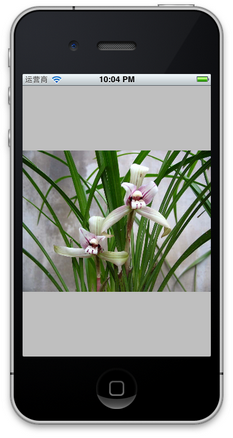
注意以上几个常量,凡是没有带Scale的,当图片尺寸超过 ImageView尺寸时,只有部分显示在ImageView中。UIViewContentModeScaleToFill属性会导致图片变形。UIViewContentModeScaleAspectFit会保证图片比例不变,而且全部显示在ImageView中,这意味着ImageView会有部分空白。UIViewContentModeScaleAspectFill也会证图片比例不变,但是是填充整个ImageView的,可能只有部分图片显示出来。
前三个效果如下图:
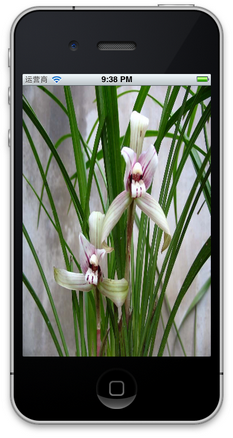
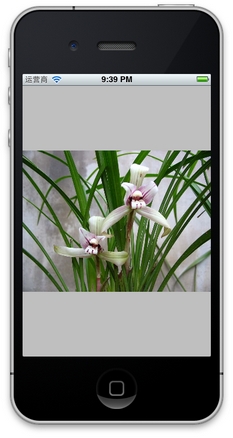

UIViewContentModeScaleToFill UIViewContentModeScaleAspectFit UIViewContentModeScaleAspectFill
4、更改位置
更改一个UIImageView的位置,可以
4.1 直接修改其frame属性
4.2 修改其center属性:
imageView.center = CGPointMake(CGFloat x, CGFloat y);
center属性指的就是这个ImageView的中间点。
4.3 使用transform属性
imageView.transform = CGAffineTransformMakeTranslation(CGFloat dx, CGFloat dy);
其中dx与dy表示想要往x或者y方向移动多少,而不是移动到多少。
5、旋转图像
imageView.transform = CGAffineTransformMakeRotation(CGFloat angle);
要注意它是按照顺时针方向旋转的,而且旋转中心是原始ImageView的中心,也就是center属性表示的位置。
这个方法的参数angle的单位是弧度,而不是我们最常用的度数,所以可以写一个宏定义:
#define degreesToRadians(x) (M_PI*(x)/180.0)
用于将度数转化成弧度。下图是旋转45度的情况:
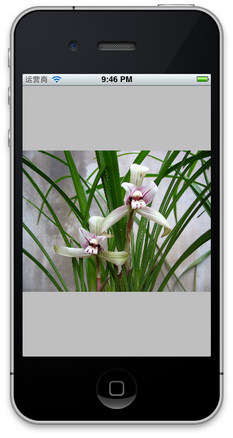
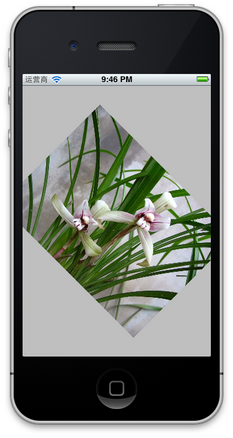
6、缩放图像
还是使用transform属性:
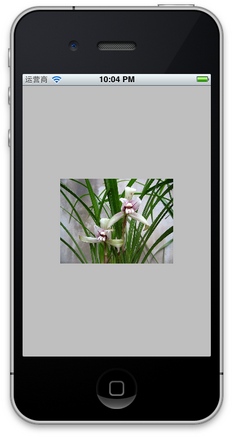
imageView.transform = CGAffineTransformMakeScale(CGFloat scale_w, CGFloat scale_h);
其中,CGFloat scale_w与CGFloat scale_h分别表示将原来的宽度和高度缩放到多少倍,下图是缩放到原来的0.6倍的示意图:
7、播放一系列图片
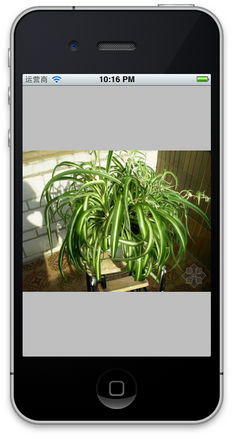
imageView.animationImages = imagesArray; // 设定所有的图片在多少秒内播放完毕 imageView.animationDuration = [imagesArray count]; // 不重复播放多少遍,0表示无数遍 imageView.animationRepeatCount = 0; // 开始播放 [imageView startAnimating];
其中,imagesArray是一些列图片的数组。如下图:


8、为图片添加单击事件:
imageView.userInteractionEnabled = YES; UITapGestureRecognizer *singleTap = [[UITapGestureRecognizer alloc] initWithTarget:self action:@selector(tapImageView:)]; [imageView addGestureRecognizer:singleTap];
一定要先将userInteractionEnabled置为YES,这样才能响应单击事件。
9、其他设置
imageView.hidden = YES或者NO; // 隐藏或者显示图片 imageView.alpha = (CGFloat) al; // 设置透明度 imageView.highlightedImage = (UIImage *)hightlightedImage; // 设置高亮时显示的图片 imageView.image = (UIImage *)image; // 设置正常显示的图片 [imageView sizeToFit]; // 将图片尺寸调整为与内容图片相同
ios之UIImageView的更多相关文章
- iOS开发-UIImageView高效设置Radius
圆角的设置在iOS中随处可见,开发的时候也很方便,但是有的时候如果一个页面有大量的需要设置圆角的图片,容易产生性能问题,UIImageView ios9.0之前设置圆角是会产生离屏渲染的,9.0之后不 ...
- iOS使用UIImageView展现网络图片(转载)
在iOS开发过程中,经常会遇到使用UIImageView展现来自网络的图片的情况,最简单的做法如下: [cpp] view plaincopy - (void)viewDidLoad { [sup ...
- iOS中UIImageView的填充模式
UIImageView的填充模式 属性名称 imageV.contentMode枚举属性: @"UIViewContentModeScaleToFill", // 拉伸自适应填满整 ...
- IOS 多于UIImageView 当加载较大的高清闪存管理
当我们是一家人View 多于UIImageView,和UIImageView表明一个更大的HD,可能存在的存储器的警告的问题.假设第一次走进这个view,无记忆出现预警.当重新进入view,在那曾经 ...
- iOS开发——UIImageView
1.图像点击之后,全屏浏览 - (void)viewDidLoad { [super viewDidLoad]; _myImage=[[UIImageView alloc]initWithFrame: ...
- iOS 实现UIImageView 的不停的旋转(更新:2017.7.26)
1.先创建一个UIImageView. - (void)createImageView { UIImageView *imageView = [[UIImageView alloc] initWith ...
- UI控件(ios)---UIImageView
在实现网络异步存储中,突然发现对控件UIImageView有点生疏了,在这里复习一下. UIImageView,顾名思义是用来放置image的. 1.初始化UIImageView UIImageV ...
- iOS开发-UIImageView响应点击事件
UIImageView是不能够响应点击事件的,在开发过程中我们需要经常对头像等添加点击事件,上网搜索一番后发现有如下两个方法: 1.找到点击图片Event,添加事件处理函数 UIImageView.u ...
- iOS开发-UIImageView的contentMode属性
UIImageView 的contentMode这个属性是用来设置图片的显示方式,如居中.居右,是否缩放等,有以下几个常量可供设定:UIViewContentModeScaleToFillUIView ...
- iOS UIImage UIImageView 展示图片 不变形 处理
展示图片 时候 固定 了 imageView 的大小 图片 也裁剪了 尽量保持比例 可是 还是失真 变形了 这张图 ui 要求展示的UIimageView 大小 是固定 的 ,传过来的 图片 是 ...
随机推荐
- [HNOI2010] 公交线路 bus
标签:状态压缩+矩阵快速幂. 题解: 首先看范围,p<=10,那么我们可以想到状态压缩.我们把从一个长度为10的区间进行压缩,1代表可以,那么当值一个区间的1的个数为k个,我们就认为他是合法的. ...
- C#求圆的周长、面积、体积
窗体应用程序 private void button1_Click(object sender, EventArgs e) { double r; r = Convert.ToInt32(textBo ...
- Restful API官方文档
理解Restful架构:http://www.ruanyifeng.com/blog/2011/09/restful RESTful设计指南:http://www.ruanyifeng.com/blo ...
- [LOJ#10042] 收集雪花
题目链接: 点我 题目分析: 双指针扫描可以保证在\(O(n)\)的时间复杂度内处理这道题.另外,虽然这个题标签是\(hash\),但是字符串\(hash\)是可以卡掉的,所以建议直接离散化. 维护两 ...
- php 分析2
a:link,a:visited,a:hover,a:active 1:解释 link:连接平常的状态 visited:连接被访问过之后 hover:鼠标放到连接上的时候 active:连接被按下 ...
- 谈PHP中的钩子
钩子,英文为hooks.在程序中应用相当广泛,但是究竟什么是钩子呢?本人介绍一下目前本人对钩子的理解和相关心得. 假如有这么一段程序流: function fun(){ funA(); funB(); ...
- div 绝对定位
div绝对居下 .Phone2title{ width:%; height:30px; line-height:30px; /*text-align:left;*/ /*background-colo ...
- go实现生产者消费者
package main import ( "fmt" "math/rand" ) func main() { ch := make(chan int) don ...
- Gin框架body参数获取
需求: 记录所有请求的json数据 body, _ := ioutil.ReadAll(c.Request.Body) if body != nil { log.Info("请求body内容 ...
- Incredibuild导入key的方式
作者:朱金灿 来源:http://blog.csdn.net/clever101 Incredibuild5.0采用新的授权机制,在安装完服务端之后右键单击它的授权文件License .ib_lic, ...